





mnovak
Members
-
Joined
-
Last visited
Everything posted by mnovak
-
Well f*$@& Really wish the documentation was clearer about expanding. Can't remove the drives once they're added, so I don't have enough spare space to clear off the drives to rebuild them into a single vdev.
-
I managed to get enough blank disks to migrate my server to ZFS pools (or at least try to) I had 7x8TB drives, created the first pool of 4 drives, off to the races. I added a single drive, expanded the pool. I "thought" it had finished adding the drive (I was mistaken) so I added another, and another. Now I'm left with what I assume is asingle pool with 1 vdev of 5 drives, and 1 vdev of 2 drives. Unraid doesn't seem to acknowledge the second vdev for storage space though. Just wondering how screwed am I, Do I have to add 3 more drives for the other vdev to be acknowledged/used? pool: mainzpool state: ONLINE scan: scrub repaired 1000K in 10:26:38 with 0 errors on Thu Oct 15 20:10:52 2026 expand: expanded raidz1-0 copied 20.5T in 2 days 03:15:39, on Thu Oct 15 09:44:14 2026 config: NAME STATE READ WRITE CKSUM mainzpool ONLINE 0 0 0 raidz1-0 ONLINE 0 0 0 /dev/sda1 ONLINE 0 0 0 /dev/sdc1 ONLINE 0 0 0 /dev/sdk1 ONLINE 0 0 0 /dev/sdd1 ONLINE 0 0 0 /dev/sdb1 ONLINE 0 0 0 raidz1-1 ONLINE 0 0 0 /dev/sdj1 ONLINE 0 0 0 /dev/sdi1 ONLINE 0 0 0 errors: No known data errors
-
I'm at my wits end. I have one share that I can't access anything other than the root level folder. I have a couple of shares mounted to one machine, all use the same user to access each share, all shares have the same permissions. But if I try to access my Plex share, I can't see past the root of the share, if I try to open any of the folders windows says the folder is unavailable/moved/deleted Even if I set the share to public I still can't get past the root level. I've tried reseting the permissions for all the folders and files, removing and re-adding my user. I'm stuck. (again, the other shares with the same settings all work just fine, it's just THAT share that won't work) Diag's attached Help me Obi wan Kenobi, you're my only hope... <<insert swearing>> case-f`in-sensative-folders. For whatever reason my share was set to lowercase (I didn't change this) and because all of my folders contain uppercase characters when Windows requested the folder from the server the server of course couldn't "find" the shared folder. JFC, I feel like a moron. kwik-e-mart-diagnostics-20250226-2034.zip
-
The built in VPN using Wireguard can give you direct connection to the server. Easy peasy lemon squeezy. Alternatively I also use Tailscale now that it's free-ish to connect my ROG Ally and Steam Deck to Headless when I'm away from home.
-
Hilariously I use this to stream to my Deck/Ally more often than I run native titles. Saves battery and gives me a beefier video card to crank up the visuals. Gueniunly appreciate your hard work on this!
-
JFC that's a lot THANK YOU! You're awesome, just in case you didn't already know lol
-
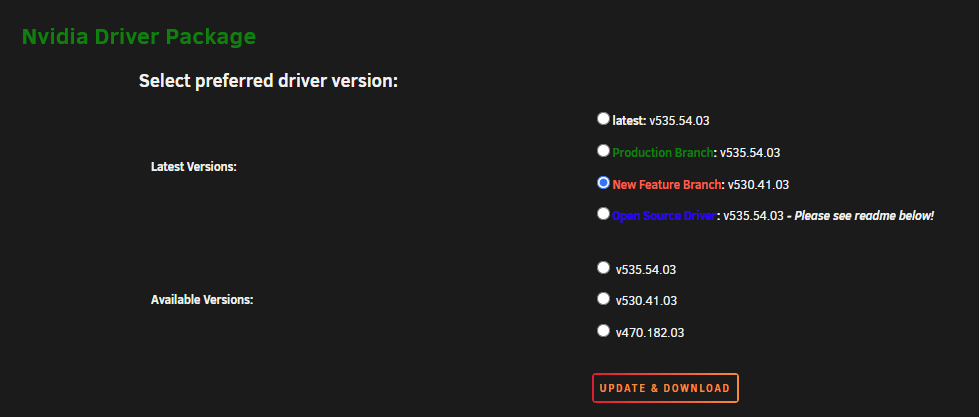
You just open the nVidia Driver plugin and select the driver you want, it's all in the same plugin?
-
Kindly read the last line of drivers for the 4060ti
-
You should probably try it before complaining, according to nvidia it works?I'm running 6.12 just fine with the other driver. You don't need to be on "Latest" for GPU. I assure you it'll be fine if you downgrade, and it will fix the container.Downgrade your driver to v530.41.03Downgrade your driver to v530.41.03Forgive me, I feel like an idiot asking. How do I add an AppImage to the list of programs? I'm trying my damnest to add the Yuzu appimage and for whatever reason Steam won't accept it if I browse to it and add it as a non steam game. It worked in an earlier build, but I can't for the life of me get it to work now. Edit: NM, I added another app an repathed/renamed the target. Still not sure why Steam won't add a browsed application.Is it a bug that my Plex Appdata folder is treated as "External"? I have to force backups of externals and then create omissions to get it to not skip PlexI know very little about what's happening with your plugin... I do know there's a wild number of people looking for 11th Gen support(myself included). According to Intel's docs it should be present for use on Rocket Lake processors? https://cdrdv2.intel.com/v1/dl/getContent/634648It had a unique one, but is showing all 0's now. Might be failing. We'll see.Just logged into my server this afternoon and saw my USB is blacklisted. I trust support will hemp me, but is anyone else having issues like this? I just updated to the new release candidate, but I haven't changed my USB since I created the server a few months ago. Most confusing. Is there anything I shouldn't do while I wait for support? if I reboot am I SOL?

