





takkischitt
Members
-
Joined
-
Last visited
Everything posted by takkischitt
-
I'm trying to set up a second server so my son (and us!) can also have a survival server to play on as the original server I started is creative. I have followed the intructions above, but it fails when creating the container. Can anyone help/advise? docker run -d --name='binhex-minecraftbedrockserver-survival' --net='bridge' -e TZ="Europe/London" -e HOST_OS="Unraid" -e HOST_HOSTNAME="UnraidServer" -e HOST_CONTAINERNAME="binhex-minecraftbedrockserver-survival" -e 'CREATE_BACKUP_HOURS'='12' -e 'PURGE_BACKUP_DAYS'='14' -e 'ENABLE_WEBUI_CONSOLE'='yes' -e 'ENABLE_WEBUI_AUTH'='no' -e 'WEBUI_USER'='admin' -e 'WEBUI_PASS'='' -e 'WEBUI_CONSOLE_TITLE'='Minecraft Bedrock' -e 'STARTUP_CMD'='' -e 'UMASK'='000' -e 'PUID'='99' -e 'PGID'='100' -l net.unraid.docker.managed=dockerman -l net.unraid.docker.webui='http://[IP]:[PORT:8222]/' -l net.unraid.docker.icon='https://raw.githubusercontent.com/binhex/docker-templates/master/binhex/images/minecraftbedrockserver-icon.png' -p '17132:19132/tcp' -p '17132:19132/udp' -p '17133:19133/tcp' -p '17133:19133/udp' -p '8222:8222/tcp' -v '/mnt/user/appdata/binhex-minecraftbedrockserver2':'/config':'rw' 'binhex/arch-minecraftbedrockserver' 42e2706e1d25dc9b8e0d2842b04b101e03bcbeaf8dca9d2d7520b6a270b5ce65 docker: Error response from daemon: driver failed programming external connectivity on endpoint binhex-minecraftbedrockserver-survival (65f761857d966161069eaed0eb8640010958d8498d7b814be55c898b3a1e4b57): Bind for 0.0.0.0:8222 failed: port is already allocated. The command failed.
-
Should I install this even if my docker applications are showing when they need an update?
-
I have been using Wireguard for quite a while now, and until today, flawlessly. I'm currently away from home and use my phone as a hotspot to connect my laptop to for internet access. Usually, I'd turn on the Wireguard client on my laptop and I'd be able to access my home network as if I was sitting in my living room. But for some reason, it's not working now. Wireguard seems like it's connected and should be working, but I cannot see my home network or Unraid server. I have tried Wireguard running on my laptop, tried it running on my phone (the phone has access to the home network and Unraid server when running Wireguard) and I've tried having Wireguard running on both the phone and tablet but the tablet just won't get access. I've checked the client settings and all seems OK, the tunnel config works on the phone, I've tried deleting the tunnel config on my laptop and importing the backup again. Can anyone help? It's driving me mad, as it seems like it should be working.
-
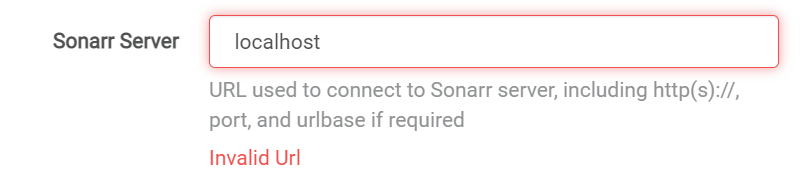
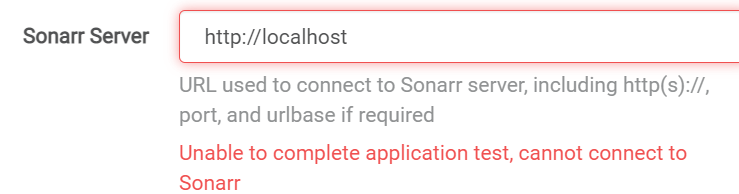
I'm not having much luck here... I also tried 'http://localhost:8989' but when pressing the test button, it just ran and never completed and I had to cancel out of the settings.
-
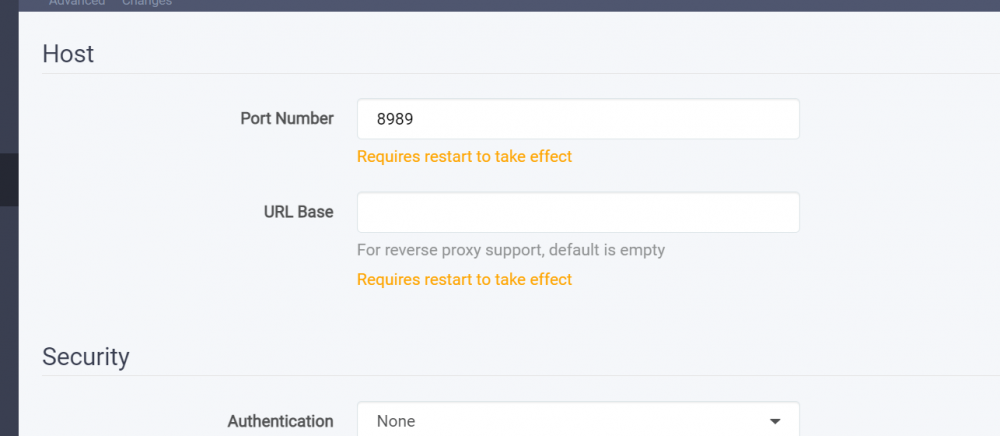
Would that be the 'URL Base'?
-
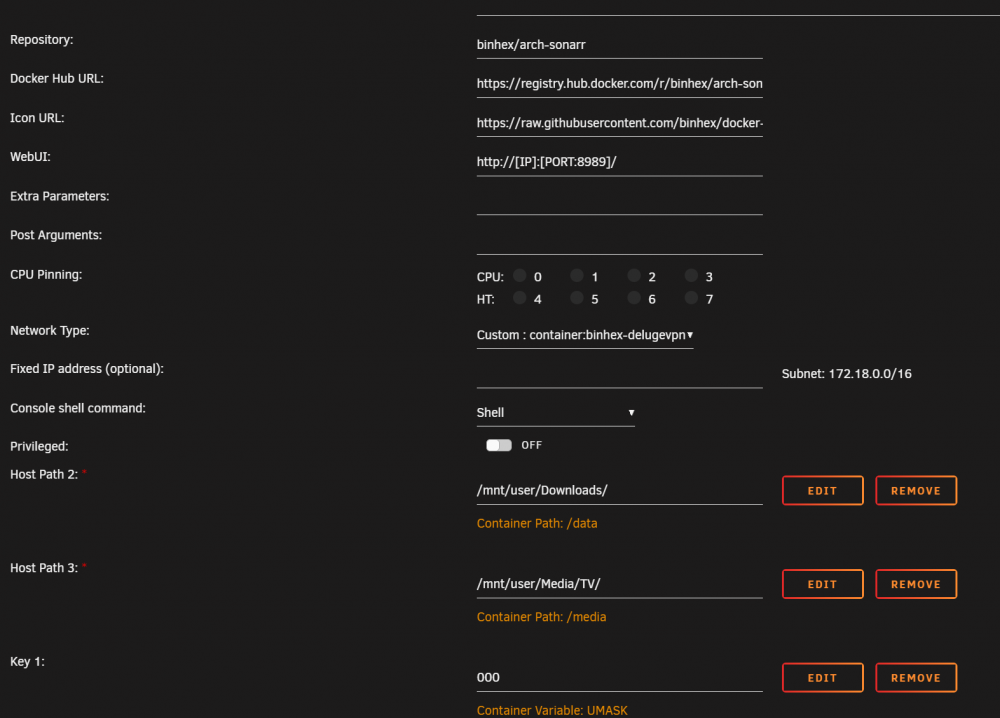
Is that the part about localhost? I dont seem to have a host section in the container config:
-
A couple of days ago, something happened and I could no longer access the WebUI for Radarr, Sonarr and Prowler. I had not made any changes to the system, though there were updates. I originally set them up to run through delugeVPN, and I eventually realised that I needed to add the arrs ports to 'VPN_INPUT_PORTS'. So that got me access to the WebUI again. Now, for some reason, Sonarr (and Radarr) can no longer access the indexers via Prowlarr. The indexers work fine in Prowlarr, but the connection times out when Sonarr and Radarr try to connect. Can anyone advise? As far as I can tell, everything is set up correctly. 2022-07-07 15:30:58.6|Debug|Api|[PUT] /api/v3/config/host: 202.Accepted (169 ms) 2022-07-07 15:30:58.6|Debug|Api|[GET] /api/v3/health: 200.OK (3 ms) 2022-07-07 15:30:58.8|Debug|Api|[GET] /api/v3/health: 200.OK (4 ms) 2022-07-07 15:31:04.2|Debug|Api|[GET] /api/v3/config/indexer: 200.OK (9 ms) 2022-07-07 15:31:04.2|Debug|Api|[GET] /api/v3/indexer: 200.OK (46 ms) 2022-07-07 15:31:49.1|Debug|Api|[GET] /api/v3/config/host: 200.OK (25 ms) 2022-07-07 15:31:52.3|Debug|Api|[GET] /api/v3/health: 200.OK (3 ms) 2022-07-07 15:31:52.3|Debug|Api|[GET] /api/v3/system/status: 200.OK (4 ms) 2022-07-07 15:31:52.3|Debug|Api|[GET] /api/v3/diskspace: 200.OK (39 ms) 2022-07-07 15:31:56.2|Debug|Api|[GET] /api/v3/log/file: 200.OK (8 ms) 2022-07-07 15:32:16.2|Debug|Api|[GET] /api/v3/command: 200.OK (6 ms) 2022-07-07 15:32:16.3|Debug|Api|[GET] /api/v3/command: 200.OK (6 ms) 2022-07-07 15:32:45.6|Debug|NewznabCapabilitiesProvider|Failed to get newznab api capabilities from http://192.168.0.200:9696/2/ [v3.0.8.1507] System.Net.WebException: The operation has timed out.: 'http://192.168.0.200:9696/2/api?t=caps&apikey=(removed) ---> System.Net.WebException: The operation has timed out. at System.Net.HttpWebRequest.RunWithTimeoutWorker[T] (System.Threading.Tasks.Task`1[TResult] workerTask, System.Int32 timeout, System.Action abort, System.Func`1[TResult] aborted, System.Threading.CancellationTokenSource cts) [0x000e8] in /build/mono/src/mono/mcs/class/System/System.Net/HttpWebRequest.cs:956 at System.Net.HttpWebRequest.GetResponse () [0x0000f] in /build/mono/src/mono/mcs/class/System/System.Net/HttpWebRequest.cs:1218 at NzbDrone.Common.Http.Dispatchers.ManagedHttpDispatcher.GetResponse (NzbDrone.Common.Http.HttpRequest request, System.Net.CookieContainer cookies) [0x00123] in M:\BuildAgent\work\63739567f01dbcc2\src\NzbDrone.Common\Http\Dispatchers\ManagedHttpDispatcher.cs:81 --- End of inner exception stack trace --- at NzbDrone.Common.Http.Dispatchers.ManagedHttpDispatcher.GetResponse (NzbDrone.Common.Http.HttpRequest request, System.Net.CookieContainer cookies) [0x001c0] in M:\BuildAgent\work\63739567f01dbcc2\src\NzbDrone.Common\Http\Dispatchers\ManagedHttpDispatcher.cs:107 at NzbDrone.Common.Http.HttpClient.ExecuteRequest (NzbDrone.Common.Http.HttpRequest request, System.Net.CookieContainer cookieContainer) [0x00086] in M:\BuildAgent\work\63739567f01dbcc2\src\NzbDrone.Common\Http\HttpClient.cs:126 at NzbDrone.Common.Http.HttpClient.Execute (NzbDrone.Common.Http.HttpRequest request) [0x00008] in M:\BuildAgent\work\63739567f01dbcc2\src\NzbDrone.Common\Http\HttpClient.cs:59 at NzbDrone.Common.Http.HttpClient.Get (NzbDrone.Common.Http.HttpRequest request) [0x00007] in M:\BuildAgent\work\63739567f01dbcc2\src\NzbDrone.Common\Http\HttpClient.cs:281 at NzbDrone.Core.Indexers.Newznab.NewznabCapabilitiesProvider.FetchCapabilities (NzbDrone.Core.Indexers.Newznab.NewznabSettings indexerSettings) [0x0006f] in M:\BuildAgent\work\63739567f01dbcc2\src\NzbDrone.Core\Indexers\Newznab\NewznabCapabilitiesProvider.cs:59 2022-07-07 15:32:45.6|Warn|Torznab|Unable to connect to indexer [v3.0.8.1507] System.Net.WebException: The operation has timed out.: 'http://192.168.0.200:9696/2/api?t=caps&apikey=(removed) ---> System.Net.WebException: The operation has timed out. at System.Net.HttpWebRequest.RunWithTimeoutWorker[T] (System.Threading.Tasks.Task`1[TResult] workerTask, System.Int32 timeout, System.Action abort, System.Func`1[TResult] aborted, System.Threading.CancellationTokenSource cts) [0x000e8] in /build/mono/src/mono/mcs/class/System/System.Net/HttpWebRequest.cs:956 at System.Net.HttpWebRequest.GetResponse () [0x0000f] in /build/mono/src/mono/mcs/class/System/System.Net/HttpWebRequest.cs:1218 at NzbDrone.Common.Http.Dispatchers.ManagedHttpDispatcher.GetResponse (NzbDrone.Common.Http.HttpRequest request, System.Net.CookieContainer cookies) [0x00123] in M:\BuildAgent\work\63739567f01dbcc2\src\NzbDrone.Common\Http\Dispatchers\ManagedHttpDispatcher.cs:81 --- End of inner exception stack trace --- at NzbDrone.Common.Http.Dispatchers.ManagedHttpDispatcher.GetResponse (NzbDrone.Common.Http.HttpRequest request, System.Net.CookieContainer cookies) [0x001c0] in M:\BuildAgent\work\63739567f01dbcc2\src\NzbDrone.Common\Http\Dispatchers\ManagedHttpDispatcher.cs:107 at NzbDrone.Common.Http.HttpClient.ExecuteRequest (NzbDrone.Common.Http.HttpRequest request, System.Net.CookieContainer cookieContainer) [0x00086] in M:\BuildAgent\work\63739567f01dbcc2\src\NzbDrone.Common\Http\HttpClient.cs:126 at NzbDrone.Common.Http.HttpClient.Execute (NzbDrone.Common.Http.HttpRequest request) [0x00008] in M:\BuildAgent\work\63739567f01dbcc2\src\NzbDrone.Common\Http\HttpClient.cs:59 at NzbDrone.Common.Http.HttpClient.Get (NzbDrone.Common.Http.HttpRequest request) [0x00007] in M:\BuildAgent\work\63739567f01dbcc2\src\NzbDrone.Common\Http\HttpClient.cs:281 at NzbDrone.Core.Indexers.Newznab.NewznabCapabilitiesProvider.FetchCapabilities (NzbDrone.Core.Indexers.Newznab.NewznabSettings indexerSettings) [0x000a1] in M:\BuildAgent\work\63739567f01dbcc2\src\NzbDrone.Core\Indexers\Newznab\NewznabCapabilitiesProvider.cs:64 at NzbDrone.Core.Indexers.Newznab.NewznabCapabilitiesProvider+<>c__DisplayClass4_0.<GetCapabilities>b__0 () [0x00000] in M:\BuildAgent\work\63739567f01dbcc2\src\NzbDrone.Core\Indexers\Newznab\NewznabCapabilitiesProvider.cs:36 at NzbDrone.Common.Cache.Cached`1[T].Get (System.String key, System.Func`1[TResult] function, System.Nullable`1[T] lifeTime) [0x000b1] in M:\BuildAgent\work\63739567f01dbcc2\src\NzbDrone.Common\Cache\Cached.cs:104 at NzbDrone.Core.Indexers.Newznab.NewznabCapabilitiesProvider.GetCapabilities (NzbDrone.Core.Indexers.Newznab.NewznabSettings indexerSettings) [0x00020] in M:\BuildAgent\work\63739567f01dbcc2\src\NzbDrone.Core\Indexers\Newznab\NewznabCapabilitiesProvider.cs:36 at NzbDrone.Core.Indexers.Torznab.Torznab.get_PageSize () [0x00000] in M:\BuildAgent\work\63739567f01dbcc2\src\NzbDrone.Core\Indexers\Torznab\Torznab.cs:23 at NzbDrone.Core.Indexers.Torznab.Torznab.GetRequestGenerator () [0x00000] in M:\BuildAgent\work\63739567f01dbcc2\src\NzbDrone.Core\Indexers\Torznab\Torznab.cs:27 at NzbDrone.Core.Indexers.HttpIndexerBase`1[TSettings].TestConnection () [0x00007] in M:\BuildAgent\work\63739567f01dbcc2\src\NzbDrone.Core\Indexers\HttpIndexerBase.cs:336 2022-07-07 15:33:46.2|Debug|Api|[GET] /api/v3/command: 200.OK (5 ms) 2022-07-07 15:33:46.3|Debug|Api|[GET] /api/v3/command: 200.OK (6 ms)
-
Hi, hopefully someone can assist me. I've got binhex containers on my system (DelugeVPN, Sonarr, Radarr, Prowlerr), but something has happened recently and I can no longer access the WebUI for Radarr, Sonarr and Prowler via their IPs. I have not made any changes to the system, though there have been updates. I originally set them up to run through delugeVPN, so I'm thinking this may have something to do with it, as it is only the Sonarr, Radarr and Prowlerr containers that are having issues. Could anyone advise as to what may have happened, and how I can avoid whatever has happened from happening again? I notice my containers don't have a Host Port in their settings, but when I try to add it, I get an error (see below for Radarr example). Once that happens, the docker image becomes orphaned and I have to reinstall it and remove the Host Port so the container will actually install. root@localhost:# /usr/local/emhttp/plugins/dynamix.docker.manager/scripts/docker run -d --name='binhex-radarr' --net='container:binhex-delugevpn' -e TZ="Europe/London" -e HOST_OS="Unraid" -e HOST_HOSTNAME="UnraidServer" -e HOST_CONTAINERNAME="binhex-radarr" -e 'UMASK'='000' -e 'PUID'='99' -e 'PGID'='100' -l net.unraid.docker.managed=dockerman -l net.unraid.docker.webui='http://[ip]:[port:7878]/' -l net.unraid.docker.icon='https://raw.githubusercontent.com/binhex/docker-templates/master/binhex/images/radarr-icon.png' -p ':7878/tcp' -v '/mnt/user/Downloads/':'/data':'rw' -v '/mnt/user/Media/Films/':'/media':'rw' -v '/mnt/user/appdata/binhex-radarr':'/config':'rw' 'binhex/arch-radarr' docker: Error response from daemon: conflicting options: port publishing and the container type network mode. See 'docker run --help'.
-
I just went and bought a new USB and after restoring the pre-update flash backup, then updating, everything went smoothly from what I can tell. The previous USB flash drive must have been dodgy.
-
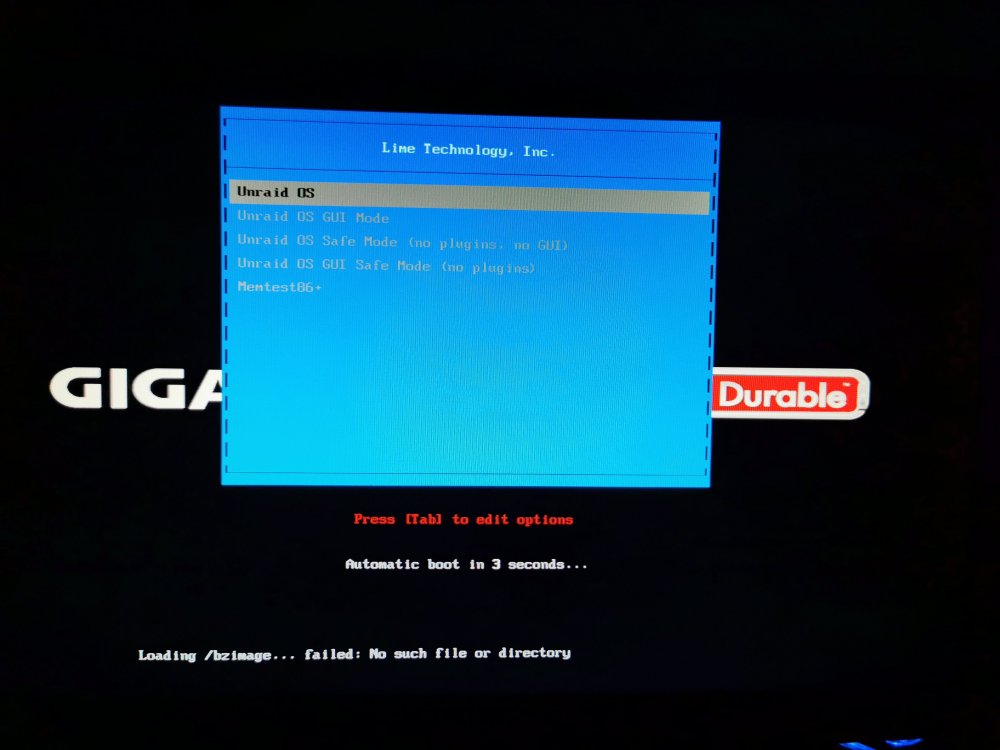
Updated to 6.10.3 (from 6.10.0) but OS wont boot. It's just sitting on the boot options screen and the 5 second countdown is just looping round (see attached image). There is a message saying: Loading /bzimage... failed: No such file or directory Can anyone help or advise?
-
When I install this container, I get the following error: [s6-init] making user provided files available at /var/run/s6/etc...exited 0. [s6-init] ensuring user provided files have correct perms...exited 0. [fix-attrs.d] applying ownership & permissions fixes... [fix-attrs.d] done. [cont-init.d] executing container initialization scripts... [cont-init.d] done. [services.d] starting services [services.d] done. ************************************************************* ************************************************************* *** Your config file is not valid! *** *** Please check the docs at *** *** https://docs.frigate.video/configuration/index *** ************************************************************* ************************************************************* *** Config Validation Errors *** ************************************************************* [Errno 2] No such file or directory: '/config/config.yml' [2022-05-12 22:28:49] frigate.app INFO : Starting Frigate (0.10.1-83481af) Traceback (most recent call last): File "/opt/frigate/frigate/app.py", line 312, in start self.init_config() File "/opt/frigate/frigate/app.py", line 77, in init_config user_config = FrigateConfig.parse_file(config_file) File "/opt/frigate/frigate/config.py", line 896, in parse_file with open(config_file) as f: FileNotFoundError: [Errno 2] No such file or directory: '/config/config.yml' ************************************************************* *** End Config Validation Errors *** ************************************************************* [cmd] python3 exited 1 [cont-finish.d] executing container finish scripts... [cont-finish.d] done. [s6-finish] waiting for services. [s6-finish] sending all processes the TERM signal. [s6-finish] sending all processes the KILL signal and exiting. When I checked the /appdata/frigate path, there is nothing in there, so I created a folder called 'config' and added the minimal config, but I'm still getting the above error. Can anyone advise? I thought containers always installed into 'appdata'?
-
Is this what you're referring to? https://www.howtogeek.com/howto/16226/complete-guide-to-symbolic-links-symlinks-on-windows-or-linux/
-
I'm wanting to create a Windows VM that has an Unraid share showing as a 'physical' hard drive (not a network location/drive etc) so I can use Google Backup & Sync within the Windows VM to backup some folders in the share to the computer backup part of Google Drive (not the Google Drive folder). Is this possible?
-
Where do I go to get the flash backup download? I cant find anywhere to login on the Unraid.net website. Edit: Never mind, I see that you can access it via the forums here via my profile. Will leave this up for anyone is as clueless as me!
-
Argh, the USB flash drive backup was from a while ago, so I must've made changes to things since that backup. Will that have messed things up badly? Or if I can get the templates back to the way they were, should everything work again? Sorry for the noob questions, not long with unraid and this pen drive failing has been a pain!
-
Ah, I had it running through binhex-deluge for the vpn. I've now removed the port from the setup, but getting the following error now: root@localhost:# /usr/local/emhttp/plugins/dynamix.docker.manager/scripts/docker create --name='binhex-sonarr' --net='container:binhex-delugevpn' -e TZ="Europe/London" -e HOST_OS="Unraid" -e 'UMASK'='000' -e 'PUID'='99' -e 'PGID'='100' -p '9897:9897/tcp' -v '/mnt/user/Downloads/':'/data':'rw' -v '/mnt/user/Media/TV/':'/media':'rw' -v '/mnt/user/appdata/binhex-sonarr':'/config':'rw' 'binhex/arch-sonarr' Error response from daemon: conflicting options: port publishing and the container type network mode The command failed. I'm not sure why all this is happening. I had to replace the USB as the previous one failed, would that cause these issues? I thought the containers were separate from the USB flash drive?
-
root@localhost:# /usr/local/emhttp/plugins/dynamix.docker.manager/scripts/docker run -d --name='binhex-sonarr' --net='bridge' -e TZ="Europe/London" -e HOST_OS="Unraid" -e 'UMASK'='000' -e 'PUID'='99' -e 'PGID'='100' -p '9897:9897/tcp' -p '8989:8989/tcp' -v '/mnt/user/Downloads/':'/data':'rw' -v '/mnt/user/Media/TV/':'/media':'rw' -v '/mnt/user/appdata/binhex-sonarr':'/config':'rw' 'binhex/arch-sonarr' ac4acd4da0a9ffb00b7bb06a7327d16a7a0e15d11ee716eac0230a3a9d9badab docker: Error response from daemon: driver failed programming external connectivity on endpoint binhex-sonarr (708ec04199f30905cdcdfdf7fb7cba2293aef50da4f9ebc405c4691e0ed73e74): Bind for 0.0.0.0:8989 failed: port is already allocated. The command failed.
-
I restarted my server and since then, Sonarr wont start. When I try to start it, I get the following popup message: "Execution error. Server error." The logs have nothing in them. All the other containers were fine after the restart, so I'm not sure what has happened. I've tried reinstalling it from previous apps with no luck. Can anyone help or advise?
-
I'm fairly new with Unraid, so please bear with me if I've been a noob. I restarted my server via the restart button at the top right of the GUI. I didn't stop the array or anything (I thought Unraid would do this automatically?). Now the server isn't showing up on the network and the router isn't seeing it either. Can anyone advise or help?
-
Is there any harm in keeping the trim function even when the cache is a btrfs pool? Or should I just remove trim and be done with it? I just don't want to be getting warnings about not having it from Fix Common Problems (I know this isn't the Fix Common Problems thread).
-
Has anyone had any expoerience with on of these? I just want a UPS that will shut down my system safely in the event of a power outage, nothing fancy, no need for lots of power. This looks like it would do. https://smile.amazon.co.uk/gp/product/B07TNS9ZBP/
-
Ah, no problem! Thanks for the confirmation. I maybe should have asked sooner as I've spent the last week on and off trying to work out what I was doing wrong! 🥴
-
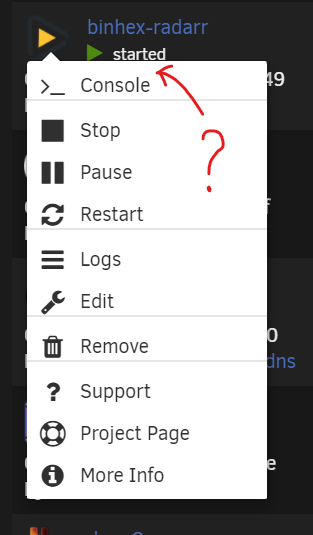
Is there any way to get the WebUI button back on containers routed through binhex-delugevpn? I've followed the instructions and can access by putting the containers IP and port directly into the browser, but I was wondering if there was any way to get back the WebUI button in the container menu when clicking on the logo in unRAID docker tab.
-
For some reason, torrents that I delete from Deluge (both with data and without) reappear after a few minutes and start downloading again (if the data has been removed). I'm not sure what's going on. Can anyone advise?
-
Great, thanks guys.




