





jgosnell
Members
-
Joined
-
Last visited
Everything posted by jgosnell
-
The original version will fail because although the same script is being called for the internal backup process, the output file names were changed from containing flash_backup to now having boot_backup. That would cause the old version to fail. What I posted above has been changed to reflect the new filenames and the backup portion of the script working on my system. The notification at the end of the script doesn't seem to work anymore so I need to troubleshoot that.
-
I still use this user script for boot device backups. #!/bin/bash #### SECTION 1 ####------------------------------------------------------------------------------------------------------ #dir = WHATEVER FOLDER PATH YOU WANT TO SAVE TO dir="your directory of choice" echo 'Executing native unraid backup script' /usr/local/emhttp/webGui/scripts/flash_backup #### SECTION 2 ####------------------------------------------------------------------------------------------------------ echo 'Remove symlink from emhttp' find /usr/local/emhttp/ -maxdepth 1 -name '*boot-backup-*.zip' -delete sleep 5 #### SECTION 3 ####------------------------------------------------------------------------------------------------------ if [ ! -d "$dir" ] ; then echo "making directory as it does not yet exist" # make the directory as it doesnt exist mkdir -vp "$dir" else echo "As $dir exists continuing." fi #### SECTION 4 ####------------------------------------------------------------------------------------------------------ echo 'Move Flash Zip Backup from Root to Backup Destination' mv /*-boot-backup-*.zip "$dir" sleep 5 #### SECTION 5 ####------------------------------------------------------------------------------------------------------ echo 'Deleting Old Backups' #ENTER NUMERIC VALUE OF DAYS AFTER "-MTIME +" find "$dir"* -mtime +10 -exec rm -rfv {} \; echo 'All Done' #### SECTION 6 ####------------------------------------------------------------------------------------------------------ #UNCOMMENT THE NEXT LINE TO ENABLE GUI NOTIFICATION UPON COMPLETION /usr/local/emhttp/webGui/scripts/notify -e "Unraid Server Notice" -s "Flash Zip Backup" -d "A copy of the boot disk has been backed up" -i "normal" exit
-
Having the same issue
-
You can always use Neolink in docker as a middleman to get the stream into BI. Looks like dev has slowed on the project so may not work well with newer Reolink cameras.
-
I had to edit the core.config_entries file is HASS to reflect a change in the device path. Old path: /dev/serial/by-id/usb-QEMU_QEMU_USB_SERIAL_1-0000:00:07.7-4-if00-port0 New path: /dev/serial/by-id/usb-QEMU_QEMU_USB_SERIAL_1-0000:00:07.0-4-if00-port0 All is working again now. I am still getting the serial and console entries but since everything seems to work I am not going to worry with it. <serial type='dev'> <source path='/dev/serial/by-id/usb-dresden_elektronik_ingenieurtechnik_GmbH_ConBee_II_DE24XXXXX-if00'/> <target type='usb-serial' port='1'> <model name='usb-serial'/> </target> <alias name='ua-serial006004'/> <address type='usb' bus='0' port='4'/> </serial> <console type='dev'> <source path='/dev/serial/by-id/usb-dresden_elektronik_ingenieurtechnik_GmbH_ConBee_II_DE24XXXXX-if00'/> <target type='serial' port='1'/> <alias name='ua-serial006004'/> <address type='usb' bus='0' port='4'/> </console>
-
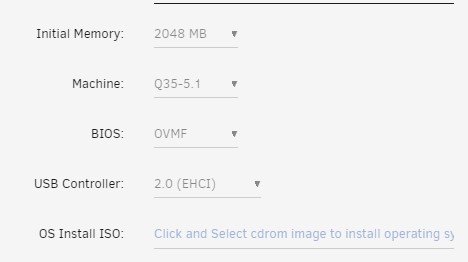
After "upgrading" the VM machine type and usb controller type to match yours, HASS no longer can see the device. Troubleshooting now.
-
Running UnRaid 6.10.3 and VM as follows
-
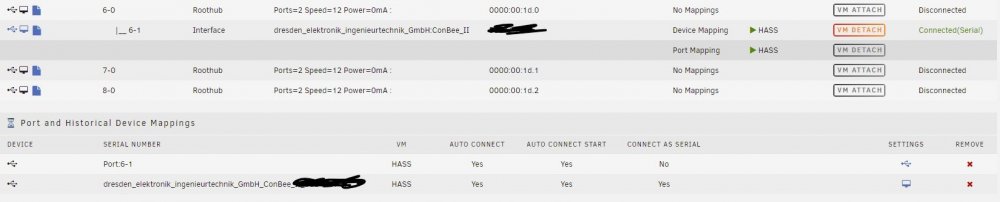
Is it possible it is because I have the port enabled as well? Should we enable the base USB port or just the device itself?
-
I shut down my VM and edited the XML file to remove all references of a serial connection and all references of my ConBee II. I then enabled the automatic attachment of the device in USB Manager and selected to attach as serial only. Started up the VM and all seems good. Home Assistant sees the device and my integration and all devices show properly. Great Job!! One question for you though. When I go back to view the VM XML, I see a serial entry and a console entry for the ConBee like in this snippet. Is that normal? <serial type='dev'> <source path='/dev/serial/by-id/usb-dresden_elektronik_ingenieurtechnik_GmbH_ConBee_II_DEXXXXXXX-if00'/> <target type='usb-serial' port='1'> <model name='usb-serial'/> </target> <alias name='ua-serial006002'/> <address type='usb' bus='0' port='4'/> </serial> <console type='dev'> <source path='/dev/serial/by-id/usb-dresden_elektronik_ingenieurtechnik_GmbH_ConBee_II_DEXXXXXXX-if00'/> <target type='serial' port='1'/> <alias name='ua-serial006002'/> <address type='usb' bus='0' port='4'/> </console> Also, for anyone else seeing this. I did not have to edit the "core.device_registry" file under the .storage directory within HASS. What I detailed above is the only changes I had to make.
-
Thank you very much. I will test with my ConBee II and let you know the results.
-
Is there a setting that we would need to change to specify the serial connection option or is it automatically determined somehow? Nevermind.... After updating the plugin, I now see the toggle for "Connect as Serial Only". Thank you.
-
Check your VM xml. Mine had a double entry for the ConBee after upgrade where one of the entries was wrapped in a <console> tag. I removed that entry and only left the <serial> tagged entry and everything started working. I have no idea what is adding the second <console> entry though.
-
I just upgraded to 6.10.3 and my ConBee II is still working using the original steps above. I am running the latest version of Home Assistant as well.
-
Ok. Thank you for the info.
-
I currently have UnRaid 6.10.2 up and running with 4 drives connected directly to SATA connections on the mobo. These connections are SATA2 so I want to utilize a spare HBA I have and breakout the SAS connections into SATA3. Can I just move my drives to those connections since there is technically no traditional RAID or do I have a risk of data loss and corruption?
-
No it doesn't need to match. My Conbee is physically connect to Bus 6 port 1 as reported by UnRaid. I think line that is specifying what bus/port to attach to within the HA VM so the Zigbee integration know where to look for it.
-
Your pasted code show be inside the domain area. Mine for instance is between the "interface" section and the "console" section. Here is the code I am successfully using: <serial type='dev'> <source path='/dev/serial/by-id/usb-dresden_elektronik_ingenieurtechnik_GmbH_ConBee_II_DE2XXXXXX-XXXX'/> <target type='usb-serial' port='1'> <model name='usb-serial'/> </target> <alias name='serial0'/> <address type='usb' bus='0' port='4'/> </serial>
-
Appears to be another update available. Thank you for maintaining this project.
-
After reverting back to 6.9.2 and using the "USB Manager" plugin, mine has been really stable even through HASS VM reboots. Make sure the VM config itself is not set to auto mount the USB though and let the plugin handle it.
-
Thank you!
-
Hi @Roxedus, just curious if you have any idea if or when this container was going to be updated to the new TDNS version currently at 8.0.1.
-
I am not quite sure what is going on then. I cannot get my Home Assistant page to show nor my router admin page. I am accessing UnRaid externally which forces SSL so I have my custom tab urls set to SSL as well. HA and router internal pages are SSL as well.
-
Can this be used to view internal LAN webpages (same subnet as Unraid) when access through My Servers external access? I cannot get any of the internal pages to load through this plugin.
-
Everything here works fine on 6.9.2 with a Home Assistant VM. Upgrading Unraid to 6.10R2 breaks the USB passthrough for the Conbee II coordinator. I tried to manually edit the XML for the VM but still could not get it to work properly, I think my USB Manager plugin was still trying to connect the device to the vm. I just rolled back to 6.9.2 instead of fighting it. Hopefully UnRaid will make some changes to RC3 or the dev of the Zigbee integration for HA will make changes to allow this to work without any special procedures.


