





thaoggamer
Members
-
Joined
-
Last visited
-
Bloody Champion @JorgeB thank you very much for your help
-
Update: Not sure if it will help but what I have now done is changed the shares that were set to Cache Only to be Cache and Array. Hopefully I don´t lose 2 parity disks in the next 48 hours I have also added an updated Diagnostics file which takes into account above change. galactica-diagnostics-20251020-2300.zip
-
@JorgeB attached here. galactica-diagnostics-20251020-2210.zip
-
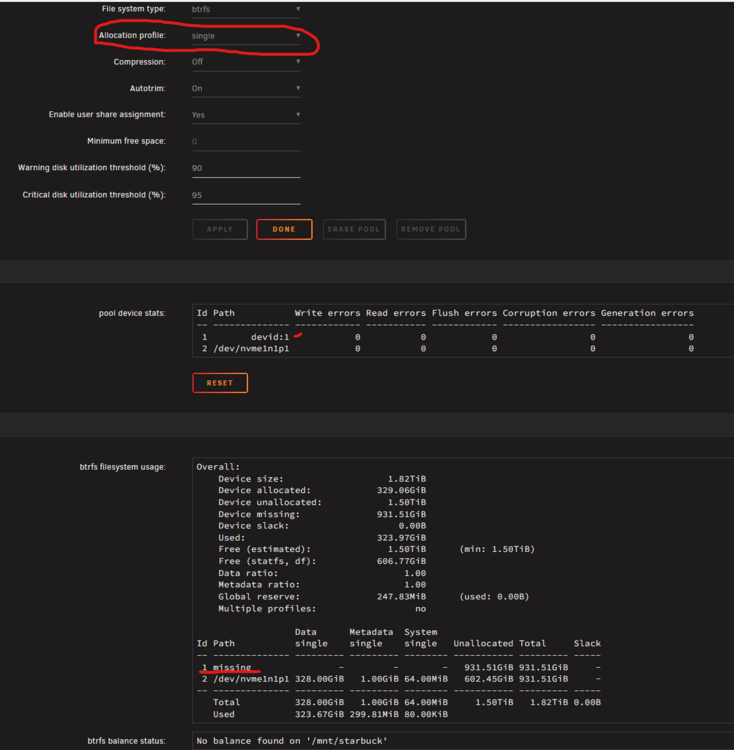
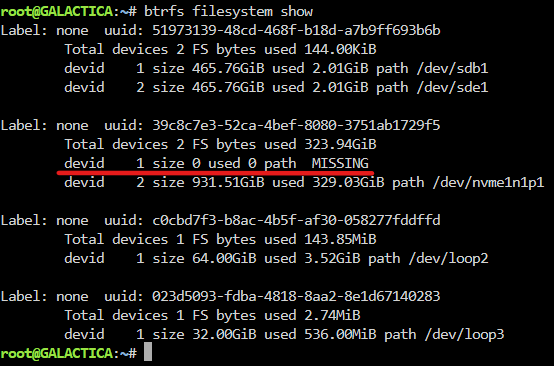
Ok on my unRAID server the main cache pool has a missing "device path". I also noticed that it is no longer in a RAID1 config. I am not sure what happened but the funny thing is the currently "working disk" was throwing errors and I removed it to see if I could repair it using Partition Manager Pro. When I used Partition Manager it said the disk was "unformatted" so I formatted the disk to NTFS working on the assumption that when I put it back into the server, it would just have the contents rebuilt from the remain member disk in the pool. I put the disk back in, and there were no more errors and then I noticed that the pool was now "2TB" rather than the expected "1TB" (they are 2 x 1TB Crucial nVME units) but somehow the DATA is on the disk I removed... so very strange. Is there a way for me to move the contents of the cache pool to the array, delete the cache pool, recreate it and then move the data back from the array back to the newly created cache pool ensuring that I have it set to RAID1 for redundancy/fault tolerance? For the record I have a 2nd cache pool but I'm not using that for anything at the moment.

-
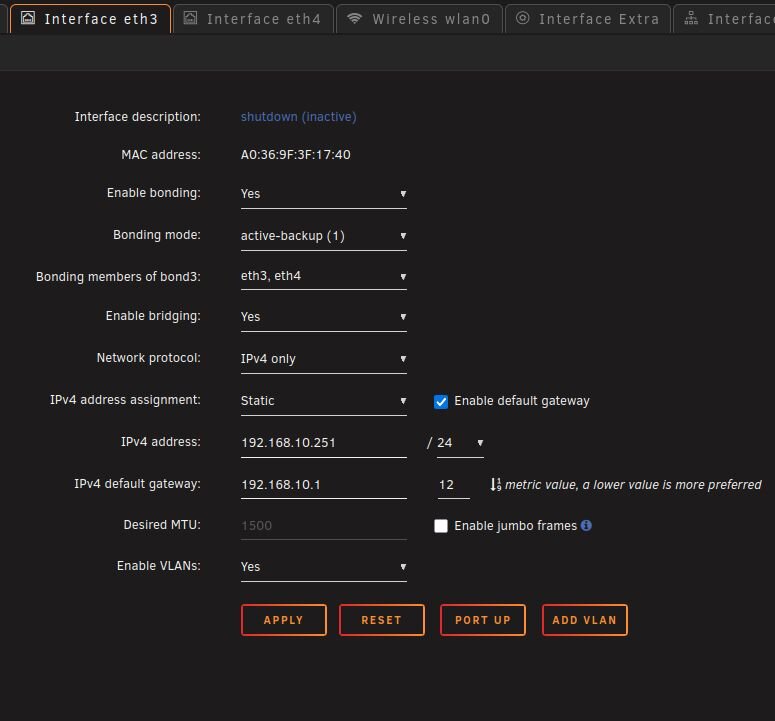
Thanks @MAM59 I will give it a go... the only thing I don't understand is that with my previous 2.5Gb card I had it set to active/backup and I never had issues with the connection dropping... weird... but will see how it goes.
-
I am currently using an Intel dual port 10-Gigabit X540-AT2 NIC in my server. I installed this yesterday and everything worked fine with the card setup as a bond linked to a Ubiquiti UniFi USW Flex XG 10Gb with 2 ports aggregated to account for the NIC bonding. This morning, I was not able to login to the server and resolved this by unplugging the ethernet cables and then plugging them back in. This restored the connection and I was able to login. I checked the logs and there were some entries in there but I cannot make any heads or tails about this. I have now reconfigured the bond into 2 separate ports along with removing the aggregated port config on the switch the server is connected to. I have attached the log - if anyone has some insight in what happened that would be awesome - I will see if the issue occurs with a non-bonded connection. syslog.txt
-
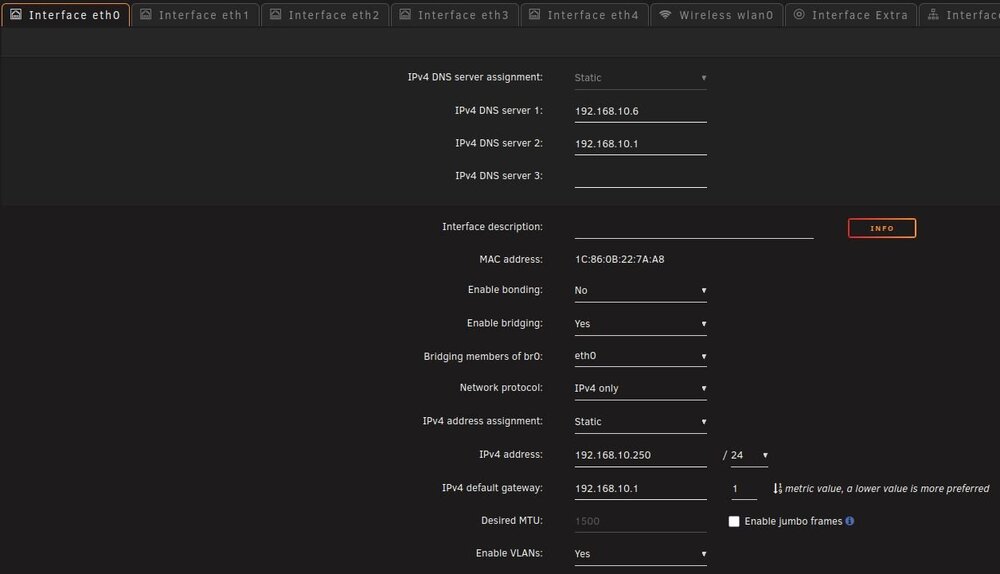
This is a follow up topic from https://forums.unraid.net/topic/194039-solved-separate-devices-into-their-own-iommu-group/ I have installed a new 10Gb dual port SFP+ NIC into the system with a plan to remove the current 2.5Gb dual port card. When I initially did this on a previous attempt I added the 10Gb ports to the existing bond and then physically removed the 2.5Gb card but the system displayed an error message saying eth0 does not exist which was the 2.5Gb NIC. I tried to resolve the issue by creating a new bond with just the 10Gb ports and even though this worked I couldn't set any DNS servers for the new bond because these were set at part of eth0? So under the 1st 10Gb port (where the bond is set to yes as well as bridging) I could set a static IP and a gateway but there is no option at the top of that panel to set DNS servers because that is only available under eth0 linked to the bond associated with the 2.5Gb card. How do I remove the 2.5Gb card but then make the 10Gb card the "primary" so to speak with the DNS options available to set. I cannot seem to get rid of the reference to eth0 even when I physically remove the 2.5Gb card?
-
Thanks @JorgeB that worked. I set PCIe ACS Override to "Downstream" and also disabled allow unsafe interrupts - the system seems to be working fine now.
-
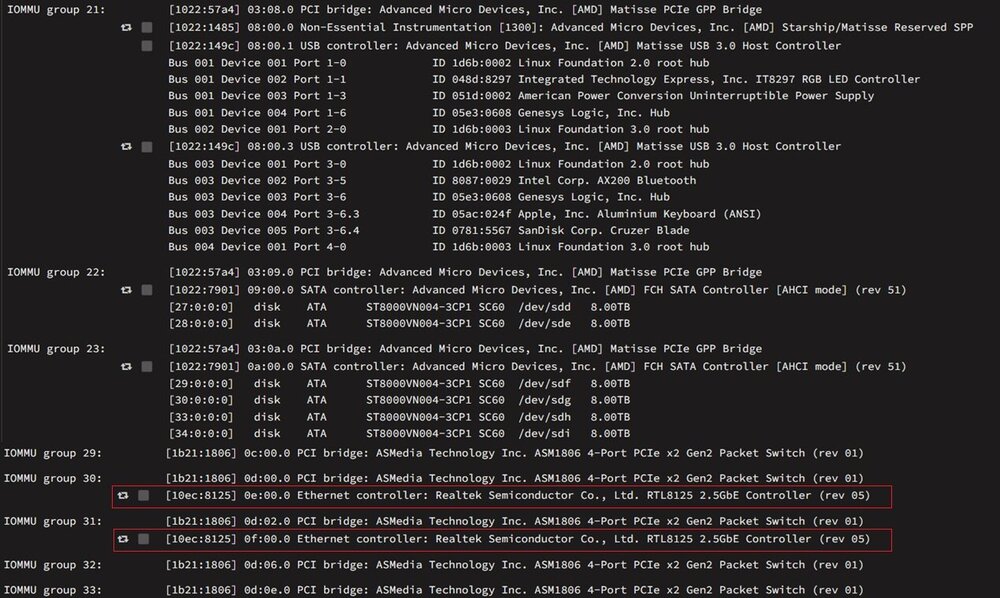
Hi team!! The TLDR is: I swapped my dual 2.5Gb NIC for a dual 10Gb NIC but the 10Gb NIC is faulty and causes the server to shutdown (gracefully thank goodness #noparitycheck). I have put the 2.5Gb NIC back in but I am having multiple issues such as a reference to eth0 not existing even though there is an entry for the card which I have now re-installed. None of my attempts to configure the network has worked and then I noticed that the link lights for the card do not illuminate. I used the onboard 1Gb NIC and that works fine. My suspicion is that the 2.5Gb NIC is not happy because its sharing an IOMMU group with an Add-on SATA card I'm using... this was never an issue as both the SATA card and the 2.5Gb NIC have been running in the system for almost a year without issue. So the question is how do I move the Realtek 2.5Gb ethernet controller into its own IOMMU group. Highlighted in red in the image... I tried SpaceInvaderOne's video from 7 years ago but that resulted in the system not booting because it couldn't find the USB drive - so I reverted that change it boots normally. I can only assume that things have changed in 7.1.4. Can someone please let me know how I do this? Thanks!!!
-
As @Candle said, removing the Mover plugin and just using the Stock mover function is fine... so there is definitely something wrong with the plugin. I'm not too sure how I'm supposed to report that and too be fair, whilst that app gives you a lot of control, I'd say it's only for systems where, managing your cache is a necessity (maybe due to size) rather than just keeping things tidy.
-
Already done that. This is the new version I'm using now.
-
I have unmarked this as solved, because the issue still persists. I generated a number of backups from my other client PCs to fill up the cache to about 50% and then I ran move manually. I see the task running in the syslog and it says completed successfully, but the cache disk doesn't show any "Read" activity and the array disks do not show any "Write" activity. The files are still on the cache drive as well so nothing is getting moved?
-
If you can, re-configure your current unRAID server and remove 2-3 drives. Then build the new server (assuming you don't need any of the existing hardware in your current server) using those 3 drives (1 parity 2 for storage) Install a 30 day trial of unRAID and move your data from the old server to the new one. Once it's complete, transfer the license to the new server and then move the remaining disks from the old build to the new one. This is what I did for my current build. On another occassion I copied all my data to a QNAP NAS and then rebuilt the unRAID server from scratch then moved the data back. If you're willing to risk it... you could also just copy all the data to an external disk and then do the new build and copy the data back to it.
-
After having issues with poorly responding VM's I noticed that my cache drive is full. I tried running mover manually but this did not work and clearly the scheduled move function is not functional either. I have updated unRAID to 7.1.2 from 7.1.1. This however did not resolve the issue. Mover is set to run daily at 02:00 and I have set the move threshold to 25% but again this did not trigger the move (my cache is comprised of 2 x 1TB nVME SSDs). I have attached my diagnostics file and I also noticed these messages in the system log; May 13 15:14:31 GALACTICA root: Fix Common Problems: Error: Share Appz has disk7 set in its included disk settings May 13 15:14:31 GALACTICA root: Fix Common Problems: Error: Share Appz has disk8 set in its included disk settings May 13 15:14:31 GALACTICA root: Fix Common Problems: Error: Share DeviceDrivers has disk7 set in its included disk settings May 13 15:14:31 GALACTICA root: Fix Common Problems: Error: Share DeviceDrivers has disk8 set in its included disk settings As well as this message when I try to trigger mover manually; May 13 15:13:47 GALACTICA emhttpd: shcmd (132): /usr/local/sbin/mover start |& logger -t move & May 13 15:13:47 GALACTICA move: Usage: /usr/local/sbin/mover.old start [-e <disk_name>] May 13 15:13:47 GALACTICA move: /usr/local/sbin/mover.old stop|status May 13 15:13:47 GALACTICA move: <disk_name> must match pattern 'disk[0-9]*' and /mnt/<disk_name> must be a mountpoint The thing is I only have 6 disks in my array (plus 2 parity disks) so disk numbers only go up to disk6 - and when I checked, all the shares' "Included Disks" option they all only show "disk1 to disk6" and no disks are excluded at all, so I'm not too sure where disk7 comes from. I must admit that this server originally had 12 disks in it... 2 parity and 10 storage disks but I replaced these 4TB disks with 8TB disks and it's been running like that for over a year now? Any insights and advice would be welcome. Specs: AMD Ryzen 5950X Gigabyte X570 Aorus Pro WiFi nVidia RTX 2060 128GB DDR4 @ 3200Mhz 8 x Seagate IronWolf disks 2 x Crucial 1TB nVME SSDs Thanks, galactica-diagnostics-20250513-1544.zip
-
Ok so finally got it working... not exactly sure what was wrong. I just deleted all the existing files/templates (again), removed docker, removed all my existing VM's and then disabled both Docker and Virtual Machine Manager. I then rebooted the unRAID server and re-installed everything (Docker/VM Manager). Got all my other VM's up and running with no issue then ran Macinabox and everything worked as per spaceinvaderone's video guide. Would love to figure our why it wasn't working but... system is up so... cancelled that idea.



