Brandon_K
Members
-
Joined
-
Last visited
Everything posted by Brandon_K
-
That SX3008F switch is "fiber only" and will not work with RJ45 SFP+ due to the power required by them. It will only work with optical SFP's (either 1g or 10g), as well as twinaxial DAC transceivers. Also something to keep in mind, most 10gbe gear will drop back to 1gbe, but will not negotiate 2.5 or 5gbe rates. I saw mention of your 2.5gbe router in your OP. If you have gig internet (or less) that is typically a non issue, but if you have 2gig+ internet that uses a multigig (2.5/5) port, you'll need to find some intermediary solution. If you want 10gbe throughout the house, you'll need to spend a good bit more money on 10gbe switches that have 10gbe RJ45 onboard, or that support RJ45 SFP's. Or start pulling fiber through your house. Single mode fiber is cheap and futureproof. Otherwise, a more basic 12-24 port gig switch that has one or two 10gbe uplink ports for the server would still prove very beneficial. That would still give the server full 1gbe access to your internet, while allowing full 1gbe access for each of nine other clients. Grab something like a Intel x520-SR2 that has dual SFP+ cages and connect that up to the switch with a 10gbe DAC cable. Super cheap, low power and reliable.
-
From my OP ; "This is specific to Chrome. It works in Edge, Chrome incognito (all on the same machine), Chrome on my phone. " I could have been more clear in my wording above that this issue is specific to my laptop. It does NOT work in Chrome, on my laptop (but has for over a year, without issue). It DOES work in both Edge and a Chrome Incognito window, on the same laptop. It also works on (a standard) Chrome tab from my phone, as it always has. I don't think this is an Unraid issue, it's definitely something specific to something in Chrome. Maybe I fat-fingered some shortcut or something. I just don't know where to even begin looking. I'm a hardware guy, not a software guy. I have no idea what sort of frames/html/java/xml/whatever Unraid uses to display those pages, to know where to start hunting for whatever setting got changed.
-
Is there a reason why you don't simply use SSD / NVME for your working directory when you're editing? I have a 1TB Gen4 NVME that I use exclusively for photo / video editing. It's mounted as a single drive cache pool, with my /workingdata share set to "only" for cache, with that NVME selected. It has zero issues saturating the 2x10gbe connection in to my Unraid box. When I'm done with the edits, I move it to the array (which subsequently moves it to another NVME cache pool, then gets moved by the mover when I'm sleeping). Mechanical disk RAIDz will never touch the throughput and scrub speed that modern NVME can do. And they're cheap! I just picked up another 1TB Intel (granted, PCIe3, not 4) for $69 at Micro Center the other day.
-
While I appreciate the suggestion, it isn't a solution. I like Chrome. It's been working perfectly fine with Unraid for 18 months, up until two days ago.
-
No no, I wasn't suggesting that at all, just saying there are those of us who would like it to stay the way it is, while still being able to utilize ZFS (or more specifically, have the choice to go either way). Striped arrays for me isn't even a matter of expansion, but rather power. I have no need to have the read performance of a striped array in a media server, so it's silly (for me) to pay to have 15 disks spun when all I need is 1. I would think that they're still able to leverage self correcting bitrot protection with the existing array format. I am by no means a pro on ZFS, but as I understand it, it's simply a function of parity, not directly *striped* parity.
-
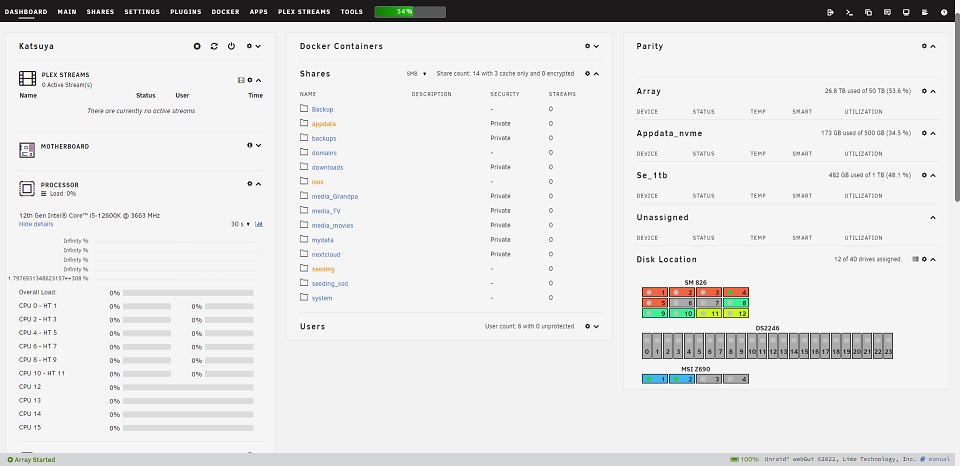
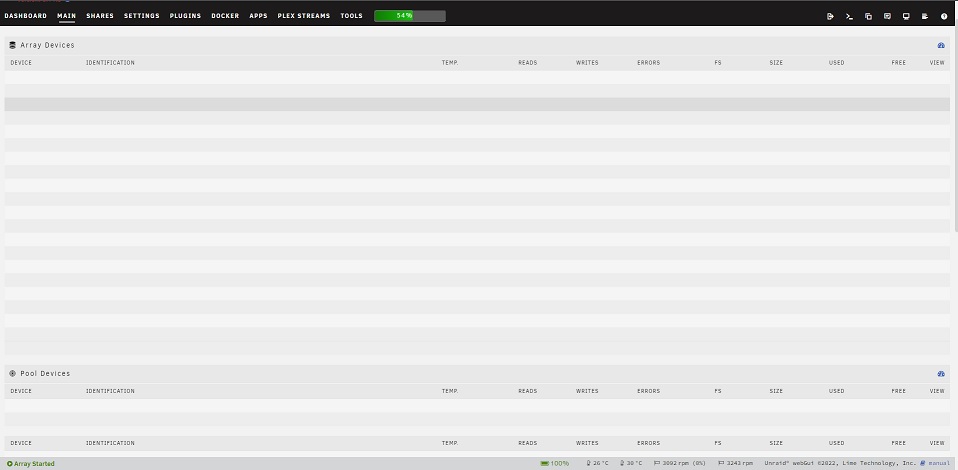
So this randomly happened yesterday. Poof, dashboard and main no longer populates data. Some of the plugins are showing data (like disk location), but you can't interact with the plugins. I can minimize or open the panes, but that's it. This is specific to Chrome. It works in Edge, Chrome incognito (all on the same machine), Chrome on my phone. No ad blockers running, no weird or malicious extensions in Chrome. I cleaned all of the browsing data for the hour prior to it happening. Rebooted both the server, as well as closed Chrome, restarted my laptop, etc. I'm at a complete loss here. Halp?
-
On the flip side, I think there are many of us that are going to get the benefits of the ZFS file system, without being forced in to a striped array. That is one of Unraid's biggest and most valuable selling points. If you want a striped array, TrueNAS is already available and will do that. For free even. There are just too many drawbacks for striped arrays (regardless of the file system) for a home media server imo. More wear and tear on disks, more expensive to expand, at a much higher cost $/TB, significantly more expensive to operate, etc. While I'm not hoping for guys like you who want RAIDz support, I'm going that's not the only option we'll get with ZFS support. Something else to possibly consider, when you hear "ZFS support", it shouldn't immediately make you think of RAIDz. ZFS is a file system, not a array structure.
-
The drive is empty, at least there is nothing in the root of the drive. I'm assuming the few megs on it is for Unraid share info (even though it's not assigned as a share/cache to any other share) or filesystem purposes? I know my way around Unraid pretty well, but understanding the deep dive portions of the file system and how Unraid works with the shares in the background is out of my wheelhouse. Beyond that, without knowing how Unraid will mirror the disks, I'm still worried that it would still mirror a completely wiped disk.
-
Subject pretty much says it all. What is the correct process to convert an existing / in operation single disk cache pool to a mirrored cache pool? I can find guides on the inverse, but not single to two disk. Backstory; I have a NVME that is being used for container data. I have a matching NVME that was formerly used as a separate cache pool and is now empty / unused. Both drives are formatted as btrfs. I know the basics of needing to stop the array, add another drive slot to the existing cache pool, but what I don't know how to do convert the pool to RAID1. Specifically, I'm concerned about it mirroring the empty drive, thus wiping out the container data. Any help would be appreciated!

-
If you have "Move now button follow plugin filters" set to "yes", by setting "Disable mover running on a schedule" to "yes" also, has effectively disabled the entire mover system. Set "move now follows plugin filters" to *NO* and "Disable Mover running on a schedule" to *NO*.
-
You only need three things to get GPU to work in containers for 11th-13th gen; * Intel GPU TOP plugin * GPU Statistics plugin * "/dev/dri" as a *device* path in your container. If your container doesn't have it as a device path, add it.
-
The cost difference (new vs new) in a generation or two old hardware vs brand new is so small, that it seems silly to go in to a dead end platform (1151, 1200, etc). That said, something like a ASrock Z690 Pro RS gets you 8x SATA, 3x NVME and 2.5gig (plus plenty of PCIE for HBA or 10gbe expansion). $140. Add a i3 12100 for $120 and that's a pretty low power box while still having all of the needed IO. A i5 12100T can be had on ebay for ~$100 and it saves you a few more watts.
-
I'm still having some issues that I've yet to be able to solve. What I want is pretty simple; when the cache is >70% full, move everything (all "cache: yes" shares) to the array. I've been playing with options and I can get it to move, but it only moves data that is above 70% and leaves everything else on cache. I'm mostly just trying to avoid spinning up disks every day if I don't have to. It usually takes 3-5 days to get my cache disk to ~70% utilization. My settings are below; No *Note that setting this to yes effectively disables this plugin Priority for mover process: Normal Priority for disk I/O: Normal Only move at this threshold of used cache space: 70 % Move files off cache based on age? No Move files that are greater than this many days old: 1 Use CTIME: No Move files based on minimum size? No Move files that are larger than this size (In M). 1 Move files off cache based on sparsenes? No Move files that are greather than this sparseness: .1 Ignore files listed inside of a text file: No File list path: Ignore file types: No comma seperated list of file types: Let scheduled mover run during a parity check / rebuild: No Force turbo write on during mover: No Log when not moving due to rules: Yes Force move of all files on a schedule: No Cron Schedule to force move all of files: Allow force mover schedule to run during a parity check/rebuild: No Ignore All hiden files and directories: No Script to run before mover (No checks, always runs): Script to run after mover (No checks, always runs): Move All from Cache-Yes shares when disk is above a certain percentage: Yes Move All from Cache-yes shares pool percentage: 75 % Move Now button follows plug-in filters: Yes Test Mode: No What am I missing or doing wrong?
-
I am (was?) having issues with the plugin not moving. My goal is to only spin up the array disks and move from cache to the array if the cache was 70% full. I didn't realize that the mover schedule was effectively a gate keeper on if the mover plugin will run. If I'm understanding correctly; if I have the mover schedule set to run every 8 hours and the tuning plugin set to 70% threshold used, if the cache is at 50%, it will NOT move anything nor spin up disks unless the cache is < 70%? It may wait xx days to spin up disks and move (which is what I want)?
-
As I said, the port forward was temporary to see if it was an internal issue or similar. Server IP is 192.168.10.15. Phone, laptop, etc are all 192.168.10.xxx. Laptop is .10.100. I think it's something PIA/VPN related. The one constant that I've found throughout everything is if Key 1 (VPN Enabled) is enabled, the webgui fails to load (and I've found reference to that from other users). If Key 1 is disabled, the webgui loads fine. Here is my docker config; docker run -d --name='binhex-delugevpn' --net='bridge' --privileged=true -e TZ="America/New_York" -e HOST_OS="Unraid" -e HOST_HOSTNAME="<snip>" -e HOST_CONTAINERNAME="binhex-delugevpn" -e 'VPN_ENABLED'='yes' -e 'VPN_USER'='<snip>' -e 'VPN_PASS'='<snip>' -e 'VPN_PROV'='pia' -e 'VPN_CLIENT'='openvpn' -e 'VPN_OPTIONS'='' -e 'STRICT_PORT_FORWARD'='no' -e 'ENABLE_PRIVOXY'='yes' -e 'LAN_NETWORK'='192.168.10.0/24' -e 'NAME_SERVERS'='84.200.69.80,37.235.1.174,1.1.1.1,37.235.1.177,84.200.70.40,1.0.0.1' -e 'DELUGE_DAEMON_LOG_LEVEL'='info' -e 'DELUGE_WEB_LOG_LEVEL'='info' -e 'VPN_INPUT_PORTS'='' -e 'VPN_OUTPUT_PORTS'='' -e 'DEBUG'='false' -e 'UMASK'='000' -e 'PUID'='99' -e 'PGID'='100' -l net.unraid.docker.managed=dockerman -l net.unraid.docker.webui='http://[IP]:[PORT:8112]/' -l net.unraid.docker.icon='https://raw.githubusercontent.com/binhex/docker-templates/master/binhex/images/deluge-icon.png' -p '8112:8112/tcp' -p '58846:58846/tcp' -p '58946:58946/tcp' -p '58946:58946/udp' -p '8118:8118/tcp' -v '/mnt/user/downloads/':'/data':'rw' -v '/mnt/user/seeding/':'/seeding':'rw' -v '/mnt/user/appdata/binhex-delugevpn':'/config':'rw' --sysctl="net.ipv4.conf.all.src_valid_mark=1" 'binhex/arch-delugevpn' <snip> And another log. There is a section where it shows the listening IP as 0.0.0.0 and shows that Deluge and the webui is not running. I just don't know enough about it to know why it's not working. 2022-09-14 22:18:25 net_iface_up: set tun0 up 2022-09-14 22:18:25,076 DEBG 'start-script' stdout output: 2022-09-14 22:18:25 net_addr_v4_add: 10.38.112.227/24 dev tun0 2022-09-14 22:18:25 /root/openvpnup.sh tun0 1500 1553 10.38.112.227 255.255.255.0 init 2022-09-14 22:18:25,077 DEBG 'start-script' stdout output: 2022-09-14 22:18:25 Initialization Sequence Completed 2022-09-14 22:18:42,210 DEBG 'start-script' stdout output: [info] Attempting to get external IP using 'http://checkip.amazonaws.com'... 2022-09-14 22:18:47,642 DEBG 'start-script' stdout output: [info] Successfully retrieved external IP address 181.214.206.85 2022-09-14 22:18:47,644 DEBG 'start-script' stdout output: [info] Port forwarding is not enabled 2022-09-14 22:18:48,264 DEBG 'watchdog-script' stdout output: [info] Deluge listening interface IP 0.0.0.0 and VPN provider IP 10.38.112.227 different, marking for reconfigure 2022-09-14 22:18:48,268 DEBG 'watchdog-script' stdout output: [info] Deluge not running 2022-09-14 22:18:48,270 DEBG 'watchdog-script' stdout output: [info] Deluge Web UI not running 2022-09-14 22:18:48,271 DEBG 'watchdog-script' stdout output: [info] Privoxy not running 2022-09-14 22:18:48,272 DEBG 'watchdog-script' stdout output: [info] Attempting to start Deluge... [info] Removing deluge pid file (if it exists)... 2022-09-14 22:18:48,596 DEBG 'watchdog-script' stdout output: [info] Deluge key 'listen_interface' currently has an undefined value [info] Deluge key 'listen_interface' will have a new value '10.38.112.227' [info] Writing changes to Deluge config file '/config/core.conf'... 2022-09-14 22:18:48,785 DEBG 'watchdog-script' stdout output: [info] Deluge key 'outgoing_interface' currently has an undefined value [info] Deluge key 'outgoing_interface' will have a new value 'tun0' [info] Writing changes to Deluge config file '/config/core.conf'... 2022-09-14 22:18:48,913 DEBG 'watchdog-script' stdout output: [info] Deluge key 'default_daemon' currently has a value of '42dd2611abd94ceb9de451ee26f8965f' [info] Deluge key 'default_daemon' will have a new value '42dd2611abd94ceb9de451ee26f8965f' [info] Writing changes to Deluge config file '/config/web.conf'... 2022-09-14 22:18:49,115 DEBG 'watchdog-script' stdout output: [info] Deluge process started [info] Waiting for Deluge process to start listening on port 58846... 2022-09-14 22:18:49,323 DEBG 'watchdog-script' stdout output: [info] Deluge process listening on port 58846 2022-09-14 22:18:50,432 DEBG 'watchdog-script' stdout output: Setting "random_port" to: False Configuration value successfully updated. 2022-09-14 22:18:50,433 DEBG 'watchdog-script' stderr output: <Deferred at 0x14e7ecdb7040 current result: None> 2022-09-14 22:18:51,436 DEBG 'watchdog-script' stdout output: Setting "listen_ports" to: (6890, 6890) Configuration value successfully updated. 2022-09-14 22:18:51,437 DEBG 'watchdog-script' stderr output: <Deferred at 0x14e13cb7efb0 current result: None> 2022-09-14 22:18:52,534 DEBG 'watchdog-script' stderr output: <Deferred at 0x14b51864e680 current result: None> 2022-09-14 22:18:52,568 DEBG 'watchdog-script' stdout output: [info] No torrents with state 'Error' found 2022-09-14 22:18:52,568 DEBG 'watchdog-script' stdout output: [info] Starting Deluge Web UI... [info] Deluge Web UI started 2022-09-14 22:18:52,569 DEBG 'watchdog-script' stdout output: [info] Attempting to start Privoxy... 2022-09-14 22:18:53,573 DEBG 'watchdog-script' stdout output: [info] Privoxy process started [info] Waiting for Privoxy process to start listening on port 8118... 2022-09-14 22:18:53,576 DEBG 'watchdog-script' stdout output: [info] Privoxy process listening on port 8118
-
Ok, I give up. I've spent hours off and on on this issue and I cannot figure it out. At some point (to which I have no idea when, it's been at least a month or two now, I've had little time to work on it) I've lost access to the webui for DelugeVPN. I have few troubleshooting skills when it comes to linux so the only things that I've done to try to fix it is container updates as well as deleting the container (including the image) and reinstalling it. I know the container is still running because certain other pieces of software still use it and are able to send requests to it, which it happily pulls and transfers. I just simply cannot access the webgui. I've tried different browsers, different machines entirely. I've temporarily port-forwarded it's port through my router to attempt to access it externally, no luck. Console works. Unraid 6.11-RC4. binhex-delugevpn, whatever the latest version is. Network is bridge, accessing it via http://mylocalIP:8112. Subnet is correct in the config, 192.168.10.0/24 [edit] Logs are helpful I suppose. It has been so long since I did the initial setup that I forgot about having to copy the OpenVPN files over from PIA. In the logged, it looked like that was an issue, so I re-downloaded the openvpn.zip from PIA and followed the (5 year old) SIO video. I deleted the old openvpn file in appdata, made a new one, copied the 3 required files over. If the VPN is enabled (in container settings) I get the following log and errors. If it is disabled, I get my webgui back. Obviously I have an issue with the VPN setup (I think), but I'm not sure what it is? text error warn system array login -P FORWARD DROP -P OUTPUT DROP -A INPUT -s 172.17.0.0/16 -d 172.17.0.0/16 -j ACCEPT -A INPUT -s 212.102.35.147/32 -i eth0 -j ACCEPT -A INPUT -s 212.102.35.22/32 -i eth0 -j ACCEPT -A INPUT -s 195.78.54.188/32 -i eth0 -j ACCEPT -A INPUT -i eth0 -p tcp -m tcp --dport 8112 -j ACCEPT -A INPUT -i eth0 -p udp -m udp --dport 8112 -j ACCEPT -A INPUT -s 192.168.10.0/24 -d 172.17.0.0/16 -i eth0 -p tcp -m tcp --dport 58846 -j ACCEPT -A INPUT -s 192.168.10.0/24 -d 172.17.0.0/16 -i eth0 -p tcp -m tcp --dport 8118 -j ACCEPT -A INPUT -p icmp -m icmp --icmp-type 0 -j ACCEPT -A INPUT -i lo -j ACCEPT -A INPUT -i tun0 -j ACCEPT -A OUTPUT -s 172.17.0.0/16 -d 172.17.0.0/16 -j ACCEPT -A OUTPUT -d 212.102.35.147/32 -o eth0 -j ACCEPT -A OUTPUT -d 212.102.35.22/32 -o eth0 -j ACCEPT -A OUTPUT -d 195.78.54.188/32 -o eth0 -j ACCEPT -A OUTPUT -o eth0 -p tcp -m tcp --sport 8112 -j ACCEPT -A OUTPUT -o eth0 -p udp -m udp --sport 8112 -j ACCEPT -A OUTPUT -s 172.17.0.0/16 -d 192.168.10.0/24 -o eth0 -p tcp -m tcp --sport 58846 -j ACCEPT -A OUTPUT -s 172.17.0.0/16 -d 192.168.10.0/24 -o eth0 -p tcp -m tcp --sport 8118 -j ACCEPT -A OUTPUT -p icmp -m icmp --icmp-type 8 -j ACCEPT -A OUTPUT -o lo -j ACCEPT -A OUTPUT -o tun0 -j ACCEPT 2022-09-13 01:06:13,182 DEBG 'start-script' stdout output: -------------------- 2022-09-13 01:06:13,182 DEBG 'start-script' stdout output: [info] Starting OpenVPN (non daemonised)... 2022-09-13 01:06:13,205 DEBG 'start-script' stdout output: 2022-09-13 01:06:13 DEPRECATED OPTION: --cipher set to 'aes-128-cbc' but missing in --data-ciphers (AES-256-GCM:AES-128-GCM). Future OpenVPN version will ignore --cipher for cipher negotiations. Add 'aes-128-cbc' to --data-ciphers or change --cipher 'aes-128-cbc' to --data-ciphers-fallback 'aes-128-cbc' to silence this warning. 2022-09-13 01:06:13,205 DEBG 'start-script' stdout output: 2022-09-13 01:06:13 WARNING: file 'credentials.conf' is group or others accessible 2022-09-13 01:06:13 OpenVPN 2.5.7 [git:makepkg/a0f9a3e9404c8321+] x86_64-pc-linux-gnu [SSL (OpenSSL)] [LZO] [LZ4] [EPOLL] [PKCS11] [MH/PKTINFO] [AEAD] built on May 31 2022 2022-09-13 01:06:13 library versions: OpenSSL 1.1.1q 5 Jul 2022, LZO 2.10 2022-09-13 01:06:13,205 DEBG 'start-script' stdout output: 2022-09-13 01:06:13 NOTE: the current --script-security setting may allow this configuration to call user-defined scripts 2022-09-13 01:06:13,205 DEBG 'start-script' stdout output: 2022-09-13 01:06:13 CRL: loaded 1 CRLs from file -----BEGIN X509 CRL----- <SNIPPED> -----END X509 CRL----- 2022-09-13 01:06:13,205 DEBG 'start-script' stdout output: 2022-09-13 01:06:13 TCP/UDP: Preserving recently used remote address: [AF_INET]212.102.35.147:1198 2022-09-13 01:06:13 UDP link local: (not bound) 2022-09-13 01:06:13 UDP link remote: [AF_INET]212.102.35.147:1198 2022-09-13 01:06:14,635 DEBG 'start-script' stdout output: 2022-09-13 01:06:14 [amsterdam416] Peer Connection Initiated with [AF_INET]212.102.35.147:1198 2022-09-13 01:06:14,732 DEBG 'start-script' stdout output: 2022-09-13 01:06:14 TUN/TAP device tun0 opened 2022-09-13 01:06:14 net_iface_mtu_set: mtu 1500 for tun0 2022-09-13 01:06:14 net_iface_up: set tun0 up 2022-09-13 01:06:14 net_addr_v4_add: 10.17.112.220/24 dev tun0 2022-09-13 01:06:14 /root/openvpnup.sh tun0 1500 1553 10.17.112.220 255.255.255.0 init 2022-09-13 01:06:14,734 DEBG 'start-script' stdout output: 2022-09-13 01:06:14 Initialization Sequence Completed 2022-09-13 01:06:21,868 DEBG 'start-script' stdout output: [info] Attempting to get external IP using 'http://checkip.amazonaws.com'... 2022-09-13 01:06:32,211 DEBG 'start-script' stdout output: [info] Failed on last attempt, attempting to get external IP using 'http://whatismyip.akamai.com'... 2022-09-13 01:06:32,529 DEBG 'start-script' stdout output: [info] Successfully retrieved external IP address <snipped> 2022-09-13 01:06:32,531 DEBG 'start-script' stdout output: [info] Port forwarding is not enabled 2022-09-13 01:07:02,959 DEBG 'watchdog-script' stdout output: [info] Deluge listening interface IP 0.0.0.0 and VPN provider IP 10.17.112.220 different, marking for reconfigure 2022-09-13 01:07:02,963 DEBG 'watchdog-script' stdout output: [info] Deluge not running 2022-09-13 01:07:02,965 DEBG 'watchdog-script' stdout output: [info] Deluge Web UI not running 2022-09-13 01:07:02,967 DEBG 'watchdog-script' stdout output: [info] Privoxy not running 2022-09-13 01:07:02,967 DEBG 'watchdog-script' stdout output: [info] Attempting to start Deluge... [info] Removing deluge pid file (if it exists)... 2022-09-13 01:07:03,271 DEBG 'watchdog-script' stdout output: [info] Deluge key 'listen_interface' currently has an undefined value [info] Deluge key 'listen_interface' will have a new value '10.17.112.220' [info] Writing changes to Deluge config file '/config/core.conf'... 2022-09-13 01:07:03,459 DEBG 'watchdog-script' stdout output: [info] Deluge key 'outgoing_interface' currently has an undefined value [info] Deluge key 'outgoing_interface' will have a new value 'tun0' [info] Writing changes to Deluge config file '/config/core.conf'... 2022-09-13 01:07:03,589 DEBG 'watchdog-script' stdout output: [info] Deluge key 'default_daemon' currently has a value of '42dd2611abd94ceb9de451ee26f8965f' [info] Deluge key 'default_daemon' will have a new value '42dd2611abd94ceb9de451ee26f8965f' [info] Writing changes to Deluge config file '/config/web.conf'... 2022-09-13 01:07:03,796 DEBG 'watchdog-script' stdout output: [info] Deluge process started [info] Waiting for Deluge process to start listening on port 58846... 2022-09-13 01:07:04,005 DEBG 'watchdog-script' stdout output: [info] Deluge process listening on port 58846 2022-09-13 01:07:05,108 DEBG 'watchdog-script' stdout output: Setting "random_port" to: False Configuration value successfully updated. 2022-09-13 01:07:05,108 DEBG 'watchdog-script' stderr output: <Deferred at 0x145d08cc3010 current result: None> 2022-09-13 01:07:06,128 DEBG 'watchdog-script' stdout output: Setting "listen_ports" to: (6890, 6890) Configuration value successfully updated. 2022-09-13 01:07:06,129 DEBG 'watchdog-script' stderr output: <Deferred at 0x1491ab346d10 current result: None> 2022-09-13 01:07:07,213 DEBG 'watchdog-script' stderr output: <Deferred at 0x1470aae66fe0 current result: None> 2022-09-13 01:07:07,252 DEBG 'watchdog-script' stdout output: [info] No torrents with state 'Error' found 2022-09-13 01:07:07,252 DEBG 'watchdog-script' stdout output: [info] Starting Deluge Web UI... 2022-09-13 01:07:07,252 DEBG 'watchdog-script' stdout output: [info] Deluge Web UI started 2022-09-13 01:07:07,253 DEBG 'watchdog-script' stdout output: [info] Attempting to start Privoxy... 2022-09-13 01:07:08,257 DEBG 'watchdog-script' stdout output: [info] Privoxy process started [info] Waiting for Privoxy process to start listening on port 8118... 2022-09-13 01:07:08,259 DEBG 'watchdog-script' stdout output: [info] Privoxy process listening on port 8118 Any help would be appreciated [/edit]
-
The 12600k can do at least two 4K transcodes on CPU alone, which is going to be the same limit that your 8700 can do on QSV. While there isn't any iGPU support for Alder Lake support right now, you'll still have better overall performance with the 12600k, even with transcoding.
-
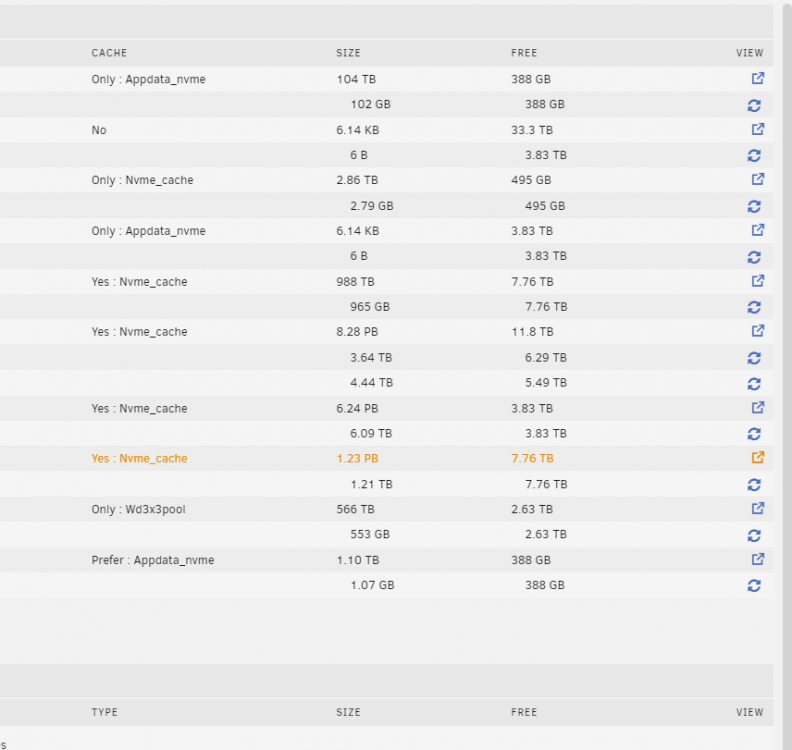
I'm not sure when this occurred, so I'm unsure if this is a RC5 bug, or if this was due to how I handled replacing/consolidating a number of disks. I had a dozen drives that I consolidated down to 5. I used robo to copy each disk from the array directly to the new drives (as unassigned devices). IE, disk1 and disk2 of the array were copied to /disks/newdrive1, etc. No issues with the data copies. I went this route as the old disks were pretty slow SMR's and it was significantly faster to copy two disks at the same time to their new home. At that point, I upgraded from RC4 to RC5 and rebooted. Everything still looked good, so I shutdown, pulled the old drives, rebooted, created a new config with the 5 new drives. I reassigned the shares to the new disk config, everything looked great and parity is currently rebuilding. But when I let it compute shares, it is off wildly. The array is currently made up of 5x10tb + 2x10tb parity. No share uses more than two disks, plus some shares have 500gb of cache to work with. Yet, I'm getting a few shares reporting as multiple petabytes. Picture cropped for sake of resolution and readability.
-
Please please report back and let us know how it goes!
-
I've come across an odd issue and I'm not sure if it's me being dense, or if I'm missing something in the logic of how the process works. When using MC to move data between shares, it's not actually moving data. It shows that it's moved to the share that I moved it to, but it hasn't physically moved it (verified both by looking directly on the disk, as well as "Recompute" in the share showing the data is still on the original disk. None of the data is ever touching the main array, only moving between cache pools (or specifically, shares on cache pools) What I have; The data I'm moving from is a /download share setup on a nvme as a "only" share, so the data should only be ever living on that nvme. The disks I'm moving to is a 3 spindle RAID5 cache pool. The share is /wd3xcache and is also set to "only", using that 3 spindle cache pool. It's the only share on that cache pool. Two separate cache pools, one share on each pool, simply moving data between the two shares. If I use the RenMov command in MC, it shows the directory is moved between the shares, but the progress bar never comes up, it's simply instant (as the test file is 5GB, it shouldn't be instant). If I *copy* the data between shares, I get the progress bar showing that it's copying at ~200MB/sec as I would expect. If I use Windows to connect to the shares and move the directories, it moves as I would expect, though much slower as the workstation I'm using it only connected with a 1gbe network. I'm embarking on a project of organizing a decade worth of unorganized data hoarding, so I'm trying to find the best route to move data within Unraid.
-
Is your Plex under heavy use, or is it just the matter of having your Plex docker running?
-
Thank you to everyone who guided me in the right direction. While it isn't perfect, I'm getting somewhere! The echo command posted earlier, as well as needing to chmod the /dev/dri now has me hardware transcoding in Plex on a i5 12600K. 2% CPU and 5% GPU load on a basic 4K transcode (13gb film, 265, 10bit). There are still some issues though. There is some odd green video artifacting when I try to transcode LOTR (125gb 4K remux). But it's a start! My go-to build is binhex's Plex. Unfortunately it doesn't have the "Extra Parameters" field to add --device=/dev/dri . What would I have to add to the binhex template to do that? Part of my issue is I don't understand what --device=/dev/dri actually is or does, so I have idea where to start on what to add.
-
I feel like a complete moron here, but admittedly I have limited experience with linux outside of Unraid. I've been banging my head against a wall for a bit here. I read through this thread 15 times and I seem to be missing some obvious step, or my limited knowledge of linux is hindering me. I see the bit about "Extra Parameters" (which I don't have with binhex's build). And I see; root@Tuna:~# cat /boot/config/modprobe.d/i915.conf #options i915 force_probe=4692 blacklist i915 But I have no idea where that goes? Can you (or anyone else) give a condensed / step by step version on what needs done to get QS working under Unraid / Plex? I would be much greatful!
-
For the most part, PCIe cards of any lane count will work in any PCIe slot with any other lane count. What you really need to do is sit down and determine what you have as far as add on cards and their bandwidth, what your board has for available slots and then where you want to have peak performance and where you don't mind taking a hit. I went with the MSI Z690-A DDR4 board specifically because of the x16 length slots. As of this moment, I'm running a Intel X520-SR2 (PCIe 2.0 x8), IBM M5110 HBA (PCIe 3.0 x8) and a LSI 9207-8e HBA (PCIe 3.0 x8) The X520 is only ever going to be able to operate at 2.0, because it's only a 2.0 card. It uses 8 lanes, so it could use 32gbps of bandwidth if it was put in a 2.0 (or greater) x8 slot. If you take that same card and put it in a x4 slot (regardless of PCIe 2/3/4), it will max out at 16gbps. in a x1 slot, 4gbps. Each of my HBA's can do 64gbps. The reality is thought that one of these HBA's connect to a pair of external shelfs (24x2.5, 15x3.5). Since the bulk of those disks are used as my Unraid array and since Unraid doesn't strip data, I'm rarely ever able to move any crazy data speeds through there. On write, I'm limited to parity speed writes. On reads, I'm really not pulling data from too many disks at the same time. For me, it made sense to do the following; * M5110 in the x16 slot, giving me full bandwidth (important as I'll have some NVME connected to that card) * 9207-8e on the x1 slot. The drops the card all the way down to 8gbps on that single lane, but the reality is that is still more bandwidth than I can ever move do to a non-striped array. * X520-SR2 in the x4 slot. It chokes my bandwidth for a 2x10gbe NIC down to 16gbps total, but that's fine. I kept high network bandwidth as a preference since I have two 2x500gb Gen4 cache pools to write to and pull appdata from. I'm going to ultimately pull the two HBA's and replace them with a single 16i HBA, then pass through two of the ports to the shelfs with a slot adapter. This will give me full bandwidth on any of the disks. HTH.
-
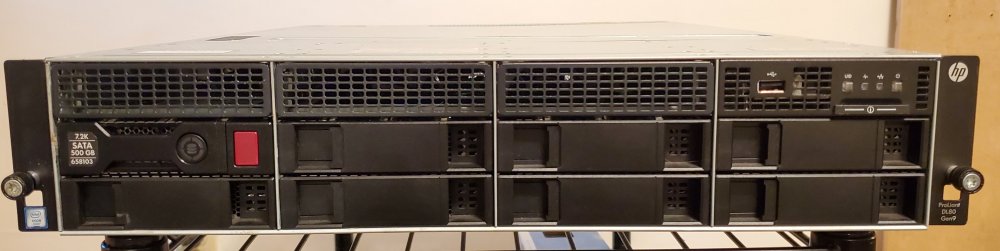
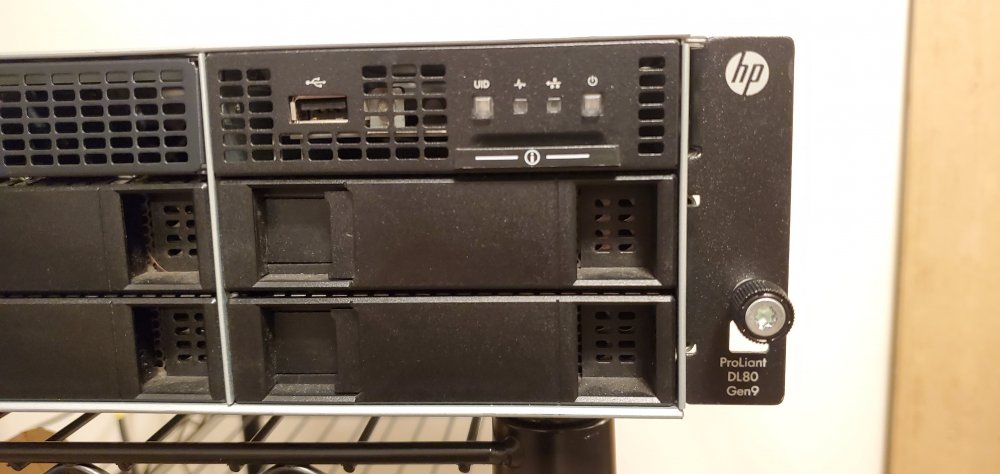
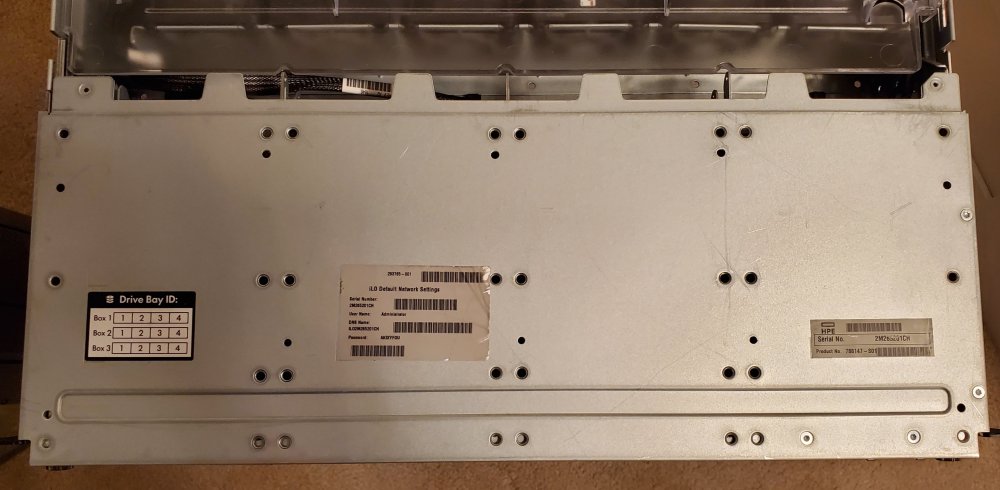
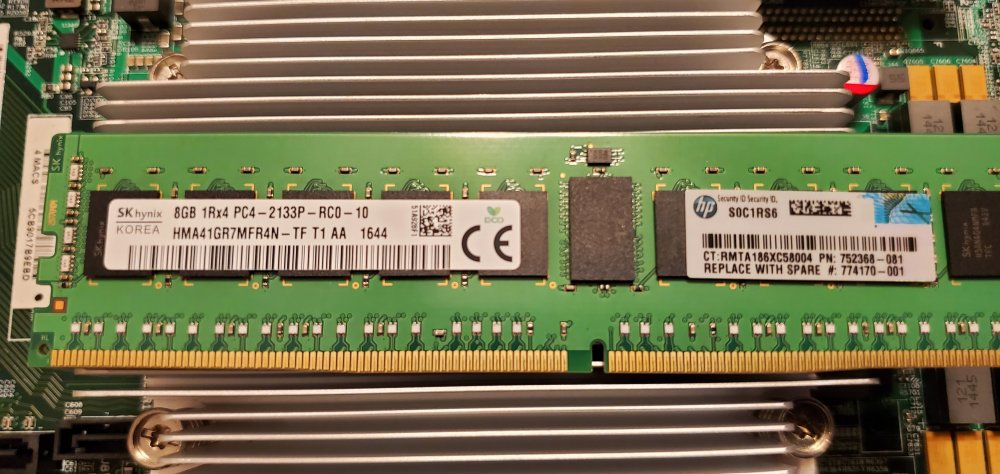
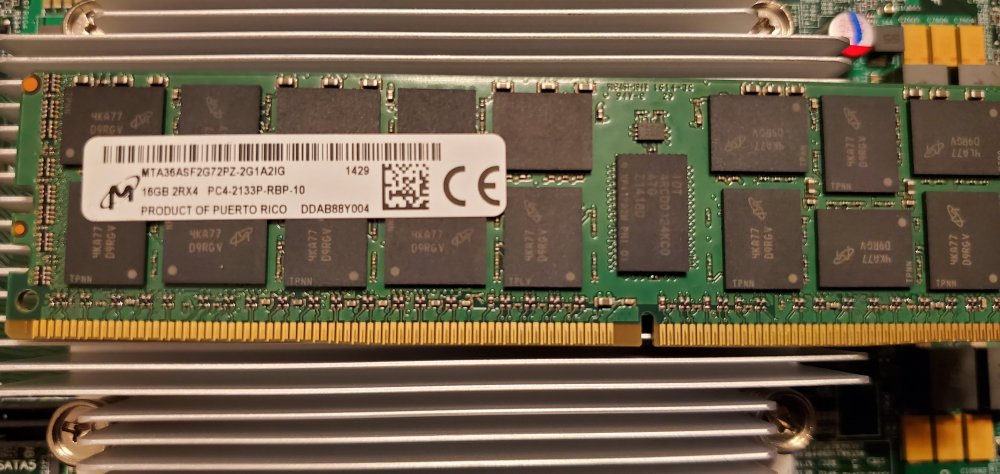
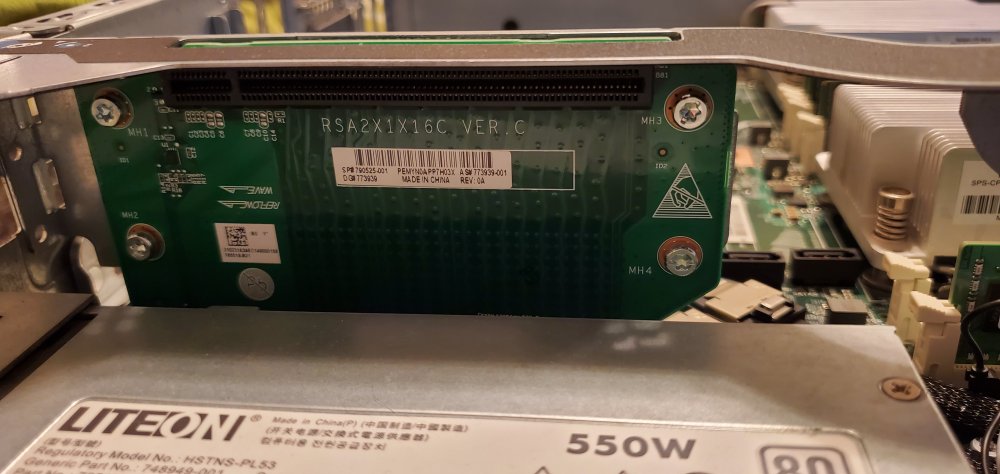
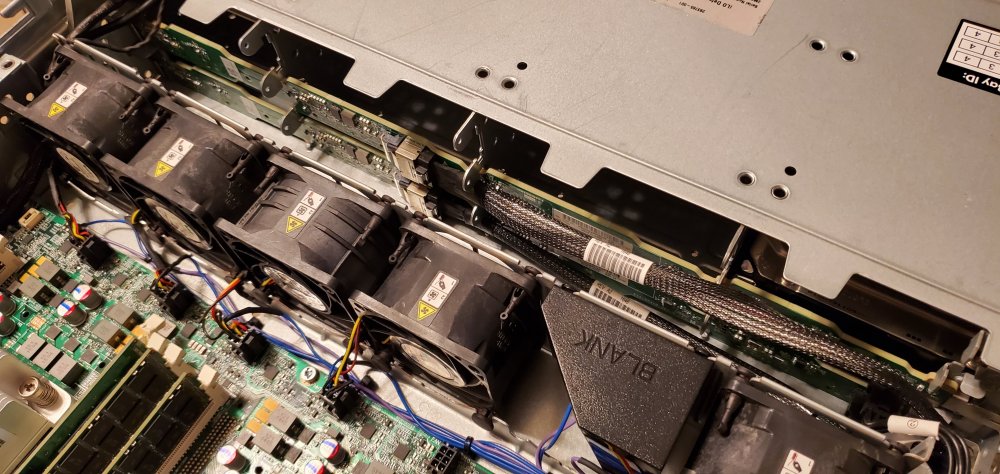
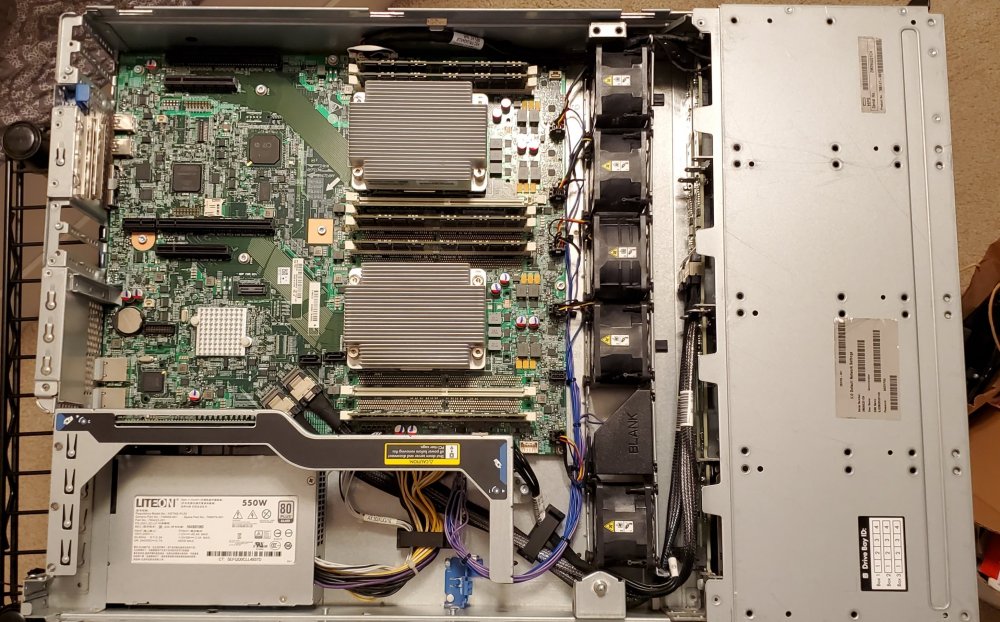
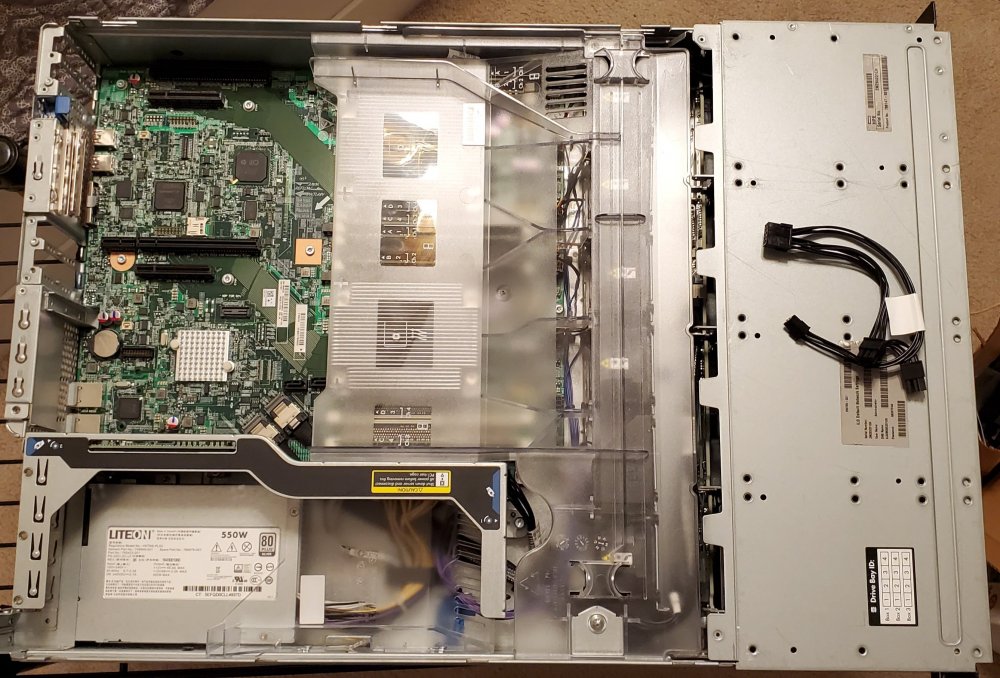
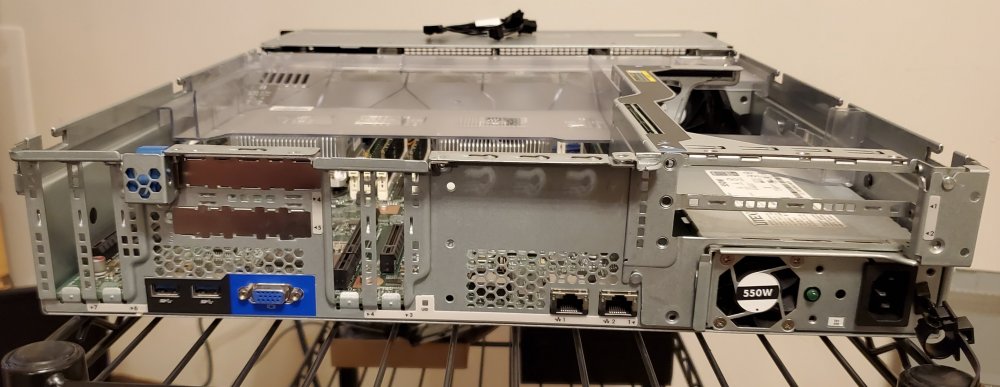
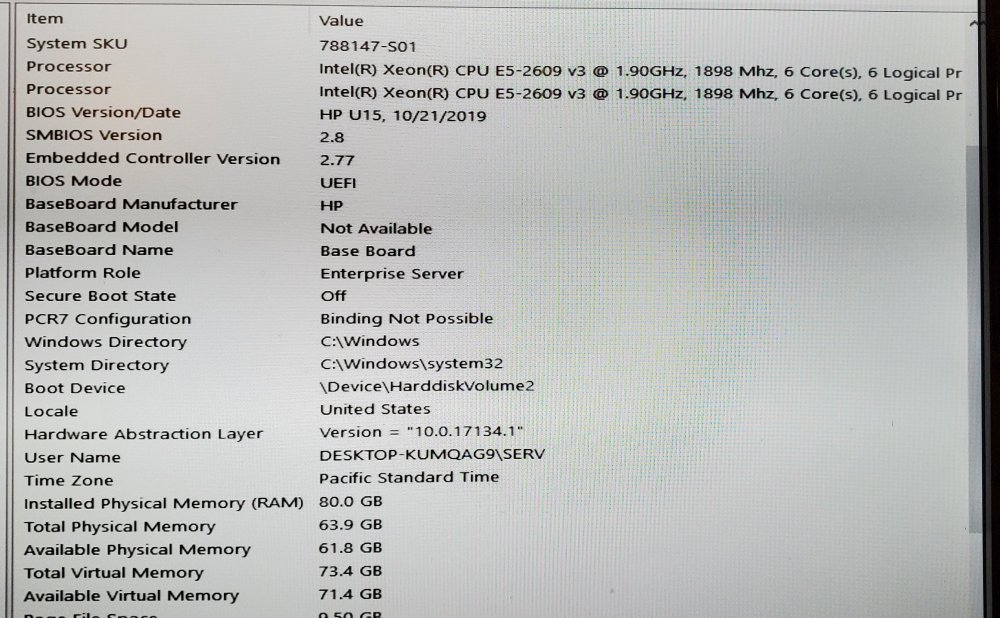
Hey all. Long time Unraid user and forum lurker, first time poster. I recently moved to a different hardware platform from my DL80 and as much as I want to keep it, I just really can't justify it. As I know Dell gets a lot of love, this would be a direct competitor to a Dell R730 LFF (I prefer HP, especially iLO over iDRAC, but that's a difference debate for a different day). Up for sale is my "old" Unraid server. Specs; * HPE DL80 Gen9 * 2x Xeon E5-2609v3's - Officially supports up to 105w v4's (2660v4), but I've been told by other owners that it'll do 120w CPU's with no issues. * 80GB DDR4 ECC 2133 (4x16GB + 2x8GB) * 8x3.5" SAS\SATA hot swap drive bays + 12 drive caddies (+4 2.5" adapters) * GPU enablement kit installed, allows for full height, full length x16 GPU in a 2U chassis * Three x16 and two x8 PCIe 3.0 slots, plus HP's FlexibleLOM slot if you add in the FlexLOM riser * 2x Intel gigabit onboard - I can add in a dual 10gbe X520-SR2 low profile NIC for a bit more if you need 10gbe connectivity * 550w PSU * HP iLO4 Integrated Lights Out / IPMI * Onboard 8 lane HP H240 12gbps SAS * Quiet fans! (See below) I ran this for 18 months or so as my primary Unraid box. I had intentions on adding the 3rd backplane to the drive cage, giving me 3 more drive bays (hence why 12 caddies are included), but ultimately just added some disk shelves to it. This ran 8 drives internally and another 36 externally via the two disk shelves. I never had any issues with it at all. It was always rock solid. There is no physical damage to it (some minor scratches on the exterior from racking / unracking). All of the ducts and guides are included and exactly where they should be (see pics attached). As with pretty much all enterprise gear, noise is the least of the consideration. The fans in this were not quiet. They weren't the loudest piece of gear I've ever owned (that goes to some 1U Dell gear), but still not quiet. I modified the fans in this a bit to get them to a more reasonable state. Specifically, there is a Arduino Nano in the chassis that acts as a buffer between the motherboard and the fans. It takes the signal being sent to the fans, modifies it, then spits it back out. At idle to ~50% load or so it is SIGNIFICANTLY quieter than a stock system. They ramp up/down in a non-linear curve based on what the motherboard is requesting. Zero heat issues even after the modification. This also had the added benefit of knocking ~50w or so off of the idle power draw. The fans can easily be returned to stock with a few pieces of heat shrink and a soldering iron. If you would prefer I do this, I'm happy to do that before shipping it out. $610 - I'm happy to ship on the buyers dime via their preferred shipping method +$10 for boxes and materials. Boxed and ready to go, I'm guessing this is going to be a little shy of 50 pounds. [Terms] * This is my first time selling here, so I'm open to working with someone on providing references. I have a spotless Facebook Marketplace profile, a spotless eBay profile and I have my old Heatware and Beerology (ArsTechnica) trading accounts from way back in the day. * Payment - I despise PayPal with my heart and soul. I would much prefer to not use them. I have Venmo, Zelle, I think maybe CashApp? Old school check or money order works as well. Cash works as well if this is a local pickup / meet. * Location - I'm in the South Hills of Pittsburgh, PA (15236). If it avoids the shipping hassle, I'm willing to meet ~2 hours drive from my area. Potentially a bit further if you throw a few bucks in for fuel. Realistically I could bring my Ego Power Station and boot it right then and there for you. * Contact - lord athens (no space) at Google's free email service is the email. PM through here works. Or you can get me on FB Messenger through this link. * Trades - I don't have a ton in my "needs" category, but I'm looking for the following for partial trade; * a pair of matched ~128gb SSD's (building another pfsense box) * DDR4 3200 RAM - Decent timings, 16gb sticks * Decent office chair * 120v PDU, preferably 1 or 2U, cannot be a full length 0U (I'm in 24U rack). Must have branch metering and switching. * 8-12TB CMR drives * Long shot, 500gb WD SN750 SE's