





T_Matz
Members
-
Joined
-
Last visited
Everything posted by T_Matz
-
I have attached the diagnostics, also sorry about the double post. Thought I deleted this one prior to uploading the other post. I appreciate the help tower-diagnostics-20230807-0834.zip
-
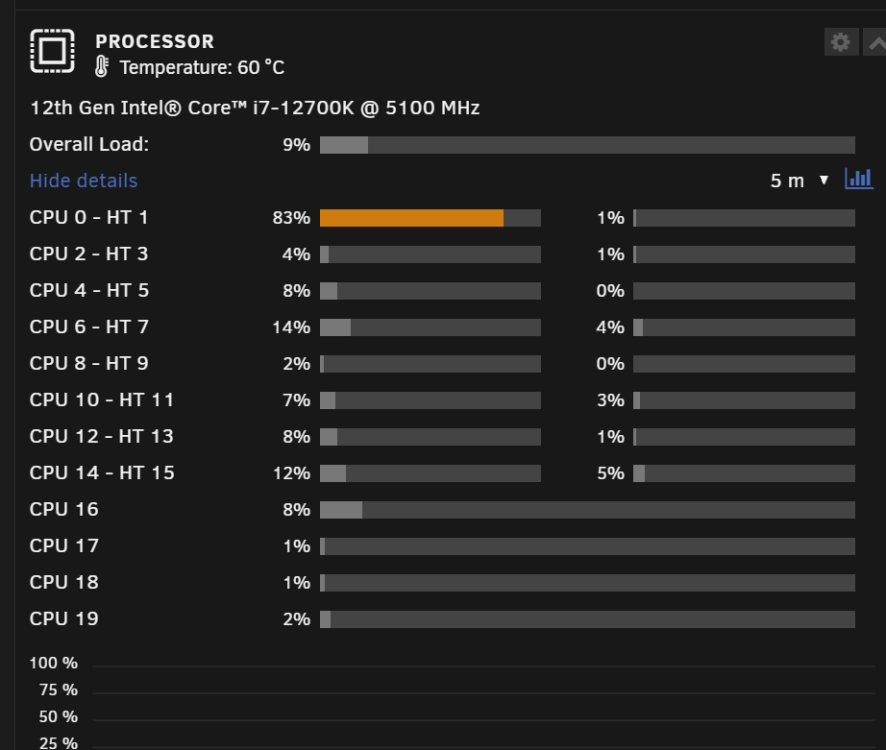
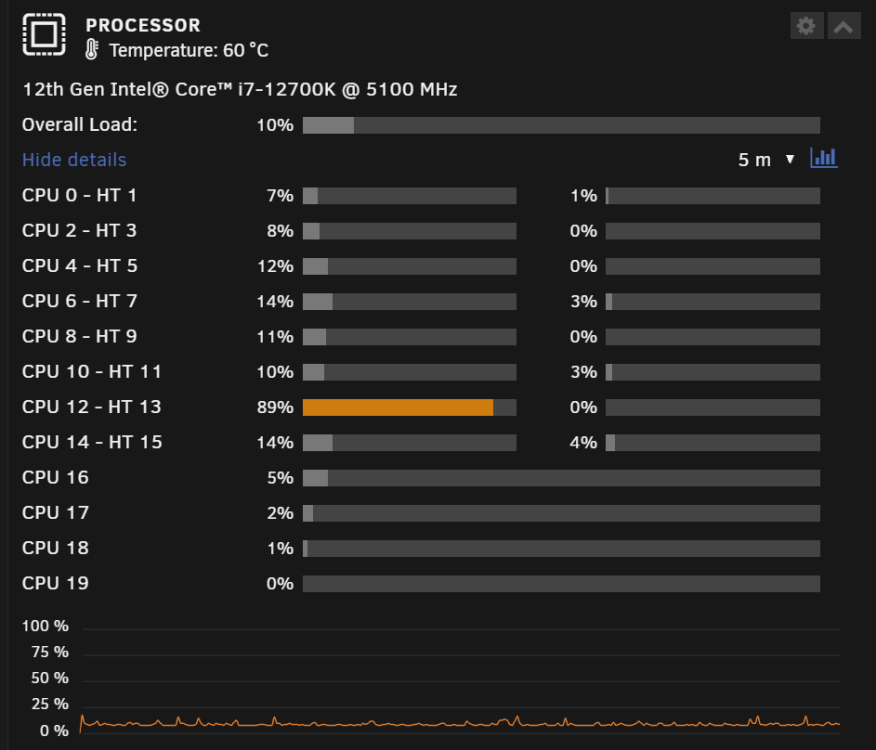
Currently running 6.12.3 and I have a single core always sitting between 80-95% utilization where the rest of the cores sit between 0-6% utilization. It bounces between Core 0 and 12 but one of the cores is always above 80% utilization. Not sure what i should do to correct this. Rig details Intel Core i7-12700K | ASUS ROG Strix Z690-G Gaming WiFi | CORSAIR Vengeance 64GB (2 x 32GB) RAM DDR5 5200 | 5 - Seagate IronWolf Pro 12TB | SAMSUNG 980 PRO M.2 2TB (cache drive) | SAMSUNG 970 EVO PLUS m.2 250GB (VM drive) | MSI 2070 super (VM GPU) | WD Purple Pro 14 TB (VM Passthrough) | Sandisk Ultra Dual -64 GB (boot device)
-
you can see with the pictures that one of the cores is always over utilized, Ive noticed occasionally it will sit at 100% as well
-
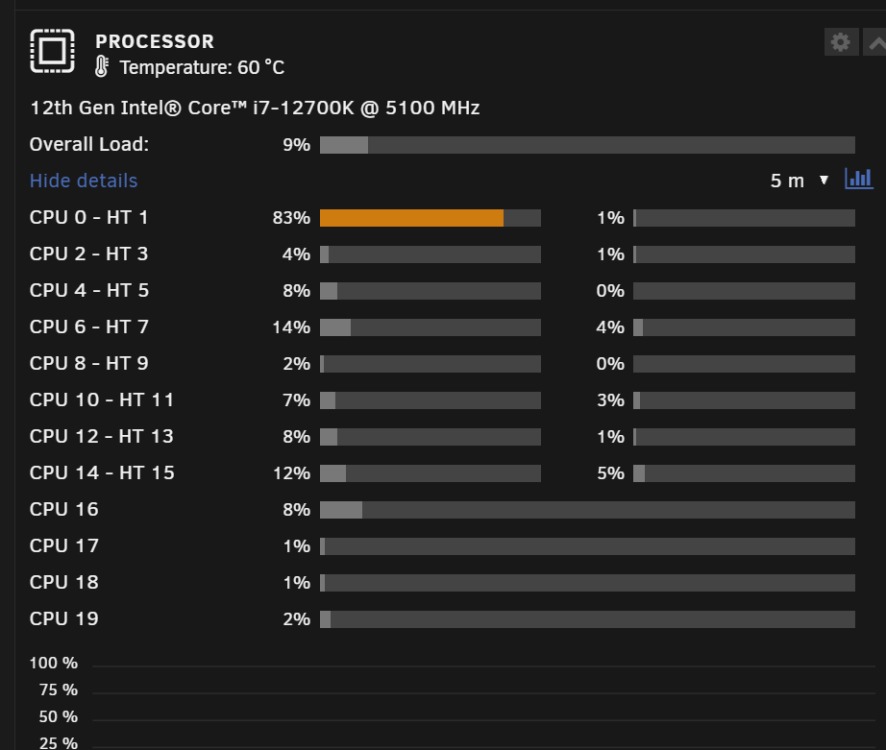
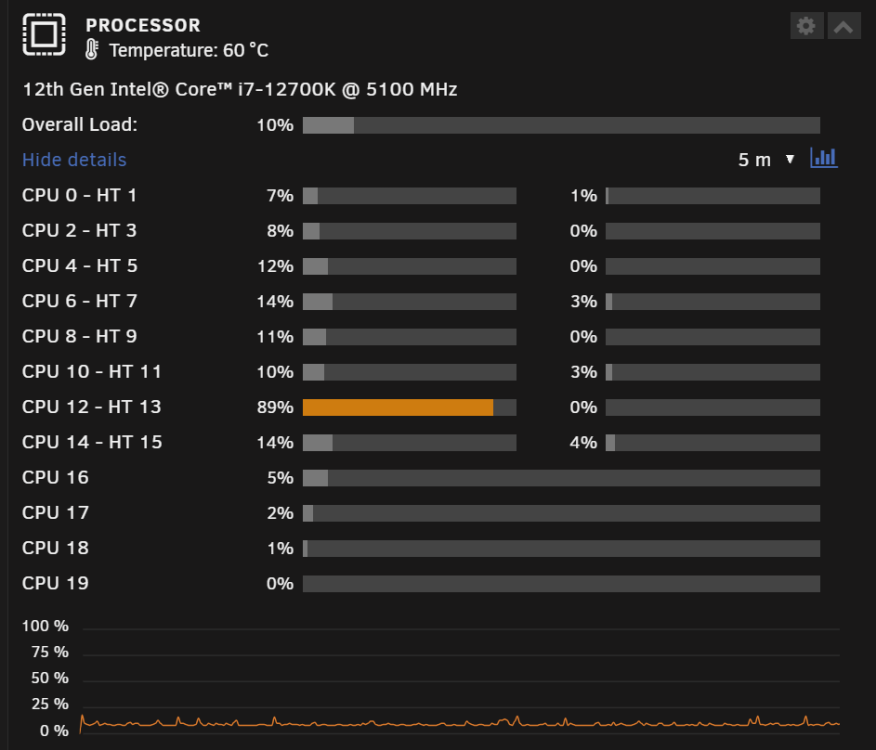
Currently running 6.12.3 and I have a single core always sitting between 80-95% utilization where the rest of the cores sit between 0-6% utilization. Also upon a full reboot all cores will be above 80% utilization for 15 mins. Not sure what is going on any help to help troubleshoot the issue would be appreciated. Rig details Intel Core i7-12700K | ASUS ROG Strix Z690-G Gaming WiFi | CORSAIR Vengeance 64GB (2 x 32GB) RAM DDR5 5200 | 5 - Seagate IronWolf Pro 12TB | SAMSUNG 980 PRO M.2 2TB (cache drive) | SAMSUNG 970 EVO PLUS m.2 250GB (VM drive) | MSI 2070 super (VM GPU) | WD Purple Pro 14 TB (VM Passthrough) | Sandisk Ultra Dual -64 GB (boot device)
-
I haven't had any issues either since switching to IPv4. It does suck not having IPv6 capabilities
-
Switching to just ipv4 fixed my issue
-
I changed it to ipv4 only. The GUI has been good now for an hour. I will update if it becomes unresponsive again
-
After updating to 6.12 the web GUI becomes unresponsive after a few minutes. All Dockers and VMs operating normally. If I reboot the system the web GUI is accessible for a few minutes. I am able to ssh into the system but unable to pull diagnostics after webgui becomes unresponsive. Rig details Intel Core i7-12700K | ASUS ROG Strix Z690-G Gaming WiFi | CORSAIR Vengeance 64GB (2 x 32GB) RAM DDR5 5200 | 5 - Seagate IronWolf Pro 12TB | SAMSUNG 980 PRO M.2 2TB (cache drive) | SAMSUNG 970 EVO PLUS m.2 250GB (VM drive) | MSI 2070 super (VM GPU) | WD Purple Pro 14 TB (VM Passthrough) | Sandisk Ultra Dual -64 GB (boot device)
-
-
I was able to get this diagnostics report prior to the WEBGUI becoming unresponsive tower-diagnostics-20230703-1042.zip
-
Ive tried multiple times, when the WEBGUI stops responding I am able to SSH into my UNRAID server but when I enter the diagnostics command it never completes. It just sits there blinking. under the command. If I reboot the machine i am able to log into the WEBGUI and also SSH into the UNRAID server the diagnostics will complete. with UNRAID 6.11.5 did not give me these issues
-
Are you asking for the sys log or something else? Rig details Intel Core i7-12700K ASUS ROG Strix Z690-G Gaming WiFi CORSAIR Vengeance 64GB (2 x 32GB) RAM DDR5 5200 5 - Seagate IronWolf Pro 12TB SAMSUNG 980 PRO M.2 2TB (cache drive) SAMSUNG 970 EVO PLUS m.2 250GB (VM drive) MSI 2070 super (VM GPU)
-
Web GUI becomes unresponsive within 1 hours of a reboot. All Dockers and VMS continue to run but unable to log into unRAID web GUI.
-
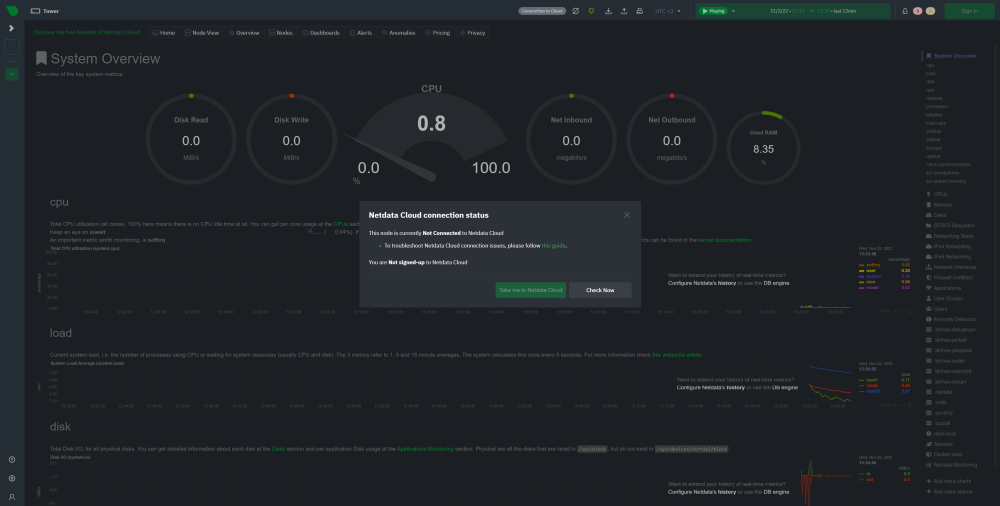
netdata is unable to connect to the netdata cloud. is there a setting i have to change in order for it to get access to the internet?
-
That worked! Thank you, i did have a back up so the data base was still there and its attempting to repair now. Thank you so much!
-
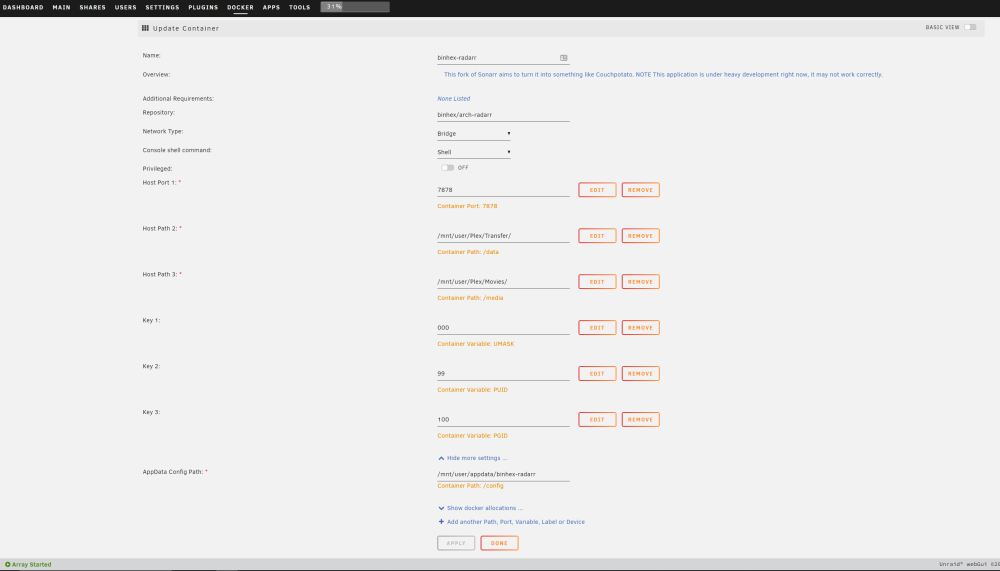
I am still unable to get Radarr to open. I am getting an ERR_connection_refused error. Every other docker opens correctly. RADARR was able to open 2 weeks ago with no issues. I am not sure what I should do. Ive attached the logs and a screen shot of my set up. Any help is greatly appreciated. Binhex-radarr log.txt
-
Radarr is unreachable for me. When i try to connect to the webui i get a refused connection. Sonarr connects just fine with no issues. Doe anyone know what i can do to fix this issue? Binhex-radarr log.txt
-
Wow you aren't having any issues with your NIC? I think I'll have to just get a new NIC for my server, does anyone know of a list of known working NICs
-
This did not help and i had to remove the 10G NIC. It was causing issues with even the onboard NIC. Once removed i havent had any issues with the onboard NIC. But that is only 1 gigabit. I havent found anything to get this card to work, does anyone have a suggestion for a card that would work?
-
Thank you @zoggyI will downgrade my server OS version and see if that helps. I will report back if it does or does not.
-
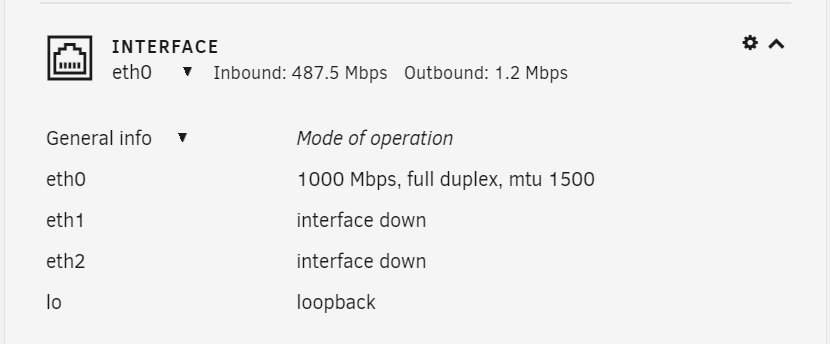
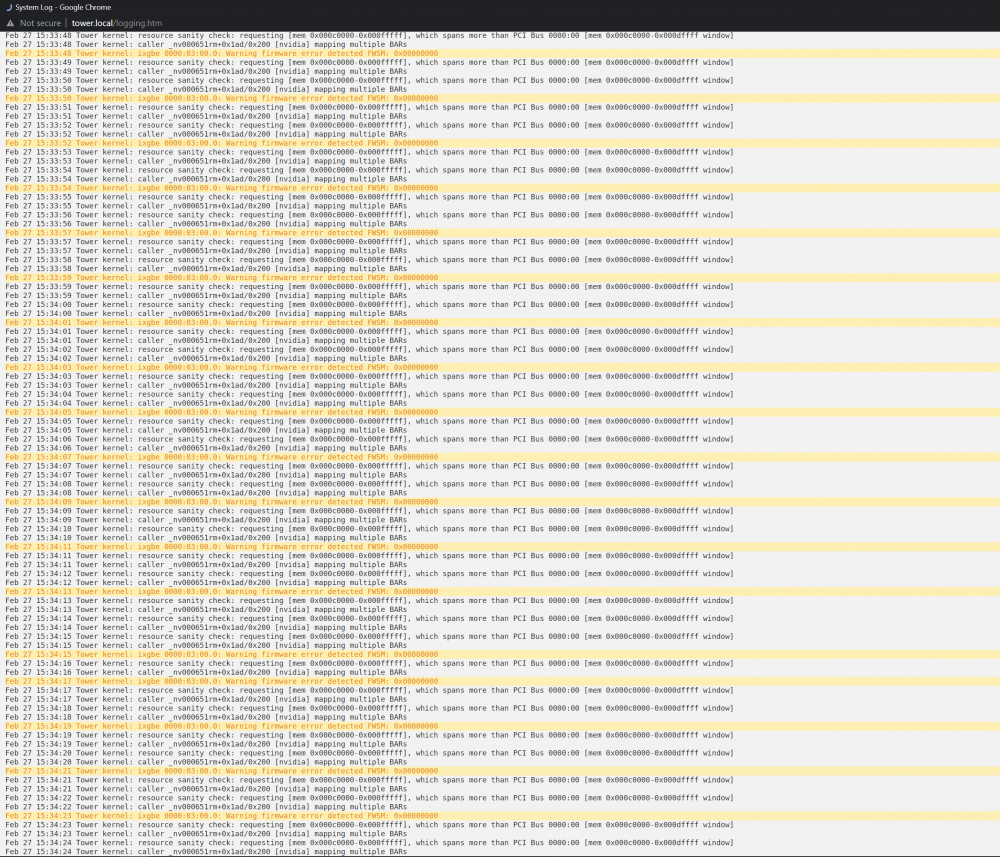
Here is what I am looking at. You have the same issue as mine, your eth1 interface is down. I dont know how to change that to up. I went into the ssh and put in ifconfig -eth1 up it didnt give me a error code but if i do a lshw command it states the ports are disabled. if i plug a cable into the disabled prots it spits out a firmware issue in the logs as well.
-
Im new to unraid, and I am having issues with my 10G NIC. It is generating firmware errors in the logs and I am not sure how to fix the issue. The error is: Feb 27 15:43:01 Tower kernel: ixgbe 0000:03:00.0: Warning firmware error detected FWSM: 0x00000000 ethernet card: Intel E10G42BT X520-T2 MOBO: ASROCK x570 Pro4 CPU: AMD 3900X





