T_Matz
Members
-
Joined
-
Last visited
Everything posted by T_Matz
-
Im getting multiple warnings and error messages in my logs. The whole system is running extremely slow, I tried to run a parity check and it was running at 100 kb/s. All my drives passed a short test, but my parity drive 2 will not run a extended drive unless its the only drive running a extended test. Im assuming a drive is failing but I do not know how to figure out which one it is, except for maybe it pointing at the parity drive 2. Maybe a power issue? I was running this with docker and vms disabled. Update Rebooted unraid into safe mode, now only parity 1 and array drive 3 will run extended smart tests. Parity check is still incredibly slow at about 200 kb/s syslog.txt Diagnostics File.zip
-
My plex-pass docker is setup to have transcode go to RAM /tmp. The memory slowly increases with every show or movie played and doesn't go back down, I've seen it get as high as 16gbs. If I restart the docker the ram usage resets. Is there a way to fix this memory leak or have the docker scheduled to reset daily when it's not in use?
-
Is there a way to find the user name and password in the appdata? or through a console command? Im having an issue getting into the webui as well.
-
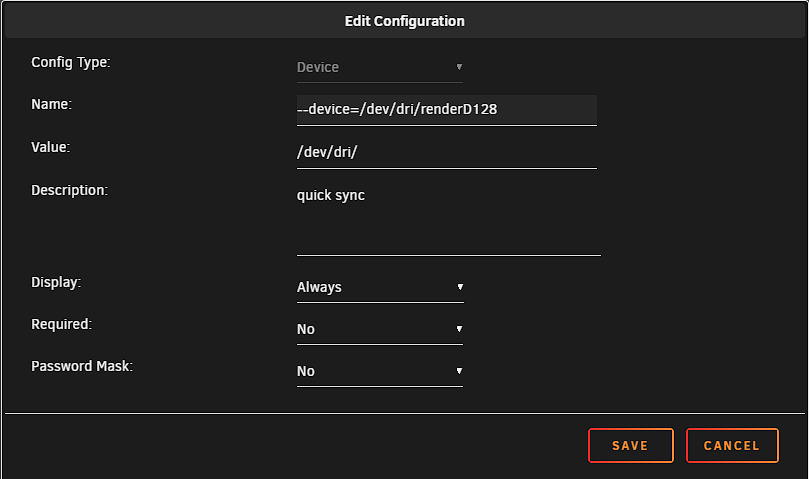
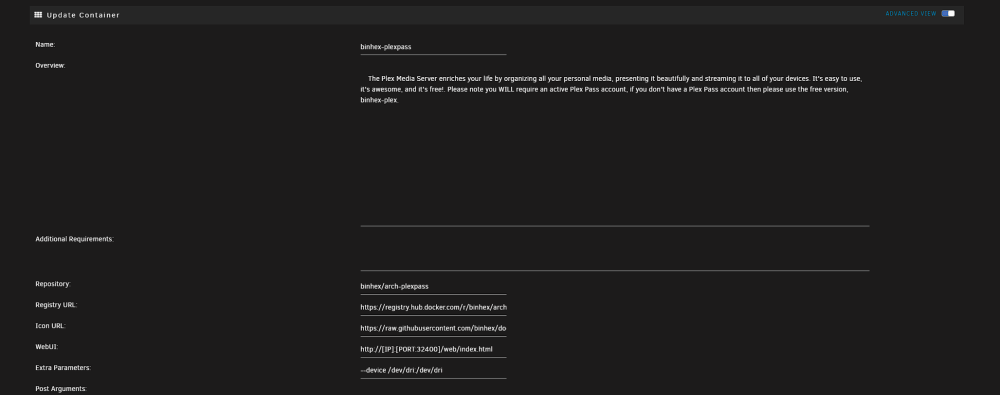
I use my intel iGPU for transcoding ill attach my setup to show you how mine is working. You have to select advance settings and include --device /dev/dri:/dev/dri in the extra parameters section.
-
Is the current update broken? should i wait to update?
-
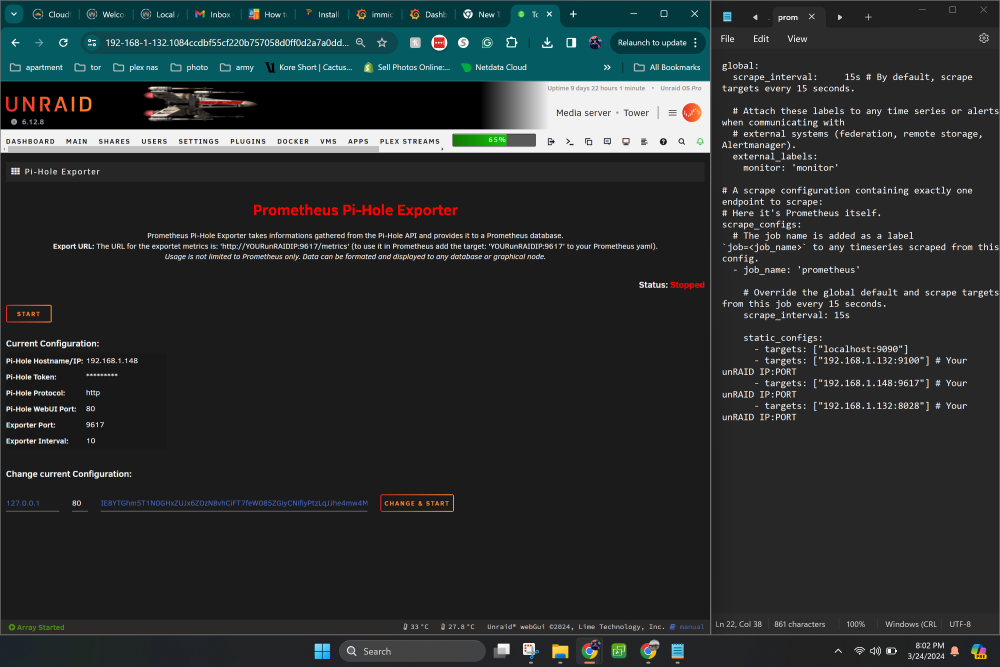
I have prometheus up and running with a few inputs. but I am unable to get pihole the pihole exporter connected to this. The exporter is running, the ipaddress and port are added to the prometheus yml but its state is always down. Not sure where to go and trouble shoot from here.
-
You are correct I cant ping Pihole. I thought everything was working correctly because it is blocking traffic but I cant ping it from any computer on the network. Edit: I was able to correct the issue with not being able to ping Pihole. I have the exporter up and running but it wont connect to prometheus now. I still get a connect:connection refused.
-
I can not get the Pi-hole Exporter to run. Its configured but it will not start. Pi hole was set to bridge, but i tried br0 and another custom network i have but nothing lets it connect not sure what i should do to proceed
-
It is set to intel. But immich still doesn't seem to be using the iGPU
-
Has anyone gotten an intel iGPU to work with the immich docker from the community applications? The immich docs state it should work but i havent been able to figure out how to get it working. I added a device to the docker with it mapped to /dev/dri is there something im missing?
-
Has anyone gotten an intel iGPU working with immich?
-
Update, I was able to get a new USB drive installed with Unraid and it booted. Also, i am now able to update apps and install the community apps again. It must have just been that my flash drive failed and it wouldnt let me install the community apps page.
-
Ok so that worked sort of. Unraid was able to boot, it was a little confusing since i had two keys and Unraids documentation on this is a little out of date but I got it working thank you once again JorgeB for all the help as usual!
-
Can confirm with a fresh install on a new drive Unraid will boot. I put my flash back up on the new drive and it will not boot it hangs at loading /bzroot. Am i going to have to reinstall every docker and figure out all my drives or is there a way to recover some of this information?
-
I ordered two new flash drives so i can attempt it again with better flash drives. But i can confirm -UEFI is enabled -USB drive was the only device in the bios boot menu -USB drive is checks out fine on Windows 11 PC -there is no - after the EFI -I ran a Memtest with a Windows USB drive and came back with zero errors -does not make it past /bzroot/...ok -tried to boot to safe mode does the same thing
-
I ordered 2 new flash drives. They arrive tomorrow, I will write back updating status after I attempt the fresh drives.
-
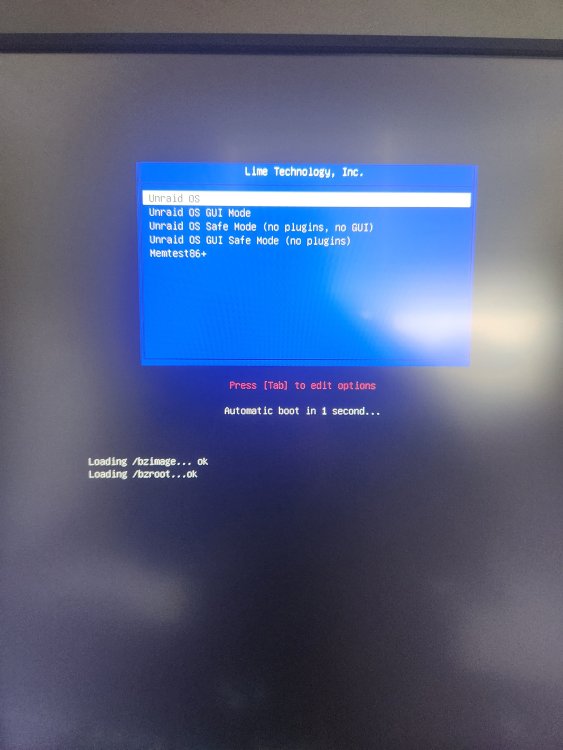
It gets to here I attached a picture of the boot process. It hangs here and doesn't go any further. If I press enter after 5 mins the computer completely reboots. Not sure what the bios was set to. It was working with the other flash drive
-
So this might have been apart of a larger issue. My flash drive failed, created a new bootable flash drive and now it won't let me past the unraid boot screen
-
Ran a mem test came back with no issues. Booted into a Windows USB just fine
-
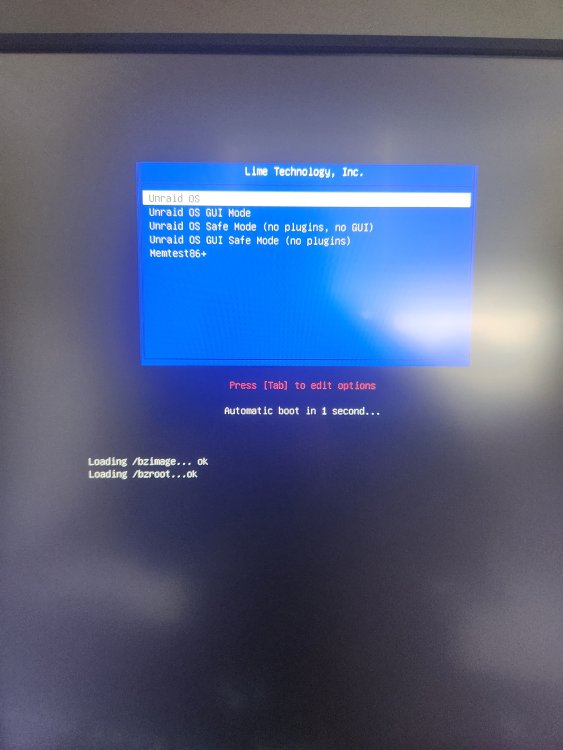
My flash drive seems to have failed last night. I created a new drive from a backup I had but the unraid is will not boot. It makes it to the unraid blue screen and it never goes past loading /bzimage...ok and loading /bzroot....ok. It will reboot the computer over and over from that screen, I'm not sure what to do from this point, I didn't want to create a new image from scratch and have to figure out all the drive locations
-
There were no outages at the time. I also stopped crowdsec and pihole dockers and it still wont let me reinstall the community apps
-
As the title suggests, i can no longer access community apps. I received a notification that there was an update to it, when i tried to install it I received an error and community apps were removed. When I try to reinstall i continue to get the error. Logs posted as well as the error message. plugin: updating: community.applications.plg Executing hook script: pre_plugin_checks Cleaning Up Old Versions Fixing pinned apps Setting up cron for background notifications plugin:tower-diagnostics-20240310-1816.zip downloading: community.applications-2024.03.10-x86_64-1.txz ... plugin: community.applications-2024.03.10-x86_64-1.txz download failure: Generic error Executing hook script: gui_search_post_hook.sh Executing hook script: post_plugin_checks
-
I appologize for the late response, I was able to figure it out. I had PRIVOXY enabled. With that disabled i am able to access the webui. Does having the privoxy disabled expose any data to the internet? I have my PIA account info put into the docker with VPN enabled.
-
So i am unable to connect to my deluge docker when VPN is enabled, but if its disabled i can connect to the docker just fine all my arrs are able to connect to the deluge docker regardless, and there are no errors in the log file. not sure what to check any help pointing me in the right direction would be appreciated.
-
I installed crowdsec and have not been able to figure out how to access the webui. The docker default settings does have the same port as another docker. I changed the port in the docker settings and the webui is still not accessible. Can seem to figure this out. Also on the docker page it isnt showing an IP address for the app to host port mapping.