





CDLehner
Members
-
Joined
-
Last visited
Everything posted by CDLehner
-
Here is the RECEIVING drive... Assign it...or just run of=/dev/sdf?

-
So...I won't use disk5, as trurl cautions; I'll put a 3T drive, I had previously copied and removed back in. And this is the CLONE... Do this with array on or off? Do I need to do anything, to the RECEIVING disk...before running this command?
-
^ Thanks so much!
-
Sitting patiently…mostly.
-
^ OK… - how do you clone a drive, in unRAID; or will a CLONE…like in the dock on Windows…just be bit-for-bit perfect, including not caring about XFS, and re-creating XFS (or reiserfs…doesn’t matter, if we get the data back and get to “start over”) - and…do we then put the clone in, make IT disk7 (while keeping the ORIGINAL disk7 out of the mix)…and try the reiserfsck?
-
- I think I understand. While Stellar might see, the wrongly formatted disk…in XFS; it likely can’t restore, to anything other than a Windows-based formatted disk (and FTR…if that’s true…that is kinda what I was thinking)? So…if I run reiserfsck; I don’t run it against a clone of 7, right? reiserfsck —scan-whole-partition —rebuild-tree/dev/md7 is “right against” 7 itself, yes?
-
^ Oh boy; now I'm confused again (go figure, right?) - So...I can/should, go ahead and try Stellar; just doesn't seem like it'll likely work? - FTR...I think I might as well use disk5, as my "clone"; since it was 5 that was supposed to get formatted....in order to have 7 copied to it to begin with. Let's say, Stellar does see these drives; 5 is reiserfs and 7 is XFS. I think...whether it is Stellar, and/or cloning...and/or; these need to be on the same format? If so...make 5 XFS, before I start; or re-format 7 back to reiserfs (and would/n't that make any kind of recovery, even less likely)? - And if none of the above, is really much of an option; and I decide on this... I leave disk7, on XFS...and run this command?
-
One of the "issues" I'm anticipating...is with disk formats. Of course, I'll re-watch the above video...in greater detail, as I'm in the midst of actually trying it; but he did say something about...it not being able to recognize drives, because they weren't formatted...but to format them, would mean to lose data. IDK...something like that; and it was explained, because of a feature Stellar does have...that allows it to find drives, that aren't of a format Windows recognizes. I'm just not sure, what it will do with reiserrf and XFS.
-
Little 'ole me; teach you guys something. J/K; I realize, you have to do something dumb like this...to begin with...to even need to try this kind of recovery. I did a quick search of YT, about Stellar Data Recovery...and this was the 1st hit. I think it's fated: it was also a 3T drive...and just "dumb" files, like mine. Ordered a double-dock, that's due today (Thursday); and we'll have a run. WTH; can't get any worse, right?
-
So...let me say this: ^ I do have an extra 3T drive...if that's what's needed for "proper" recovery ^ I've said from the start, time wasn't that big a factor (though it is taking much longer than anticipated...due to my fault entirely) ^ And I think this is the thing I have to wrestle with; and...maybe all of you, keep mission-critical files on your servers...but I just have dumb movies and music on mine. Now, I say "dumb"...tongue in cheek, because OT1H; music and movies, aren't family heirlooms and/or one-of-a-kind files. OTOH...how many will I lose, how many can be replaced; and when will I even know they're destroyed??? For example: let's say I have 20,000 albums, ripped and stored. By f**cking up that ONE drive; will I lose 500...or will some part, of 18,000 be lost? Let's say...if I knew I'd lost it, right now; I could replace it. But...maybe I don't go to listen to that album...or watch that movie; for a year (literally, one time...I was watching a movie; Home Theater, people over...and we didn't get, like the last 15 minutes of the movie...the climax! Because of a likely file/disk corruption). Maybe, once I discover it; now it's not recoverable. No...I don't still have, ALL the media I've ripped...over 15 years?? Yes, they're just music and movies; but they're my music and movies. The music is more precious. If it turns out, True Lies got corrupted/lost; I go on eBay, buy a used copy. Rip, store, etc. But if I go to listen, to the HiRes FLAC file...of The Koln Concert; that I paid $20 to download...and that's now compromised. That's another story 🤷♂️ This is all, mostly rhetorical. This is the decision I have to make. Let's put it this way: if someone has done it...knows how to do it; if it's just time-consuming, and the likelihood of success...is "high". Sure...why the hell not. If not: if it's time-consuming, and a pain-in-the-a$$, and a moon-shot to boot; I'll just have to accept...what's gone is gone. Not enough time, left in this life, to listen to 20,000 (or whatever it is...lost/stopped counting) albums anyway.
-
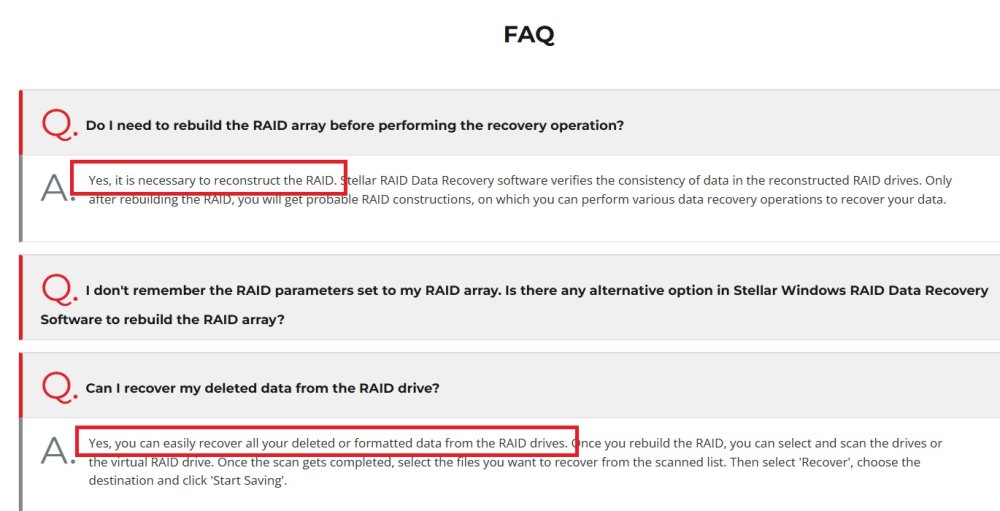
Someone lent me a copy, of Stellar Data Recovery Technician 10.2 I'm just a little confused, about how to go about the recovery. And while I know those here, aren't neccesssarily here to give advice about Stellar per se; I'm looking at their FAQ... ...and I'm wondering: if this is something that needs to be done, "inside" the array; or can I do something as simple, as drop that drive...into a SATA/USB dock, and recover it? This is all, new territory for me.
-
What about something like STARUS RAID Restore, or Hetman? https://www.forbes.com/advisor/business/software/best-data-recovery-software/
-
Thanks itimpi. I am waiting to see what others have to weigh-in, before doing something. In other words, I'm happy to run this command... and/or any tool, that might help. Just waiting, before it's even more "too-late" to turn back.
-
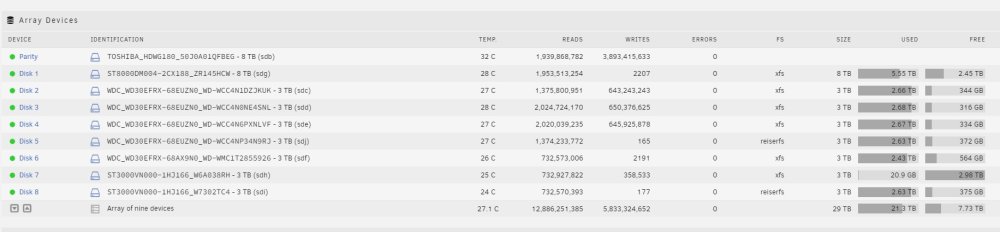
UGH! I am soo damn mad at myself! 🤬🤬🤬🤬🤬 Here I am...just steadily going about, my monkey's work. Copy drive...wait hours; format drive...copy drive...wait hours. Monday night, I checked the copy...from disk5 to disk4. 4 more hours at bedtime. Great...I have a FULL day tomorrow. I'll get up in the morning; 5 to 4 will be done. Format 5, copy disk7 to disk5 (remember...disk6 was already copied to disk1, and will just be coming out when we're done); and it can get started on its hours, while I'm out ALL day. I was in a hurry; no coffee...and so I kept reminding myself: FORMAT 5, COPY 7!! I go to do the copy; and realize I f@#king formatted disk7. I punched myself in the head, but had to go. The only thing, that kept it from ruining my day completely...is the small hope, that it might be recoverable. I kind of told myself...that's what RAID and Parity is all about, right; protection for 1 disk? Trust me...I'm hoping for the best, but am realistically expecting the worst. So...can I recover, what I formatted from disk7??
-
Diagnostic, after re-build. Off to copy, disk3 to 2. unserver-diagnostics-20230204-1622.zip
-
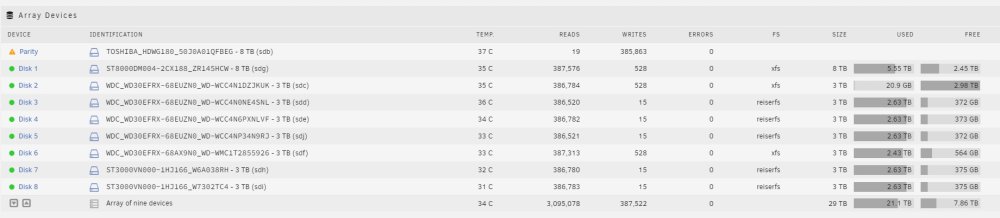
OK; I think we're back on track now... After the re-build, I'll post a diagnostic; and if all looks good...I assume I can go back to copy, re-format, copy?
-
No sir; I'm pretty OCD. So, now...Parity back and re-start array; before I copy disk3 to 2? If I put Parity back in...will I have to wait for a re-build before the copy?
-
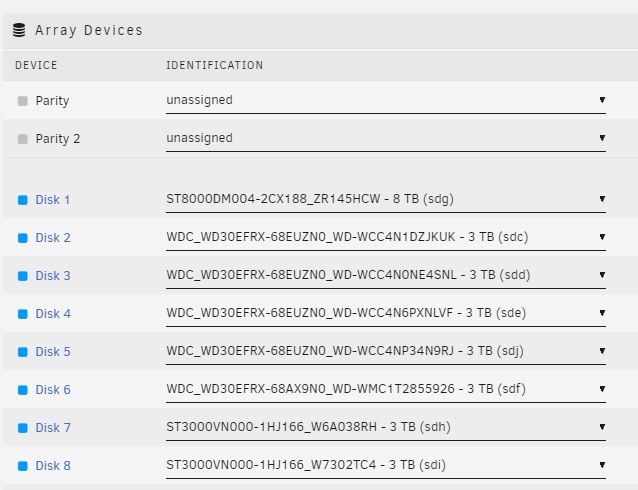
^ No, I wanted disk5…out the array. Last time I unassigned a disk…you had me start array, w/o the parity; and post a diagnostic. So that’s what I did. I just want to get the array down to 1 + 7 (drives); but we’re also reformatting to XFS. So…put Parity back, and do I need to re-build before I do the next copy? (disk3 to disk2)
-
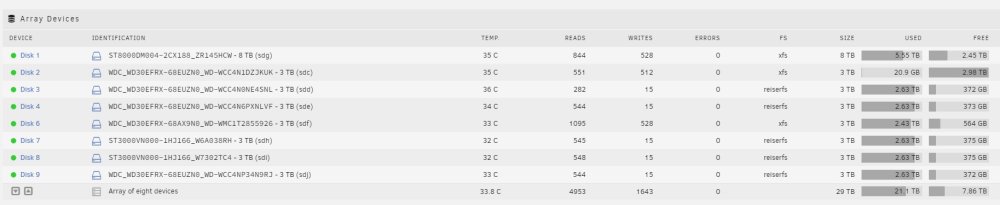
Actually...I looked back, and I'm going to do this. Unassign parity (now that disk5 is removed, and New Config has been run)...start the array in normal/not maintenance mode; and post that diagnostic. Awaiting further instruction. Thanks unserver-diagnostics-20230203-1827.zip
-
Thanks. Diagnostic, with disk5 removed...but before New Config/Rebuild. unserver-diagnostics-20230203-1817.zip
-
Yes, I am planning on removing it; but that's not why I didn't format it. Just pure coincidence. I was just going 2 to 1, 3 to 1; format 3...4 to 3, etc. But you're right; I might as well, shut down the array...pull 5, and then proceed. I'll post a diagnostic after that; but I'll probably start the 4 to 3 copy right away.
-
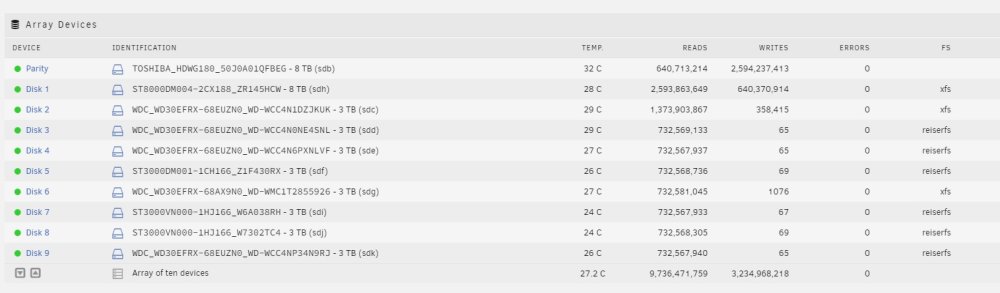
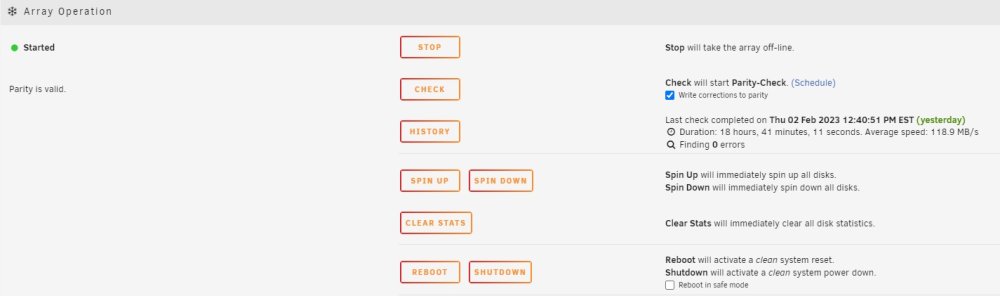
Ugh! I'm getting sooo damn frustrated. Every time, I think I know what to expect from the next step; it seems to throw me. Copy finished, from disk2 to disk1. I stopped the array...changed file type to XFS; started array...gave permission to format, disk2. And then I expected hours, to format...a 3T drive. Just looks like this (after a quick acknowledgement, that it was formatting disk2) My next step, was going to be...to copy disk3 to disk2?
-
Sorry. I think I was wondering along the lines, of Parity in the array or out. But that's been asked and answered. Parity in = better protection; so that's what I'm doing. 2-to-1
-
^ Thank you gents. FTR...anyone have issue, with the SeaSonic FOCUS GX-750??
-
disk2 to disk1? Do it with array on or off?



