





aglyons
Members
-
Joined
-
Last visited
Everything posted by aglyons
-
so the non-standard port issue is a result of letsencrypt. There is a solution but it does not seem to be possible with this container. It requires a TXT DNS entry. I can't seem to figure out how to do this with the current container options. https://community.letsencrypt.org/t/using-encrypt-for-non-standard-ports/20164/3
-
Has anyone managed to get external non-standard ports working, specifically with Nextcloud? I've managed to get it working with standard 443 https but if I try to use a non-standard external port everything gets borked. I've added this to the advanced nginx config section as I read in a post listen 8585 ssl http2; didn't seem to work out right. From what I've seen in the logs that config is not getting added to the conf file. [6/3/2022] [2:03:52 AM] [Nginx ] › ℹ info Reloading Nginx [6/3/2022] [2:03:57 AM] [SSL ] › ℹ info Requesting Let'sEncrypt certificates for Cert #9: domain.domain.com [6/3/2022] [2:03:57 AM] [SSL ] › ℹ info Command: certbot certonly --config "/etc/letsencrypt.ini" --cert-name "npm-9" --agree-tos --authenticator webroot --email "[email protected]" --preferred-challenges "dns,http" --domains "domain.domain.com" [6/3/2022] [2:04:00 AM] [SSL ] › ✔ success Requesting a certificate for domain.domain.com Successfully received certificate. Certificate is saved at: /etc/letsencrypt/live/npm-9/fullchain.pem Key is saved at: /etc/letsencrypt/live/npm-9/privkey.pem This certificate expires on 2022-09-01. These files will be updated when the certificate renews. NEXT STEPS: - The certificate will need to be renewed before it expires. Certbot can automatically renew the certificate in the background, but you may need to take steps to enable that functionality. See https://certbot.org/renewal-setup for instructions. - - - - - - - - - - - - - - - - - - - - - - - - - - - - - - - - - - - - - - - - If you like Certbot, please consider supporting our work by: * Donating to ISRG / Let's Encrypt: https://letsencrypt.org/donate * Donating to EFF: https://eff.org/donate-le - - - - - - - - - - - - - - - - - - - - - - - - - - - - - - - - - - - - - - - - [6/3/2022] [2:04:01 AM] [Nginx ] › ℹ info Reloading Nginx [6/3/2022] [2:04:01 AM] [Express ] › ⚠ warning Command failed: /usr/sbin/nginx -t -g "error_log off;" nginx: [emerg] no "ssl_certificate" is defined for the "listen ... ssl" directive in /data/nginx/proxy_host/5.conf:6 nginx: configuration file /etc/nginx/nginx.conf test failed [6/3/2022] [2:04:33 AM] [SSL ] › ℹ info Testing http challenge for domain.domain.com [6/3/2022] [2:04:48 AM] [SSL ] › ℹ info HTTP challenge test failed for domain domain.domain.com the host was not found 5.conf # ------------------------------------------------------------ # domain.domain.com # ------------------------------------------------------------ server { set $forward_scheme https; set $server "192.168.200.88"; set $port 444; listen 80; listen [::]:80; server_name domain.domain.com;
-
I currently don't have any pass through enabled, heck I don't even have any VMs or Docker's installed yet. I also haven't come across any performance or system freezes. Everything seems to be working normal. Hopefully I didn't just jinx myself lol
-
OK, parity check completed with 0 errors. But, I have UnRaid set to send SNMP messages to my Synology log service. I am finding UnRaid sends a massive number of log messages all set as Log Severity of 'ERR'. I just received 376 log entries regarding.... 2022/05/20 16:07:00 [error] 6727#6727: *904052 limiting requests, excess: 20.132 by zone authlimit, client: 192.168.200.254, server: , request: PROPFIND /login HTTP/1.1, host: knoxx
-
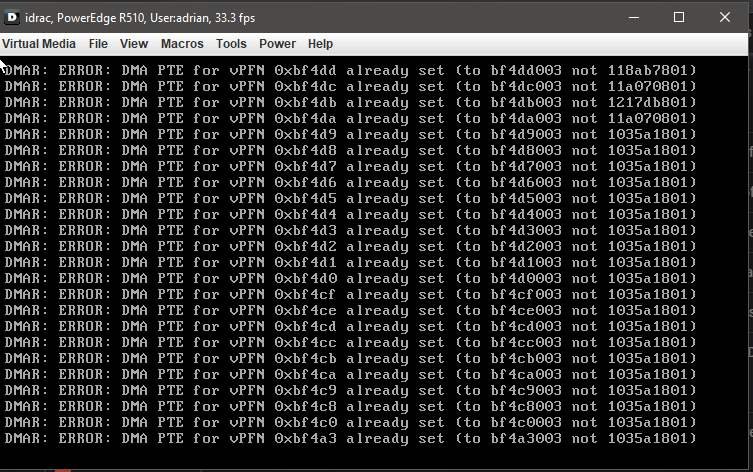
New V6.10 update and now I see a series of DMAR errors popping up in the monitor I did a search and came across people suggesting doing a parity check. I just started one so we'll see what comes from that. I'll post diags if I keep seeing this pop up or if by request.
-
All's good now. Connected to mothership. Thx for your help!
-
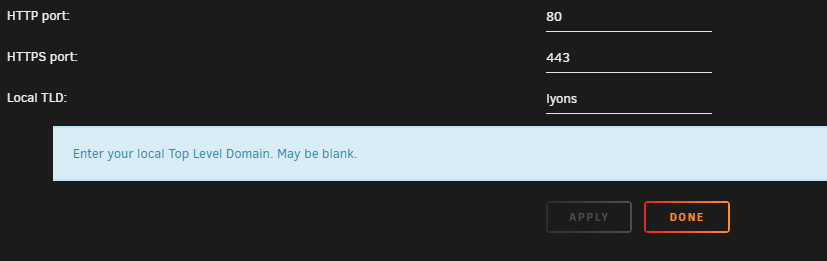
Nope, changing that in the Management section of the settings page didn't even change the tld that UnRaid responds to. <-----UNRAID-API-REPORT-----> SERVER_NAME: KNOXX.lyons ENVIRONMENT: production UNRAID_VERSION: 6.9.2 UNRAID_API_VERSION: 2.46.3 (running) NODE_VERSION: v14.15.3 API_KEY: valid MY_SERVERS: authenticated MY_SERVERS_USERNAME: aglyons RELAY: connected MOTHERSHIP: ok ONLINE_SERVERS: KNOXX[owner="aglyons"] OFFLINE_SERVERS: ALLOWED_ORIGINS: http://localhost, http://IPV4ADDRESS, https://IPV4ADDRESS, http://knoxx, https://knoxx, http://knoxx.local, https://knoxx.local HAS_CRASH_LOGS: no </----UNRAID-API-REPORT----->
-
ah ha, I think I figured it out I am using my own TLD '.lyons' with my PiHole. Unifi does not like .local for some reason. It causes a bunch of problems. I failed to update the TLD in UnRaid. It still says .local
-
Nope, no RP -yet that is. I do plan on going there once I get the hang of it. Plugin is up to date report contents looked ok to me too <-----UNRAID-API-REPORT-----> SERVER_NAME: KNOXX ENVIRONMENT: production UNRAID_VERSION: 6.9.2 UNRAID_API_VERSION: 2.46.3 (running) NODE_VERSION: v14.15.3 API_KEY: valid MY_SERVERS: authenticated MY_SERVERS_USERNAME: aglyons RELAY: connected MOTHERSHIP: ok ONLINE_SERVERS: KNOXX[owner="aglyons"] OFFLINE_SERVERS: ALLOWED_ORIGINS: http://localhost, http://192.168.XXX.XXX, https://192.168.XXX.XXX, http://knoxx, https://knoxx, http://knoxx.local, https://knoxx.local HAS_CRASH_LOGS: no </----UNRAID-API-REPORT----->

-
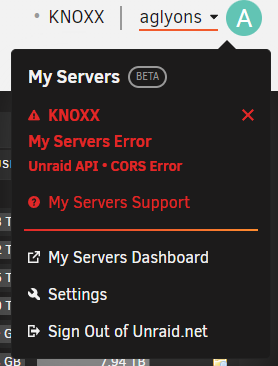
Came across this recently and it won't go away. I searched around the forum and found nothing. knoxx-diagnostics-20220519-1233.zip
-
How could I get duplicate lines in the go file? I've never edited that myself. This could only have to come from plugins being installed.
-
Diagnostics..... knoxx-diagnostics-20220518-0949.zip Some lines in the syslog that jump out to me 172 285 392 406 629 927-931 967
-
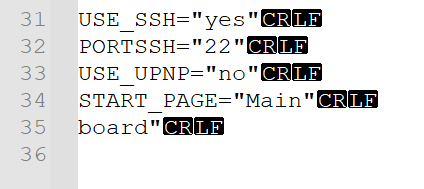
I managed to get the system started again. I took a look at the ident.cfg file, specifically lines 35 and 36. I deleted line 35 and line 36. Added a LF so that there was an empty line 35. I decided this due to the default ident.cfg file being formatted that way. I'm not sure what line 35 board" was supposed to be or if it was added by a plugin update. Somehow this file was changed during the backup process that hung the system. I'm not sure if I should go forward with an update to 6.10 at this point or if there are any other diagnostics I can do to make sure the system is stable enough to upgrade.
-
No go, System is screwed. How can I get this back up with the current config working?
-
chkdsk reported no errors. I only have three USB ports on the Dell R510. The external USB ports are home to a UPS and keyboard. The internal USB was my boot connection. It's been stable ever since I first installed everything. I've made a BIN backup image of the thumbdrive. Will try to start it up again.
-
Thanks, Ill try that. I did try safe mode with GUI. The built-in Firefox loading localhost failed to load any page. That would tell me that unRaid was not running. Something is borked.
-
This is a brand new Samsung Flash drive. I've had the system for about two weeks. 6.10 is released and it was advised to take a backup of the original flash. So I did. The file would start to DL but stop after a minute or so. The webUI became non-responsive so I had to restart via SSH (powerdown -r). Tried to backup again and the same thing happened. The file would start to DL but stall. WebUI again non-responsive. Restart again via SSH and now the system will not come back up. It's sitting at; /var/tmp/indent.cfg: line 35: unexpected EOF while looking for matching `"' /var/tmp/ident.cfg: line 36: syntax error: unexpected end of file Welcome to Linux 5.10.28-Unraid x86_64 (tty1) (none) login: Tried a full powerdown of the system and still won't come back up again.
-
OK, so the definitive answer.... https://wiki.unraid.net/Cache_disk#Amount_of_data "Amount of data The final consideration in choosing a cache drive is to think about the amount of data you expect to pass through it. If you write ~10 GBs per day, then any drive 10 GB or larger will do (a 30 GB SSD may be a good fit in this case). If you write 100 GB in one day every few weeks, then you will want a cache drive that is larger than 100 GB. If you attempt a data transfer that is larger than the size of your cache drive, the transfer will fail."
-
It's interesting that mapped SMB connections in Windows does show the correct array capacity.

-
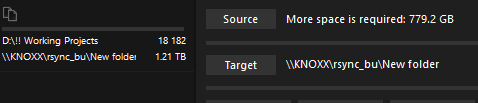
OK, that's good to know. BUT, the same thing still happens. Unraid reports the capacity of the cache. I just changed one share to use cache and ensured that it showed the full array capacity in the shares page. I tried the copy/paste again. Same error as before, approx 800GB more space needed to copy the pasted files.

-
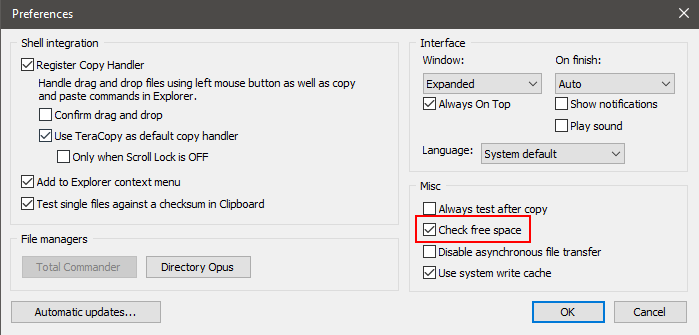
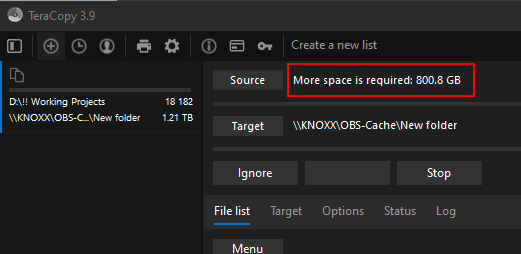
Ok, I think I figured out what is going on here. There STILL is an issue with Unraid in a way¹. I use Teracopy as my file copy handler. An option that it has is to check free space before a copy/move procedure. The built in Windows copy/pate I think does the same thing. It checks for free space prior to starting the operation. Unraid reports back the capacity of the cache, not the capacity of the share being transferred to. Copying a test folder of 1348GB (1.22TB on-disk) returned an error needing an extra 800GB of space. 500GB (cache size) + 800GB (additional space needed error) = 1300GB IMO, Unraid should be returning the free space available on the share not the cache size. I'm curious with regards to how the cache system works. I understand the mover and that it runs on a schedule. But, is the mover/cache system smart enough to monitor the current capacity of the cache and start moving files if capacity is getting too high, before the schedule kicks in? ¹ **UPDATE** As I write this and poke around the UI while testing, I noticed an interesting quirk which probably answers my own question. I noticed that if you have a share set to use cache (not 'cache only' but any cache setting), the available space shown in the share panel shows the available capacity of the cache, not the array. The effect of returning the cache capacity rather than the array capacity means that you will hit a hard limit on the size of the file transfer you want to accomplish. Exactly the situation I am hitting now. As I understand it, the purpose of using cache is to help speed up transfers. Like a fast loading holding space. This seems to work differently. The problem is if you turn cache off, transfer rates are terrible. I upgraded to 10GBe and with no cache, transfers will start in the 500MB/s range but very quickly plummet to < 90MB/s even with Turbo Write enabled. On a pipe that can handle 1250MB/s and SATA3 drives that can do 750MB/s (both in theory, yes), 90MB/s is a far far cry from potential. I would be happy with seeing a sustained 400-500MB/s.
-
knoxx-diagnostics-20220508-2339.zip
-
I changed it.
-
So I do have a min free space set for drives. In this scenario, I was copying a folder with multiple files totaling 1.2TB. Windows saw that there was only 500GB of space on the target share because it was the cache that it was looking at.
-
I thought about how to go about searching for this in the forum and couldn't come up with anything. My apologies if this is a rehash. I have two 250GB SSD cache drives in a btrfs pool. Total 500GB. If you try to transfer in 1.2TB of data, Windows complains that there isn't enough space. Regardless of the fact that the array is 60TB in size. Is this as expected or is this something that is being looked into?


