aglyons
Members
-
Joined
-
Last visited
Everything posted by aglyons
-
First up, I tried looking at the Unraid docs to try and figure it out myself but there is nothing there! I followed along, like everyone else. But, I ran into something that confuses the heck out of me. I have a second NIC, always have and on that NIC I had bridging turned off. Each container assigned to eth1 would be on network 168.202.x defined as vlan2 on my UDMProSE, and assigned an IP manually to each container. This would be the situation for any container that I want to expose to the internet via NPM. But, some containers are not exposed and don't need to have a dedicated IP so for those I stuck on the bridge for local and VPN access only (Radarr, Sonarr etc). But once I turned on bridging for eth1, br1 showed up and eth1 disappeared! All the containers I had setup on eth1 were offline. On a sidenote; 'Bridge' is still listed in the networks but choosing that is using the eth0 NIC network 168.200.x even though bridging is disabled for eth0. Why isn't that bridge using the eth1 NIC for the bridge mode since it IS enabled? Same for 'Host'
-
regarding the "because parent directory has insecure permissions" errors that were discussed in earlier threads. As I understand it, NPM is looking at the permissions of the parent folder. That folder is in the appdata folder on UR. UR wants the ownership and permissions of its contents as 'nobody' and 777. There's even the docker permissions tool that fixes this in one click. But if UR sets the permissions to what it needs, NPM will complain that this is insecure. How can we get around this problem? I'm sorry if this is a rehash and has already been resolved. I've spent that last 30 minutes searching the web for answers with no luck.
-
Read through this thread on the GitHub https://github.com/ytdl-org/youtube-dl/issues/31530
-
So I'm sure I'm not the only one that has had some pains with some Docker containers not assigning the right ownership or permissions on files that they create in the shared folders. Or, if a an SMB user puts files onto a networks share. In my case, I couldn't change that in the Docker container I was running. So while I am not a scripter, I did stay at a Holiday-Inn Express last night! So I fired up ChatGPT and got to work on writing a script that would fix this problem, in real-time. I think it's pretty self-explanatory if you go through the code. But this will monitor files/folders for whenever a file or folder is touched on some way. It will then check the permissions and ownership and fix them accordingly. I added array variables so that you can define which targets you want to monitor. I also added an array variable to exclude certain file extensions from being changed. Add the share paths you want to monitor each in quotes. Then add the file extensions you want to exclude, each in quotes. The script is set to monitor recursivly so you only have to enter the top level. Everything contained will be monitored. Pop it into the userscripts add-on and set it to start at array start. So far in my testing it's been working a treat! But do your own testing to make sure that it is working how you want it to before you set it to start automatically. #!/bin/bash # Monitored directories monitored_dirs=("/mnt/user/path1/" "/mnt/user/path2/") # Excluded extensions excluded_exts=("ext1" "ext2") # Function to check ownership and permissions of files and directories check_obj() { if [[ -e "$1" ]]; then # File or directory exists # Exclude files with excluded extensions for ext in "${excluded_exts[@]}"; do if [[ "$1" == *".$ext" ]]; then return fi done # Check ownership owner=$(stat -c '%U' "$1") if [[ "$owner" != "nobody" ]]; then # Set ownership to nobody chown nobody "$1" fi # Check permissions if [[ -d "$1" ]]; then # Directory perms=$(stat -c '%a' "$1") if [[ "$perms" != "777" ]]; then # Set permissions to 'drwxrwxrwx' chmod 777 "$1" fi else # File perms=$(stat -c '%a' "$1") if [[ "$perms" != "666" ]]; then # Set permissions to '-rw-rw-rw-' chmod 666 "$1" fi fi fi } # Watch for changes to files and directories inotifywait -r -m -e create,modify,move,attrib "${monitored_dirs[@]}" | while read path action file; do # Check ownership and permissions of changed object check_obj "$path/$file" done
-
So, being that I am not a scripter, and that ChatGPT is so popular and awesome. I had ChatGPT write a bash script! Perhaps someone with some more coding experience can review it and make sure this would work. #!/bin/bash # Function to check ownership and permissions of files and directories check_obj() { # Check ownership owner=$(stat -c '%U' "$1") if [[ "$owner" != "nobody" ]]; then # Set ownership to nobody chown nobody "$1" fi # Check permissions if [[ -d "$1" ]]; then # Directory perms=$(stat -c '%a' "$1") if [[ "$perms" != "777" ]]; then # Set permissions to 'drwxrwxrwx' chmod 777 "$1" fi else # File perms=$(stat -c '%a' "$1") if [[ "$perms" != "666" ]]; then # Set permissions to '-rw-rw-rw-' chmod 666 "$1" fi fi } # Watch for changes to files and directories inotifywait -m -e -r create,delete,modify,move,attrib /path/to/watch | while read path action file; do # Check ownership and permissions of changed object check_obj "$path/$file" done With the following instructions:
-
periodically, using the file manager plugin, select the appdata share and reset the ownership to 'nobody' and the permissions to 'read/write' for all three levels. This is the default for Unraids built in permissions system to function. Some Docker containers either don't have explicit settings for GUID and PUID as well as UMASK support. As such, they write files with internal container permissions and it messes with Unraid on the host side. I wish there was an automation plugin that could watch for this happenening and correect it in real-time. All my searches have led to people telling me to script it myself. There is a plugin that is specifically for this purpose, "Docker Safe New Perms" in the tools section, top row. But it is a manual process and it hits all shares across the whole server. Probably smart to do now and then as well.
-
Screen shot your SS template settings and post it here. Also, screen shot the setting for the share where your are saving DLs to.
-
A couple steps you could take. 1. File/Folder Permissions - sometimes they get messed up 2. Disk errors - do you have the file integrity plugin and is it running checks? 3. Force update the container - might work but rebuild using the same image data 4. Delete & Reinstall - Be sure to also check the remove image option. Then reinstall from Apps > Previously Installed
-
@Frank1940 Just to understand, are you saying that if original file, in the array, is located on drive6 and Unraid determined that the file should be stored on drive5, then it would run a copy/delete rather than a move operation? If that's the case, I think that should be viewed as, mabye not a full on bug in DFM, but at least an oversight. I am moving a file within the same user share, not across the drives in the array after all.
-
Sorry if this is a rehashed issue, there are a ton of pages on this thread and not enough time in the day! I went to move a file from a folder to another folder in the same share and instead of an instant move, DFM started to perform a copy procedure. Is this normal mode of operation?
-
This is due to a suspected update to Youtube's platform. We have to wait until a new YT-DL is released that addresses the changes before it can DL videos from the platform.
-
I'll make the assumption that you are running containers in bridge mode with br0. This would also include you NPM container. Another assumption, all the "services" you are running are talking to each other via the internal Docker network, 172.xxx.xxx.xxx. It would also mean that you access all of your services through the hosts IP with different port assignments, 192.168.xxx.xxx:port. If that is the case and you are not able to access those services, I would check the network settings in UR and look at the bridge settings there. Although it is interesting that you state you can access them through the domain. I run things a little different in that I have most public accessible services in their own VLAN running from a 2nd NIC, seperate from the hosts network. This keeps them segregated from my local network systems. In that instance, each service gets its own dedicated IP on that VLAN manually assigned. Docker containers either don't request or respond to DHCP so they won't be assigned an IP. I wish that wasn't the case as I would rather reserve IP's in my router.
-
I have noticed that when you make this level of change to the Docker network, you will have to go through all of your containers networking config. You might find that IP addresses may have changed or the network type may be missing. I've even seen it where it all looks right but doesn't work until you force update the container for it to be rebuilt.
-
As usual, I was greeted this morning with some container updates. Rather than update all automatically, I checked to see if any were in use, containers like postgres, apps that you don't want shutdown if someone is working with it. I updated NPM, Vaultwarden and PHPMyAdmin, one by one as needed. Once I go to the less important containers, I clicked the Update All button. That process went and tried to update containers I already updated. It tried to DL the images, realized it already had the latest versions, shutdown the up-to-date container, deleted it and then spun it back up again. Some containers it did this multiple times on the same container. You can see this happen in the log below. I had already updated NPM, Vaultwarden and PHPMyAdmin manually and then clicked the Update All button. The first thing it tried to do is update NPM and Vaultwarden. Shutting them down, deleting the container, and re-creating the container. Later on in the process it does the same thing to PHPMyAdmin. And that one it processed multiple times. Further down the list you'll start to see Radarr and Sonarr entries. While I do have two Radarr containers, both Radarr and Sonarr containers are updated more than once during the Update All process. Both of those containers I did not manually update prior to pressing the Update All button. ** Just to note as to why I marked this as urgent. It's because containers that are current and don't need an update are getting shutdown and rebuilt. If you did have a DB and someone/thing started to use it when the system killed it, it could lead to data corruption and the loss of the DB data. If you don't agree with that assesment, by all means set it to the level you feel appropriate. Update All Process Log Pulling image: jc21/nginx-proxy-manager:latest IMAGE ID [51855260]: Pulling from jc21/nginx-proxy-manager. Status: Image is up to date for jc21/nginx-proxy-manager:latest TOTAL DATA PULLED: 0 B Stopping container: Nginx-Proxy-Manager-Official Successfully stopped container: Nginx-Proxy-Manager-Official Removing container: Nginx-Proxy-Manager-Official Successfully removed container: Nginx-Proxy-Manager-Official Command execution docker run -d --name='Nginx-Proxy-Manager-Official' --net='eth1' --ip='192.168.xxx.xxx' -e TZ="America/New_York" -e HOST_OS="Unraid" -e HOST_HOSTNAME="KNOXX" -e HOST_CONTAINERNAME="Nginx-Proxy-Manager-Official" -e 'TCP_PORT_81'='81' -e 'TCP_PORT_80'='80' -e 'TCP_PORT_443'='443' -e 'DB_SQLITE_FILE'='/data/database.sqlite' -e 'TCP_PORT_3000'='3000' -l net.unraid.docker.managed=dockerman -l net.unraid.docker.webui='http://[IP]:[PORT:81]' -l net.unraid.docker.icon='https://nginxproxymanager.com/icon.png' -v '/mnt/user/appdata/Nginx-Proxy-Manager-Official/data':'/data':'rw' -v '/mnt/user/appdata/Nginx-Proxy-Manager-Official/letsencrypt':'/etc/letsencrypt':'rw' -v '/tmp/Nginx-Proxy-Manager-Official/var/log':'/var/log':'rw' --memory=1G --no-healthcheck 'jc21/nginx-proxy-manager' bcb6c33e858f04db6f903e09c1d1f1c0277cd307980de95e21280f41daee8689 The command finished successfully! Pulling image: vaultwarden/server:latest IMAGE ID [1772728349]: Pulling from vaultwarden/server. Status: Image is up to date for vaultwarden/server:latest TOTAL DATA PULLED: 0 B Stopping container: vaultwarden Successfully stopped container: vaultwarden Removing container: vaultwarden Successfully removed container: vaultwarden Command execution docker run -d --name='vaultwarden' --net='eth1' --ip='192.168.XXX.XXX' -e TZ="America/New_York" -e HOST_OS="Unraid" -e HOST_HOSTNAME="KNOXX" -e HOST_CONTAINERNAME="vaultwarden" -e 'TCP_PORT_80'='80' -e 'SIGNUPS_ALLOWED'='false' -e 'INVITATIONS_ALLOWED'='true' -e 'WEBSOCKET_ENABLED'='true' -e 'ADMIN_TOKEN'='XXXXXXXXXXXXXXXXXXXXXX' -l net.unraid.docker.managed=dockerman -l net.unraid.docker.webui='http://[IP]:[PORT:80]/admin' -l net.unraid.docker.icon='https://raw.githubusercontent.com/selfhosters/unRAID-CA-templates/master/templates/img/bitwardenrs.png' -v '/mnt/user/appdata/vaultwarden':'/data':'rw' 'vaultwarden/server' 4568218b4404cf0fa49191c6e608e80129c773adb73cf874eea47e0d462e5b03 The command finished successfully! Pulling image: phpmyadmin/phpmyadmin:latest IMAGE ID [1487451533]: Pulling from phpmyadmin/phpmyadmin. Status: Image is up to date for phpmyadmin/phpmyadmin:latest TOTAL DATA PULLED: 0 B Stopping container: phpmyadmin Successfully stopped container: phpmyadmin Removing container: phpmyadmin Successfully removed container: phpmyadmin Command execution docker run -d --name='phpmyadmin' --net='bridge' -e TZ="America/New_York" -e HOST_OS="Unraid" -e HOST_HOSTNAME="KNOXX" -e HOST_CONTAINERNAME="phpmyadmin" -e 'MYSQL_USER'='root' -e 'MYSQL_PASSWORD'='XXXXXXXXXXXXXX' -e 'PMA_HOST'='172.17.0.3' -e 'PMA_PORT'='3306' -l net.unraid.docker.managed=dockerman -l net.unraid.docker.webui='http://[IP]:[PORT:80]' -l net.unraid.docker.icon='https://secure.gravatar.com/avatar/4be7d922dc46f22e6b0cf1162f0e329b.jpg' -p '8181:80/tcp' 'phpmyadmin/phpmyadmin' ee3b4890eb4532d77143615452013286fc83d89e0b29a62babc14ec7aad59c11 The command finished successfully! Pulling image: randomninjaatk/sonarr-extended:latest IMAGE ID [2044845357]: Pulling from randomninjaatk/sonarr-extended. IMAGE ID [3751dd3182d5]: Already exists. IMAGE ID [48f754c837b5]: Already exists. IMAGE ID [cec0326ce8b4]: Already exists. IMAGE ID [d0e90526e3df]: Already exists. IMAGE ID [3987af20e7c8]: Pulling fs layer.Downloading 100% of 65 MB.Verifying Checksum.Download complete.Extracting.Pull complete. IMAGE ID [ffe17d43eb4c]: Pulling fs layer.Downloading 100% of 918 B.Verifying Checksum.Download complete.Extracting.Pull complete. IMAGE ID [84043728f635]: Pulling fs layer.Downloading 100% of 186 MB.Verifying Checksum.Download complete.Extracting.Pull complete. IMAGE ID [863ae8a93da6]: Pulling fs layer.Downloading 100% of 31 MB.Verifying Checksum.Download complete.Extracting.Pull complete. IMAGE ID [4f4fb700ef54]: Pulling fs layer.Downloading 100% of 32 B.Verifying Checksum.Download complete.Extracting.Pull complete.Pulling fs layer.Downloading 100% of 32 B.Verifying Checksum.Download complete.Extracting.Pull complete. IMAGE ID [e2f0eb47cc6e]: Pulling fs layer.Downloading 100% of 14 KB.Download complete.Extracting.Pull complete. Status: Downloaded newer image for randomninjaatk/sonarr-extended:latest TOTAL DATA PULLED: 281 MB Stopping container: Sonarr-Extended Successfully stopped container: Sonarr-Extended Removing container: Sonarr-Extended Successfully removed container: Sonarr-Extended Command execution docker run -d --name='Sonarr-Extended' --net='bridge' -e TZ="America/New_York" -e HOST_OS="Unraid" -e HOST_HOSTNAME="KNOXX" -e HOST_CONTAINERNAME="Sonarr-Extended" -e 'enableAutoConfig'='true' -e 'enableRecyclarr'='false' -e 'enableQueueCleaner'='false' -e 'enableExtras'='true' -e 'extrasType'='all' -e 'extrasLanguages'='en-US' -e 'extrasOfficialOnly'='false' -e 'plexUrl'='http://x.x.x.x:32400' -e 'plexToken'='' -e 'PUID'='99' -e 'PGID'='100' -l net.unraid.docker.managed=dockerman -l net.unraid.docker.webui='http://[IP]:[PORT:8989]' -l net.unraid.docker.icon='https://raw.githubusercontent.com/RandomNinjaAtk/unraid-templates/master/randomninjaatk/img/sonarr.png' -p '8803:8989/tcp' -v '/mnt/user/appdata/sonarr-extended':'/config':'rw' -v '/dev/rtc':'/dev/rtc':'rw' -v '/mnt/remotes/DS1515_DVR/':'/dvr':'rw,slave' 'randomninjaatk/sonarr-extended' 8f30aeff64ee3418d353fc5b78c2a6eb01e1b023ea142ca7acc71b65faf3dc65 The command finished successfully! Removing orphan image: 1b409a2b7618 Successfully removed orphan image: 1b409a2b7618 Pulling image: randomninjaatk/radarr-extended:latest IMAGE ID [424215705]: Pulling from randomninjaatk/radarr-extended. IMAGE ID [6f0fdad1ce92]: Already exists. IMAGE ID [c61fe2056171]: Already exists. IMAGE ID [604d992cfe46]: Already exists. IMAGE ID [e4bccb8e029e]: Already exists. IMAGE ID [8df0d2280990]: Already exists. IMAGE ID [cc0dd1489249]: Already exists. IMAGE ID [5ff21c841fd5]: Already exists. IMAGE ID [9ef21b554bb3]: Already exists. IMAGE ID [1c424689551d]: Pulling fs layer.Downloading 100% of 14 KB.Verifying Checksum.Download complete.Extracting.Pull complete. Status: Downloaded newer image for randomninjaatk/radarr-extended:latest TOTAL DATA PULLED: 14 KB Stopping container: radarr-extended Successfully stopped container: radarr-extended Removing container: radarr-extended Successfully removed container: radarr-extended Command execution docker run -d --name='radarr-extended' --net='bridge' -e TZ="America/New_York" -e HOST_OS="Unraid" -e HOST_HOSTNAME="KNOXX" -e HOST_CONTAINERNAME="radarr-extended" -e 'enableAutoConfig'='true' -e 'enableRecyclarr'='false' -e 'enableQueueCleaner'='false' -e 'enableExtras'='true' -e 'extrasType'='all' -e 'extrasLanguages'='en-US' -e 'extrasOfficialOnly'='true' -e 'extrasSingle'='true' -e 'extrasKodiCompatibility'='true' -e 'plexUrl'='http://x.x.x.x:32400' -e 'plexToken'='' -e 'PUID'='99' -e 'PGID'='100' -l net.unraid.docker.managed=dockerman -l net.unraid.docker.webui='http://[IP]:[PORT:7878]' -l net.unraid.docker.icon='https://raw.githubusercontent.com/RandomNinjaAtk/unraid-templates/master/randomninjaatk/img/radarr.png' -p '8802:7878/tcp' -v '/mnt/user/appdata/radarr-extended':'/config':'rw' -v '/mnt/remotes/DS1515_DVR/':'/ssync':'rw,slave' 'randomninjaatk/radarr-extended' 39f2f3fb55bb6c89175fba165f4c18a980a5424e1a78dbb32e0619ed754222b6 The command finished successfully! Removing orphan image: 4995824d4653 Error: Image can not be deleted, in use by other container(s) Pulling image: randomninjaatk/radarr-extended:latest IMAGE ID [432242607]: Pulling from randomninjaatk/radarr-extended. Status: Image is up to date for randomninjaatk/radarr-extended:latest TOTAL DATA PULLED: 0 B Stopping container: radarr-extended-3D Successfully stopped container: radarr-extended-3D Removing container: radarr-extended-3D Successfully removed container: radarr-extended-3D Command execution docker run -d --name='radarr-extended-3D' --net='bridge' -e TZ="America/New_York" -e HOST_OS="Unraid" -e HOST_HOSTNAME="KNOXX" -e HOST_CONTAINERNAME="radarr-extended-3D" -e 'enableAutoConfig'='true' -e 'enableRecyclarr'='true' -e 'enableQueueCleaner'='false' -e 'enableExtras'='false' -e 'extrasType'='all' -e 'extrasLanguages'='en-US' -e 'extrasOfficialOnly'='true' -e 'extrasSingle'='true' -e 'extrasKodiCompatibility'='true' -e 'plexUrl'='http://x.x.x.x:32400' -e 'plexToken'='' -e 'PUID'='99' -e 'PGID'='100' -l net.unraid.docker.managed=dockerman -l net.unraid.docker.webui='http://[IP]:[PORT:7878]' -l net.unraid.docker.icon='https://raw.githubusercontent.com/RandomNinjaAtk/unraid-templates/master/randomninjaatk/img/radarr.png' -p '8805:7878/tcp' -v '/mnt/user/appdata/radarr-extended-3d':'/config':'rw' -v '/mnt/remotes/DS1515_DVR/':'/ssync':'rw,slave' 'randomninjaatk/radarr-extended' 83948ae7b10ab7b58b1f7cb21d174fc360fbd9bcde9aacf9eb8ebddb0d88769e The command finished successfully! Pulling image: vaultwarden/server:latest IMAGE ID [1268246491]: Pulling from vaultwarden/server. Status: Image is up to date for vaultwarden/server:latest TOTAL DATA PULLED: 0 B Stopping container: vaultwarden Successfully stopped container: vaultwarden Removing container: vaultwarden Successfully removed container: vaultwarden Command execution docker run -d --name='vaultwarden' --net='eth1' --ip='192.168.XXX.XXX' -e TZ="America/New_York" -e HOST_OS="Unraid" -e HOST_HOSTNAME="KNOXX" -e HOST_CONTAINERNAME="vaultwarden" -e 'TCP_PORT_80'='80' -e 'SIGNUPS_ALLOWED'='false' -e 'INVITATIONS_ALLOWED'='true' -e 'WEBSOCKET_ENABLED'='true' -e 'ADMIN_TOKEN'='XXXXXXXXXXXXXX' -l net.unraid.docker.managed=dockerman -l net.unraid.docker.webui='http://[IP]:[PORT:80]/admin' -l net.unraid.docker.icon='https://raw.githubusercontent.com/selfhosters/unRAID-CA-templates/master/templates/img/bitwardenrs.png' -v '/mnt/user/appdata/vaultwarden':'/data':'rw' 'vaultwarden/server' f151269cebc5799271e9d75e003a9870d3c3683d23d29afbeb176fd8e7d55e32 The command finished successfully! Pulling image: phpmyadmin/phpmyadmin:latest IMAGE ID [1507640128]: Pulling from phpmyadmin/phpmyadmin. Status: Image is up to date for phpmyadmin/phpmyadmin:latest TOTAL DATA PULLED: 0 B Stopping container: phpmyadmin Successfully stopped container: phpmyadmin Removing container: phpmyadmin Successfully removed container: phpmyadmin Command execution docker run -d --name='phpmyadmin' --net='bridge' -e TZ="America/New_York" -e HOST_OS="Unraid" -e HOST_HOSTNAME="KNOXX" -e HOST_CONTAINERNAME="phpmyadmin" -e 'MYSQL_USER'='root' -e 'MYSQL_PASSWORD'='XXXXXXXXXXXXXX' -e 'PMA_HOST'='172.17.0.3' -e 'PMA_PORT'='3306' -l net.unraid.docker.managed=dockerman -l net.unraid.docker.webui='http://[IP]:[PORT:80]' -l net.unraid.docker.icon='https://secure.gravatar.com/avatar/4be7d922dc46f22e6b0cf1162f0e329b.jpg' -p '8181:80/tcp' 'phpmyadmin/phpmyadmin' 32692203a42693708070b76ebcaaa0cbe6a92b62a17f3ba4c899e727c9748a6d The command finished successfully! Pulling image: randomninjaatk/sonarr-extended:latest IMAGE ID [2128215845]: Pulling from randomninjaatk/sonarr-extended. Status: Image is up to date for randomninjaatk/sonarr-extended:latest TOTAL DATA PULLED: 0 B Stopping container: Sonarr-Extended Successfully stopped container: Sonarr-Extended Removing container: Sonarr-Extended Successfully removed container: Sonarr-Extended Command execution docker run -d --name='Sonarr-Extended' --net='bridge' -e TZ="America/New_York" -e HOST_OS="Unraid" -e HOST_HOSTNAME="KNOXX" -e HOST_CONTAINERNAME="Sonarr-Extended" -e 'enableAutoConfig'='true' -e 'enableRecyclarr'='false' -e 'enableQueueCleaner'='false' -e 'enableExtras'='true' -e 'extrasType'='all' -e 'extrasLanguages'='en-US' -e 'extrasOfficialOnly'='false' -e 'plexUrl'='http://x.x.x.x:32400' -e 'plexToken'='' -e 'PUID'='99' -e 'PGID'='100' -l net.unraid.docker.managed=dockerman -l net.unraid.docker.webui='http://[IP]:[PORT:8989]' -l net.unraid.docker.icon='https://raw.githubusercontent.com/RandomNinjaAtk/unraid-templates/master/randomninjaatk/img/sonarr.png' -p '8803:8989/tcp' -v '/mnt/user/appdata/sonarr-extended':'/config':'rw' -v '/dev/rtc':'/dev/rtc':'rw' -v '/mnt/remotes/DS1515_DVR/':'/dvr':'rw,slave' 'randomninjaatk/sonarr-extended' b6e2fb622045d5170219eefc701afa5a29736d0c02441fb26535dbbe7e1908a7 The command finished successfully! Pulling image: randomninjaatk/radarr-extended:latest IMAGE ID [1588594277]: Pulling from randomninjaatk/radarr-extended. Status: Image is up to date for randomninjaatk/radarr-extended:latest TOTAL DATA PULLED: 0 B Stopping container: radarr-extended Successfully stopped container: radarr-extended Removing container: radarr-extended Successfully removed container: radarr-extended Command execution docker run -d --name='radarr-extended' --net='bridge' -e TZ="America/New_York" -e HOST_OS="Unraid" -e HOST_HOSTNAME="KNOXX" -e HOST_CONTAINERNAME="radarr-extended" -e 'enableAutoConfig'='true' -e 'enableRecyclarr'='false' -e 'enableQueueCleaner'='false' -e 'enableExtras'='true' -e 'extrasType'='all' -e 'extrasLanguages'='en-US' -e 'extrasOfficialOnly'='true' -e 'extrasSingle'='true' -e 'extrasKodiCompatibility'='true' -e 'plexUrl'='http://x.x.x.x:32400' -e 'plexToken'='' -e 'PUID'='99' -e 'PGID'='100' -l net.unraid.docker.managed=dockerman -l net.unraid.docker.webui='http://[IP]:[PORT:7878]' -l net.unraid.docker.icon='https://raw.githubusercontent.com/RandomNinjaAtk/unraid-templates/master/randomninjaatk/img/radarr.png' -p '8802:7878/tcp' -v '/mnt/user/appdata/radarr-extended':'/config':'rw' -v '/mnt/remotes/DS1515_DVR/':'/ssync':'rw,slave' 'randomninjaatk/radarr-extended' 38b6e2139cc03a7ee00ce3873fb06b796af230a3be6a4343bfcf1b5ad7062196 The command finished successfully! Pulling image: randomninjaatk/radarr-extended:latest IMAGE ID [1411147329]: Pulling from randomninjaatk/radarr-extended. Status: Image is up to date for randomninjaatk/radarr-extended:latest TOTAL DATA PULLED: 0 B Stopping container: radarr-extended-3D Successfully stopped container: radarr-extended-3D Removing container: radarr-extended-3D Successfully removed container: radarr-extended-3D Command execution docker run -d --name='radarr-extended-3D' --net='bridge' -e TZ="America/New_York" -e HOST_OS="Unraid" -e HOST_HOSTNAME="KNOXX" -e HOST_CONTAINERNAME="radarr-extended-3D" -e 'enableAutoConfig'='true' -e 'enableRecyclarr'='true' -e 'enableQueueCleaner'='false' -e 'enableExtras'='false' -e 'extrasType'='all' -e 'extrasLanguages'='en-US' -e 'extrasOfficialOnly'='true' -e 'extrasSingle'='true' -e 'extrasKodiCompatibility'='true' -e 'plexUrl'='http://x.x.x.x:32400' -e 'plexToken'='' -e 'PUID'='99' -e 'PGID'='100' -l net.unraid.docker.managed=dockerman -l net.unraid.docker.webui='http://[IP]:[PORT:7878]' -l net.unraid.docker.icon='https://raw.githubusercontent.com/RandomNinjaAtk/unraid-templates/master/randomninjaatk/img/radarr.png' -p '8805:7878/tcp' -v '/mnt/user/appdata/radarr-extended-3d':'/config':'rw' -v '/mnt/remotes/DS1515_DVR/':'/ssync':'rw,slave' 'randomninjaatk/radarr-extended' a4f8fedc650436fea527b736a0885b7ed48aedd18c65281e0160490a4d8f6fb3 The command finished successfully! Pulling image: phpmyadmin/phpmyadmin:latest IMAGE ID [958672631]: Pulling from phpmyadmin/phpmyadmin. Status: Image is up to date for phpmyadmin/phpmyadmin:latest TOTAL DATA PULLED: 0 B Stopping container: phpmyadmin Successfully stopped container: phpmyadmin Removing container: phpmyadmin Successfully removed container: phpmyadmin Command execution docker run -d --name='phpmyadmin' --net='bridge' -e TZ="America/New_York" -e HOST_OS="Unraid" -e HOST_HOSTNAME="KNOXX" -e HOST_CONTAINERNAME="phpmyadmin" -e 'MYSQL_USER'='root' -e 'MYSQL_PASSWORD'='XXXXXXXXXXXXXX' -e 'PMA_HOST'='172.17.0.3' -e 'PMA_PORT'='3306' -l net.unraid.docker.managed=dockerman -l net.unraid.docker.webui='http://[IP]:[PORT:80]' -l net.unraid.docker.icon='https://secure.gravatar.com/avatar/4be7d922dc46f22e6b0cf1162f0e329b.jpg' -p '8181:80/tcp' 'phpmyadmin/phpmyadmin' 5991e39090ea47179c894b751a59a833e24387a116b72e6bc7af2f2ffead08c5 The command finished successfully! Pulling image: randomninjaatk/sonarr-extended:latest IMAGE ID [1786763402]: Pulling from randomninjaatk/sonarr-extended. Status: Image is up to date for randomninjaatk/sonarr-extended:latest TOTAL DATA PULLED: 0 B Stopping container: Sonarr-Extended Successfully stopped container: Sonarr-Extended Removing container: Sonarr-Extended Successfully removed container: Sonarr-Extended Command execution docker run -d --name='Sonarr-Extended' --net='bridge' -e TZ="America/New_York" -e HOST_OS="Unraid" -e HOST_HOSTNAME="KNOXX" -e HOST_CONTAINERNAME="Sonarr-Extended" -e 'enableAutoConfig'='true' -e 'enableRecyclarr'='false' -e 'enableQueueCleaner'='false' -e 'enableExtras'='true' -e 'extrasType'='all' -e 'extrasLanguages'='en-US' -e 'extrasOfficialOnly'='false' -e 'plexUrl'='http://x.x.x.x:32400' -e 'plexToken'='' -e 'PUID'='99' -e 'PGID'='100' -l net.unraid.docker.managed=dockerman -l net.unraid.docker.webui='http://[IP]:[PORT:8989]' -l net.unraid.docker.icon='https://raw.githubusercontent.com/RandomNinjaAtk/unraid-templates/master/randomninjaatk/img/sonarr.png' -p '8803:8989/tcp' -v '/mnt/user/appdata/sonarr-extended':'/config':'rw' -v '/dev/rtc':'/dev/rtc':'rw' -v '/mnt/remotes/DS1515_DVR/':'/dvr':'rw,slave' 'randomninjaatk/sonarr-extended' 49b5f9c866ad9c4f11530839bcb82d8ca54c19212d2967f997355031d6301727 The command finished successfully! Pulling image: randomninjaatk/radarr-extended:latest IMAGE ID [594919306]: Pulling from randomninjaatk/radarr-extended. Status: Image is up to date for randomninjaatk/radarr-extended:latest TOTAL DATA PULLED: 0 B Stopping container: radarr-extended Successfully stopped container: radarr-extended Removing container: radarr-extended Successfully removed container: radarr-extended Command execution docker run -d --name='radarr-extended' --net='bridge' -e TZ="America/New_York" -e HOST_OS="Unraid" -e HOST_HOSTNAME="KNOXX" -e HOST_CONTAINERNAME="radarr-extended" -e 'enableAutoConfig'='true' -e 'enableRecyclarr'='false' -e 'enableQueueCleaner'='false' -e 'enableExtras'='true' -e 'extrasType'='all' -e 'extrasLanguages'='en-US' -e 'extrasOfficialOnly'='true' -e 'extrasSingle'='true' -e 'extrasKodiCompatibility'='true' -e 'plexUrl'='http://x.x.x.x:32400' -e 'plexToken'='' -e 'PUID'='99' -e 'PGID'='100' -l net.unraid.docker.managed=dockerman -l net.unraid.docker.webui='http://[IP]:[PORT:7878]' -l net.unraid.docker.icon='https://raw.githubusercontent.com/RandomNinjaAtk/unraid-templates/master/randomninjaatk/img/radarr.png' -p '8802:7878/tcp' -v '/mnt/user/appdata/radarr-extended':'/config':'rw' -v '/mnt/remotes/DS1515_DVR/':'/ssync':'rw,slave' 'randomninjaatk/radarr-extended' a0b918e0a6a80194d03c224d0c3e2d96643c0913c503f44faf900450296bed6a The command finished successfully! Pulling image: randomninjaatk/radarr-extended:latest IMAGE ID [799742618]: Pulling from randomninjaatk/radarr-extended. Status: Image is up to date for randomninjaatk/radarr-extended:latest TOTAL DATA PULLED: 0 B Stopping container: radarr-extended-3D Successfully stopped container: radarr-extended-3D Removing container: radarr-extended-3D Successfully removed container: radarr-extended-3D Command execution docker run -d --name='radarr-extended-3D' --net='bridge' -e TZ="America/New_York" -e HOST_OS="Unraid" -e HOST_HOSTNAME="KNOXX" -e HOST_CONTAINERNAME="radarr-extended-3D" -e 'enableAutoConfig'='true' -e 'enableRecyclarr'='true' -e 'enableQueueCleaner'='false' -e 'enableExtras'='false' -e 'extrasType'='all' -e 'extrasLanguages'='en-US' -e 'extrasOfficialOnly'='true' -e 'extrasSingle'='true' -e 'extrasKodiCompatibility'='true' -e 'plexUrl'='http://x.x.x.x:32400' -e 'plexToken'='' -e 'PUID'='99' -e 'PGID'='100' -l net.unraid.docker.managed=dockerman -l net.unraid.docker.webui='http://[IP]:[PORT:7878]' -l net.unraid.docker.icon='https://raw.githubusercontent.com/RandomNinjaAtk/unraid-templates/master/randomninjaatk/img/radarr.png' -p '8805:7878/tcp' -v '/mnt/user/appdata/radarr-extended-3d':'/config':'rw' -v '/mnt/remotes/DS1515_DVR/':'/ssync':'rw,slave' 'randomninjaatk/radarr-extended' 9d8dcd87ae8dc11ecbeefc09bedd1368cafdfed0832153fb86e67d8db46090ce The command finished successfully! Pulling image: randomninjaatk/sonarr-extended:latest IMAGE ID [464443020]: Pulling from randomninjaatk/sonarr-extended. Status: Image is up to date for randomninjaatk/sonarr-extended:latest TOTAL DATA PULLED: 0 B Stopping container: Sonarr-Extended Successfully stopped container: Sonarr-Extended Removing container: Sonarr-Extended Successfully removed container: Sonarr-Extended Command execution docker run -d --name='Sonarr-Extended' --net='bridge' -e TZ="America/New_York" -e HOST_OS="Unraid" -e HOST_HOSTNAME="KNOXX" -e HOST_CONTAINERNAME="Sonarr-Extended" -e 'enableAutoConfig'='true' -e 'enableRecyclarr'='false' -e 'enableQueueCleaner'='false' -e 'enableExtras'='true' -e 'extrasType'='all' -e 'extrasLanguages'='en-US' -e 'extrasOfficialOnly'='false' -e 'plexUrl'='http://x.x.x.x:32400' -e 'plexToken'='' -e 'PUID'='99' -e 'PGID'='100' -l net.unraid.docker.managed=dockerman -l net.unraid.docker.webui='http://[IP]:[PORT:8989]' -l net.unraid.docker.icon='https://raw.githubusercontent.com/RandomNinjaAtk/unraid-templates/master/randomninjaatk/img/sonarr.png' -p '8803:8989/tcp' -v '/mnt/user/appdata/sonarr-extended':'/config':'rw' -v '/dev/rtc':'/dev/rtc':'rw' -v '/mnt/remotes/DS1515_DVR/':'/dvr':'rw,slave' 'randomninjaatk/sonarr-extended' 1ca558631dc04cd00a3fcedd2a232208eed22b3fb7933eda95621b6b8ae7a89e The command finished successfully! Pulling image: randomninjaatk/radarr-extended:latest IMAGE ID [492415863]: Pulling from randomninjaatk/radarr-extended. Status: Image is up to date for randomninjaatk/radarr-extended:latest TOTAL DATA PULLED: 0 B Stopping container: radarr-extended Successfully stopped container: radarr-extended Removing container: radarr-extended Successfully removed container: radarr-extended Command execution docker run -d --name='radarr-extended' --net='bridge' -e TZ="America/New_York" -e HOST_OS="Unraid" -e HOST_HOSTNAME="KNOXX" -e HOST_CONTAINERNAME="radarr-extended" -e 'enableAutoConfig'='true' -e 'enableRecyclarr'='false' -e 'enableQueueCleaner'='false' -e 'enableExtras'='true' -e 'extrasType'='all' -e 'extrasLanguages'='en-US' -e 'extrasOfficialOnly'='true' -e 'extrasSingle'='true' -e 'extrasKodiCompatibility'='true' -e 'plexUrl'='http://x.x.x.x:32400' -e 'plexToken'='' -e 'PUID'='99' -e 'PGID'='100' -l net.unraid.docker.managed=dockerman -l net.unraid.docker.webui='http://[IP]:[PORT:7878]' -l net.unraid.docker.icon='https://raw.githubusercontent.com/RandomNinjaAtk/unraid-templates/master/randomninjaatk/img/radarr.png' -p '8802:7878/tcp' -v '/mnt/user/appdata/radarr-extended':'/config':'rw' -v '/mnt/remotes/DS1515_DVR/':'/ssync':'rw,slave' 'randomninjaatk/radarr-extended' 114453618c85281bcea3ada320983f6fb4a02d4d7b772e44bd3fd8369773a3ec The command finished successfully! Pulling image: randomninjaatk/radarr-extended:latest IMAGE ID [1112258170]: Pulling from randomninjaatk/radarr-extended. Status: Image is up to date for randomninjaatk/radarr-extended:latest TOTAL DATA PULLED: 0 B Stopping container: radarr-extended-3D Successfully stopped container: radarr-extended-3D Removing container: radarr-extended-3D Successfully removed container: radarr-extended-3D Command execution docker run -d --name='radarr-extended-3D' --net='bridge' -e TZ="America/New_York" -e HOST_OS="Unraid" -e HOST_HOSTNAME="KNOXX" -e HOST_CONTAINERNAME="radarr-extended-3D" -e 'enableAutoConfig'='true' -e 'enableRecyclarr'='true' -e 'enableQueueCleaner'='false' -e 'enableExtras'='false' -e 'extrasType'='all' -e 'extrasLanguages'='en-US' -e 'extrasOfficialOnly'='true' -e 'extrasSingle'='true' -e 'extrasKodiCompatibility'='true' -e 'plexUrl'='http://x.x.x.x:32400' -e 'plexToken'='' -e 'PUID'='99' -e 'PGID'='100' -l net.unraid.docker.managed=dockerman -l net.unraid.docker.webui='http://[IP]:[PORT:7878]' -l net.unraid.docker.icon='https://raw.githubusercontent.com/RandomNinjaAtk/unraid-templates/master/randomninjaatk/img/radarr.png' -p '8805:7878/tcp' -v '/mnt/user/appdata/radarr-extended-3d':'/config':'rw' -v '/mnt/remotes/DS1515_DVR/':'/ssync':'rw,slave' 'randomninjaatk/radarr-extended' 6ba041227e8d0c65fe26f6f7fdedd8455e4e416eaa4a8961dcb56d0c72575a71 The command finished successfully! knoxx-diagnostics-20230327-1006.zip
-
So I've seen this come up before. Not that often but it happened again. Pulling up the login screen and at the top are two lines of error output. Once you log in, the screen is white and these lines are at the top. Warning: parse_ini_file(state/var.ini): failed to open stream: No such file or directory in /usr/local/emhttp/login.php on line 11 Warning: session_start(): Cannot start session when headers already sent in /usr/local/emhttp/plugins/dynamix/include/.login.php on line 8 Warning: session_start(): Cannot start session when headers already sent in /usr/local/emhttp/plugins/dynamix/include/.login.php on line 214 Warning: session_regenerate_id(): Cannot regenerate session id - session is not active in /usr/local/emhttp/plugins/dynamix/include/.login.php on line 217 Warning: Cannot modify header information - headers already sent by (output started at /usr/local/emhttp/login.php:11) in /usr/local/emhttp/plugins/dynamix/include/.login.php on line 222 SSH still works and I was able to create a diagnostics. I looked around and there was mention that this happens durint the appdata backup process. I looked at my backups and I noticed that they had not been runnign for a few days now. The last backup 'attempt' was on the 19th and was showing '-error' in the filename. This is the content of the AppDataBackup plugin; [19.02.2023 03:00:01] Backup of appData starting. This may take awhile [19.02.2023 03:00:01] Not stopping : Not started! [ / Up 3 hours] [19.02.2023 03:00:01] Not stopping : Not started! [ / Up 3 hours (healthy)] [19.02.2023 03:00:01] Not stopping : Not started! [ / Up 3 hours] [19.02.2023 03:00:01] Not stopping : Not started! [ / Up 3 hours (healthy)] [19.02.2023 03:00:01] Not stopping : Not started! [ / Up 3 hours] [19.02.2023 03:00:01] Not stopping : Not started! [ / Up 3 hours] [19.02.2023 03:00:01] Not stopping : Not started! [ / Up 3 hours] [19.02.2023 03:00:01] Not stopping : Not started! [ / Created] [19.02.2023 03:00:01] Not stopping : Not started! [ / Up 3 hours] [19.02.2023 03:00:01] Not stopping : Not started! [ / Up 3 hours] [19.02.2023 03:00:01] Not stopping : Not started! [ / Up 3 hours] [19.02.2023 03:00:01] Not stopping : Not started! [ / Up 3 hours] [19.02.2023 03:00:01] Not stopping : Not started! [ / Exited (0) 3 hours ago] [19.02.2023 03:00:01] Not stopping : Not started! [ / Up 3 hours] [19.02.2023 03:00:01] Not stopping : Not started! [ / Up 3 hours] [19.02.2023 03:00:01] Not stopping : Not started! [ / Exited (137) 3 hours ago] [19.02.2023 03:00:01] Not stopping : Not started! [ / Exited (143) 3 hours ago] [19.02.2023 03:00:01] Not stopping : Not started! [ / Up 3 hours (healthy)] [19.02.2023 03:00:01] Stopping binhex-prowlarr... done! (took 1 seconds) [19.02.2023 03:00:02] Stopping binhex-urbackup... done! (took 2 seconds) [19.02.2023 03:00:04] Backing Up appData from /mnt/cache/appdata/ to /mnt/remotes/192.168.200.89_Backups/KNOXX/appdatabu/[email protected] [19.02.2023 03:00:04] Separate archives enabled! [19.02.2023 03:00:04] Ignoring: . [19.02.2023 03:00:04] Ignoring: .. [19.02.2023 03:00:04] Backing Up: binhex-prowlarr [19.02.2023 03:00:04] Verifying Backup binhex-prowlarr [19.02.2023 03:00:04] Backing Up: binhex-urbackup [19.02.2023 03:00:14] Verifying Backup binhex-urbackup [19.02.2023 03:00:17] Backing Up: dashy [19.02.2023 03:00:17] Verifying Backup dashy [19.02.2023 03:00:17] Backing Up: FileBot [19.02.2023 03:00:17] Verifying Backup FileBot [19.02.2023 03:00:17] Backing Up: homeassistant [19.02.2023 03:00:22] Verifying Backup homeassistant [19.02.2023 03:00:23] Backing Up: Home-Assistant-Core [19.02.2023 03:00:23] Verifying Backup Home-Assistant-Core [19.02.2023 03:00:23] Backing Up: mariadb [19.02.2023 03:00:46] Verifying Backup mariadb [19.02.2023 03:00:51] Backing Up: nextcloud [19.02.2023 03:01:06] Verifying Backup nextcloud [19.02.2023 03:01:08] Backing Up: Nginx-Proxy-Manager-Official [19.02.2023 03:01:08] Verifying Backup Nginx-Proxy-Manager-Official [19.02.2023 03:01:08] Backing Up: pihole [19.02.2023 03:01:46] Verifying Backup pihole [19.02.2023 03:01:52] Backing Up: radarr-extended [19.02.2023 03:04:53] Verifying Backup radarr-extended [19.02.2023 03:05:30] Backing Up: radarr-extended-3d [19.02.2023 03:05:32] Verifying Backup radarr-extended-3d [19.02.2023 03:05:33] Backing Up: seedsync [19.02.2023 03:05:33] Verifying Backup seedsync [19.02.2023 03:05:33] Backing Up: sonarr-extended [19.02.2023 03:05:59] Verifying Backup sonarr-extended [19.02.2023 03:06:04] Backing Up: TubeArchivist [19.02.2023 03:06:05] Verifying Backup TubeArchivist [19.02.2023 03:06:05] Backing Up: vaultwarden [19.02.2023 03:06:05] Verifying Backup vaultwarden [19.02.2023 03:06:05] done [19.02.2023 03:06:05] Starting binhex-urbackup... (try #1) Error while starting container! - Code: Server error [19.02.2023 03:06:10] Starting binhex-urbackup... (try #2) Error while starting container! - Code: Server error [19.02.2023 03:06:16] Starting binhex-urbackup... (try #3) Error while starting container! - Code: Server error [19.02.2023 03:06:16] Container did not started after multiple tries, skipping. [19.02.2023 03:06:18] Starting binhex-prowlarr... (try #1) Error while starting container! - Code: Server error [19.02.2023 03:06:23] Starting binhex-prowlarr... (try #2) Error while starting container! - Code: Server error [19.02.2023 03:06:28] Starting binhex-prowlarr... (try #3) Error while starting container! - Code: Server error [19.02.2023 03:06:28] Container did not started after multiple tries, skipping. [19.02.2023 03:06:37] A error occurred somewhere. Not deleting old backup sets of appdata [19.02.2023 03:06:37] Backup / Restore Completed knoxx-diagnostics-20230324-0939.zip
-
That's my biggest issue with IPVLAN. I'm not 100% sure if it might be causing problems with Unifi, specifically Unifi's threat detection/blocking. I'm not 100% sure how they approach this feature, whether it is IP based or MAC based and how it affects what I will call a 'floating MAC'; the same MAC for multiple systems.
-
The option is in the Unraid Docker settings. You'll need to stop Docker first, then you can change the option. I don't think you can see it until Docker is down.
-
Hey all, I was looking at various pen-testing tools that are out there and got to thinking about if there was a docker container that I could run in Unraid. That would allow anyone to do proper penetration testing and take security steps if anything is amiss. I did come across the OWASP tool Venom . There is a Docker container for it on DH and the GIT (https://github.com/ovh/venom#docker-image) but there is no template in Unraid. I've got no clue how to build a template ATM. I'm still learning all this stuff. But, I was wondering if there's more to test than just the Venom tool. Maybe there is something already out there that does all the penetration testing, preferably in a UI, that we can get up and running on UR. Suggestions?
-
Hey @Squid, Thanks for jumping in here. And, not to be snarky. But I think you missd the part in my post that aluded to not having a clue how to do that.
-
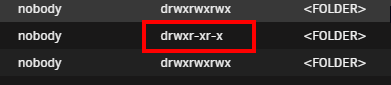
Happened across this post. I have exactly the same problem. The container I am using, as far as I can tell, does not implement anything regarding UMASK on files created inside the container. As such, while the files are owned by 'nobody', the permissions are "nobody drwxr-xr-x". The share that is being written to does have public access. But, while users on the network can view and copy files/folders, they just can't do anything else. They can't edit or delete anything. As I mentioned, I believe this is down to the containers DEV not implementing the UMASK functions. I suspect that there may be other DEV's that miss this as well. In my case I am using Seedsync and the DEV has been MIA for quite some time and this problem persists. As a possble solution, if there was a way to inotify specific folders and trigger a New Safe Permissions process on it, that would be great. Would solve a lot of peoples problems. Yes, I know you can do that easily with a script. Alas, I and many many others are not scripters and would risk breaking our Unraid server in the attempt to create such a thing. Hence why we went the Unraid route to begin with. I will say that getting started in Unraid has opened me up to so many new things and has taught me a lot. But I am not at the level of creating a script, getting it into Unraid and telling Unraid to run it on a regular basis.
-
First, apologies if posting here an in the Discord is a no-no. I've got a Seedsync snafu that's got me stuck. I've been running it for years but noticed something odd and now it's acting up on me. I've managed to figure out the UID:GID issue so now the container is writing the DL's under 'nobody' but the permissions are all messed up for new files getting written. It sets them in a way that no external system can delete/move the files. I can't figure out how to correct this problem. I've run the Docker New Permissions tool on the entire system but while that fixed previous files/folder, it does nothing for new ones. I've searched for the better part of 2+ hours and tried many things. I've added a 'umask 0000' variable to the template. I've open the console of the Seedsync container and ran 'umask 0000'. The mapped DIR in the container is 777 and is owned by user 99. Nothing changes. All new downloads have the permissions set above in the screenshot. I'd be pulling my hair out but I don't have any left.
-
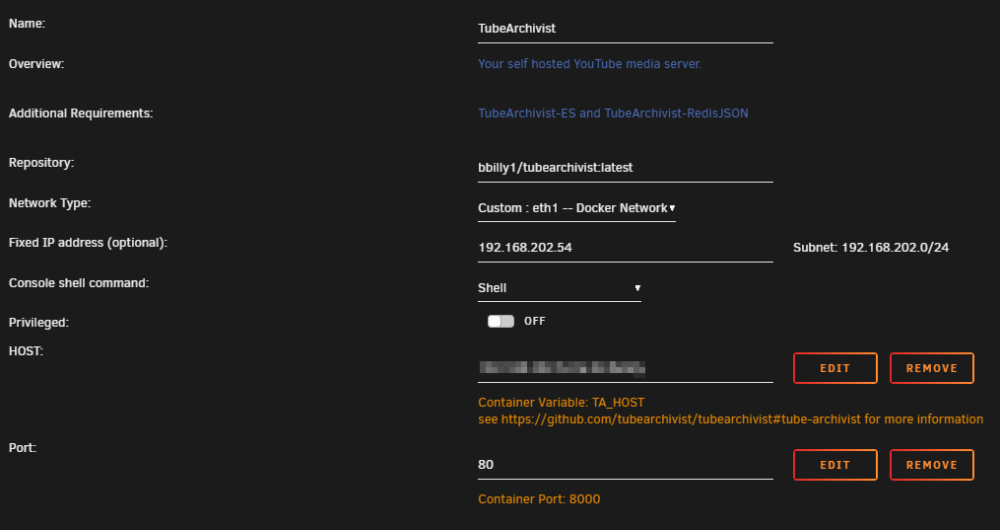
I moved TA to my Docker network with a dedicated NIC. I also moved ES and Redis to the same network each with dedicated IP's. I updated the TA config so it can connect to those services and then changed the port in TA from 8000 to 80. But it won't take. It still shows port 8000. I don't see any error messages in logs referring to that. Everything was working fine prior and still does aside form the port issue.

-
I saw that and did put stuff there. The problem I see going that route though is any time you want to edit that content, it has to stop the container, rebuild it and start it back up. Just to change a note. Perhaps if there was a way to edit that content without going through the whole rebuild process?
-
I'd like to see a little notepad option for the Docker containers where we could write our own notes. Things like CLI commands and such. I've added a curated whitelist to my PiHole install and would like to keep notes on the GIT for it and the CLI command to update the list from time to time. Yes, I could write these things down in a Notion page or Google Keep or......whatever. But having them right there next to the container would be helpful. It's a little quality of life thing.
-
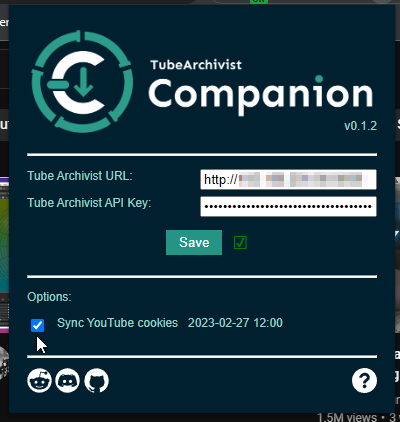
Let's get the immediate things out of the way first. 1. You installed TubeArchivist-ES 2. You've installed TubeArchivist-Redis (using redis/redis-stack-server:latest image) 3. You've added the 'path.repo' variable to the Redis template and pointed it to the right user share for ES snapshots 4. You've configured the right paths in the TA template such as ES, Redis and where it's going to store DL's Did you install the Chrome Add-on and check off 'sync cookies'