





aglyons
Members
-
Joined
-
Last visited
Everything posted by aglyons
-
Thanks for everyone's hard work on bringing V7 out!! Question: How often with new releases is the kernel updated? I was hoping to see at least kernel 6.7 in UR7 but we didn't quite get there on this release. My Ryzen 8500G still can't use the APU to do my Plex transcoding, so I am stuck using the Nvidia 1050ti, which runs in a PCIE slot with only one lane. The Ryzen 5 series with the 740 APU is supported under Kernel 6.7 going forward.
-
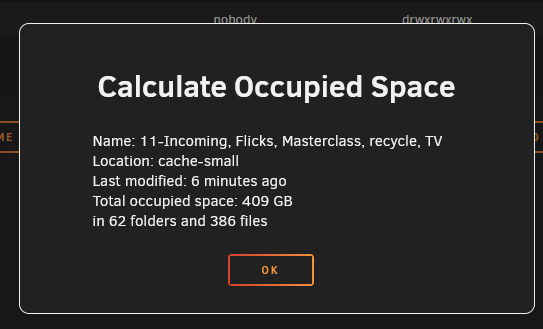
I've noticed a discrepancy in capacity stats between Unraid and ZFS Master. One of my cache pools (2 drive mirrored ZFS) is reporting 483GB capacity. ZFS Master is reporting 464GB. The Capacity used is also reported differently as 409GB in UR and 381GB in ZFS Master. Exploring the dataset from ZFS Master and calculating the capacity used reports 409GB I'm not sure who would own the issue, whether that's UR or the ZFS Master.


-
Thanks for the vote! The problem with your solution is the order you have them determines the startup order when the array starts up. If you have containers that are dependent on another container, it could cause issues if the dependence isn't started first.
-
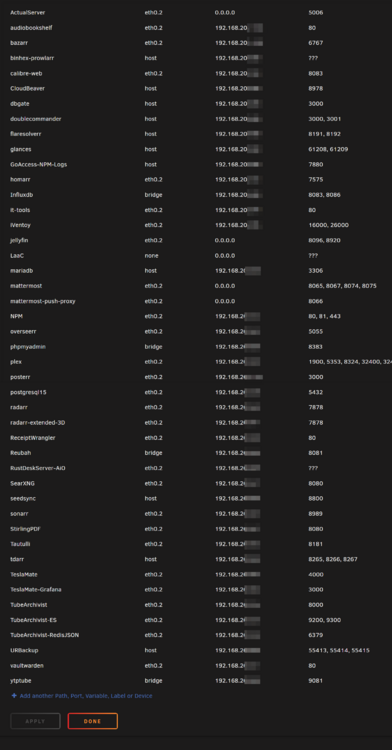
I may be in the minority, but I assign IPs to each container on a dedicated Docker VLAN. The challenge the Unraid UI poses is that it doesn't present the allocation table in an organized way. Over a year ago, I posted a feature request to group/sort the containers by network and list them in numerical order by IP address or allow for sorting by IP or ports. That hasn't happened yet, so things are still currently sorted alphabetically by container name. Has anyone found or made a plugin/addon/script that can query the system for all of the allocations and list them out neatly?
-
So we'll get there eventually. It's just a little bummer that I'll have to wait a little longer before I can use the iGPU in the 8500G. I'm stuck with the 1050ti, which is stuck in a PCIE16 slot running on 1 lane, so transcodes are crawling at CPU speeds!
-
I see ZFS 2.3.0-rc3 has been aligned for Linux v6.12.1. Just waiting for one commit test to complete for freebsd13-4r. Fingers crossed that ZFS 2.3.0 is released in time for URv7 to jump up to Linux 6.12.x which has been marked as LTS.
-
Please forgive if there is a more appropriate forum for this question/discussion. Feel free to move it there if applicable. Disclosure: I'm not a Linux guru by any means so my lack of accuracy may be a contributor. I recently moved my UR server to newer hardware in a new chassis consolidating another server running some Docker containers (Plex, Tdarr) on bare metal. I went with an AMD R5 8500G on an m-atx B650 board and a new SAS controller. Everything went fine with the transfer. All the drives were mounted and the array is working fine. However, the APU in the AMD CPU cannot be used in the current UR V6.12.14 because of the kernel version 6.1.118. I've done some searching around and from what I can see, these CPUs were first supported under kernel v6.7 albeit using open-source drivers. It was not supported until v6.11rc2 with the latest stable kernel version being v6.12 that addressed random reboots when using virtualization -a significant issue with use in an UR scenario. Which brings us to UR v7 rc1. I see in the release notes that UR7 is based on the kernel v6.6.62. That would lead me to understand that these CPUs are still not going to work properly with the latest version of UR until the kernel version gets up to and beyond kernel v6.12. TLDR: Why the choice to use kernel v6.6.62 in UR7 when that version is significantly behind the currently available releases?
-
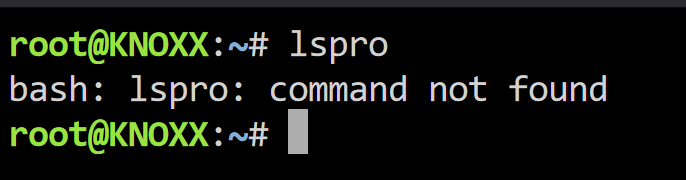
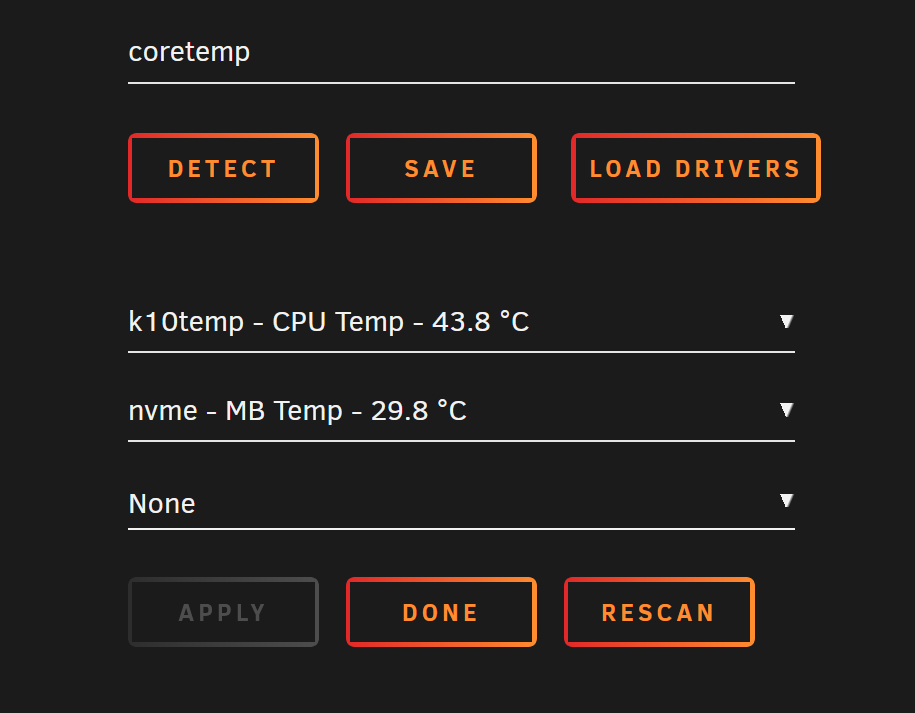
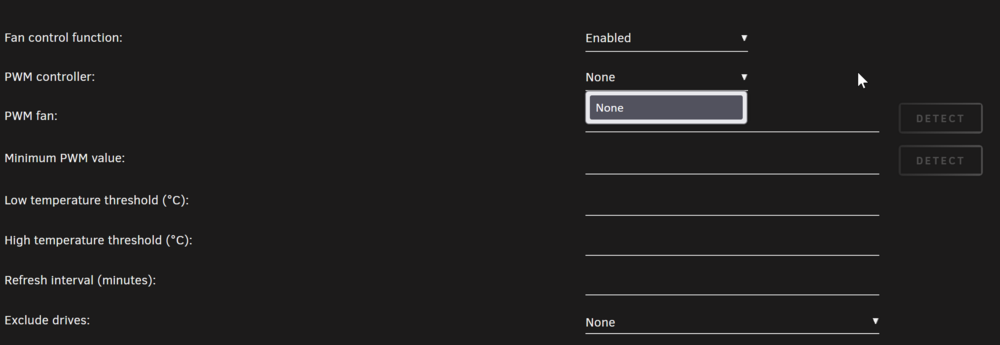
So, I've been trying to get this working for a while now and have gotten nowhere! If 'lspro' is a Linux CLI command, it's not working on my system! (UR 6.12.14) I can see the Commander in the hardware list Dynamix System Temps shows none for fans. Dynamix Fan Control also sees nothing. And sensors-detect also finds nothing. I'm not sure what I am missing? Is there a driver plugin I need to install? A kernel config that needs adding to the boot?

-
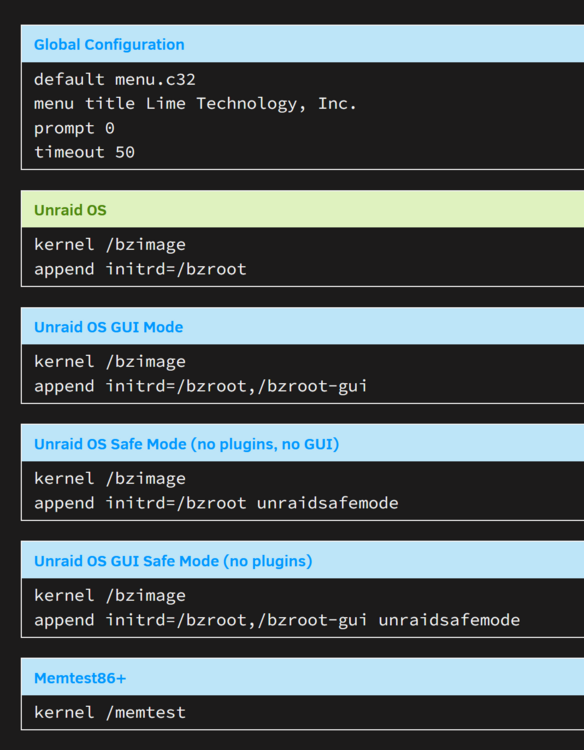
I started hunting for info on kernel options -I'd never heard of that before being a Linux newbie. I found the config on the Flash drive, and it looks like mine is the default standard with no other options enabled. The thing is, I'm not sure what I need to put in there to enable the USB_HID. I tried wrapping my head around what was listed on the links you shared, but nothing was clear to me.
-
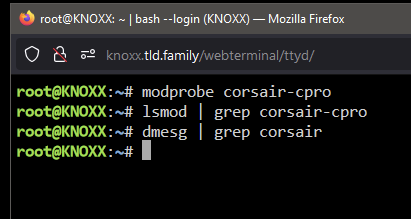
Hey @bmartino1! Thanks for pulling that together. I didn't see that post you referred to! I tried the cli commands and oddly enough.....nothing was returned for any of them?! Did I miss something?
-
I've looked around and have seen others writing about creating a VM to control the Corsair Commander Fan hub, but from what I have read about the UR kernel, it should already be there. The Commander Pro was added to Linux Kernel 5.9. https://www.phoronix.com/news/Corsair-Commander-Pro-Linux-5.9 The Slackware v15.0 UR is using is based on Linux kernel v5.15.19. http://www.slackware.com/index.php root@KNOXX:/# cat /etc/os-release NAME=Slackware VERSION="15.0" ID=slackware VERSION_ID=15.0 PRETTY_NAME="Slackware 15.0 x86_64 (post 15.0 -current)" ANSI_COLOR="0;34" CPE_NAME="cpe:/o:slackware:slackware_linux:15.0" HOME_URL="http://slackware.com/" SUPPORT_URL="http://www.linuxquestions.org/questions/slackware-14/" BUG_REPORT_URL="http://www.linuxquestions.org/questions/slackware-14/" VERSION_CODENAME=current So, while it appears in the hardware list, sensors-detect fails to find anything, and neither Fan Control nor System Temp sees it either.
-
I'm not surprised that it worked once downgraded. If the UI JS/CSS files are updated in the new release and the browser has the old versions cached, it will cause UI issues. Now, if this display issue happens on a new machine that has NEVER loaded Unraids webUI, that would be suspect of a bug. If you're running Chrome, just open dev tools (F12) and it has cache disabled by default. I think FF needs to be on the Network tab and make sure the 'disable cache' checkbox is ticked.

-
From what I have seen with this kind of symptom, flushing browser cache is a first step. Apologies if this was already done, it wasn't mentioned by OP.
-
****Nevermind. I found the cause from another post that described something different but was actually the same behaviour. Mover logging was logging all files it moved, and diags was going through that log file. I went to pull a diagnostics file and noticed in the output window that it was listing files in a cache drive. It was going to take a month of Sundays to go through all 23GB/150,000 files. I stopped the diag process and moved the files from the cache drive to a different share on the array. The cache drive has zero files/folders, and I ran the diagnostics tool again, and it listed the same files on the cache drive! What is going on here?!
-
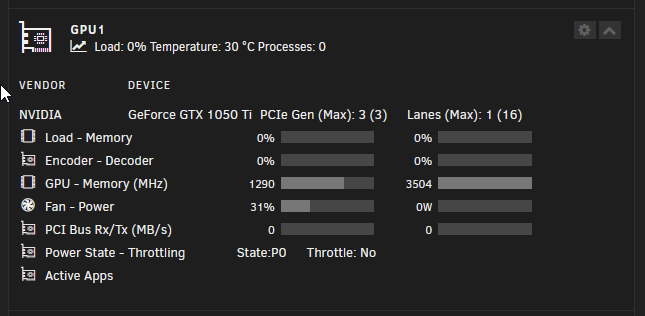
I recently moved my Unraid onto new hardware. I had another Ubunutu system running Docker containers for Tdarr and Plex with Unraid holding the media. I had an Nvidia 1050ti in the Tdarr/Plex system, and when I moved Unraid, I moved the Nvidia card to it. I then added Plex and Tdarr to Unraid and moved the previous Tdarr configuration over, so they are all the same settings. I am seeing a massive hit to performance with Tdarr in Unraid. I easily hit 170FPS processing 1080p 10bit H265 files on the Ubuntu system, which was on much older hardware. In Unraid, I barely hit 60 fps while doing the same thing. 4K transcodes were hitting the upper 80fps, and now, they are 17fps with the same configuration. The GPU activity shows it is barely taxing the GPU encoder/decoder, and the CPU is doing almost nothing. Checking if file access could be the bottleneck, the disks are showing virtually no significant activity either, and the old system was pulling across the network to process video. Any ideas on what is going on here? Diagnostics to come..... ********I think I may have figured out the issue: PCIE lanes! The MB and CPU I've used (R58500G & M-ATX B650) only provide PCIE4 x8 for the first slot and PCIE4 x1 for the other three slots. The first slot, usually for a GPU, I have my SATA controller in it for extra disk bandwidth since it's a 24 port card. That means the Nvidia is in a slot with only 1 PCIE lane. I think the older system had more lanes for the Nvidia card as there wasn't a SATA controller card in it, and that is where I am seeing the performance drop. Now, if only disabling unneeded MB devices (audio, USB ports, etc.) could release those lanes for PCIE slots, that would be awesome. Heck, even the other two PCIE_3 and PCIE_4 slots I could do without if the lanes could be diverted to PCIE_2. But I don't think it works like that. knoxx-diagnostics-20241129-2117.zip
-
Yes, please help us understand why Unraid seems to be different from every other VM platform. I've run VMware servers and barebones Docker boxes, and I have never seen a situation where an IP is duped with a different MAC. To this day, I still have a duped IP in my Unifi, and I've managed it by flagging it as blocked. Everything works, so it's not as if it is having any impact on functionality. But it does impact things when that MAC is not blocked. I've seen services become flaky and unreliable. It makes sense that packets could be routed to the wrong network port/MAC.
-
OK, so this is most likely down to the older kernel in URv6x. I'll have to wait till UR7 is released to take advantage of the APU in the AMD 8500G. I had a chat with ich777 about Radeon-Top and he confirmed that installing Radeon-Top is the same thing as un-blacklisting the GPU. Which is not supported yet so that's why everything gets locked up.
-
Do you have any insight on when UR7 might be going general release? I know we haven't seen any RC releases but then again, I don't know if the UR team do those. If it's not long then I can wait. I'm not a Linux pro by any measure. Simply problems that others solve in minutes can take me days to figure out.
-
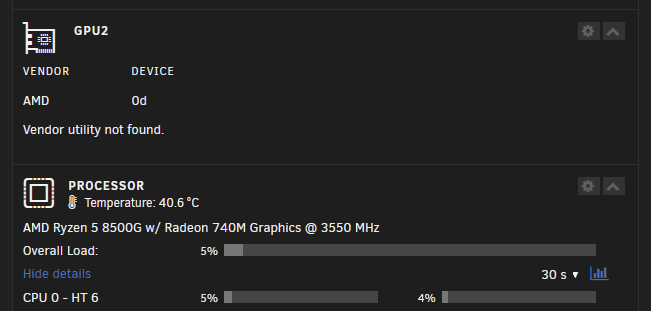
RADEON-TOP UR 6.12.13 Ryzen 5 8500G / Radeon 740M Graphics Forgive me if this was listed somewhere. I've been working on this for quite some time and all the searches I have done have led me nowhere. I've managed to get the system to boot up and the GPU is shown in the device list. I had to blacklist it in modprobe or the whole server would lock up at boot. So now that the system is up and I can see the VGA in the devices, I went to install Radeon-Top. When it came to the last part, enabling amdgpu kernel 'something', the whole thing locked up again. Was this a fluke and I should try installing it again? If the GPU is blacklisted does this pose a problem for Radeon-Top? Is Radeon-Top needed anymore to get the GPU into a Plex container? The GPU Stats plugin can see my Nvidia card and it does see the AMD one but nothing is displayed. Could this be down to the UR kernel not supporting the GPU as yet? (I can't confirm this is a fact but other posts on Linux systems all point to kernels above 6.1.106)
-
OK, I blacklisted it again, re-enabled it in the BIOS and the server came up with the AMD VGA in the devices list. But now another issue, I went to install radeon-top and when it got to the last part, enabling the amd kernel mode (or something to that extent) the whole system locked up.
-
I tried that and while it will boot up, the AMDGPU is not accessible to containers.
-
Is it possible that the CPU is too new for the current kernel in v6.12.113? Could the kernel bump in UR7 fix the issue?
-
BUMP. Any ideas anyone? I doubt it but could this be a problem if I also have an Nvidia 1050ti installed at the same time? At the moment it's the only way I can get this server started with a functional screen attached. I tried with the iGPU on and set as primary but ended up with a blank screen and no webUI; I assumed the system locked up like it does now but with no screen there's no way of knowing it.
-
I have been running my UR server on a DellR510 for a few years and decided that I wanted out of the datacenter hardware rat race. I repurposed my docker box and picked up a new MB+CPU, this time an AMD with iGPU so that I can free up a slot on the board. I've managed to get the array all back online but I ran into a problem in that you can't have the iGPU if enabling CSM and NOT booting into UEFI mode -which is how the R510 was booting for ages. I renamed the efi- folder on the thumb drive, disabled CSM and was able to turn on the iGPU in BIOS. The UR boot screen comes up now and it starts the boot up process. I can see where it finds the AMDGPU and starts the driver process. But it crashes with a calltrace and stops dead. after a few seconds the screen scrolls like mad and ends up here; I've searched Google and on here and have not found anything that makes it clear what the issue is or how to fix it. Any ideas?
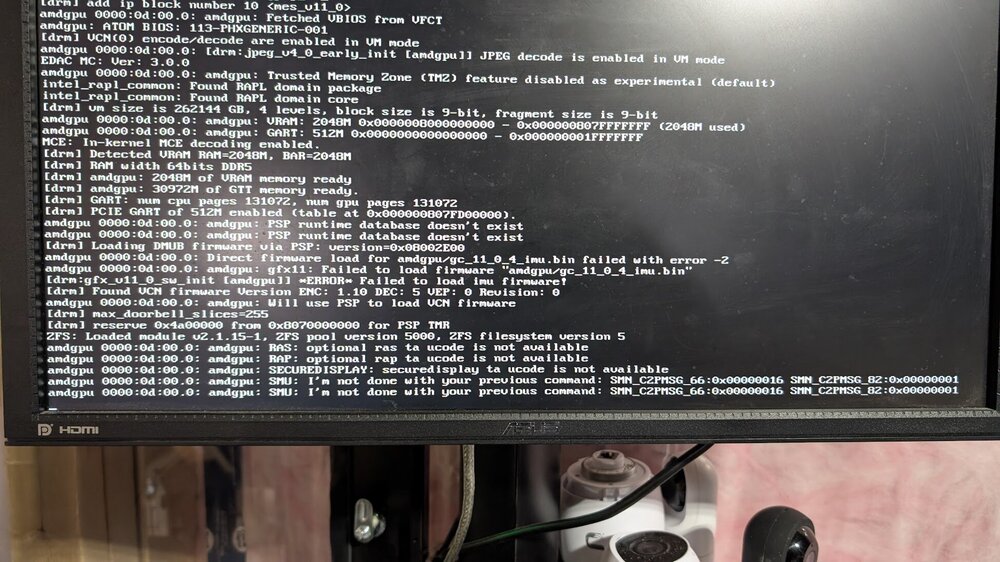
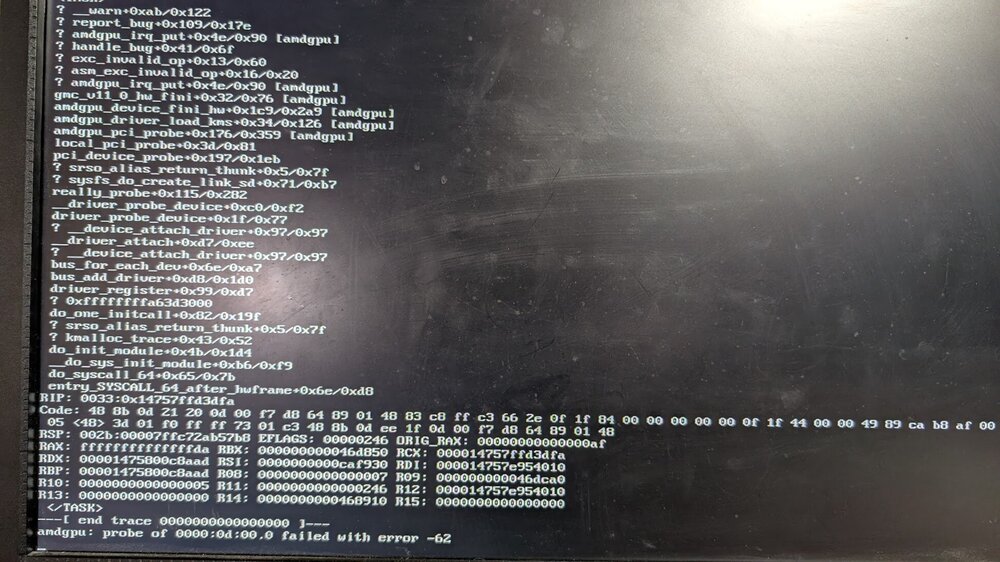
-
Hmmm, I'm already underwhelmed by Unraid's array performance. I guess it's tough to have our cake and eat it, too: resiliency vs. performance. I like how files on the array drives are easily accessible in the event of a disaster. However, how FUSE works kills any performance benefit that multiple disks could provide. I wonder if there is a path/plan to replace FUSE with a ZFS-based approach that includes file accessibility on each drive (like FUSE does) with the parity drives the array uses. Or maybe I'm just completely confused about how FUSE works versus ZFS capabilities!





