aglyons
Members
-
Joined
-
Last visited
Everything posted by aglyons
-
Unraid itself named the VLAN eth0.2 when I created it in the UR network settings. Perhaps if that is creating an invalid naming convention the UR devs should be notified that this needs fixing @JorgeB. I did manage to get this working with some help from a Reddit post I put up a few days after my post here. While it is working, it is presented differently in the UR Docker list. The network shown is the hex ID of what appears to be a new network. But it does work.
-
I really do like this app and am very thankful for the team that put it together. That being said, I feel this image should be transitioned into a single container with ES and REDIS included. Having those dependencies as external containers is confusing to new adopters and has clearly introduced issues, just looking at the number of threads. I don't have any idea HOW to create an image with all the dependencies included.......yet. But I'm gonna start looking into how that's done. If someone else beats me to it, that's be great!
-
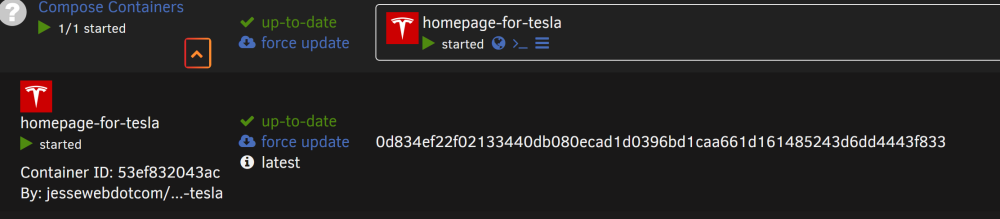
Haven't been working with Docker for very long and even less with compose. I have a project that I was trying to get working in compose as there's no template for it is the UR app store. https://github.com/JesseWebDotCom/homepage-for-tesla I have a MACVLAN docker network already in place (eth0.2) for some other external services so I was trying to interpret what I found on other sites on how to add those settings to the compose YAML. I must have something wrong as it's not working at all. It doesn't crash but I can't access anything from the IP I assigned it. If it's easier to create an UR template rather than crack the compose mystery then I'm all for that. Mind you, I don't have a clue how to do that yet either lol. version: '3' services: app: image: jessewebdotcom/homepage-for-tesla:latest volumes: - /mnt/user/appdata/homepage-for-tesla/bookmarks/bookmarks.json:/app/public/bookmarks.json - /mnt/user/appdata/homepage-for-tesla/images:/app/public/images ports: - "80:80" networks: eth0.2: ipv4_address: 192.168.202.70 networks: eth0.2: external: true
-
Hey all, I just completed a parity swap and when the copy process finished, an email was sent out to notify me. It's the content of the email that confused me because when I went to the UI>Main page, I didn't see what I had expected to see. The subject line alludes to the rebuild process as already running. This would tell me the array is up and disk 8 is being rebuilt from the array and parity data. But that's not the case. When I logged into the UI I could see the copy process was finished but the array was down and the rebuild was not running. I manually started the array and that's when the rebuild started up. The email notification that followed confirmed that If the first email was supposed to be correct, in that after the copy process completed, UR was supposed to kick off a rebuild of disk 8. Then let me know and I can provide whatever I can to help diagnose the issue. But this could be down to just the email template having the wrong information.
-
Any simple approaches to flashing floating around the forums, or should I just go with the Truenas doc that I found? https://www.truenas.com/community/resources/cross-flashing-dell-h310-h710-mini-to-it-mode.166/
-
All disks are neg at either SATA3.1 or STATA3.3. All 6Gpbs. I checked the disk specs and they are all capable of 240MBs read/write. I guess that all depends on the files that are being read/written. Smaller files would most def hinder the drives from hitting top speeds before the operation finished. That being said, I ran unbalance on the drive I pulled out first to get as much off as I could. That was running the move at about 48MBs read. reconstruct write was enabled which is supposed to speed things up. And I understand that the Fuse parity calculation operation is intensive but my dual Xeon CPUs and 96GB of RAM were practically sleeping when all of this is happening. So I don't get where the slowdown comes from.
-
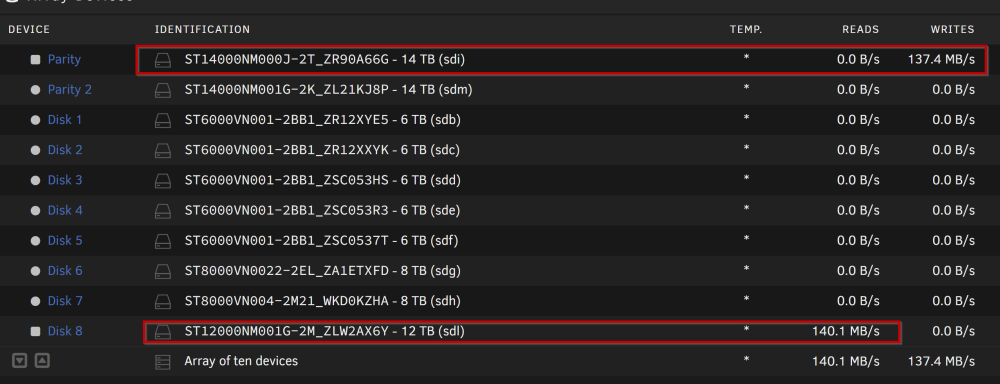
Hey all! I've been running UR on a dell R510 with a PERC310 HBA for a while now. I understand that this card is not considered the go-to choice, but at the time I had no clue and went with the board that was included. I was told that it would work, and it does; just not 100%. More like 99.99%. That being said I recently started a parity swap with a new drive. I've been watching the process and the read/writes are about 140-200MB/s between the two drives. It got me thinking that the HBA might be holding the servers performance back from what it could be. UR doesn't recognize the PERC310 as a PERC310. Instead it loads the Broadcom / LSI MegaRAID SAS 2008 [Falcon] (rev 03) driver according to the hardware report. So my questions are; Can I/Should I flash the HBA with alternate FW to allow for better integration with UR Does the PERC310 have hardware limitations that are not allowing the system to run as it could If flashing is not an option and the PERC310 is a bottleneck, suggestions on an alternate controller I assume swapping the controller might cause issues with the UR license on the flash. What's the process to correct that. I also assume that swapping the controller, as long as all the drives are connected after, should retain the parity. If I am off base anywhere by all means steer me in the right direction. Thanks all! PS. The more I am learning about UR, Linux, VM's and docker the more fun I am having!!
-
I started a parity swap procedure last night around 11pm. I've been watching it for a while now and that's when I noticed the UI bug. The "Current Operation Started" date and the running time displayed are out of whack. I started the operation at 12/12/23 11:41 pm. The current date today is 12/13/2023 8:36 am. The system feels that this process started "twenty-eight days ago" I suspect this is purely UI and I doubt this has any effect on anything serious, but who know better other than the devs, which brings me here!
-
me too. And then TA shuts down after a series of connection attempts. I really am not a fan of multiple container operations for a single service to function.
-
I wonder how many others are running an Aquantia chipped NIC?
-
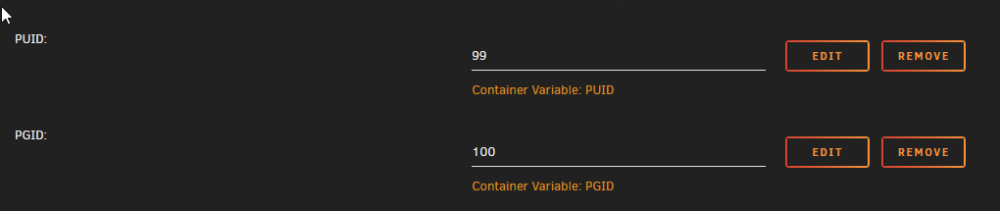
AFAIK, Are these set in the config? And what are the read/write permissions on the ..../appdata/Nginx-Proxy-Manager-Official/data/logs files? Make sure that they are set to this

-
@Kilrah BINGO! That fixed it. Running on port 80! Thx very much for the tip!
-
That would make sense in normal situations but Unraid's docker networking is a little.....unique from what I understand. The default bridge is hooked into the primary NIC of the server. If you want to run your docker containers on a secondary NIC -like me, you have to run that NIC in bridge with Vlans. Each container on that network gets its own IP on the host network. I've set up a number of other containers that use 8080 or the like but when you flip to the custom bridge network, it ignores the container default and uses the defined variable as the port. In my case, 80. In this template, the reverse seems to be the case. Anything other than bridge forces the predefined container port and ignores the provided port variable. This is the first time I've come across a container that acts like this.
-
Revisiting the port concerns. What if you are not running the container in bridge mode? I have a dedicated IP assigned and the container is stuck at port 8080. Could this be down to the template config? I see that line 30 is setting 8080 hardcoded.
-
NPM v2.10.3 NPM > Settings > Default Site I have this set to redirect to google.com. I went to test it hitting my public IP and the redirect works for 443 but not for 80. I then used an old subdomain I had set up which was still pointing to my IP. If I hit the domain naked, I get the unknown domain redirection If I add the protocol 'http' I get the redirection If I add the protocol 'https' I don't get the redirection. This may be something I need to submit to Git
-
That's interesting. How long have you had your TA installed for? I installed mine about 3 months ago and that was already part of the community template, if I recall correctly. I already had that variable in place since installing. Maybe that's why I haven't been seeing these errors crop up. I also installed the Docker patch a while ago when I noticed the Unknown Version issue pop up. Has there been any movement on a docker image that is self contained? I read somewhere a while back that this was something that was being looked into to simplify the TA setup process. One container to rule them all!
-
Ok, there's a gotcha!
-
would be nice if there was the best of both worlds. Write a DL to the cache but have the mover put it on the array. But, still bypass fuse for the write.
-
Came across this video the other day. I'm wondering if this is even a good idea or not. Would this have any effect on share marked for cache that 'should' be moved to the array? Are they still moved or not?
-
Hey Ford! Thanks for the deep dive. I think I can follow this. I've been swamped with the other stuff that pays the bills. I'll go through this with a fine tooth magnifying glass and see if I can put 2 and 2 together. Thx A. PS ......and always carry a towel.
-
Hey Ford! So networking gear is Unifi so VLANs are not a problem there. By default Unifi allows inter-vlan traffic. You have to block it if you don't want it. But the majority of what you were talking about flew right past me lol. I went back to using MACVLAN as being a geek, I like to see all the servers and PC's on the network. IPVLAN use plays havock with Unifi as clients pop up and drop off randomly. The MACVLAN issue was when the primary NIC was used for bridging creating br0 while using MACVLAN. Using a second NIC alleviates that problem. Thanks for jumping in and trying to help out. If you could dumb it down a bit for a lunkhead, I'd appreciate the translation!
-
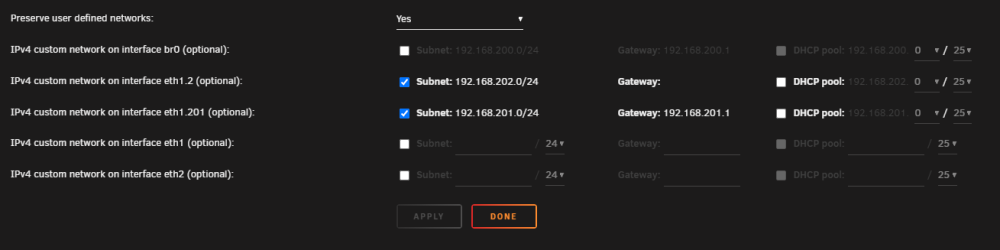
So I've searched around like mad trying to find some tutorials that would happen to show my 'possible' use case. So far, no luck. My UR has 3 NICs in it. I am using only two of them currently. NIC1: 10gbe is primary - 192.168.200.0/24 NIC2: 1gbe - 192.168.202.0/24 (tagged vlan2 on Unifi) I currently have bridging turned off an both. Docker network mode is set to MACVLAN. The default bridge network in UrDocker is hooked into NIC1 and I do have some containers on there that I want to keep there for the higher bandwidth. Other containers I have on NIC2 to keep them somewhat separate from the primary network and route traffic through NPM (also on NIC2). But there are containers that are on the bridge network that I would rather be on the 202.0/24 network. I've tried pulling the IP assigned to NIC2 and setting up a VLAN-ID2 with the 202.0/24 network and assigning the IP manually there. I also added another Unifi network as VLAN-ID201 201.0/24 and assigned an IP on that network in the event I want to put my HA VM on there (that's another puzzle, VM networking in UR). But here's the thing. Once I add VLAN201 in the networking settings, the gateway for VLAN2 disappears in the Docker settings and any container assigned to br1.2, can't get out and nobody can access the services. My thought was I wanted to have the default bridge (200.0/24) running as a bridge. 202.0/24 running as a MACVLAN but also have a 202.0/24 bridge that is accessed from NIC2's assigned IP. So I would have Bridge (200.0 > 172.1) eth1-bridge (202.2 > 172.2) eth1-MACVLAN-2 (202.0/24) eth1-MACVLAN-201 (201.0/24) Is this setup even possible using manual custom Docker networks? Also, if anyone knows of any video series that plainly lays out Docker networks, please share! I've seen a bunch so far but when I try to implement what they've shown I don't get the same results.
-
I figured "But you do you." would be the end of that convo.
-
Setting your IMG to 20GB and having it fill up can crash every container you have running. A 2tb ssd will take a heck of a lot longer to fill up and you would probably notice this before any damage happens. But you do you. Best bet would be to file a post on the Github for the project. - https://github.com/NginxProxyManager/nginx-proxy-manager/issues
-
On the advice of someone else, I switched from using docker.img to a DIR. It's more flexible with how much data can be written as the IMG approach has a fixed virtual disk size. THe DIR route is the capacity of the share it's being stored in. You can chagne that in the Docker settings after you shut down Docker. You will have to reinstall all your containers but that's fairly simple as they are all listed in 'Previous Apps' in the CA.