





aglyons
Members
-
Joined
-
Last visited
Everything posted by aglyons
-
YUP!, good to go.
-
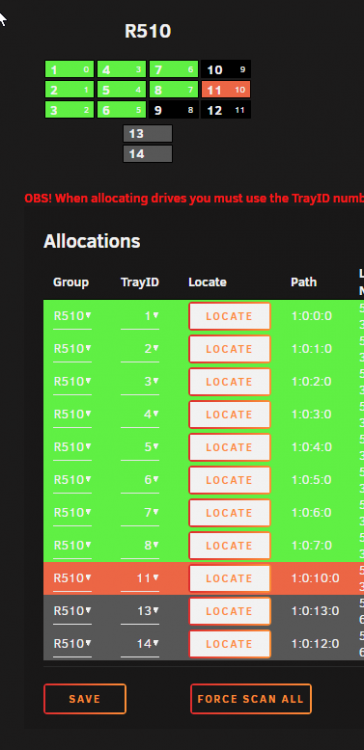
Curious, why don't use tray override? If we shouldn't use that, why is it there? What was its intended use case? That setting was actually perfect. I have 12 external trays on the R510 chassis with two internal 2.5" bays. Creating a whole other layout for 2 drives seems overkill. I didn't think this issue would really affect anything, I saw it more of a cosmetic concern.
-
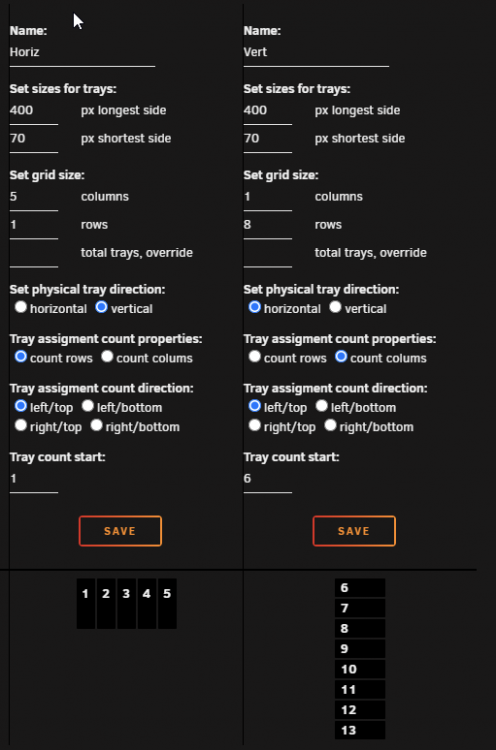
I suspect you could create two layouts. One horizontal and one vertical and assign the drives appropriately.
-
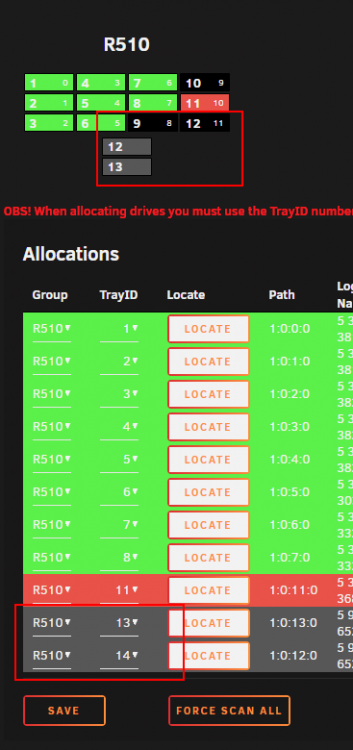
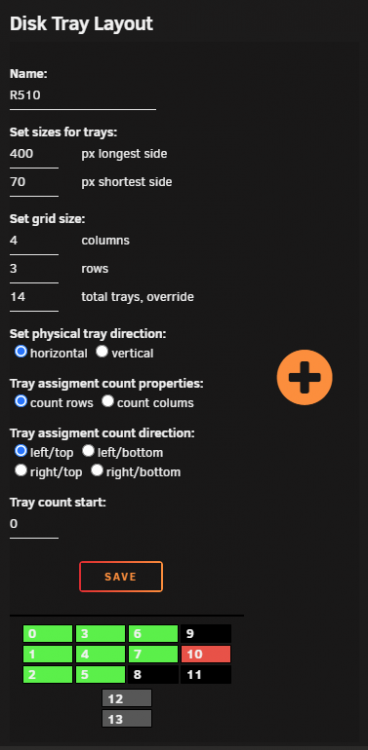
@olehj Seems to be a little bug in the layout page. The drive numbers are duping drive 12 when it should be continuing at 13 & 14.
-
So the situation here is there are a number of different sources all over the Synology that are in the backup set. To "pull" the data to the unraid as apposed to "pushing" the data would mean a significant amount of scripting and management. Each source would need its own script to trigger the sync. While many might not be concerned about a 'little' scripting, I'm not a deep Linux guy and it would take me some time to figure it all out.
-
So it's definitely something buggy with Synology then. Good to know, I can bring this up in the ticket I have with them. It's frustrating in that rsync is the ONLY way to automate a file backup to a server that is not another Synology NAS. The local backup option in hyperbackup won't let you choose a mapped network location!
-
So after searching all over and taking bits of info from all over, including your amazing help. I've come to determine that Synology's rsync on DSMv7+ has some issues. SMB transfers into UnRaid come in around 70-115MB/s. Rsync from Synology hovers around 7MB/s. So at the moment I can't use rsync as it would keep things running for months with the backup set that I have. Just for the initial sync! I have a ticket in with Synology. I'll update here when I have some news.
-
Do I need to provide specific vars here or is this as scripted?
-
Curious, I have user scripts installed. Could that be used for this in some way?
-
Awesome, thx s80_UK, This gets me started. The article I posted did have a section at the end on securing the daemon. [files] path = /home/public_rsync comment = RSYNC FILES read only = true timeout = 300 auth users = rsync1,rsync2 secrets file = /etc/rsyncd.secrets and in the secrets file just a username:password combo. Then secure the password file with chmod 600 /etc/rsyncd.secrets rsync1:9$AZv2%5D29S740k rsync2:Xyb#vbfUQR0og0$6 rsync3:VU&A1We5DEa8M6^8
-
I came across this doc that walks through creating an rsync daemon. But being new to UnRaid, I don't know where to create the conf file as etc is hidden AFAIK. https://www.atlantic.net/vps-hosting/how-to-setup-rsync-daemon-linux-server/ I know that rsync is already installed in UnRaid so it's just a question of creating the conf file and then spinning up the daemon.
-
So I'm in the same position as OP in that I have Synology's Hyperbackup already configured with the data that needs backing up. It was going to an rsync server running on a Qnap NAS but I am taking that offline and replacing it with the Unraid. I'd still really like to know how to configure UnRaid to be an rsync target. that way I can continue to use the Synology UI to pick the source data and 'push' it to the UnRaid rsync server rather than 'pulling' the data. I'd also like to avoid creating/modifying scripts anytime I want to add another source.
-
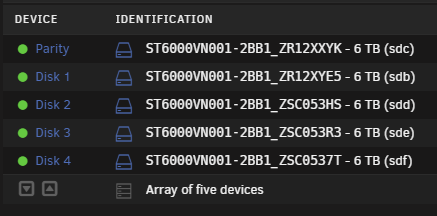
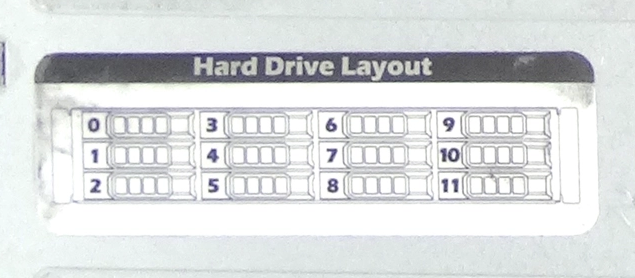
Minor cosmetic thing but...... After the parity drive, the drives start numbering at Disk 1. Is there a way to start the count as Disk 0? I ask this as the Dell R510 I bought starts disks at Disk 0
-
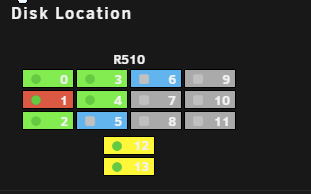
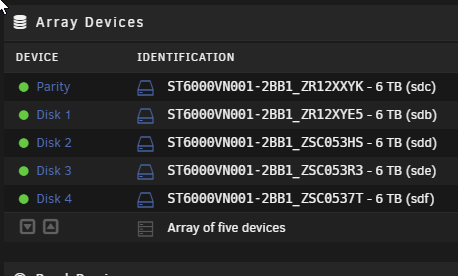
Hey all, the new guy here again. I got too excited to get started building out this box and created an array before all my HDD were here. As such, I need to re-order drives in the array so that it makes logical and physical sense. Here's my current layout Green= Data Red= Parity Blue= Unassigned Yellow= Cache Drives 0-4 are 6TB Drives 5 & 6 are 8TB (another 8TB going into bay 7 soon) I have two 12TB drives coming that will go in bay 10-11 for parity. My Array layout is as follows Here are the steps I understand I will need to take. First, replace the parity drive. 1. Preclearing the new 12TB drive 2. Stop the array, clear the current parity assignment XYK and start the array 3. stop the array again and assign the 12TB bay 10 to parity 1 4. assign the old parity drive XYK to disk 5 5. As long as both the parity drive and slot 5 are showing in blue I should be ready to copy parity data from XYK to the 12TB drive. Next I need to reorder disks around 6. Ensure parity has been verified and the array is valid. 7. stop array and assign Disk 2 = XYK, Disk 3 = 3HS, Disk 4 = 3R3, Disk 5 = 37T 8. Run "New Config" with "Preserve current assignments" 9. Start the array Should I wait until after the drive re-order to add the second parity drive to bay 11? Let me know if I missed something here or if everything I wrote makes no sense whatsoever lol. Thanks in advance
-
Recording
-
It's just finishing up a preclear on a new disk. Looking at the timer on the post read, it is refreshing about every 6 seconds.
-
6.9.2 I just bought yesterday. The dashboard is a little quicker to update. That's about a 1-2 second refresh rate. But the Main page is about 5-10 seconds between updates. I'm running on a Dell R510 12 bay Here's my stats from info Model: Custom M/B: Dell Inc. 084YMW Version A04 - s/n: ..CN1374018300G3. BIOS: Dell Inc. Version 1.12.0. Dated: 07/26/2013 CPU: Intel® Xeon® CPU X5570 @ 2.93GHz x 2 HVM: Enabled IOMMU: Enabled Cache: 128 KiB, 1 MB, 8 MB, 128 KiB, 1 MB, 8 MB Memory: 32 GiB DDR3 Multi-bit ECC (max. installable capacity 128 GiB) Network: bond0: IEEE 802.3ad Dynamic link aggregation, mtu 9000 eth0: 1000 Mbps, full duplex, mtu 9000 eth1: 1000 Mbps, full duplex, mtu 9000 eth2: 1000 Mbps, full duplex, mtu 9000 eth3: 1000 Mbps, full duplex, mtu 9000 Kernel: Linux 5.10.28-Unraid x86_64 OpenSSL: 1.1.1j Uptime:
-
I was looking for a way to speed up the refresh of the stats on the MAIN page while troubleshooting. It seems to me that it's fixed at 10 sec. I found posts talking about "Page Update Frequency" under the display settings but I can't see that on my 6.9.2 install. Has that been removed? Is there any other way to speed up the refresh, even just for a while to troubleshoot transfer speeds? I keep getting conflicting data from the sending system to the UNRAID server.
-
Yaaay! Now if Synology could catch up!
-
So I slightly misunderstood LAG's. What I am looking for is actually SMB3 multichannel. Synology WAS supposed to be releasing that with DSM 7.1. Doesn't look like it's been added as I couldn't find any setting anywhere. Can SMB multichannel be enabled in Unraid? Eventually DSM will have it added and then I should see a significant increase in performance. That being said, I still thing the transfer rates I am seeing are significantly slower then they should be. Transferring a file from WIN10 to the Synology routinely hits around 130MB a sec. That's not happening here from Synology to Unraid.
-
Since the mover is now moving content from the cache, transfers have dropped to 10MB/s. It got worse.......
-
Hey all, new user here. I have a Synology NAS that has a 4nic LAG plugged into my Unifi switch. The new Dell R510 also with a 4 nic LAG also plugged into the same switch. My transfers are running at around 23-30 MB/s (approx 230mbps). Which to me seems terrible being that there is theoretically 4000mbps (500MBps) to play with. I am transferring into a 2 disk SSD cache (250GB each). I have set the disk Tunable (md_write_method): to 'reconstruct write' as it was mentioned in another post regarding performance. Any suggestions on next steps? PS. I am currently still in trial mode. Could this be a limitation of being in trial still?
-
I'm totally new to Unraid and just picked up a refurb Dell D510-12bay. I'm coming as a Synology user so any advice on translating how Unraid works differently than Synology would also be helpful. From what I have read so far I'm building two parity drives from 2 x 12TB exos drives. I also have two Samsung 870EVO 256GB SSD's for cache and will be starting off with 5 x Ironwolf 6TB drives for data. I'll slowly add the other 5 x Ironwolf drives over time as needed. Wondering if it's possible, as an option, to go with two 5 x drive arrays with one parity each rather than one array of 10 x drives with two parity? I'd love to read everyone's thoughts on the first apps/addons that those in the know would install from day one.






