Jaybau
Members
-
Joined
-
Last visited
Everything posted by Jaybau
-
I'm only getting the error message when I manually run the mover. # mover Log Level: 1 mover: started Usage: grep [OPTION]... PATTERNS [FILE]... Try 'grep --help' for more information. find: ‘standard output’: Broken pipe find: write error mover: finished I've been writing a lot of data to the "media" share, which first goes to cache, then moves to array. I'm trying to get the data moved off cache and onto array. But the mover won't move it, because of the error. I suppose it is possible I'm trying to move something off the array onto the cache, which is failing the mover. Or something else is trying to move off the cache onto the array, but hitting a minimum floor (haven't found it yet). In a bind right now, because I need to move data off the cache, cache is filled up, but the mover gets an error.
-
The pool/array's free space is 8.61 TB, and the share floor is 25 GB. What is causing the error message?
-
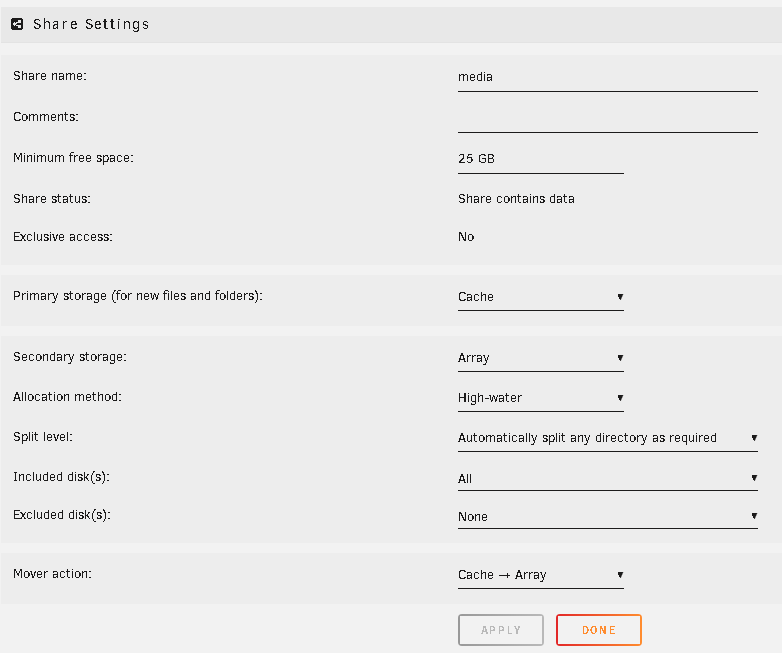
When running "Mover" I receive this error message: Tower shfs: share cache full Not sure if the above message is telling me the "share" is full or the "cache" drive is full. I assume the share. Logs do not tell me which share; I assume "media". Log Info: mover: started Usage: grep [OPTION]... PATTERNS [FILE]... find: ‘standard output’: Broken pipe find: write error mover: finished Share Settings (Allocation Method = High-water): Is the mover trying to move only to Disk 1 (because of the "high water" allocation method)? But fails because Disk 1 is below the 25 GB minimum free space? Will mover try to move to Disk 2 or Disk 3, when high water allocation is no longer viable? Should I choose a different allocation method? The reason why the disks are not balanced, despite "high water" allocation, is because I have add disks at different points of time. tower-diagnostics-20240325-0932.zip

-
Great points... If I was in charge and had the budget, I would have enhanced the unRAID product to include the important features that ZFS offers (integrity, scrub, repair, snapshot), but done with the unRAID brand/mission. And if I didn't have the budget to do it in the unRAID way, the next best thing is SnapRAID. I just read unRAID's about "mission": Besides wanting to centrally store my data, I also want to keep my data for a many decades. Hence why data integrity verification and some way of restoring data in the case of hardware failure or some bit rot event caused by whatever (I have experienced bit loss, but can't explain how/why, and don't really care, I just want mitigation), and done efficiently (money/time). It becomes hard to justify the cost when it exceeds the purchase cost of my media collection, except the cost of time accumulating the media. Which is why the data integrity/recovery has become more important to me. Backups mean doubling my storage costs. Parity allows me to just buy one drive for parity, so the storage ratio is excellent. Parity gives me the risk vs. cost ratio that is desirable for me at the moment. But something else was mentioned...gamers. I'm not a gamer, but I have heard their performance requirements are very demanding. So maybe this is the real reason ZFS is coming...it's for the high performance demanding gamers, with the high performing hardware investment. So ZFS's hardware demands and costs aren't a big deal to the gamers who already have expensive rigs.
-
I don't think ZFS is aligned with the Unraid product mission. I want to see an unraid scrub, repair, snapshot, parity feature set.
-
My proposal would be: Optional Unraid parity array. Use SnapRaid on any pool. (it is inherent to Snapraid, so nothing needs to be developed.) Future Unraid: Full independent multi-pool support. SnapRaid like functionality, or better. Or at least provide a Snapraid plugin. Effort is minimal. Union filesystems (pooling) (not just btrfs/zfs/array). There's already several open source projects that already do this. Effort is minimal. I would use a mirror Unraid cache for write operations in between periodic snapshots/parity. This will keep my data safe until parity operation. I would experiment with more optional frequent snapshots on the cache, since I am expecting the write operations to be small. With Snapraid this can be limited to folders, file extensions, etc. With snapshots, I think it would give me versioning too. Limetech / Unraid Mission Creep? I do not think btrfs/zfs is the inline with Unraid's mission. Too much effort that isn't aligned with mission = shaking head...I just don't get it. Unraid is incorporating RAID (zfs) in their next major release !?!?!? I just don't get it at all. But Limetech is spending money on doing it, and I've read Limetech was even reluctant to doing it. So I'm not sure even Limetech thinks they are doing the right thing. I do think something similar to SnapRaid is inline with Unraid's mission. I just don't get why Limetech doesn't go full throttle in this direction instead of integrating ZFS. Unraid would still be UNraid. BTRFS/ZFS multi-disk pools just aren't un-raid. SnapRAID is. But we aren't getting it. I believe the only reason why Unraid users are going ZFS is because Unraid won't give them what they really want (scrubs, repair, snapshots). So I'm curious, if Unraid provided SnaprRAID/unionfs (or similar), would ZFS demand drop?
-
The problem with BTRFS is the RAID 5/6 bug where you can lose the entire pool. This isn't something I'm willing to risk. I am curious why SnapRAID isn't added to NerdTools and plugged into Unraid. It can be very simple to do. But, I also could be completely wrong, and would like to know why. There might be scenarios I haven't considered. It might be a lot more difficult to manage than I think. I'll be experimenting with ZFS to find out how resource hungry it is. So now I am very curious. It's not like I'm running Unraid on a Raspberry Pi or minipc. I have 3 spare 1TB drives to learn with. I assume my home network will be the speed bottleneck.
-
I think these are being accomplished by extending Unraid with File Integrity plugin and backup software. This basically becomes scrubs, snapshots, backup. I think what is really being requested is for an integrated, seamless, easy solution. And to do this without the need of doubling the drives with backups/mirror/replication; accomplish via parity algorithm. I prefer the storage/redundancy/restoration/protection efficiency of parity versus 1:1 backup/mirror (50% efficiency). What I don't understand is why Unraid doesn't think this concept would be an evolutionary step. It doesn't seem like the solution is that far away or costly, so I don't understand why its not being developed. I am looking for a seamless suite of tools to EASILY manage scrubs and restoration. If SnapRAID+Unraid was offered, I would probably go that route (all the benefits of Unraid+what I want from ZFS/BTRFS without the disadvantages). Since SnapRAID is not offered, I am preparing for ZFS. My hope is that once I get ZFS configured, scrubs and repairs are just a matter of clicking a button. The price I pay for ZFS is worth not having the cost of a headache with data integrity problems, panics, time, restoring from a backup. I don't think ZFS is ideal, but it is offering the next step towards what I want, until something else better is offered. Maybe someone will create a SnapRAID plugin. Maybe Unraid will develop the next generation of Unraid parity. In the meantime, I'm going to spend more money on buying more drives to get the solution I want.
-
Upon scrolling down to the bottom of the screen, I see the option to select "Parity is already valid." This ignores the above action, and won't overwrite/erase the parity drive. And just to make sure, after bringing the main array online, I manually forced a parity check. All is good. Thank you. Special note for a future enhancement: I do wish a bad drive outside of the main array (separate pool) didn't bring everything down and affect other pools. Wish the pools were isolated.

-
I had a hard drive failure on one of the non-array pools (separate pool for backup drives)(checked power, sata cables; used different sata controllers). Because of the drive failure, I couldn't mount the array, nor could I mount any pools. So I reset the hardware configuration, and preserved the drive assignments, and now I can mount the array/pools. But when I go to start the array (and all the pools), I have the message: "All existing data on this device [parity drive] will be OVERWRITTEN when array is Started". Worse, the drive that failed was my backup drive! So now I'm left without both my parity drive and without a backup. Why? What did I do wrong? What should I have done? tower-diagnostics-20240213-1957.zip

-
How do I remount a non-array pool? I have a non-array pool (btrfs), external hard drive, and accidentally turned the power off to one of the drives in the pool. I turned the power back on, but the pool doesn't appear to be mounted. Notice the drive is "MISSING": # btrfs filesystem show Label: none uuid: bcaa0df3-5b21-44f1-9293-f5f0ecee8ef6 Total devices 1 FS bytes used 5.28TiB devid 1 size 5.46TiB used 5.40TiB path /dev/md2p1 Label: none uuid: 03ba8866-a578-4d09-bddf-aa64ed48afe6 Total devices 2 FS bytes used 1.63TiB devid 1 size 931.51GiB used 919.51GiB path /dev/sdj1 devid 3 size 931.51GiB used 904.51GiB path /dev/sdk1 Label: none uuid: b687a212-2cbf-48f8-9b97-ccc49e39d661 Total devices 2 FS bytes used 347.89GiB devid 1 size 238.47GiB used 238.47GiB path /dev/sdi1 devid 2 size 0 used 0 path /dev/sdb1 MISSING
-
I'm asking for separating the multi-disk pools (non-array) from the main array. Docker containers and VMs run on the main array (e.g. cache). Since containers and VMs don't run on multidisk pools (or unassigned drives), separating shouldn't be a problem. Samba works for unassigned drives (via mount/unmount), so shouldn't be a problem for "unmounting" pools. Basically, I'm asking multi-disk pools to behave more like unassigned drives. Or the capability of pooling unassigned drives into a virtual filesystem.
-
Proposing decoupling the array and pool maintenance operations, so both the array and pools can be maintained independently. I don't want to stop the main array if I need to perform maintenance/changes to a pool. This also causes outages for dockers, VM's. Pools should be independent of the array. Each pool should be independent from other pools. Saved storage configurations may have potential improvements too. Fortunately we can decide if a new configuration affects array and/or pool, but there can also be multiple unaffected pools. Something similar to the functionality of Unassigned Drives; I want to manage independent pools like I can manage independent drives. I assume the cache pool would be the exception since the cache pool is tightly integrated with the array. Might be worth considering redoing the UI to show the separation of the Array drives (parity+data+cache), and multi-drive pools, and unassigned drives. Thank you for consideration.
-
Thanks, I'll take a look at the plugin. I proposed a native feature for consideration:
-
Requesting a feature to extend Unraid's multi-drive non-array storage pool by creating a storage pool for multiple drives of any file system mix. The extended feature will allow: 1) Create a virtual/merged/union storage pool combining the storage capacity from all drives. 2) Any supported file system mix. Drives/partitions can be XFS, BTRFS, ZFS. Possibly NTFS and FAT32. 3) No changes to the physical file system or partition on the drive. 4) Drives can be removed and used outside of the storage pool, and retain data and original partition information. Similar to MergeFS, UnionFS, aufs. Thank you for consideration.
-
Has there been discussion to use a union file system for Unraid multi-drive pools? I have some old drives that I wanted pooled together. I don't want them in the array. Some of the drives would be temporarily added to the pool. I want to pool the drives into a single virtual/merge/union file system pool. Basically like the Unraid array, but without the parity. Does Unraid have this capability (non-array, no parity)?
-
I resolved the incorrect total pool size by restarting the array. I have one diagnostic report in the previous post. I include one here too. There might be a time gap between the logs since I restarted the array between the issues. Thank you. tower-diagnostics-20240108-0901.zip
-
The system completed the balance convert to single mode: I expect the combined size of the two disks to be 2 TB. But from the screenshot, I have 3TB (not 2TB) !


-
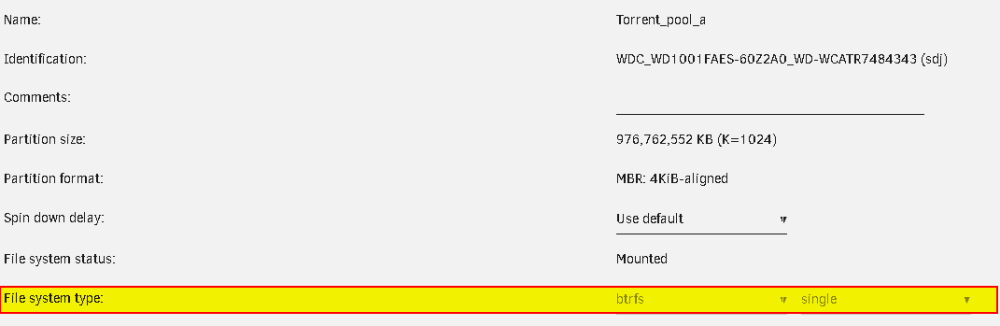
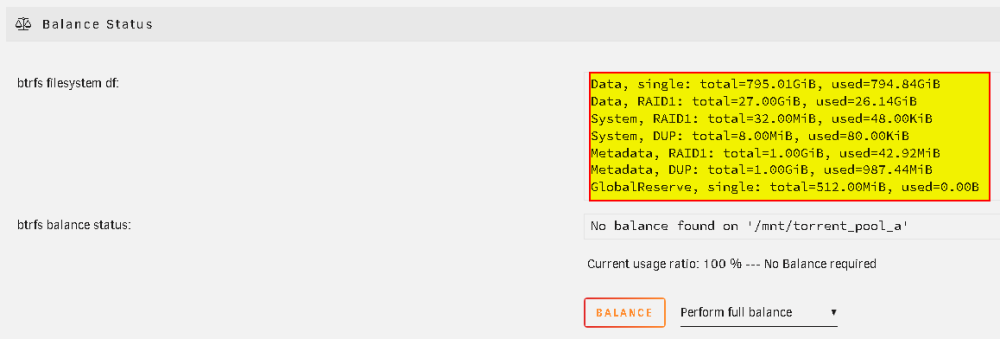
Ran into this problem: I noticed my BTRFS pool is not 2 TB, but 1.5 TB. The pool is configured with the File system type = BTRFS; Single: I noticed some unexpected info regarding RAID1: Special/important notes: I originally created the pool as "single", but it looked like unraid created it as a radi1 mirror. So I cancelled the operation, and have been attempting to redo the configuration without success. There was some other strange behaviors too: 1) Originally it was 1TB total combine space. So I attempted to "balance" to a "single" drive, even though I originally selected "single". 2) Drives can no longer be removed from the pool and mounted. I have another pool created months ago. I didn't have this problem/steps/scenario. The "df" looks different too: I'm getting into the weeds on this. I'm attempting to run a "balance to single" (I don't know if I need to do a "full balance," or what that will do, but might have to try it), and hope I get back to the point where I have 2 independent BTRFS drives that I can take out of the pool and mount as unassigned (just like the older created pool from months ago). <-- This seems to be an incorrect assumption made by me. Once the drives are in an Unraid pool, they become part of the filesystem, and no longer separate independent drives. tower-diagnostics-20240107-1554.zip


-
Note: Just realized Unraid ZFS cannot add another drive and expand the pool later. What I did is created a few unassigned drives, formatted with ZFS, did the data shuffle, and wanted to pool them together via Unraid. But if I do that, I presume it creates a ZFS pool, not a proprietary Unraid pool, therefore has the limits of ZFS (or Unraid's current implementation of ZFS). So I'm going with BTRFS so I can expand and/or take out drives later.
-
In Unraid, I thought each drive was independent, and physically separated in the OS, but just "virtually" pooled to represent a single storage mount.
-
Thank you for the instructions. Fortunately I just added additional storage so I can get out of the bind. But if someone doesn't have the extra storage, this could be a problem. Feedback: This would be a bind that can be avoided by not allowing XFS for pools, including single drive pool (use Unassigned drive instead). Thank you!
-
How does Unraid use BTRFS/ZFS for non-array multi-drive pools? Why BTRFS/ZFS? Why doesn't Unraid use XFS for non-array multi-drive pools? Should Unraid allow XFS for single-drive pools? But then later if you want to add another drive to the pool, you can't, and you'll have to format the XFS drive and do multiple file transfers. I would rather not have an option for XFS for pools, and avoid this problem. If a user wants to use XFS, they can use the Unassigned Drive feature of Unraid.
-
I wish when I created the pool Unraid didn't allow a single drive pool with XFS. Because now I'm in a bind (and others might end up here too).
-
Why is the XFS "File System type" no longer available for pools? I created a pool a while ago with a drive using XFS. I went to bring down the array to add a new drive to the pool. Originally there was only 1 drive in the pool (because I planned to add additional drives later). It uses the XFS file system. Today... I went to add the new unassigned drive with an XFS partition to the existing pool. Both drives are XFS in the same pool. It was unassigned, and I had it formatted using XFS file system. I added the new drive to the pool torrent_pool_a. I started the array. I got the message the drives couldn't be mounted to the pool, and BOTH drives needed to be reformatted. Definitely didn't want to format both drives, because the first/original drive has data on it that I want to keep (still XFS format). I then went to check the options for the pool, and under "File system type", XFS is no longer an option. I cannot even bring the original pool "torrent_pool_a" back online, because XFS is no longer an option for the pool, and I get asked to format the drive. So without the XFS option, I am really stuck, and can't use my pools which use XFS partitions. Maybe I was unlucky, and XFS was only an option for a single drive pool. And when 2 or more drives are added, XFS cannot be used. If this is true, I don't think this is a good idea, and XFS shouldn't have ever been allowed for pools to prevent this dead end. tower-diagnostics-20240106-1226.zip