





Jaybau
Members
-
Joined
-
Last visited
Everything posted by Jaybau
-
Does the DFI checks only happen in the background? Is there a manual operation? Does exporting regenerate the hashes, or exports the hashes from the extended attributes? The documentation says "generate checksum files", therefore I presume it regenerates hashes, which could be a problem if you have a problem with the existing file. I don't want to regenerate and export a hash on a corrupt file. I also have "open operations", yet I also have enabled "automatically protect new and modified files". Not sure when this operation occurs, because the setting's menu refers to "verification schedule", not "creation".
-
Is the Duplicacy CLI included in the docker? Or is there a separate docker for the Duplicacy CLI?
-
Thanks. Rebooting gave me a bunch of errors. The screen of errors was scrolling too fast for me to see everything going on, but had something to do with a USB device. Rebooted to safe mode, and then rebooting normal appears to have resolved the issue. I don't know if the two issues are related, or what the root causes were. Hopefully these two issues are not a symptom of something worse, and 100% resolved.
-
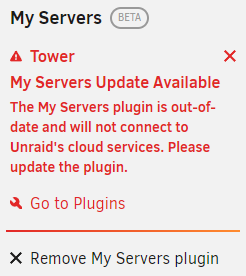
I am receiving a message regarding "My Servers Update Available", and the plugin "will not connect to Unraid's cloud services". I've tried to remove/install the plugin, and that did not fix the issue. Unraid will not create a diagnostic file for me to provide. I also cannot post to the My Servers subforum. Thank you.


-
Might anyone know of an alternate solution so the server won't have to go offline to fix this?
-
okay...I created and mounted a docker volume to the docker container. Within the container, it looks to be similar to using Unraid's "container path". What do I need to do if I want to install software (e.g. nano), and retain it?
-
I'm trying out two dockers that don't exist in CA, so it is a custom template. To make it simpler, I'm now trying just a simple Python container. If I make any Unraid configuration changes to the docker, Unraid gives me a new container ID, and I lose whatever I did within the container. I tried "committing", but that didn't seem to work either. XML <?xml version="1.0"?> <Container version="2"> <Name>python-1</Name> <Repository>python</Repository> <Registry>https://hub.docker.com/_/python/</Registry> <Network>bridge</Network> <MyIP/> <Shell>bash</Shell> <Privileged>false</Privileged> <Support>https://hub.docker.com/_/python/</Support> <Project>test1</Project> <Overview>Python is an interpreted, interactive, object-oriented, open-source programming language.
 
 Converted By Community Applications Always verify this template (and values) against the support page for the container
 
 https://hub.docker.com/_/python/</Overview> <Category/> <WebUI/> <TemplateURL/> <Icon/> <ExtraParams>--interactive --tty</ExtraParams> <PostArgs/> <CPUset/> <DateInstalled>1658618792</DateInstalled> <DonateText/> <DonateLink/> <Requires/> <Config Name="Container Variable 1" Target="LANG" Default="C.UTF-8" Mode="{3}" Description="" Type="Variable" Display="always" Required="false" Mask="false">C.UTF-8</Config> <Config Name="Container Variable 2" Target="GPG_KEY" Default="A035C8C19219BA821ECEA86B64E628F8D684696D" Mode="{3}" Description="" Type="Variable" Display="always" Required="false" Mask="false">A035C8C19219BA821ECEA86B64E628F8D684696D</Config> <Config Name="Container Variable 3" Target="PYTHON_VERSION" Default="3.10.5" Mode="{3}" Description="" Type="Variable" Display="always" Required="false" Mask="false">3.10.5</Config> <Config Name="Container Variable 4" Target="PYTHON_PIP_VERSION" Default="22.0.4" Mode="{3}" Description="" Type="Variable" Display="always" Required="false" Mask="false">22.0.4</Config> <Config Name="Container Variable 5" Target="PYTHON_SETUPTOOLS_VERSION" Default="58.1.0" Mode="{3}" Description="" Type="Variable" Display="always" Required="false" Mask="false">58.1.0</Config> <Config Name="Container Variable 6" Target="PYTHON_GET_PIP_URL" Default="https://github.com/pypa/get-pip/raw/6ce3639da143c5d79b44f94b04080abf2531fd6e/public/get-pip.py" Mode="{3}" Description="" Type="Variable" Display="always" Required="false" Mask="false">https://github.com/pypa/get-pip/raw/6ce3639da143c5d79b44f94b04080abf2531fd6e/public/get-pip.py</Config> <Config Name="Container Variable 7" Target="PYTHON_GET_PIP_SHA256" Default="ba3ab8267d91fd41c58dbce08f76db99f747f716d85ce1865813842bb035524d" Mode="{3}" Description="" Type="Variable" Display="always" Required="false" Mask="false">ba3ab8267d91fd41c58dbce08f76db99f747f716d85ce1865813842bb035524d</Config> <Config Name="Community Applications Conversion" Target="Community_Applications_Conversion" Default="true" Mode="{3}" Description="" Type="Variable" Display="always" Required="false" Mask="false">false</Config> <Config Name="scripts" Target="/scripts" Default="" Mode="ro" Description="" Type="Path" Display="always" Required="false" Mask="false">/mnt/user/user_scripts/</Config> </Container> Command docker create --name='python-1' --net='bridge' -e TZ="America/Los_Angeles" -e HOST_OS="Unraid" -e HOST_HOSTNAME="Tower" -e HOST_CONTAINERNAME="python-1" -e 'LANG'='C.UTF-8' -e 'GPG_KEY'='A035C8C19219BA821ECEA86B64E628F8D684696D' -e 'PYTHON_VERSION'='3.10.5' -e 'PYTHON_PIP_VERSION'='22.0.4' -e 'PYTHON_SETUPTOOLS_VERSION'='58.1.0' -e 'PYTHON_GET_PIP_URL'='https://github.com/pypa/get-pip/raw/6ce3639da143c5d79b44f94b04080abf2531fd6e/public/get-pip.py' -e 'PYTHON_GET_PIP_SHA256'='ba3ab8267d91fd41c58dbce08f76db99f747f716d85ce1865813842bb035524d' -e 'Community_Applications_Conversion'='false' -l net.unraid.docker.managed=dockerman -v '/mnt/user/user_scripts/':'/scripts':'ro' --interactive --tty 'python'
-
Thanks. I'll check into the 10-config.sh. Also, I added this to my "Extra Parameters": --interactive --tty Next, I'm trying to figure out how to retain the docker's content after I update the Unraid config. It seems Unraid wants to recreate the docker, and then I lose whatever I had.
-
I installed a docker, Anonaddy, from Docker Hub via CA. The docker appears installed correctly, and the docker starts. However, the docker exits, and does not stay started/active. How do I keep the docker active so I can log into it? Docker Log: [s6-init] making user provided files available at /var/run/s6/etc...exited 0. [s6-init] ensuring user provided files have correct perms...exited 0. [fix-attrs.d] applying ownership & permissions fixes... [fix-attrs.d] done. [cont-init.d] executing container initialization scripts... [cont-init.d] 00-env: executing... [cont-init.d] 00-env: exited 0. [cont-init.d] 00-fix-logs.sh: executing... [cont-init.d] 00-fix-logs.sh: exited 0. [cont-init.d] 01-fix-uidgid.sh: executing... [cont-init.d] 01-fix-uidgid.sh: exited 0. [cont-init.d] 02-fix-perms.sh: executing... Fixing perms... [cont-init.d] 02-fix-perms.sh: exited 0. [cont-init.d] 10-config.sh: executing... Setting timezone to America/Los_Angeles... Initializing files and folders [cont-init.d] 10-config.sh: exited 1. [cont-finish.d] executing container finish scripts... [cont-finish.d] done. [s6-finish] waiting for services. [s6-finish] sending all processes the TERM signal. [s6-finish] sending all processes the KILL signal and exiting.
-
Might there be an advantage creating a SnapRAID plugin? The advantages: Redundant parity protection, with the advantage of adding snapshot RAID. SnapRAID offers metadata checksum validations, used to determine if there's a parity error versus data drive error.
-
Tribler https://github.com/Tribler/tribler#docker-support
-
I would have guessed the required storage would be pre-allocated when formatted. I also noticed a big difference in initial storage consumption between BTRFS and XFS. XFS took a lot more space. I wouldn't mind learning why XFS needs more space than BTRFS. Not sure if CoW is more efficient than journal, or what presumably makes XFS more robust.
-
When I first started with Unraid I wasn't sure of: ✔ 1) If I was going to stay with Unraid. (though numerous posts about parity errors/recovery make me nervous) ✔ 2) Wasn't completely sure how Unraid was going to work, and I wanted to see how it worked. 3) Which file system I was going to use. Still thinking about going back to BTRFS because I now have UPS, don't use BTRFS RAID features ("write hole"), no frequent file changes in case of an OS failure, and I really like how BTRFS does the scrubs (Dynamix File Integrity gives me false positives).
-
Finally got it to work. I was overwriting a file. Overwriting a file did not work. I had to delete the file. I also had to wait longer than expected for the file to be deleted. If I didn't wait long enough, the file would instantly reappear when trying to copy. Once deleted, and I wait for < 1 minute, I could copy the file. I don't know if the splitting is working as expected. Not only did I run out of space, but it left partial files on the target. Those files could not be overwritten (run out of storage errors). My guess is Unraid doesn't reallocate when overwriting files, even when the Minimum Free Space changes. And since the existing files were partial files, they would never get reallocated to the disk with free space. Unraid would just keep trying to writing the same file to the same disk, therefore get the same error. To resolve this, it requires manually deleting the file.
-
Still no success. I set the Minimum Free Space to 1.5 GB for a 370 MB file.
-
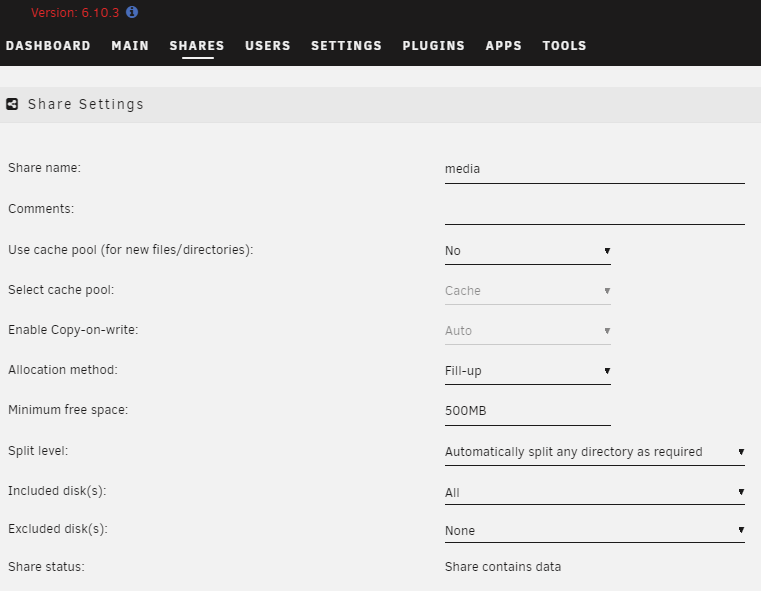
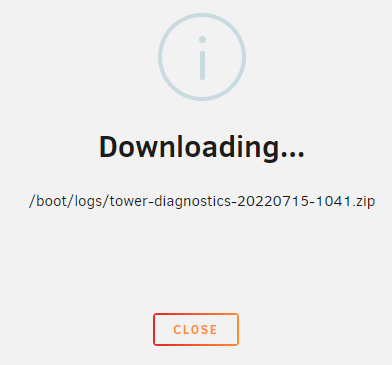
I'm getting a "There is not enough space" error trying to copy a file from Windows to Unraid share. For some reason Unraid is filling up Disk 1, but won't use Disk 2. In the Share Settings, the Minimum free space was 0KB, and I changed it to 500MB. I would expect Unraid to start using Disk 2 because there is only 209KB free on Disk 1. I cannot provide a Diagnostics file, because Unraid is stuck on "Downloading"

-
How do I safely cleanup my cache drive from uninstalled/removed Dockers? I can see old Docker folders appdata folder. Is there a better/safer option than manually deleting the folder? I also install multiple containers, so it's not exactly as obvious and idiot proof as looking at the folder name. Also, how do I get Unraid to always delete the Docker folder so I don't have to clean it up later?
-
What's the difference between SmarPhoneLover's repository, and binhex, linuxserver, hotio?
-
My answer, XFS. Why? It is the official Unraid recommendation (and since I know near nothing about the technical details, this is vitally important to my decision). XFS's better recovery is more important than BTRFS builtin checksum/scrubs (preventing the need for a recovery). If this does change, please let me know. I do prefer the concept of BTRFS: Built-in automatic checksum metadata. Potential future advantages that Unraid may adopt. Portable (not dependent on proprietary platforms or 3rd party checksum utilities). Though I do wonder since Synology's Hybrid Raid uses BTRFS, then perhaps BTFRS's reliability is on par with XFS. Notes: My system is for photos and video, not professional use. Keeping my data safe, easily recoverable, prevention, and idiot proof, is very important.
-
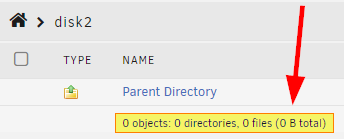
I have a hard drive that says there's 41.9 GB used space. However, when I view/browse the drive, there's zero objects. Is this normal? What is the 41.2GB used for? Is my drive empty or not? More info: I recently moved objects from Disk2 to Disk1 (via mc). Thanks.

-
source: https://unraid-guides.com/2020/12/09/what-is-the-best-filesystem-for-unraid/ I'm not an enterprise/business customer, and I'm not doing a lot of writes to the parity. I also use a UPS, so my system should shutdown cleanly. Therefore I don't think I'll have any of the risks that were mentioned. I do like that Btrfs can check data integrity, but so does the Dynamix File Integrity plugin. Though Btrfs is built-in and fool proof.
-
Anonaddy "Anonymous Email Forwarding" https://hub.docker.com/r/anonaddy/anonaddy/ https://github.com/anonaddy/docker
-
Does the plugin also inform the user of best practices to prevent common problems? For example: UPS (and configured correctly) Dynamix File Integrity plugin (installed and scheduled) ECC Memory Not sure if I'm missing anything else. Maybe potential filesystem issues (btrfs vs. xfs recommenations).
-
How easy is it to setup my array to use BTRFS RAID1 for the data drives? Is it as simple as: 1) Add 2 drives (drives can be different sizes). 2) Format btrfs 3) And Unraid automatically figures out the rest.
-
"Unraid team did discuss executing a correction run automatically after each unsafe shutdown. Because it is so common to have these issues after unclean shutdown. But in the end it was decided against it." How often do these data/parity problems happen? If SMART errors start showing up, does parity stop too? If there's an unclean shutdown, does Unraid know it's unclean? If there's errors, does unraid stop parity until resolved? How many of the problems could have been prevented by using ECC memory and UPS?




