





Gerben321
Members
-
Joined
-
Last visited
Everything posted by Gerben321
-
No folders are shared, that's the first thing I checked.
-
Since a few days I'm getting this error: [18.05.2025 04:46:57][❌][Jellyfin] tar verification failed! Tar said: tar: Removing leading `/' from member names; mnt/user/appdata/Jellyfin/plugins/Trakt_26.0.0.0/meta.json: Mod time differs; mnt/user/appdata/Jellyfin/plugins/Trakt_26.0.0.0/jellyfin-plugin-trakt.png: Mod time differs; mnt/user/appdata/Jellyfin/plugins/Kodi Sync Queue_14.0.0.0/meta.json: Mod time differs; mnt/user/appdata/Jellyfin/plugins/Kodi Sync Queue_14.0.0.0/jellyfin-plugin-kodisyncqueue.png: Mod time differs; mnt/user/appdata/Jellyfin/plugins/Playback Reporting_16.0.0.0/meta.json: Mod time differs; mnt/user/appdata/Jellyfin/plugins/Playback Reporting_16.0.0.0/jellyfin-plugin-playbackreporting.png: Mod time differs Is there something I can do to fix this? It's giving me errors every time I backup.
-
Did you ever get it working? I've facing the same issue.
-
Thanks for testing. I have managed to get it working. I have mapped /data to /mnt/disk1/minio to prevent it from erasing anything else on the disk. Seems to work just fine. I have one disk right now, and when I have two disks, I will try to get that working as well. I have read about the {1..4} way of mapping it, so I will give that a try then. Unfortunately I will have to rebuild the data, but that's no disaster since I am using it for a remote Synology NAS backup right now. I will post updates when the time comes with news.
-
Cheers. I'm basically looking for a way to easily host S3 on my unraid machine. Minio seems to be the way to go, so I was disappointed to read it didn't work 'normally'. Alternatives are Garage or SeaweedFS, but little to no info about that regarding usage on Unraid. I'll do some digging on that. Thanks in advance and let me know what you find out
-
Little bump, but using /mnt/disk1 would be the fix for Mino, right? But how about when using multiple disks? Right now I have a single 14TB disk but I am planning to buy a second for parity. Can't you like also add disk2 to the docker so Minio will use it? Or isn't it that simple? Also, can you select where to store the data when using /mnt/disk1? I obviously don't want Minio to erase stuff on there. How about a Virtual disk? Would that be real slow?
-
Does this have something to do with it? I've mounted a samba drive between both my servers and added them to the docker containers. https://github.com/borgbackup/borg/issues/6786 Not sure which version of Borg and Vorta are being used in the latest version. But for now going back to the previous patch/version solves it.
-
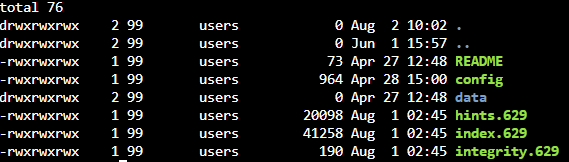
There was a recent Vorta update and since then both my systems no longer seem to backup. I get an error like this: PermissionError: [Errno 1] Operation not permitted: '/myfoldername/backupfolder/nonce-lkaa0h5v.tmp' The weird thing is that the nonce file is created, and it has content. So I'm not sure what's going on here. This is the permissions. When I change user or permisson I get a permission error in the Vorta frontend, but with this one I just get a super big error in the frontend, and only the permission line in the docker logs. I can see all folders and files in the GUI, and I can see the archives and all stuff like that. edit: Went back to tag 431f3e0 and both machines work great.
-
Thanks, I tried to force a refresh and hoped that it would clear the cache, but it didn't. Good to know it's still working.
-
When I go in Unraid the WebUI button does no longer work. I now have to use a VNC app to view Vorta via port 5900. Port 5800 shows it's disconnected. What has changed here?
