





Everything posted by unRaiderX
-
It's to much, I can't get the logs from the beginning
-
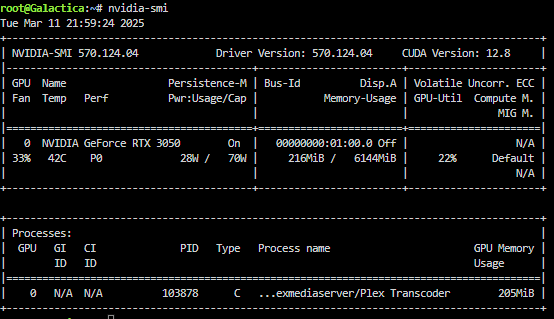
unRaid 7.0.1 And it's transcoding, so nothing wrong with the card I believe
-
Didn't help. tried another browser too, still the same
-
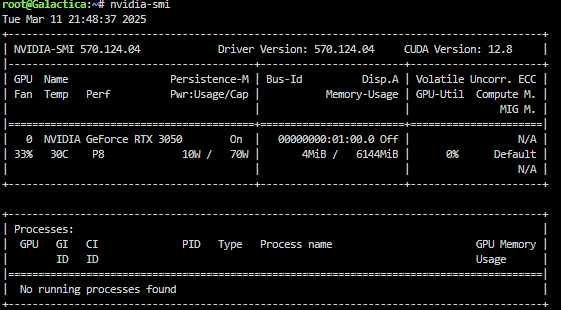
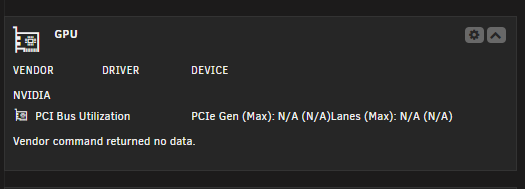
After the latest update I lost my 3050 info from the GPU statistics:
-
Hi, I just notice that after I upgraded to version 7. And removed my Array disk(SSD) and moved them to Pool Device, I still have the "Spin down" mark. The "Spin down" functions should only be available on normal spin disks?
-
Today my Tautulli start reporting problems and i'm on unraid version 7(updated the day it was released). It has been working fine since, but now. Tautulli can't connect to my plex server. Plex server is working fine locally and public. 2025-02-01 19:01:40 - ERROR :: ThreadPoolExecutor-2_0 : Failed to access uri endpoint /status/sessions. Connection error: HTTPSConnectionPool(host='10-10-20-20.xxxxxxxxxxxxxxxxxxxxxxxxxxxxxxxxxxx.plex.direct', port=32400): Max retries exceeded with url: /status/sessions (Caused by NewConnectionError('<urllib3.connection.HTTPSConnection object at 0x14b92ea36540>: Failed to establish a new connection: [Errno -3] Try again')) 2025-02-01 19:01:40 - WARNING :: ThreadPoolExecutor-2_0 : Tautulli Pmsconnect :: Unable to parse XML for get_current_activity: 'NoneType' object has no attribute 'getElementsByTagName'. 2025-02-01 19:01:40 - DEBUG :: ThreadPoolExecutor-2_0 : Tautulli Monitor :: Checking for active streams. 2025-02-01 19:01:40 - DEBUG :: ThreadPoolExecutor-2_0 : Tautulli Monitor :: Unable to read session list. 2025-02-01 19:01:40 - INFO :: Thread-326 (run) : Tautulli WebSocket :: Opening secure websocket. 2025-02-01 19:01:45 - ERROR :: Thread-326 (run) : Tautulli WebSocket :: [Errno -3] Try again. 2025-02-01 19:01:45 - INFO :: Thread-326 (run) : Re-scheduled background task: Check for server response 2025-02-01 19:01:45 - DEBUG :: Thread-326 (run) : Tautulli WebSocket :: Leaving thread.
-
Hi there, Do you have a screenshot of your NUT settings of your PowerWalker/BlueWalker you are using. You like to share? I do have PowerWalker/BlueWalker but stop using it on unraid since mine stops after som days. Hopefully I can try again, but i don't remember the settings I was using. Like to share your settings?
-
Good to know So I can upgrade back to 7 again. You don't need me to do some tests?
-
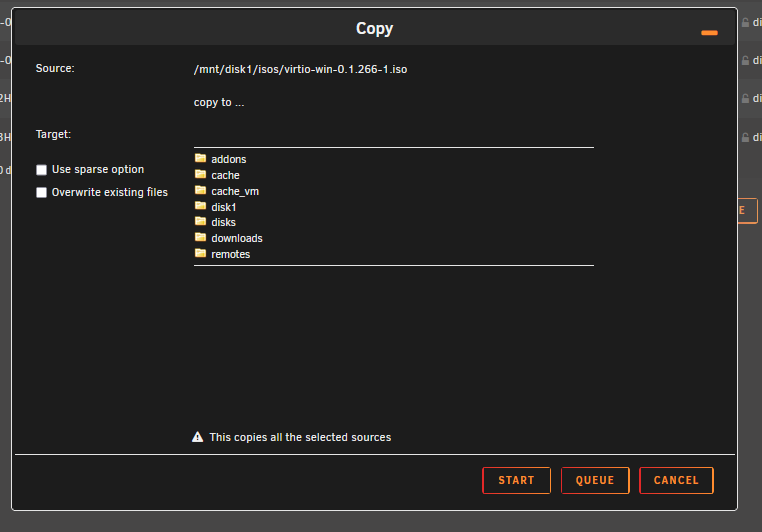
Yes that was from my download pool SSD disk... I can try from Array this is from Array disk: Copy iso file to ... And you can still see remotes
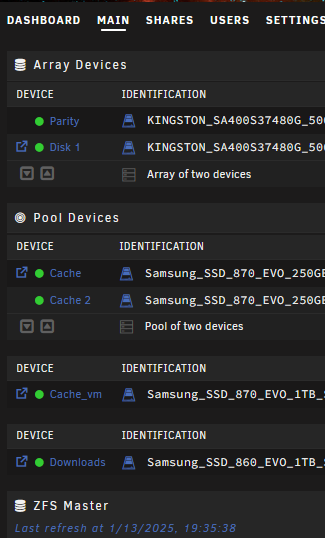
-
I just took the risk for you and me. I rolled back to 6.12.14. Here is the prof:
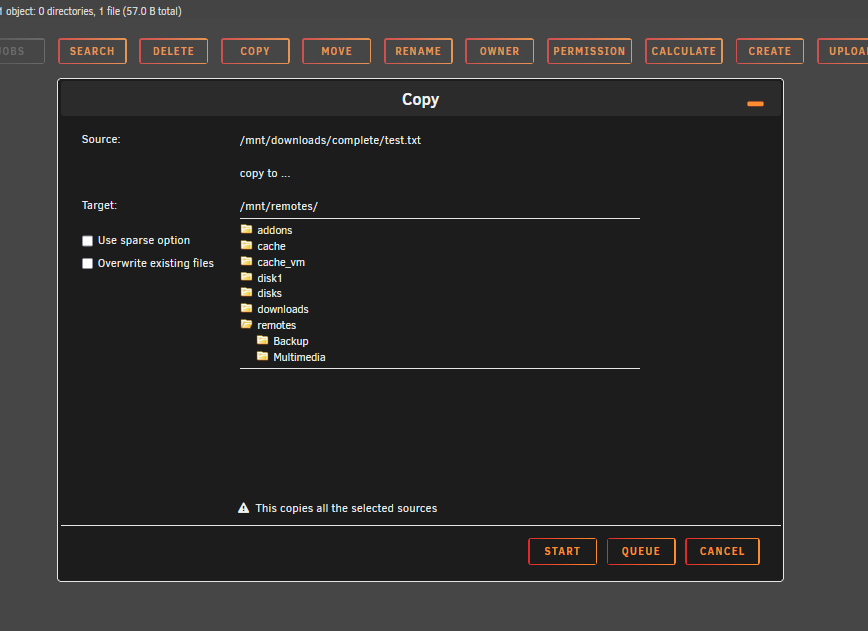
-
Yeah, It may be confusing, but I'm telling you that I could copy/move files from the File Manager before. And like you say, now I need to type the /mnt/remotes/ manually since I can't pick that anymore for my containers. Is this a bug or it going to be like this now?
-
total 0 drwxrwxrwt 4 nobody users 80 Jan 13 09:27 ./ drwxr-xr-x 12 root root 240 Jan 13 09:05 ../ drwxrwxrwx 2 nobody users 0 Apr 6 2023 Backup/ drwxrwxrwx 2 nobody users 0 Dec 20 20:10 Multimedia/ Nice to see this is some kind of bug with the picker like you say has been changed in version 7. Just let me know if you like me to roll back.
-
@dlandon You like me to roll back to 6.12.14 ?
-
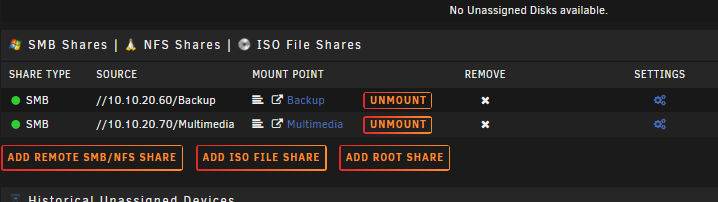
Should be there when you add a "add remote smb/nfs share" Like I have two remote NAS. Then it but the shares under automatic /mnt/remotes/ The mount point was automatlic added under the share/mount point /mnt/remotes/ like this: /mnt/remotes/Backup and /mnt/remotes/Multimedia They both are gone from File Manager and from all the containers that i like to point to remote share. All gone after upgrading to unraid 7.
-
Hmm, well this mean I have to roll back to 6.12.14 from 7. I hope this now crash anything on my system. So I can show you that i had access ti /mnt/remotes from "File manager" and also same path i can choose from my containers also. This is gone, but like I wrote earlier is working under the hood. So that's why I didn't notice this issue until I was going to copy some files over to my NAS (remote)
-
I had it on version 6.12.14. Just gone in v.7.0.0 I could copy/move files from my download disk to /mnt/remotes/.........
-
Wont let me unregister my server. I like to change my server name, but still stuck on the old one. Probably b'cos i need to unregistered and sign in again. But it won't let me. EDIT: Mange to sign out now... Just took very long time.
-
I know that But what if you need manually to copy one file from download into your remote NAS, under lot of folder. I do have lot of subfolders. Hopefully they going to fix this
-
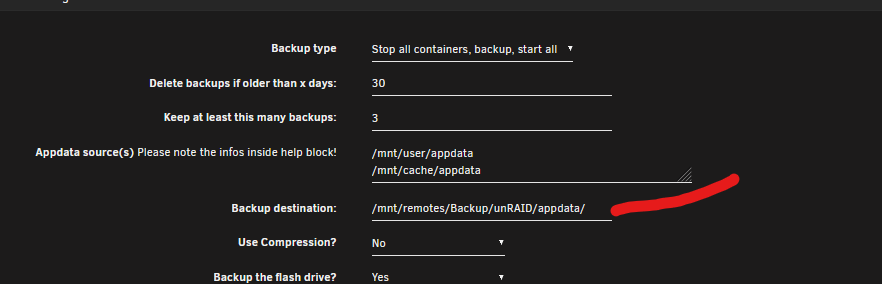
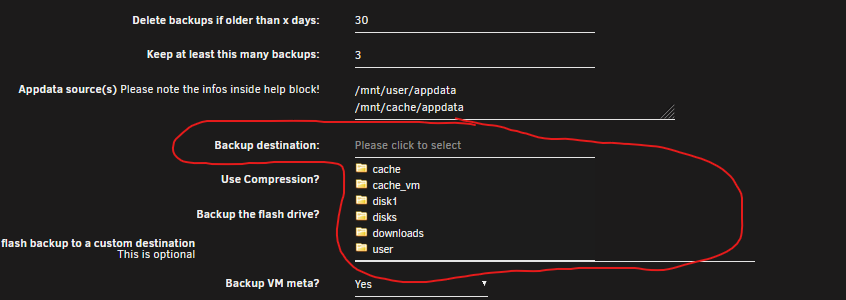
Yes please, I hope you come out with a solution here. This is going to be problems with some containers that need a valid path. For some reason all my ....arr's and Plex are still working. But if you remove the path and try to add it again, It's gone. So you need to remember your remote patch... /mnt/remotes/media/ I have to NAS, one BACKUP and MEDIA. Let's hope the backup is working, I'm using "Appdata Backup" And if I remove the destination, I can't choose my remote backup location
-
Hi, are you telling me this has just been removed in unraid v.7.0.0? Never had this problem before.
-
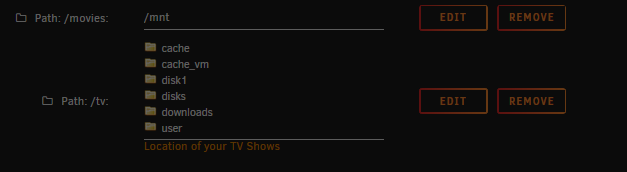
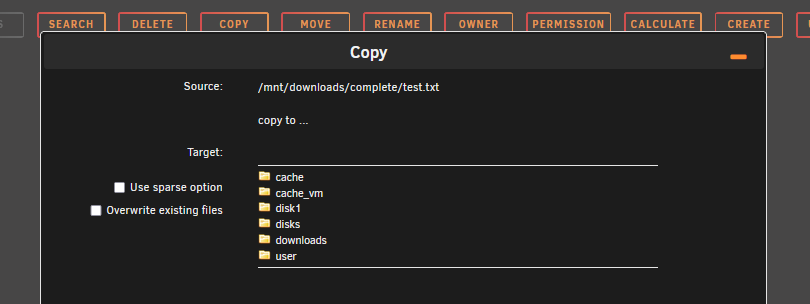
Same problem, I just notice that i was going to copy some files from unraid over to my NAS i couldn't fine the remote folder "remotes" So no way to copy. I'm glad the share is working under the hood. B'cos I do have Plex, and lot of arr's that are using /mnt/remotes/............ etc. Look at the image, the remotes folder is gone. And here i'm trying to cope a file from unraid to my NAS that was located under the remotes folder. Is now gone. Any idea how to fix this?
-
I had to replace my 2GB USB stick with an 8GB I had.
-
Updated and have been running stable for 3 hours now. No errors
-
Yeah, My USB Drive was to small, the system requirements says min 2 GB I just changed to an 8GB USB Drive, license transfare was successfully. https://docs.unraid.net/unraid-os/manual/changing-the-flash-device/
-
Sorry to hear that My case I had to small USB drive. 2 GB was not enough.


