





TimTaylor
Members
-
Joined
-
Last visited
Everything posted by TimTaylor
-
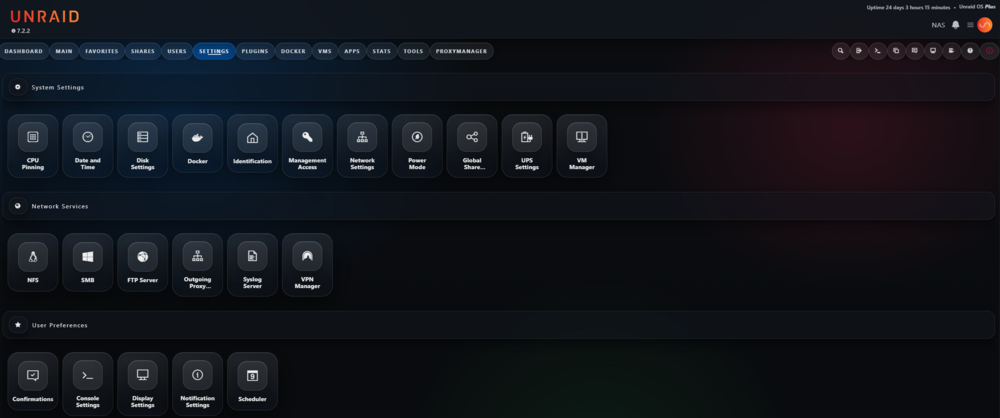
Its not done at the moment, and has some bugs 🥲. When i finish it, i will post the CSS here 😉.
-
Actually im trying to create a little glassy UI theme 🙂
-
Its a docker container (crazymax/fail2ban:latest), and it reads the NPM logs. It also seems to detect something but that jail thing i dont understand...how can the docker set the bans to the real unraid system. I think that config action = iptables-multiport[blocktype=DROP] and banaction = ufw seems to be the problem.

-
I wonder how fail2ban is really banning ips in unraid with this config. [npm] backend = auto enabled = true port = 80,443 protocol = all filter = npm maxretry = 5 ignoreip = 127.0.0.1/8 192.168.50.0/24 action = iptables-multiport[blocktype=DROP] bantime = 48h findtime = 400m logpath = /var/log/default-host_*.log /var/log/proxy-host-*.log banaction = ufw Is that the right way or do i have to use another config?
-
I ordered this one: https://www.digitec.ch/de/s1/product/startech-adap-startech-4-port-m2-to-sata-adapter-card-kontrollerkarte-47861180?supplier=406802 Seems to be based on ASMedia ASM1064 But i have read on some reddit posts, that this one should also work: https://www.digitec.ch/de/s1/product/startech-com-sata-pcie-controller-8-port-storage-controller-17703987 I dont know, i got my 110 Mbits on lan. Actually i have no test app for this
-
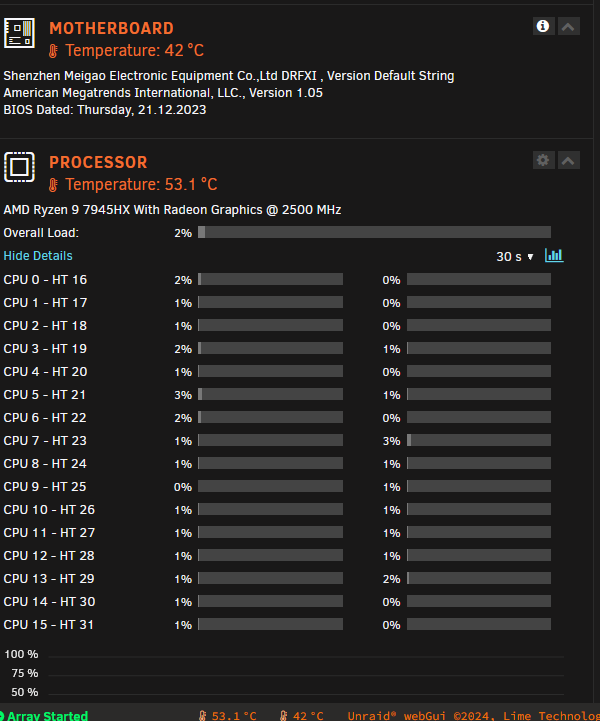
I got the Board too meanwhile and it seems to work great, for sata i use a nvme adapter from Startech.
-
Hey everyone, Has anyone tried running Unraid on the Minisforum BD790i or BD790i SE motherboards? Specifically, I'm curious about: Hardware compatibility: Are there any known issues with the onboard NIC, SATA controller, or other components? Driver support: Does Unraid have good driver support for the Ryzen 9 7940HX/7945HX processors and the X670E chipset? Stability: Have you experienced any stability issues, such as kernel panics or random reboots, while running Unraid on this board? Performance: How is the overall performance of Unraid on this platform, particularly for NAS use cases (file sharing, media streaming, etc.)? If you have any experience or insights to share, please chime in! Any information would be greatly appreciated. Thanks in advance!
-
Tried to install this on a custom br0 network with ip 192.168.0.251. Webinterface is not working, it gives error if i click something: Error code: 100 Message: Problem with connection to remote host. cURL error 0: .
-
Thank you, worked out very well
-
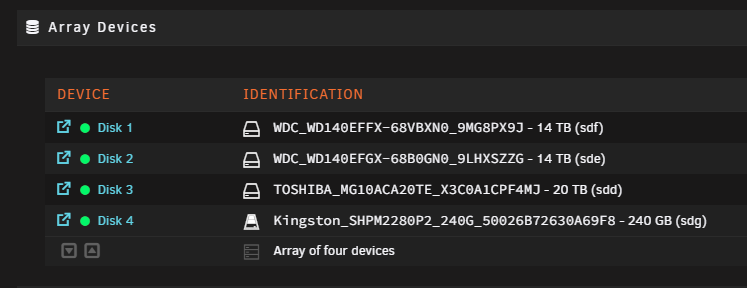
Will that new config kill any configuration? Or is there something i have to do with this? Never used new config.
-
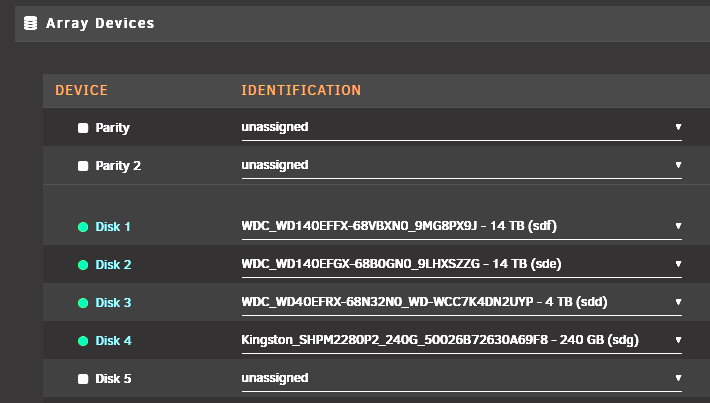
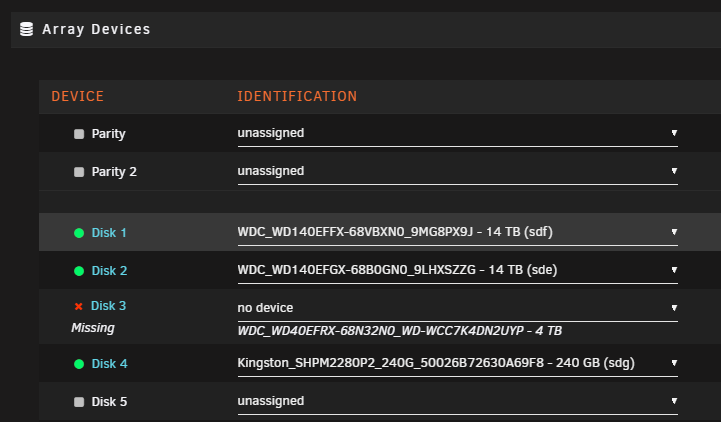
Hi there, i want to exchange a disk at my unraid server. But i dont understand what problem there is going on. I want to replace disk 3 with an new 20TB disk, if understand it right if have to set it to "no device" But then it says missing, if i now install the new disk and reboot, then add it to disk3 it says wrong? What am i missing here?
-
i repaired the cache with that btrfs command, so its working again. I will have a look on it. Thank you for the help.
-
i dont think its the ram, the nas was working for years without problems. and since 1 year on unraid. So i guess its the update it self. But i will try to repair ist like this.
-
Im copying the whole data from the cache at this time with midnight commander, it runs since 2 hours now. It seems to be only sdc1 which is the cache drive. Can i reformat it or make it to a zfs drive (seems btrfs is crap, and the error comes back like i read in another post) and then copy the data back?
-
I tried to revert to 6.11.5 but that didnt worked, so im back to 6.12.3. I cant start any docker any more, the cache drive seems to have errors cause of that 6.12 version and is now in read only mode. I really need help now. here are the actual diagnostic files: nas-diagnostics-20230802-1709.zip
-
I dont get it. The only thing i see there is: If i do this:
-
Actually i did revert do 6.11.5, now dockers are not starting anymore Im getting crazy with this
-
Same problem with 6.12.2 and 6.12.3 ... my nas is now broken cause i cant get back to 6.11
-
Edited: Because NGINX was not the problem
-
Hello all, since yesterday suddenly the docker system of unraid is buggin garound. The Dockers are started but only partially accessible. I have already restarted Unraid last night, then it worked briefly and now again the same. I don't understand what the problem is all of a sudden. Anyone sees the problem here? Seems the cache drive have problems? nas-diagnostics-20230802-1321.zip
-
How can i delete wrong entries in the list of folders? The plugin shows folders of fail2ban which are releated to another docker and not fail2ban for example.
-
Hi there, i run a nextcloud docker and installed a OCR plugin. This plugin needs 2 things installed: run apt-get install ocrmypdf tesseract-ocr-deu How can i automate this on updates of this container? Thank you for help :)
-
That would be great
-
Actually i just see which packages are installed, but i dont see who need this packages really. So if i update it maybe break something to hell then ?
-
is there a possibility to check what ressources of the nerdpack are used by the current unraid setup?




