





Neight
Members
-
Joined
-
Last visited
Everything posted by Neight
-
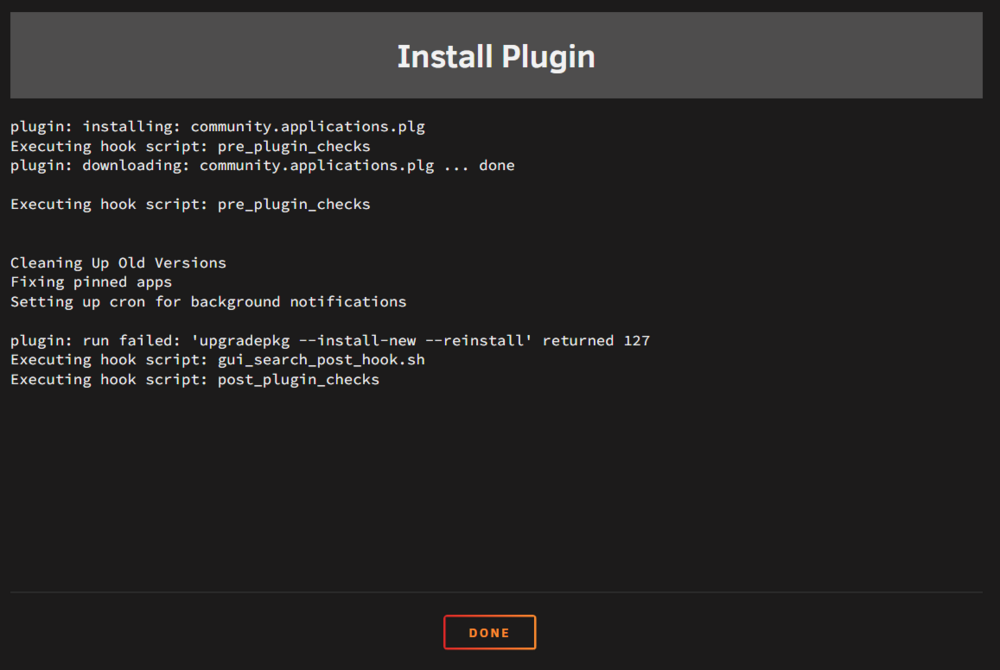
Tried to update CA, now i have no app store and get this error. Running 6.12.13 plex-diagnostics-20250309-2358.zip
-
How would I go about testing the GPU or what should I do next to try and determine the issue?
-
Update, it crashed again. Getting a ton of GPU errors no USB errors this time. plex-diagnostics-20241211-0232.zip syslog-192.168.86.135 (1).log
-
Phase 1 - find and verify superblock... Phase 2 - using internal log - zero log... ALERT: The filesystem has valuable metadata changes in a log which is being destroyed because the -L option was used. - scan filesystem freespace and inode maps... clearing needsrepair flag and regenerating metadata sb_fdblocks 664250044, counted 653904990 - found root inode chunk Phase 3 - for each AG... - scan and clear agi unlinked lists... - process known inodes and perform inode discovery... - agno = 0 - agno = 1 - agno = 2 - agno = 3 - agno = 4 - agno = 5 - agno = 6 - agno = 7 - agno = 8 - agno = 9 - agno = 10 - process newly discovered inodes... Phase 4 - check for duplicate blocks... - setting up duplicate extent list... - check for inodes claiming duplicate blocks... - agno = 0 - agno = 1 - agno = 4 - agno = 3 - agno = 7 - agno = 6 - agno = 2 - agno = 5 - agno = 8 - agno = 9 - agno = 10 clearing reflink flag on inodes when possible Phase 5 - rebuild AG headers and trees... - reset superblock... Phase 6 - check inode connectivity... - resetting contents of realtime bitmap and summary inodes - traversing filesystem ... - traversal finished ... - moving disconnected inodes to lost+found ... Phase 7 - verify and correct link counts... Maximum metadata LSN (5:3967141) is ahead of log (1:2). Format log to cycle 8. done
-
xfs_repair status: Phase 1 - find and verify superblock... Phase 2 - using internal log - zero log... ERROR: The filesystem has valuable metadata changes in a log which needs to be replayed. Mount the filesystem to replay the log, and unmount it before re-running xfs_repair. If you are unable to mount the filesystem, then use the -L option to destroy the log and attempt a repair. Note that destroying the log may cause corruption -- please attempt a mount of the filesystem before doing this.
-
I have restarted to install new sata cables. So I don't know if what you need is in there. plex-diagnostics-20241204-1208.zip
-
I had two drives fall offline recently. Disk 1 is showing up after a reboot, disk two must be rebuilt (which I'm doing now) disk 1 extended smart test showed no errors. I had one spare sata cable and replaced the for for disk 1 just in case that was the issue, I'm going to replace the one for disk 2 ASAP. just seeing if anyone has any insight. Thanks in advance! syslog-192.168.86.135.log
-
no system crashes as of yet after changing USB
-
Will do.
-
Ok I'll replace the flash drive and report back after a week or so. Are the GPU errors nothing to worry about or do you have some insight into them?
-
So I updated from 6.11.5 to 6.12.13 recently and I've had crashes every few days, it hard locks and my only option is to hold the power button to hard restart it. Not %100 sure what I'm looking at in the logs, but it seemed it may be something to do with my GPU. It's a GTX 3060. When I did the update I was promoted with something to do with Nvidia GPU's I believe and I think it said everything was good to go before I restarted and finalized the update. When I was on 6.11.5 I had absolutely no problems at all and it never crashed. Other than that there's been no changes of any kind. The only thing that changed was the unRAID software. Any help is greatly appreciated. syslog-192.168.86.135.log
-
There is a possibility that my NVMe pins on my motherboard are toast which is why it was dropping offline. I've switched to SSD cache drives now with no problems. Any idea what to look into about the update causing problems?
-
Ok so I had a friend tell me that I also upgraded to 6.12.somthing when these problems started happening. So before you posted that I downgraded to 6.11.5 and all my problems went away. Not a single error in a week now, and no crashes. Here is the diag before the downgradeplex-diagnostics-20230925-1532.zip and one from todayplex-diagnostics-20231002-2111.zip.
-
Ok it crashed again. When I had it running again this morning the log was full of NVMe errors that didn't get logged into the syslog again. I think I have it setup wrong so that's my bad. So I replaced it with an SSD. Now I'm getting the cache drive is read only and can't run Dockers. I also included the diag from just now incase it has any useful information. syslog-192.168.86.135.log plex-diagnostics-20230924-1103.zip
-
Will do. If it's going to crash again it would be in two to three days. I did replace it with a smaller NVMe so if the crashes don't come back it was the issue and I'll be back in a week to update this post. I hope not. Could you quote which issue you're having specifically? Because I'm not exactly sure what my problem is just yet lol.
-
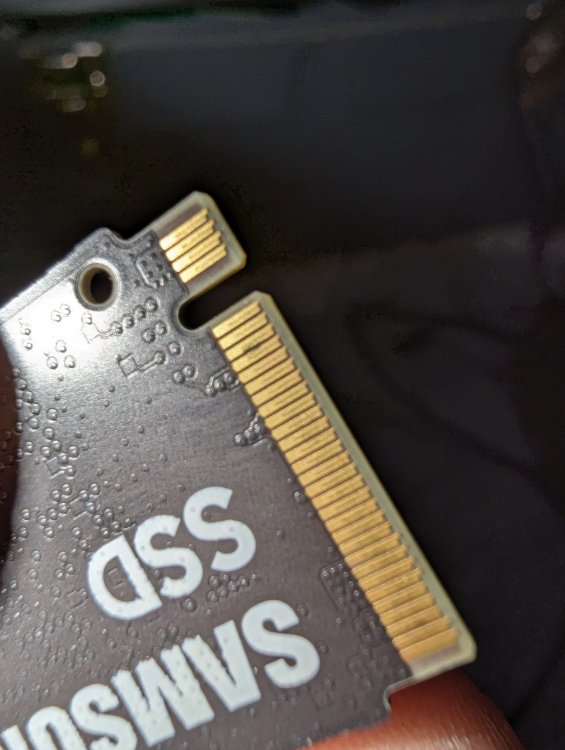
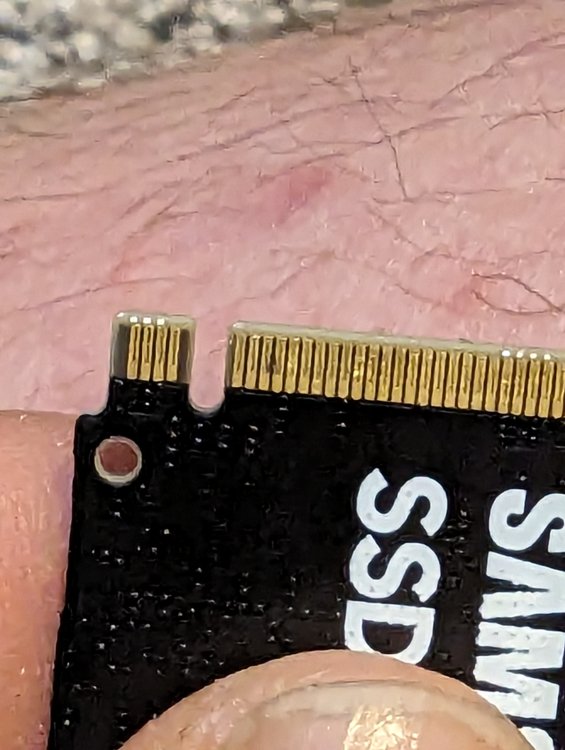
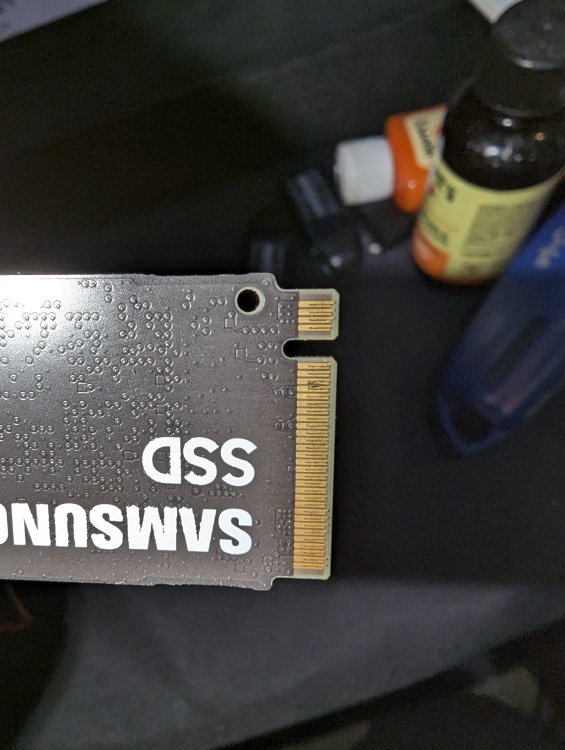
I believe that solved those errors a posted here I've still been having random crashes every two days or so. The last time that it crashed I was able to get back home before it fully froze up and it was showing a bunch of SATA connection errors. After I was able to get the system rebooted none of those errors were logged into the sys log. After taking my NVMe drive out I noticed this. Also, over the last few weeks I've been having a lot of NVME temperature warnings while seemingly nothing that should be taxing the drive is going on. Is it a possibility that this NVMe drive is dead? I tried washing it off. It's not a smudge. I know it's a little bit difficult to see but I tried to get several pictures and that's the best I could get.
-Brave9_5_20236_30_58PM.thumb.png.ef21c8383605374f65d27cafeeeeb984.png)
-
Thanks I'll try this after work today and follow up.
-
My log is filled with this as well if that helps.
-
Ok it crashed again and I had syslog running. It's different this time. All the dockers are still running but the unRAID GUI is unreachable. I did not test to see if Plex could access files so I don't know how much was actually working. My unRAID server is also called Plex just FYI. I do believe that this is not anonymous so after someone views it should I take the file down or does it not contain sensitive information? syslog-.log
-
Damn I was unaware of this. Well I hope the network card was the problem then or I'll be back in a day or so.
-
Not much more to add to the title except after it's unresponsive I have to power off and on by holding the power button and, some of the hardware changes that I have made. I swapped out a SATA PCIe card that I have had no issues with for months with a 2.5gbps network card and rearranged where the hard drives are plugged in because of that. After that the problems started. I have just uninstalled the the new network card and reinstalled the SATA card and put all the hard drive back where they were before to see if that solve the problem. Is there anything in the diagnosis anyone can tell me about why this is happening or if it is even related to the network card? plex-diagnostics-20230830-2033.zip
-
Had the same issue. I switched from binhex delugevpn to qbittorrent (because I didn't come here first) to see if that would work and it did for a few hours the same thing happened. It's working now that I deleted line 20.
-
Thank you so much the drive is back! I legit had a heart attack when it was showing as unmountable. My dockers are all gone now though (I only run plex so its not a big deal) ive never done a new config is this normal?
-
Also because the original problem was with my parity disk I do not have a backup of the data on the disk 3.
-
Ok so I was able to get the drive to show back up after trying every sata cable arrangement. Now one of my drives is showing up and unmountable or unsupported file system. I connected the drive to my windows pc and used DiskInternals to view the drive, and it shows up as XFS files system and still has data on it. plex-diagnostics-20221026-1023.zip



-Brave9_5_20236_30_58PM.png.5acf528971ef207b5ba77a28a071b76a.png)


