





NEURO
Members
-
Joined
-
Last visited
-
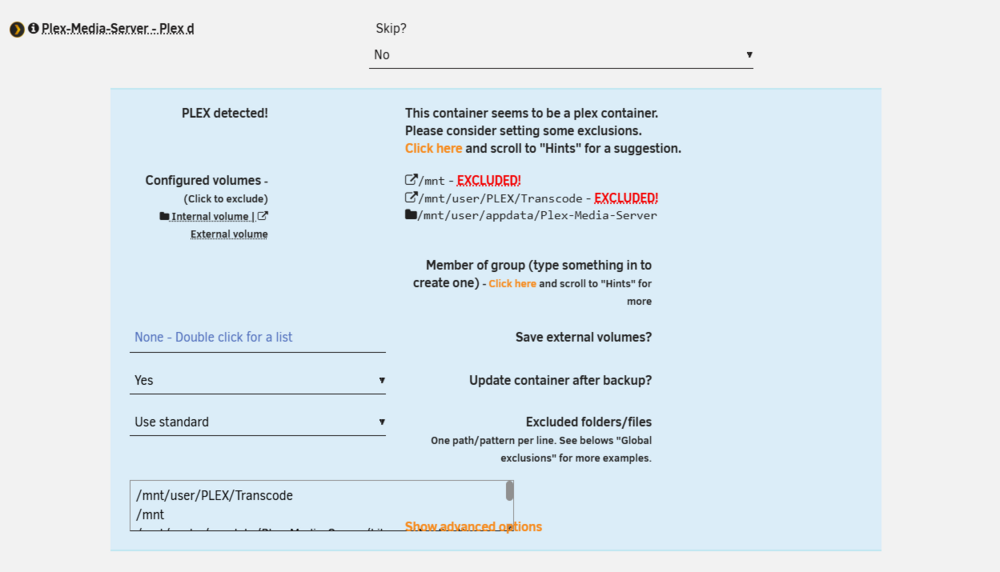
Plex Backup issues - Appdata Backup BETA (2025.09.17b1) - Giant backup sizes & Verification ErrorsHello everyone, I am experiencing a critical issue with the latest Beta version of the Appdata Backup plugin (2025.09.17b1) on Unraid 7.2.3. As a SysAdmin, I've tried to debug the situation, but I've encountered a loop that makes the backup either massive (355GB+) or completely empty (0 bytes). The Environment: Unraid Version: 7.2.3. Plugin Version: 2025.09.17b1 (Beta). Affected Container: Plex-Media-Server (official plexinc/pms-docker). Mapping: I have /mnt mapped to /data:rw within the container for media access. The Issues: Massive Backup Size: When I tried to perform a manual backup, the process attempted to include the external volume /mnt. Even though I explicitly added /mnt and /mnt/user/PLEX/Transcode to the "Excluded folders/files" list, the log showed: Backing up EXTERNAL volumes, because its enabled!. This resulted in a 600GB+ backup file before I had to manually abort the process to prevent disk exhaustion. Verification Failure: When the backup does complete for other containers or a smaller Plex set, I frequently get: tar verification failed! Tar said: tar: /mnt/user/appdata/Plex-Media-Server: Not found in archive. It seems like the verification engine is having trouble with the internal pathing or the sheer number of small metadata files in the Plex directory. UI/Logic Conflict: In the container settings, I noticed that the "Save external volumes?" option seems to override the exclusion list or behaves inconsistently when multiple paths are mapped. If I exclude everything to avoid the 355GB size, the backup finishes in 0 seconds with no data saved at all. Log snippet of the failure: Plaintext ][Plex-Media-Server] Backing up EXTERNAL volumes, because its enabled! [04.02.2026 07:30:46][debug][Plex-Media-Server] Container got excludes! /mnt, /mnt/user/PLEX/Transcode... [04.02.2026 07:30:46][ℹ️][Plex-Media-Server] Backing up Plex-Media-Server... [04.02.2026 07:30:46][X][Plex-Media-Server] tar verification failed! Questions: Is there a known issue where "Save external volumes = Yes" completely ignores the exclusion of the root /mnt path? Why does the verification fail with "Not found in archive" even when the .tar.zst file was just created? Any help or guidance would be greatly appreciated. I'm trying to keep my appdata backups lean and synced to the cloud via rclone, but this Plex behavior is currently blocking my automation. Best regards,
-
I have the same problem, apparently I get that message through Windows 11 VM, even checking Windows, after a while the memory becomes saturated, occupying 100% of the memory and the unraid log fills up. Jan 24 00:19:55 NAS-NEURO nginx: 2024/01/24 00:19:55 [error] 10248#10248: nchan: Out of shared memory while allocating message of size 41958. Increase nchan_max_reserved_memory. Jan 24 00:19:55 NAS-NEURO nginx: 2024/01/24 00:19:55 [error] 10248#10248: *1961026 nchan: error publishing message (HTTP status code 500), client: unix:, server: , request: "POST /pub/notify?buffer_length=1 HTTP/1.1", host: "localhost" Jan 24 00:19:55 NAS-NEURO nginx: 2024/01/24 00:19:55 [error] 10248#10248: MEMSTORE:00: can't create shared message for channel /notify Jan 24 00:19:58 NAS-NEURO nginx: 2024/01/24 00:19:58 [crit] 10248#10248: ngx_slab_alloc() failed: no memory Jan 24 00:19:58 NAS-NEURO nginx: 2024/01/24 00:19:58 [error] 10248#10248: shpool alloc failed Jan 24 00:19:58 NAS-NEURO nginx: 2024/01/24 00:19:58 [error] 10248#10248: nchan: Out of shared memory while allocating message of size 41958. Increase nchan_max_reserved_memory. Jan 24 00:19:58 NAS-NEURO nginx: 2024/01/24 00:19:58 [error] 10248#10248: *1961059 nchan: error publishing message (HTTP status code 500), client: unix:, server: , request: "POST /pub/notify?buffer_length=1 HTTP/1.1", host: "localhost" Jan 24 00:19:58 NAS-NEURO nginx: 2024/01/24 00:19:58 [error] 10248#10248: MEMSTORE:00: can't create shared message for channel /notify Jan 24 00:42:53 NAS-NEURO mcelog: Running trigger `bus-error-trigger' (reporter: bus) Jan 24 00:42:53 NAS-NEURO kernel: mce: [Hardware Error]: Machine check events logged
-
I RECENTLY CHANGED MY SERVER FOR A Dual Core x99 With 2 Intel Xeon E5-2650L v3 Processors But This Error Has Become Very Recurring In My Simple View Logs It Has Worked Well But The Logs Are Filling Up Due To This Error: Jan 18 10:09:02 NAS mcelog: Running trigger `bus-error-trigger' (reporter: bus) Jan 18 10:09:02 NAS kernel: mce: [Hardware Error]: Machine check events logged Jan 18 10:09:02 NAS mcelog: CPU 0 on socket 0 received Bus and Interconnect Errors in Other-transaction jan 18 10:09:02 NAS mcelog: Location: CPU 0 on socket 0 please help this is my diagnostics file: https://drive.google.com/file/d/1L4L7QrSUxxK1rolZ4Bus8RlrRhpZEnHg/view?usp=sharing
-
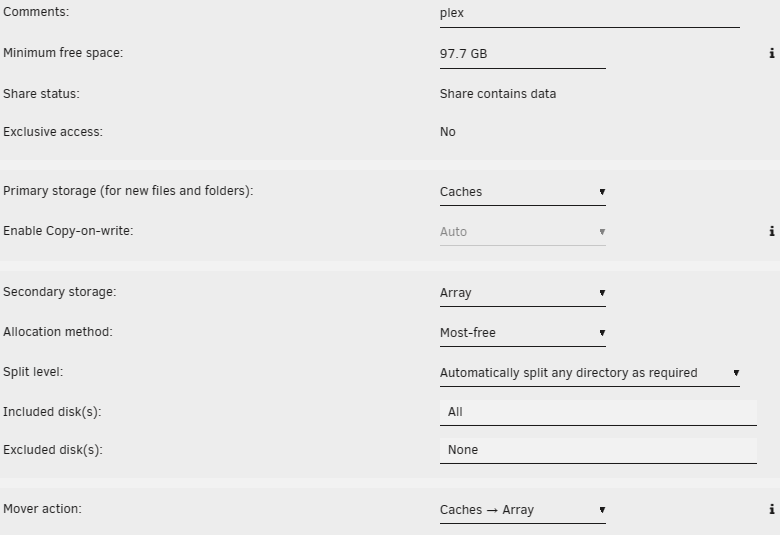
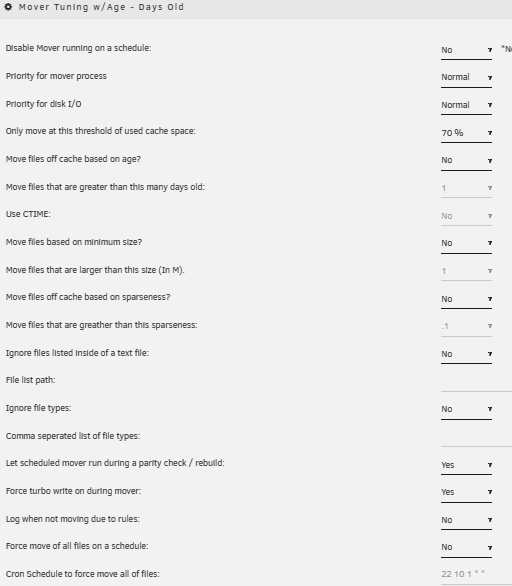
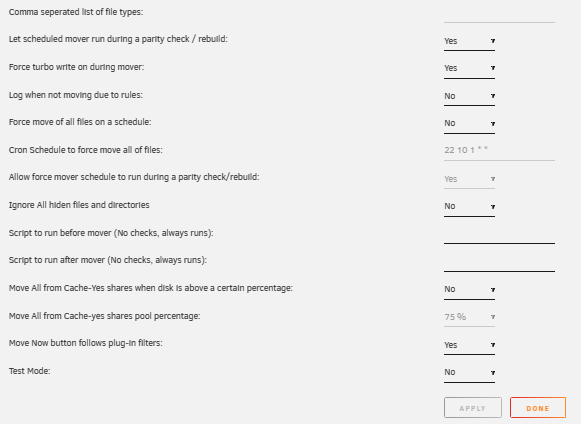
Until a few days ago I used to manually move very well but now it doesn't work for me the disk has been filled to 100% and I am manually copying the files from the cache I put my settings and I don't know how to download my logs if someone guides me on what could have happened I am a newbie
-
i solved: This was found to be due to the remnants of being in Active Directory, but instead of being a permissions issue, it was an extended ACL issue.
-
that you recommend me to do so as not to be giving permissions every q a file is downloaded since it is very annoying to enter unraid to give permissions
-
If it is correct umask the e reviewed several times but I do not know why the downloaded files do not save them with 777, you think q I need to configure so that you have these permissions even already change the owner to root in jdownloader appdata.
-
here change 000 for 777??

-
También estoy experimentando problemas con las carpetas de JDarcocker a pesar de que es con nadie 000 el resultado de los permisos de los archivos creados es drwxrwx---
-
hola amigos estoy teniendo problemas con el docker de jdownloader ya e probado varias cosas estoy con el umask en 0000 y 000 y mis permisos siempre son drwxrwx---


