





Ashe
Members
-
Joined
-
Last visited
Everything posted by Ashe
-
I'm not sure how helpful this will be but here it is, the issue seems to be more so on the VM tab not the log tab, however logs is still only showing the system log, not VM or docker.
-
Fixed both on mine, thanks
-
I think the log was reporting a latency figure, I will rerun it later and pm you the onscreen log
-
After a restart it is acting as normal! Perhaps an 11.01 quirk
-
Using rc9f Works with the above quite smoothly for VM and dockers, when it comes to the logs there is severe lag in reporting anything and stays on “refreshing” for quite a while. The system log eventually shows up, but even with clicking on the vm and docker log it still shows the system log. Going back to any other menu heading results in “refreshing” but gets there eventually.
-
11.01 for iOS Server works absolutely fine apart from docker, logs and VMs so it seems it’s not communicating with the plugin. There is also a minor visual issue with the rotating banner for the mb/cpu temps that goes right to left then bounces and goes left to right.
-
No setting change still results in a forced quit
-
Same here on iOS, although third attempt added the server. Any setting change results in the app quitting however the setting is saved.
-
Hi Peter, Recently my ISP has appeared to block port 1194 so I have switched to 443 and subsequently re-configured the server and raised new clients for iOS and windows. on connection from iOS I am getting a transport paused message which then leads to a NETWORK_EOF_ERROR / TRANSPORT_ERROR, all configurations server and client are identical to my previous setup. Have you come across this before? iOS connection log W10 Connection Log
-
Yes that's fixed it for me to a single load, thanks
-
I've just noticed on both iOS and android that sometimes it shows the board temp and then it disappears EDIT: it does come back on its own so maybe just communication with the sensor to the app
-
All working and looks great, only comment is about how the CPU load is shown, is that correct?
-
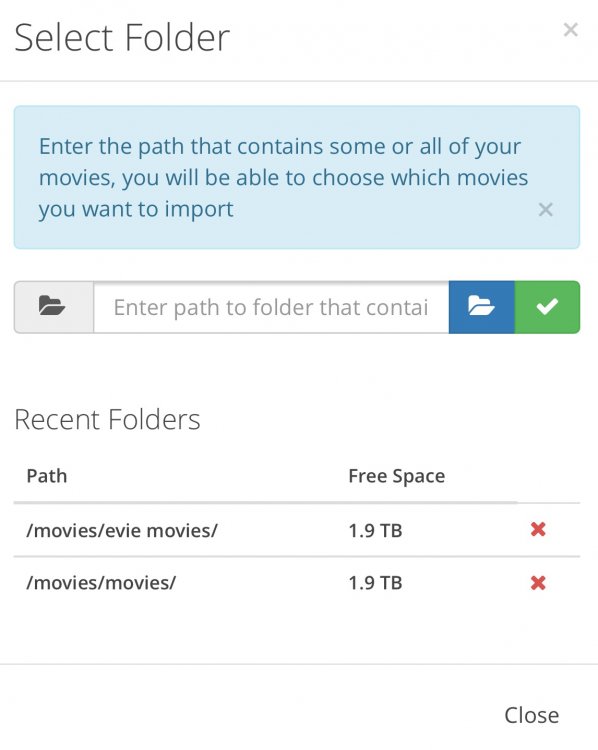
To add to scottc comments here's the screenshot to Add the paths in radarr and then to select the folder when importing a movie. Radarr will handle all processing into the correct directory
-
same here on two systems
-
Same here, no update showing available from 2.0.1
-
This is the unraid plug in which is available for download, not the app. Should be showing up on your system now
-
Not much difference in the configuration files, also have bridging enabled on my unraid server
-
Best to post your config as the plugin shows all of my network machines by default
-
I have tried with and without a password, neither work. Still on http (I haven't worked out https yet!), tried with IP address only
-
I have tried to add my test server on to the app for the 6.4 betas but it cannot connect either manually or automatically for some reason.
-
Thanks, I forgot you had the feedback section
-
Would it be possible to add unassigned disks to the disks section? As I run VMs from there it would be useful to see the disk
-
Stop and start the plugin on unraid.
-
V2.5 updated on iOS 10.2.1 it was working fine before but now immediately crashes on opening. Will reboot the phone just in case EDIT: still crashes on opening after reboot
-
Yes, I think I need to reword the message a bit, because it's valid that any of the logs doesn't exist at all. Not sure what you mean by this. Can you please clarify ? All dockers have logs currently but the message doesn't show that For the VMs for example it shows my ubuntu VM log which is set to auto start, when I manually start up my win 10 after startup there is no shown log for the win 10 VM


