





storagehound
Members
-
Joined
-
Last visited
Everything posted by storagehound
-
Carnovorbrah, I totally missed your post. I must have been pretty fried at that point. In fact, if I'd noticed, I'm sure it would have helped me get mine up sooner. The only thing different with mine is I didn't use the proxy on Jackett since I had decided to route my three containers through Deluge-VPN. I'm going to triple check my connections...I think I don't need the proxy setting in some of those other areas.
-
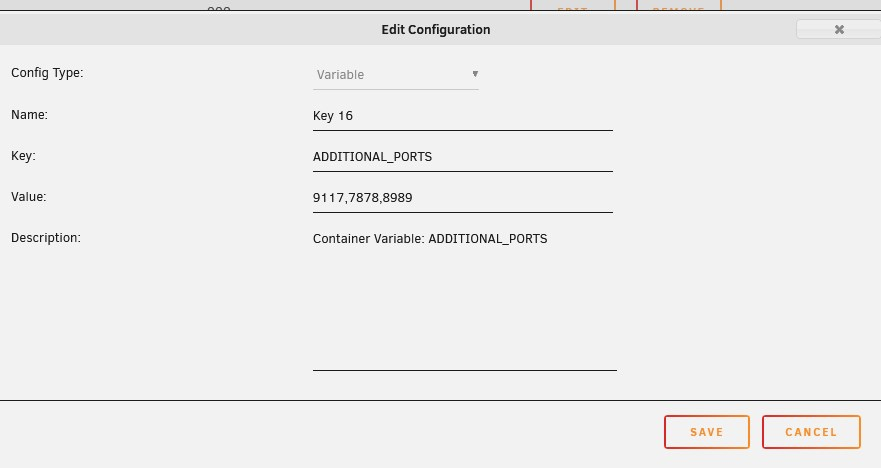
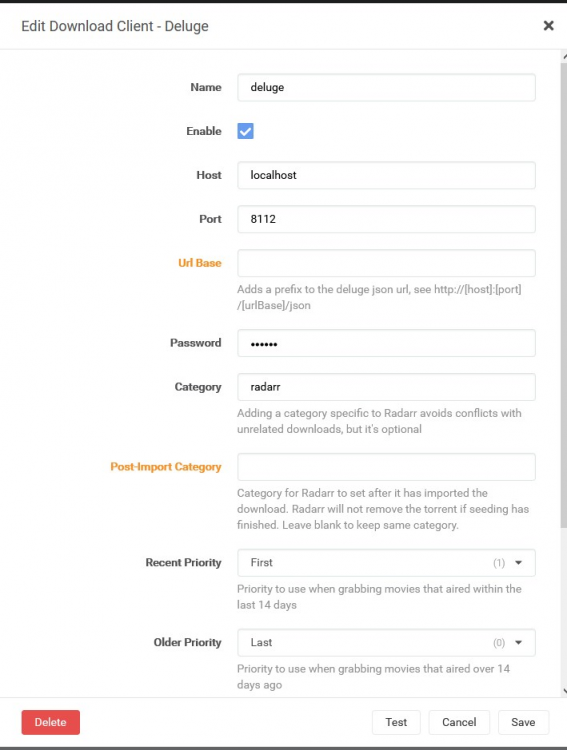
I think I got it. Seeing this screenshot from torlh helpd turn on a few brain cells. There were multiple steps to be done. I searched for "ADDITIONAL_PORTS" and found Binhex's entry in another forum. So many steps. UGLY DIRECTIONS FOLLOW: 1) I routed Jackett, Sonarr and Radarr (all Binhex versions) through Deluge VPN. Following Spaceinvader one's Youtube tutorial : How to route any docker container through a VPN container will get you most the way there (Link below). But you'll need to add the "ADDITONAL_PORTS" variable if your Deluge-VPN template does not already have it. I'll screenshot mine. Those 3 values you see are Jackett, Radarr & Sonarr. This will allow you to access them in the browser (remember, follow the video first). 2) Once you are able to access your webpages you should go through them and remove any explicit host name for your server (like 192.167.1.11) and replace it with Localhost. I would start with Jackett (if you are using that) since you may have other programs pointing to it. In the case of Radar I had to do this for all of my indexers, the Proxy settings under General and for the Download Client. Here's a screenshot of my doing the "Download Client" in Radar. After I had done all of this my containers were able to be accessed by the web page with the appropriated port: http://192.xxx.x.12:9117 for Jackett and etc. I saw that Radarr and Sonarr were able to access their indexers and deluge vpn. I know these directions are not great. I am exhausted. I only did it for those of you who will be driving yourself crazy and just need a hint. I know one of our better explainer will probably put something more useful and cohesive together. Thank you Binhex and Torlh for giving me enough to figure out what to do and actually clean up my sever.
-
I'm going to give it another day to see if I can figure out how to make things work again. If I can't, I'm going to look into how I can rollback DelugeVPN as you have I am hoping a nights sleep will help me pull together and understand what I have been reading this forum.
-
I agree with you about their site. I did try reading that first before I asked. I had deleted my question ( I began to think it was a bad one) but I am glad you had already been responding to it. Interesting info about non significant changes in connections.
-
Thanks for responding and the good info. I agree with you about the security aspect. It was one of the other things that appealed to me. I like the idea of waiting a little bit for the Synclounge Docker container. I'm not that savvy and definitely would appreciate regular maintenance as a plus. I'll think on it. it may be fun to do yours as an exercise. Thanks again!
-
The Synclounge Docker looks interesting. Is the performance much improved over using the https://synclounge.tv/? I have found that pretty unusable with my friends for months now. I'm thinking this may be a good project to tackle as it also involves other things I am curious about. Thanks
-
Thanks again, Cessquill This lead to me making several changes including dropping Transmission and moving to Binhex's Deluge. This also addressed the issue of files not moving properly. I'm pretty happy so far. I'm still playing with some of the options to fine tune things. But overall I am happy. 👏
-
Of course my VPN is not listed 😂 ...but I'll figure out how to use the "custom." I'll see if I can mimic my Transmission Docker settings in any way. Thanks again.
-
Ugh! I watched several of his videos and didn't even notice this. From the title this looks like what i want. I didn't want to VPN the whole sever. Thanks.
-
Hi, People I've tried this program on my windows box to test and I like it. I figure moving it to a Docker container will be even better and allow it to automatically move files for me without fuss. I want to put run it from a Docker but I want to have it perform its searches from my VPN . I have a Docker Torrent Downloader and it gave me options to setup my VPN account in there. I see know way to do that in RADARR. Thanks...
-
My thanks to the people who helped you put this all together. Great job all the way around. Thanks. I completely have up on help text which is what other authors use as there was just too much going on. And since damn near everything on the screen will do something if you click on it needed something else Sent from my LG-D852 using Tapatalk
-
Hello, Biased! I installed it. I really like how this was designed. Especially the fact that a guide, not just a pointer to a forum, is available. I learn interesting stuff in a forum, but it tends to be overwhelming when you have to use one as a user guide (especially after a few pages). Your guide quickly answered questions I was confused by. I hope more people to do so. Let me also add how much I appreciate the general effort people are making in putting newbie friendly descriptions to the applications. Good job all around Thank You!
-
Hello, People Is there any wisdom around moving to Community Applications before or after upgrading to 6.2? Does it even matter? Up until now I have been using the traditional Docker pointers to repositories like SparklyBalls. I plan to start using some of the less conservative containers and was figuring it was a good tome to start using CAs to do it. Thank You



