





DarB
Members
-
Joined
-
Last visited
Everything posted by DarB
-
Thanks so much for the help today!
-
Sounds good! Thanks
-
So, I was able to use the same postgres password that I used at set up (it was still the same in the postgres docker, just changed somehow in the immich docker) and it worked. Do I still need to do this?
-
That was weird! Not sure how that happened. Changed the postgres password back and now the server is up to date?? I don't quite understand what happened but it is working now so...okay.

-
Well, I am at a loss, so weird. changed it to ":latest" and looking at the docker it now says up today and looks fiine but now can't access the webui.... immich.log new.txt

-
That seems to have crashed immich all together. Did I just lose all my Immich photos? immich.log new.txt


-
nope, runs through the entire process and then just leaves me at 1.29.0

-
I think this is what you mean? See attached, let me know if this is not what you mean. immich.update.txt
-
I am running Unraid 7.0.1 and have immich set up as a docker. My current Immich server version is v1.129.0 and I cannot get it to update. I have posted to the Immich github support and they say it is an unraid issue. I go to the docker and hit "apply update" and it appears to run through the entire update process and ends by saying "The command finished successfully!" I hit the "Done" button, but then sure enough, no update applied! I just don't understand why this won't update. Logs are attached. Any help would be so appreciated! immich.log.txt
-
Yep, that is awesome! Works fantastic on the dashboard page. Does it work on other pages as well (main, shares, etc)? Just wondering if I am missing something? I love it though, makes viewing the dashboard a whole new experience!
-
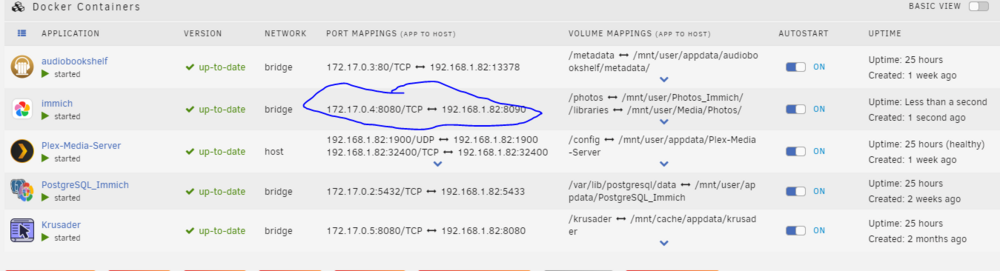
As a follow up, to test this, I stopped Krusader, changed Immich host port to 8080 and restarted it. Still can't access the WebUI, it just returns a message that it can't connect.
-
I am trying to get Immich up and running and have followed all the Spaceinvader One's instructions from his videos but after install is done I go to access the WebUI and get an error that it can't be reached. I did run into one issue that the default container port (8080) is the same as Krusader. I changed the port to 8090 and it said it was successful, but as I mentioned, I can't access the web UI. When I look at the docker container I am guessing my issue is with the port mapping, but I just don't know how to fix this. I have attached system log and a text copy of the immich log as well. immich.log.txt mediamadness-syslog-20240822-0246.zip
-
That is exactly what I ended up doing, just seemed the most logical way of going about it.
-
I don't understand what is happening, when I look at my unraid server, plex server is running, my shares are accessible and everything looks a-ok, but for some reason when I open plex on any of my devices or through the webui, the server is unavailable... I have attached diagnostics... any help would be appreciated! I cannot get this sorted. mediamadness-diagnostics-20240727-0633.zip
-
I have this error: "Invalid folder cache contained within /mnt" and nothing is able to connect to my plex server. Not really sure what is going on here but it happened after a server reboot. After the reboot, i could not connect my windows share to my media and remapped it but not sure if that caused the issue or why it would have? mediamadness-diagnostics-20240726-1850.zip
-
I have this error: Invalid folder cache contained within /mnt and nothing is able to connect to my plex server. Not really sure what is going on here but it happened after a server reboot. After the reboot, i could not connect my windows share to my media and remapped it but not sure if that caused the issue or why it would have? mediamadness-diagnostics-20240726-1850.zip
-
Well that was a very easy fix! Thanks so much!
-
I have not, I will try that as soon as I get home today...
-
I just completed a new (or upgraded into a new box) Unraid build configured as follows: Mobo: MSI PRO Z790-P WIFI CPU: Intel Core i5-13600K Desktop Processor 14 cores (6 P-cores + 8 E-cores) 24M Cache, up to 5.1 GHz CPU Air Cooler: Thermaltake Gravity i3 Intel LGA 1700 cocket, 95W CPU Cooler CL-P094-AL09WT-A RAM: CORSAIR VENGEANCE DDR5 RAM 32GB (4x16GB) 6000MHz CL36 Intel XMP iCUE Compatible Computer Memory (4 sticks) PSU: GIGABYTE GP-UD1000GM 1000W 80 Plus Gold Certified Fully Modular Power Supply I did a flash update to BIOS before installing the CPU and cooler and it works great. Moved my Unraid USB boot drive and hard drives from my old server to this build. I booted the server to BIOS, set the default to boot from the USB, saved my changes and it restarted perfectly to UNRAID. And Unraid is running perfectly! But the issue came when I shut it down. I went to restart and it would not boot. Turned it off and back on, hit delete to boot to BIOS. Made NO changes, closed BIOS and it restarted fine. This seems to be the only way I can get it to start, is by going to BIOS first. I can't figure out what setting I need to change to get it to boot up without going through BIOS first... Just wondering if anyone has any ideas?
-
So, one question that has me slightly worried... Again I need to check this when I get home, but if this is not all connected correctly, would it cause damage?
-
I thought so.... 🤔 I will have to double check that when I get home tonight....
-
I did not have the CPU power connected initially, but read this in sub-reddit thread yesterday. I actually thought that would solve the issue, but upon connecting the CPU power there was no change.
-
Hey Everyone, Just finished a new build and when I turn on the computer it won't POST or boot to Bios. The CPU light on the motherboard is on and I have run out of ideas... Build as follows: Mobo: GIGABYTE Z790 UD AC CPU: Intel Core i5-13600K Desktop Processor 14 cores (6 P-cores + 8 E-cores) 24M Cache, up to 5.1 GHz CPU Air Cooler: Thermaltake Gravity i3 Intel LGA 1700 cocket, 95W CPU Cooler CL-P094-AL09WT-A RAM: CORSAIR VENGEANCE DDR5 RAM 32GB (2x16GB) 6000MHz CL36 Intel XMP iCUE Compatible Computer Memory (4 sticks) PSU: GIGABYTE GP-UD1000GM 1000W 80 Plus Gold Certified Fully Modular Power Supply I have no GPU yet as I was going to run with the IGPU to start. This is for an Unraid build but I have not moved the HDD's or UNRAID boot drive from my other machine yet. But I should be able to POST and see bios w/o this. I have tried to flash update the BIOS and from what I can see it was successful or at least seemed to run the full cycle and power down the power supply. But even after this, I restart and the CPU light is on right away. I have also tried turning it all off and starting with one stick of memory in A1 and again with one stick in A2, no difference... I am at loss. I opened a tech support ticket with Gigabyte but no response yet and from what I can see on various Reddit threads this can take a while. I open to any and all suggestions... this just does not make any sense to me at all.
-
+1 for responsive UI. Just tried adjusting display font size on my phone to "Huge", makes no difference. I use the web ui on my phone all the time but just need to scroll in lots. It works okay, but having a responsive web UI would be really sweet.
-
Are there any updated recommendations? Does this PSA still apply? I am in the process of moving my Unraid to new hardware and while I am sticking with the same scandisk USB, seems like a good time to have a spare on hand just in case....


