





DarB
Members
-
Joined
-
Last visited
Everything posted by DarB
-
OK gotcha! Sorry... should have got that from your first post... Thanks!
-
How would it fight it? Do you mean that they are not moving air in opposing directions (Sorry if this is a stupid question)?
-
Sweet! This unit does have an integrated fan so that should be good. Thanks for the input!
-
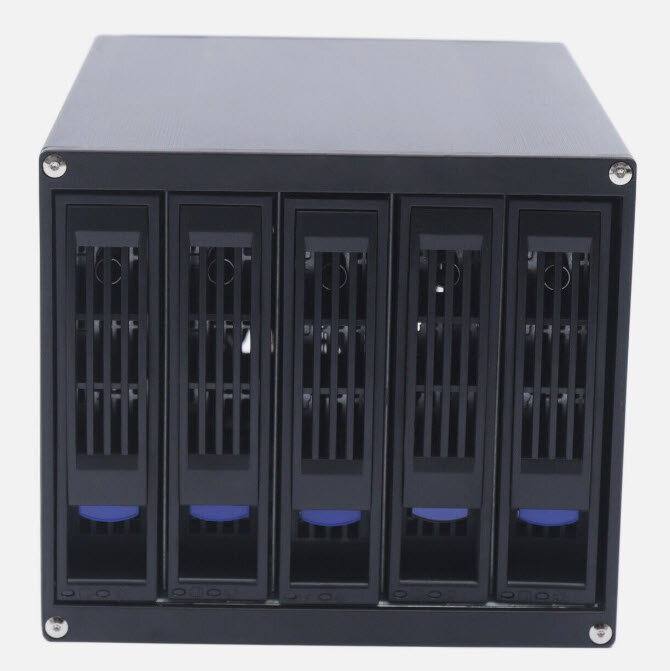
I am just looking for opinions and input. I am looking at adding a 3x5.25" to 4x3.5" hotswap bay adapter to my server. The unit I am looking at mounts the drives on their sides (so vertically). Just wondering what opinions are. All my drives are WD Red NAS drives (if that matters). I was googling this and found conflicting stories and some that mentioned that cooling may be adversly affected.
-
I having a bit of an internal debate on this also (dual CPU vs single). I am in the process of upgrading my server and I am considering going to a dual CPU configuration. I am curious, having run a dual, how do you find them for power consumption and temperature. I am guessing a dual CPU may offer some power advantages of a single CPU and separate GPU...
-
I am in Castlegar BC - southern interior and have been looking at buying something like this for my current server upgrade... I would be interested in the iStar if it is still available.
-
I am just in the early process of upgrading my server and shopping components. Just curious if dual processors might be better bang for the buck long term? I was looking at an Intel Core i5-13500 with a GPU but then started down this rabbit hole and am questioning this. Just wondering what the general consensus is.
-
That makes sense - thanks!
-
Hi All, first off - my apologies if this topic has been covered already. I have an array configured as follows: Parity - 10 TB HDD Drive 1 - 8 TB HDD Drive 2 - 6 TB HDD Drive 3 - 4 TB SSD plus 120 GB SSD for cache. I read somewhere the other day that you should not use an SSD in your array and I am wondering (A) is this true and why? and (B) should I change out drive 4 for an HDD and if I do, could I use that 4TB SSD for storing my VM's and what is the best method to do so? Just looking for some thoughts here. Thanks!
-
Okay, gotcha. Thanks so much
-
Oh wow, that is super helpful! Thanks!
-
Sweet! Thank you! I have an older GPU (GTX 960) that is not really good for anything else but I will add it to my system for this ( I do have a Plex Pass).
-
Noted, I will change the cable. Sorry if this is a stupid question, but do I need to do anything to clear the current errors or do I just leave them?
-
I am not sure if this is the appropriate place for this question. I find every once in a while when playing media on plex on various devices, that when playing super high resolution (4K+) I often get static like lines or discoloration on the tv. If I transcode down to a lower version then this goes away. I have heard that adding a GPU to my build could help plex to better handle the transcode load and clear this up, just wondering if others have found this to be the case?
-
I just logged onto my server today and was met with this error log and I am wondering what it means and if a new SATA cable on the drive could fix it: WDC_WD101EFBX-68B0AN0_VHG5T4VM-20240611-1820.txt
-
I am having the same issue, but when I do this I get the error "No such file or directory" i don't understand what I am doing wrong?

