





nanohits
Members
-
Joined
-
Last visited
-
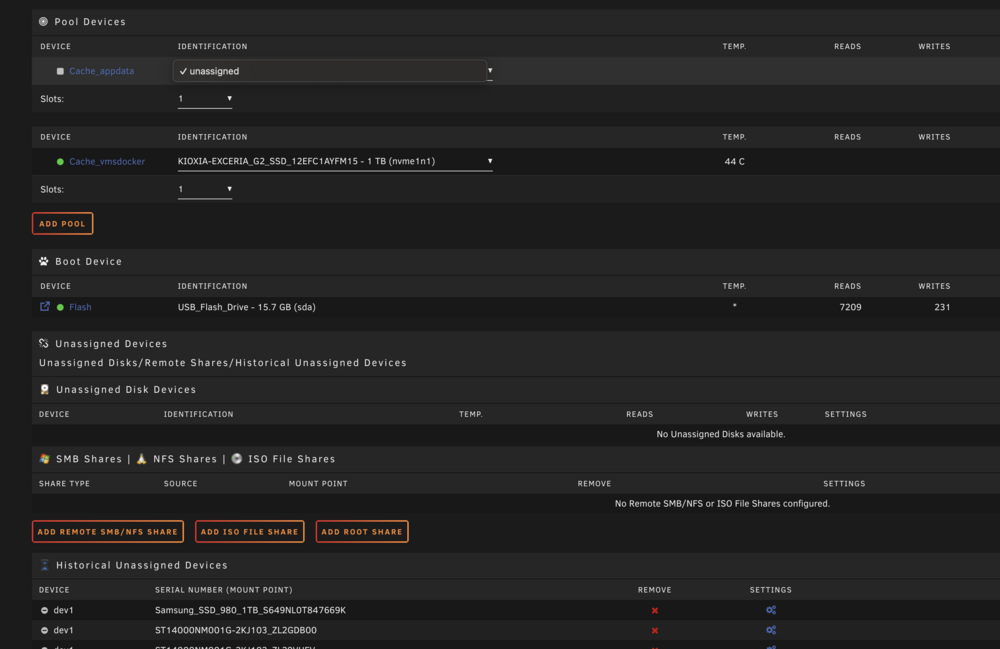
Hi All, I have 2 X NVMe drive. Today the 1st pool disappeared but the Samsung drive is missing. When I try to assign the drive, it doesnt show up. I stopped the array and still not seeing it. See screenshot. Any solution as all my cache apps are on there. Tks
-
I have the same problem.
-
I have the same issue. I have my parity check set to last day of the month. Today I upgraded to 6.12.3 and rebooted after the update and woke up this morning to find out that parity check had started.
-
Thanks. Great stuff. I will give it a try and let you know if I get stuck somewhere.
-
Thank you so much. Thats helps.
-
So single parity of 1 X 14TB drive. Current setup is I have 8 drives, 6 of them are 14TB and 2 of them are 4 TB. One of the drives which is 14TB is a parity drive. The rest are part of the array as data. Now I started seeing some errors in one of the 4TB drive and I decided to replace these 2 4TB drives with 14TB. So what I want to do is replace those 2 drives and add them to the array.
-
Fair enough. So what should I do in this case. Just remive the 2 X old 4TB drives and stick in the new 2 X 14TB drives and add them to array?
-
I have always done this. This is what I did when I first installed all the drives in Unraid. Pre clear then format and then add to the array and had no issues. I am not talking about formatting the drives I already have in Unraid.
-
Yeah preferably.
-
I have corrected it in light mode. This must be a bug in their forum software as I just added the post and hit the post button without making any changes to color.
-
I have never colored or or used any different fonts. THis is how it looks for me: https://d.pr/i/TgdqYy I have edited it in non dark mode. Should be ok now?
-
I am getting 2 new 14TB drives and will need to decommision 2 older 4TB that are starting to get errors from the parity and then install these new drives. What is the process to decommision them? do I just remove the old 4TB drives, install the new drives, pre clear and format them and start the array? My parity drive is already a 14TB drive.
-
Hi guys, I am trying to run the Nextcloud AIO container and I am running on CGNAT and I have it successfully running on the CF Argo tunnel. However when i go to setup the app at the start where it asks for domain, it has an issue, how do I disable the domain check in the Unraid Nextcloud AIO container? Any ideas? Tks
-
Same here ad havent found anything so far as a tutorial or a video.
-
Will it show there is a new version on the dashboard. It isnt showing up yet. I guess it will take some time to show up there.
