





CaptainKen
Members
-
Joined
-
Last visited
Everything posted by CaptainKen
-
Yesterday QB randomly stopped displaying the Torrent Options Dialog or is it called Add Torrent dialog (allows you to rename the torrent, select the category, etc) when manually adding a torrent from the Search window. I have added dozens of torrents in the last week, and before yesterday this windows always appeared without fail. I'm the only person with access, and I have not touched any settings in at least a week. In the Windows version, there's a setting in Downloads called "Display torrent content and some options". I presume that's the setting I need, but that is not in the binhex version. That being said, how do I get that window to appear again.
-
I have multiple movie folders: Movies, Movie Sets, Movie 3D, Movies 4k, Westerns, Movie Specials, Christmas, Movies Kids, Movies Anim, Movies Anim Sets. Is there a way when added a movie to Radarr to flag it to be moved to one of these folders?
-
I don't want to use the built-in Import feature. Instead, I simply want to copy ALL the data from my existing Windows Radarr install. I can then use DB Browser for SQL to update the paths in the various tables. I've tried updating in place, but then the UI doesn't open. I'm hoping someone has a method to do this, perhaps a script of some kind?
-
Yes, that did it!! Thank you!!!!! I created a guide on the process in case it helps someone else. Uploading Attachment... No idea why the Word doc won't upload, so here's a PDF of the guide. 0-Mount Synology with SMB inside Unraid to copy Music folder.pdf
-
Do I use "Add Remote SMB/NFS Share" button? Anything else I need to be aware of to get it working? I see that synology supports and prefers SMB3. EDIT: If I choose "Add Remote SMB/NFS Share", then the Next button doesn't work.
-
I applied the code to the source file. Same problem.
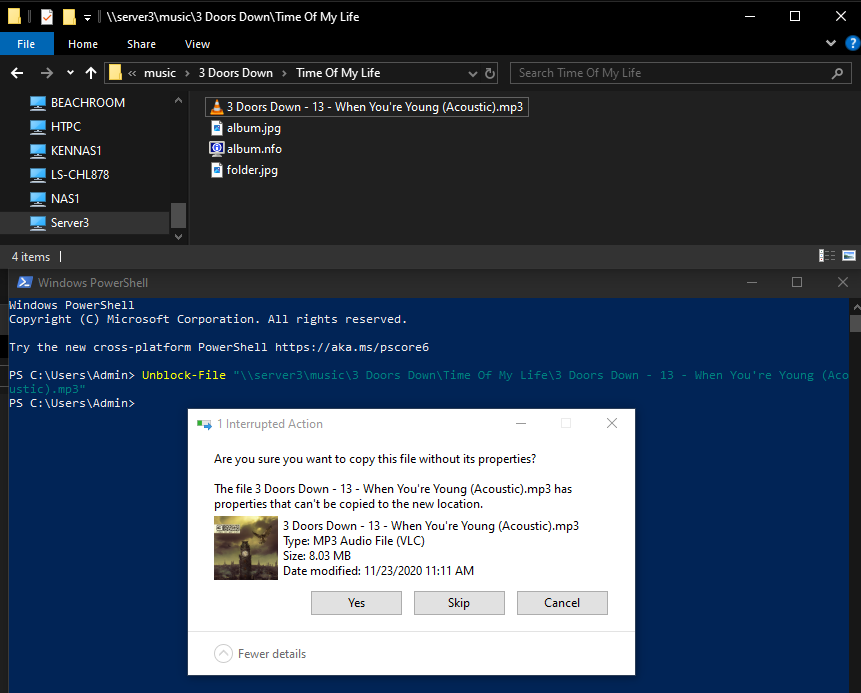
-
These are the properties of that particular file:
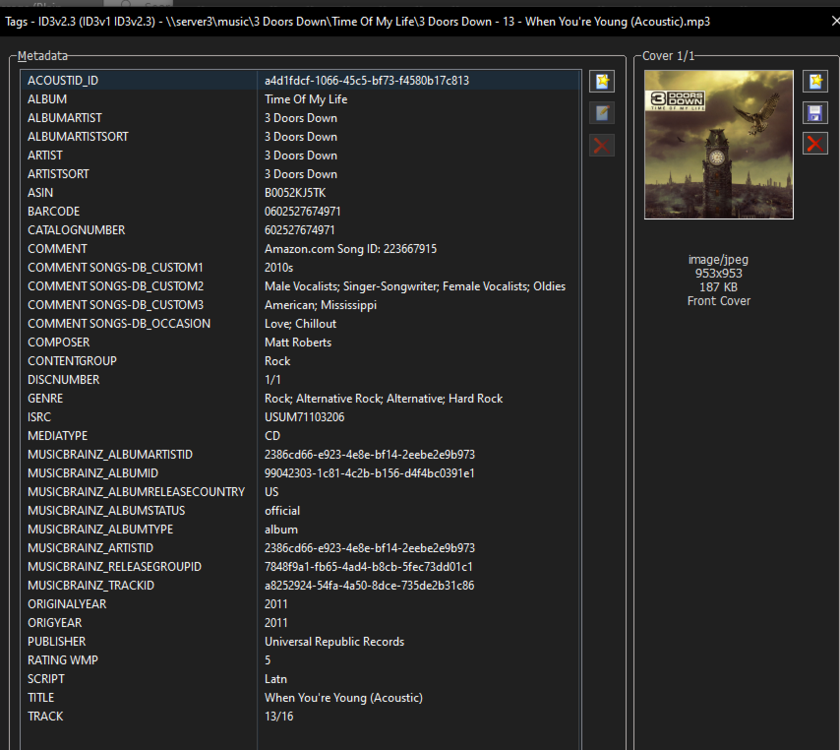
-
I turned off "enhanced macos interoperability". Now I get a different error warning that some properties won't be copied.
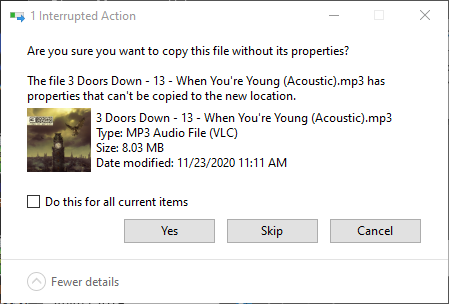
-
@Kilrah, I'm copying using drag and drop between two Windows file explorer windows. The Unraid window points to a standard SMB Unraid /media share. Thank you @JorgeB for finding the issue and a recommended solution, although I don't know where to enter the command or the value to use. I'm speechless regarding the default unraid file system having a metadata limit that's less than what Windows supports. I'm using MP3Tag, which I figured was the safest compatible program to use. Hard to believe that MP3tag doesn't issue a warning when metadata is exceeded. I'm inclined to believe a standard common xattr size has already been figured out by numerous others. Would you or someone please recommend the size to use for mp3 and flacs?
-
Regarding the logs showing the drives being almost empty. A friend of mine has also built an identical system as mine, which is the one with all the data. The logs are from mine, which I used to see if I could duplicate the issue which I was able to. So two identical systems triggering the same errors when copying. My mistake was thinking it didn't matter which system I sent the logs from. Sorry for the confusion and if it caused you to waste your time. Perhaps it's an added benefit to compare two systems. Here are the logs from the system with all the movies and tv shows copied to it.kennas1-diagnostics-20260228-1603.zip
-
Here are my diagnostic logs as requested.kennas1-diagnostics-20260228-1458.zip
-
New to Unraid coming from Synology. Successfully copied all of my movies and TV. Currently 61.5 TB used of 72 TB (85.5 %). Now attempting to copy my 140GB music library from my Synology NAS (same source as movies & tv). Getting one of two errors on some, not all files: "There is not enough space on "Highway to Hell" (whatever the folder is currently trying to copy) Or "Error 0x80070299: The requested operation could not be completed due to a file system limitation" Clicking Skip continues copying many other files, until it triggers another one of those errors, which happens a lot. I tried renaming the files, but that has not affect.
-
New to Unraid and Dockers. I was manually duplicating setting from my existing Windows install to this app. After clicking save, I got a white screen with the menu links appearing on the left side...clearly a broken display. When I closed the app and reopened I got a login screen but everything was left aligned rather then the standard centered. I also could no longer login. I replaced the config file with the original contents to get back in. As you'll see in the log file, the password was still the default. I replaced the email, username, and passwords in the log file with generic ones. Hoping someone can figure out what setting in this log caused this, so I can avoid it when I attempt to enter the settings again. Thank you in advance for your consideration. qBittorrent problem.txt
-
Thanks for replying with details. This will be combination Plex, various Arr's, Blue Iris in an Unraid build. Might also run Windows in a docker. Might also use for video editing. - We already bought our 20TB drives a while back so too late to return. - Is your power consumption question directed at the HDD's? Or the system overall? - We had read or watched video at some point indicating we should use liquid cooling, but doubtful we could find link again. - Intel CPU's don't support both QuickSync and ECC UDIMMs. Ryzen doesn't support QuickSync but does support ECC UDIMMs, which is why we selected the ARC A380 or A310. If I do use for video editing, I'll most likely add a 2nd GPU. - Figured it would be best to start with a HBA card, since we'll definitely go beyond the initial 6 drives, with 2 of them for Dual-Parity. I think I had read a long time ago, to not split drives between on MB built-in and on HBA card. - We were also hoping for IPMI, but can't have everything. EDIT: Added reference to Blue Iris camera software.
-
A friend and I have spent days researching our dual builds and here's what we've narrowed most components down to. Fractal Design Define 7 XL ASUS ProArt X670E-CREATOR WiFi AMD Ryzen 9 7950X 16-Core, 32-Thread Unlocked Desktop Processor Intel ARC A380 GPU NZXT Kraken 360mm - RL-KN360-B1 – AIO CPU Liquid Cooler Western Digital 20TB WD Gold Enterprise Class SATA Internal Hard Drive WD201KRYZ (Qty 6) Still need to research RAM, NNMe's, HBA SAS Card, etc. Will the double wide thickness of the A380 overhang the heat sync's for the MVMe's, without touching the heat sync's? Yes I know about the A310. Any other recommendations are appreciated.
-
I read in another forum that "A310/A380 can't do HDR tone map transcode in Plex". Is this still true?
-
Thanks for clarifying. My rationalization was perhaps it had something to do with the ZFS file system that they both use. I should have clarified this myself.
-
In this video it seems rather extreme recommendation to go with 1GB RAM per TB on a NAS build. Can someone please clarify?
-
Thank you for your response and details.
-
I'm going to bite the bullet after reading multiple articles and threads on using ECC RAM. Seems there are limited choices however as follows. My my applicable main build components are: Asus TUF GAMING X570-PLUS (WI-FI) ATX AM4 Motherboard AMD Ryzen 5 5600X 3.7 GHz 6-Core Processor Based on this article I assume that I should avoid UDIMM and SODIMM, but go for either RDIMM or LRDIMM? DIMM Types: UDIMM vs. RDIMM vs. LRDIMM The main brands appear to be: Corsair, Crucial, Crucial by Micron (?), Micron, Kingston, PYN, Nemix, T-Force, V-Color and Patriot. After searching Amazon, Best Buy, Newegg, B&H, MemoryC, Adorama as well as the manufacturers sites the only options I've found and that I assume are compatible with my hardware are: 32GB 2x16GB DDR4-3200 PC4-25600 2Rx8 RDIMM ECC Registered Memory by NEMIX RAM Kingston DDR4 3200MT/s* ECC Registered DIMM Kingston DDR4 3200MT/s* ECC Registered VLP DIMM Crucial 32GB DDR4 3200 (PC4-25600) RDIMM CL22 Server Memory Module Micron 16GB DDR4-3200 RDIMM 2Rx8 CL22 MTA18ASF2G72PDZ-3G2R The two Kingston page links have so many options on each I have no idea how to begin choosing.


