





JNZ
Members
-
Joined
-
Last visited
Everything posted by JNZ
-
Thanks Simon, I have sent you the files across.
-
@SimonF I'm having the same trouble with attempting a block commit on a VM snapshot. I get the dialog appear with no details which will never complete. A few days ago I upgraded to Unraid7 Stable and all has been well except now when wanting to commit to incorporate and remove the snapshots, it seems I cannot. My VM name in the UI has spaces and () in it "Home Assistant (HAOS)" but on disk, it is stored as /mnt/cachex/domains/HomeAssistant-HAOS/ When I attempt to run a block commit, it just hangs, regardless of the time I allow for it to run. The previous posts here that were similar seemed to be due to characters/spaces in the path but as far as I can tell, my path should be ok? Is there anything else I can do/look for to try and triage/resolve? Appreciate any help.
-
Thanks I missed the UI hint to get to the additional files. I will take a look at the files and go from there. Thanks for the assistance!
-
Got it, that makes sense. I can see the error now. I will correct. Thanks for adding it to the todo list. Ill keep an eye out for future updates One final question, I couldn't find any info on the docs, but what I would like to do is have custom emails to be sent off based on certain conditions on certain interfaces . I know Unraid will send notifications when the limits have been set but I won't the ability to do custom processing or notifications base don your example about moving files. It appears this custom logic is executed by 'Custom Alarms Script Execution Frequency' and the help file mentions the file 'dvm-custom-alarms.sh' Where is this? and does it provide examples of the data you can access to base your rules on and how to handle events? Appreciate your help and effort on this plugin.
-
I believe I have this setup correctly, example as below. This is my primary interface and another one setup within my network which maps to a vlan. I guess my ask was it would be good/nice to be able to get a high level, dashboard view of these secondary interfaces on the main/admin dashboard as well so as a quick glance, I can get a view on the throughput across all of my interfaces that I care about on Unraid. (ie. certain vlans that carry dockers or VM's where the traffic volume is of interest to me) Secondly , as with the above, why would I also receive the following error/message. Seems like I have not set something up correctly.


-
Is it possible to have the dashboard show multiple/all of the interfaces that have been set/made active. ? I have multiple interfaces setup across a number of containers and vms which are tied to various vlans on the network. The user intact shows all the interfaces and breaks down the data stats for each one but I'm not sure how (if possible) to create threshold rules for each interface to send notifications on a per interface basis. Is this possible ?
-
Ive recently deployed the docker for for this and it has worked with scanning of maybe 40% of the files in the share, but it has reached a point where the docker keeps crashing. On a restart, it will run and perform another scan rechecking all previous scanned folders (although not adding as it sees the folders have been indexed within the DB) but when it starts looking to add in new paths/files into the index, after some new files being indexed and added, it crashes shortly there after. (error below) 2023/10/31 07:08:22 Scanning media: /photos/media-various/Video Rip/rhrn sewquence/IMG_0315.JPG 2023/10/31 07:08:22 Job finished 2023/10/31 07:08:22 Queue waiting for lock 2023/10/31 07:08:22 Queue running: in_progress: 39, max_tasks: 40, queue_len: 2651 2023/10/31 07:08:22 Queue starting job 2023/10/31 07:08:22 Queue waiting 2023/10/31 07:08:22 Starting job 2023/10/31 07:08:22 Job finished 2023/10/31 07:08:22 Queue waiting for lock 2023/10/31 07:08:22 Queue running: in_progress: 39, max_tasks: 40, queue_len: 2650 2023/10/31 07:08:22 Queue starting job 2023/10/31 07:08:22 Queue waiting 2023/10/31 07:08:22 Starting job 2023/10/31 07:08:22 Scanning media: /photos/2022/Photos/holiday/IMG_3222.JPG panic: runtime error: invalid memory address or nil pointer dereference [signal SIGSEGV: segmentation violation code=0x1 addr=0x1c8 pc=0xb63950] goroutine 11530 [running]: github.com/photoview/photoview/api/scanner/scanner_tasks/processing_tasks.ProcessVideoTask.ProcessMedia({{}}, {{0xf68cf8?, 0xc001843b00?}}, 0xc00188e8d0, {0xc000124a68, 0x12}) /app/scanner/scanner_tasks/processing_tasks/process_video_task.go:115 +0x16d0 github.com/photoview/photoview/api/scanner/scanner_tasks.scannerTasks.ProcessMedia({{}}, {{0xf68cf8?, 0xc001843b00?}}, 0xe3f640?, {0xc000124a68, 0x12}) /app/scanner/scanner_tasks/scanner_tasks.go:128 +0x15d github.com/photoview/photoview/api/scanner.processMedia({{0xf68cf8?, 0xc001843b00?}}, 0xc00188e8d0) /app/scanner/scanner_album.go:204 +0x9b github.com/photoview/photoview/api/scanner.ScanAlbum.func1({{0xf68cf8?, 0xc001843b00?}}) /app/scanner/scanner_album.go:115 +0x55 github.com/photoview/photoview/api/scanner/scanner_task.TaskContext.DatabaseTransaction.func1(0xc000444f60?) /app/scanner/scanner_task/scanner_task.go:73 +0x3a gorm.io/gorm.(*DB).Transaction(0xc000444f60, 0xc000118760, {0x0, 0x0, 0x0}) /go/pkg/mod/gorm.io/[email protected]/finisher_api.go:606 +0x29e github.com/photoview/photoview/api/scanner/scanner_task.TaskContext.DatabaseTransaction({{0xf68cf8?, 0xc000ea3710?}}, 0xc00188e900, {0x0, 0x0, 0x0}) /app/scanner/scanner_task/scanner_task.go:72 +0xed github.com/photoview/photoview/api/scanner.ScanAlbum({{0xf68cf8?, 0xc000444ff0?}}) /app/scanner/scanner_album.go:114 +0x477 github.com/photoview/photoview/api/scanner/scanner_queue.(*ScannerJob).Run(...) /app/scanner/scanner_queue/queue.go:35 github.com/photoview/photoview/api/scanner/scanner_queue.(*ScannerQueue).processQueue.func1() /app/scanner/scanner_queue/queue.go:144 +0x72 created by github.com/photoview/photoview/api/scanner/scanner_queue.(*ScannerQueue).processQueue /app/scanner/scanner_queue/queue.go:142 +0x16a Any pointers as to why this would be or how to resolve/troubleshoot further. I've tried this with a range of scanners from 3,2 to 10 to now 40. Regardless of number used, it is at a point where it will continually fail.
-
Or.. put another way, how can I install packages if no one can assist with this topic. I just want to be able to classify the data for better reporting but I am not clear on on the install path to do this so any assistance would be great. Can unraid run with s/w installed outside of community apps? whats the process here?
-
Hi all, Ive been using a netdata docker on unraid and its working well, but I'm looking to measure bandwidth across class types to get a better idea of usage. Without any package managers I cant see how best to install and configure this. has anyone down this and if so, what is the best way to get FireQoS installed (I'm only after understanding data usage, not shaping it) Any help appreciated. Thanks
-
I have recently installed this docker and can see an update is available. How do I know what has been updated? Is it the the template config or the docker version itself it is pulling through? Also, there is a previous comment above that details dns queries to a potentially suspicious domain. Can we verify this? Isnt this using the official netdata container so more people would have this concern as well?
-
I never knew that. Great to know! I have enabled and run through the template with second instance and it worked first time! Thanks so much for your help here and getting this going.
-
I've removed the docker (it did say it could not remove the image as it is in use by another container ? - maybe the original running PP instance? ) but the second instance was removed and I manually removed the folder under appdata so its all clean. You say to add it via CA. When I added the second instance, I went through the motion of clicking "ADD CONTAINER" on the docker page, selecting the existing photoprism template but then adjusting the variables to make it unique (port numbers and storage paths) as the CA UI wont allow me to go through that path as it shows it is already installed. I assume this way is fine and the only way to do it to add an additional image instance? I will go through the install motion now to see how this goes.
-
Output from logs and run command attached. There is a permission error shown for the appdata dir but Im not sure why this would be as it exists and has same share permissions as the existing running instance? docker-run.txtdocker-startlog.txt
-
Thanks, I have attached the template for the second instance below. Hope these help. The main change was a new port number and different mount paths for this instance.
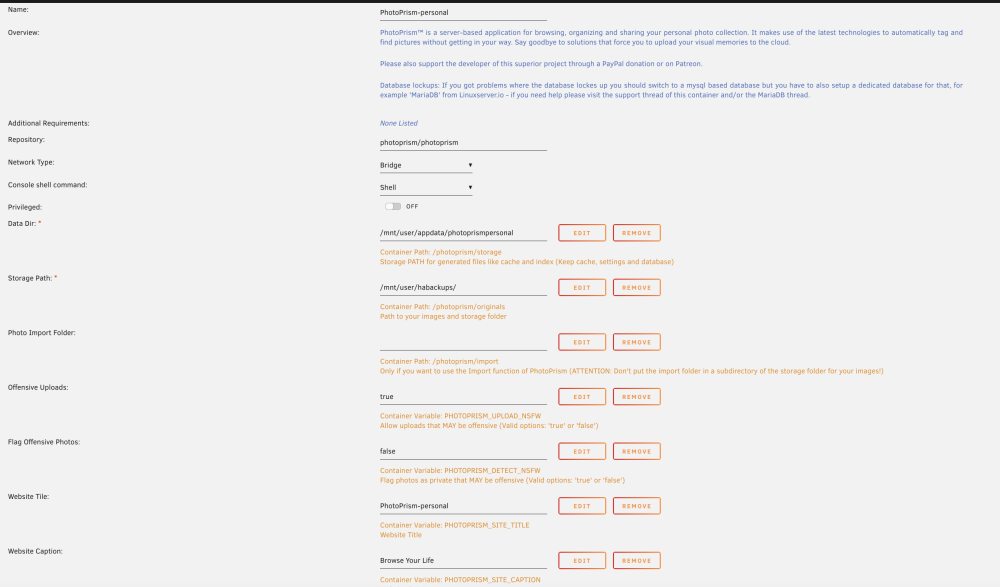
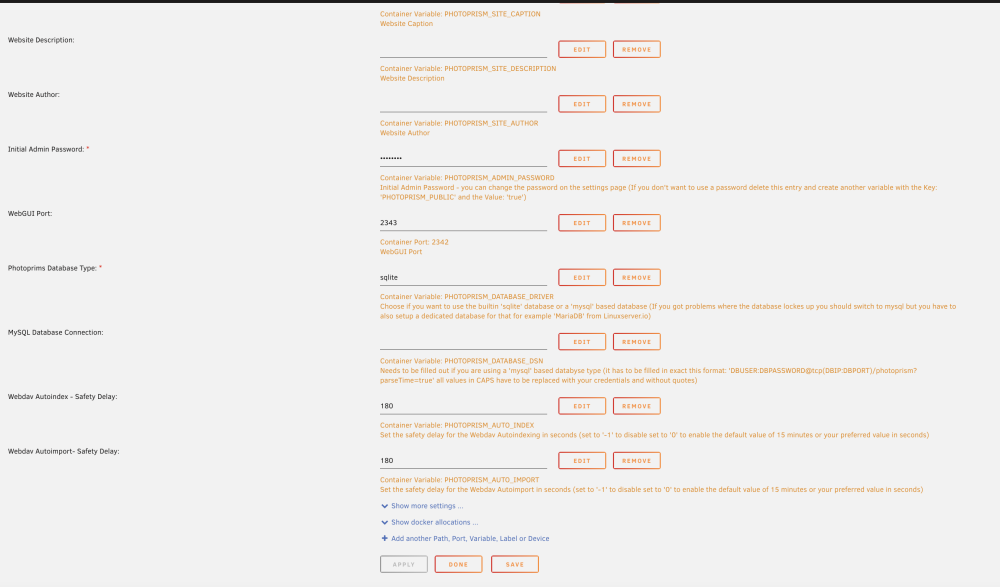
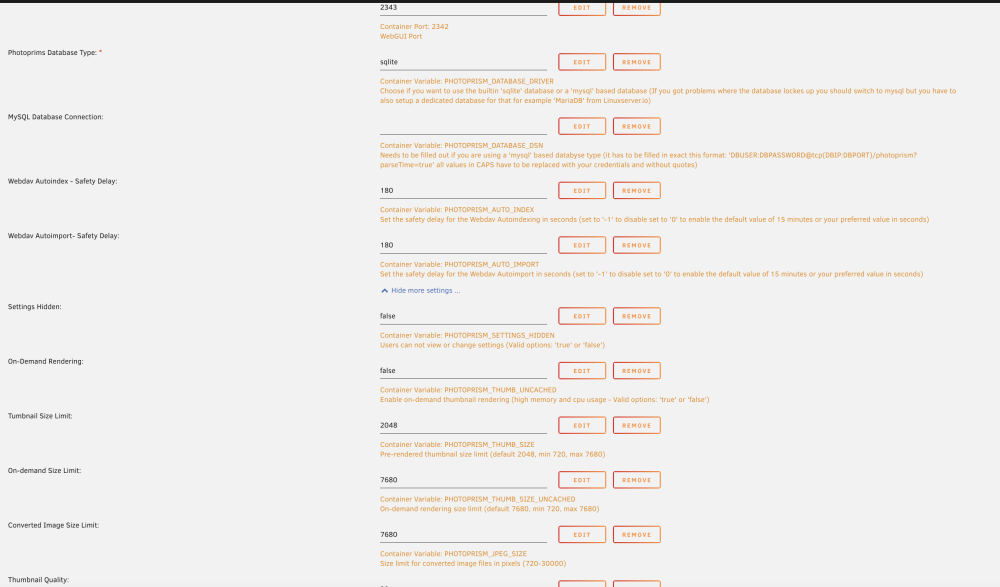
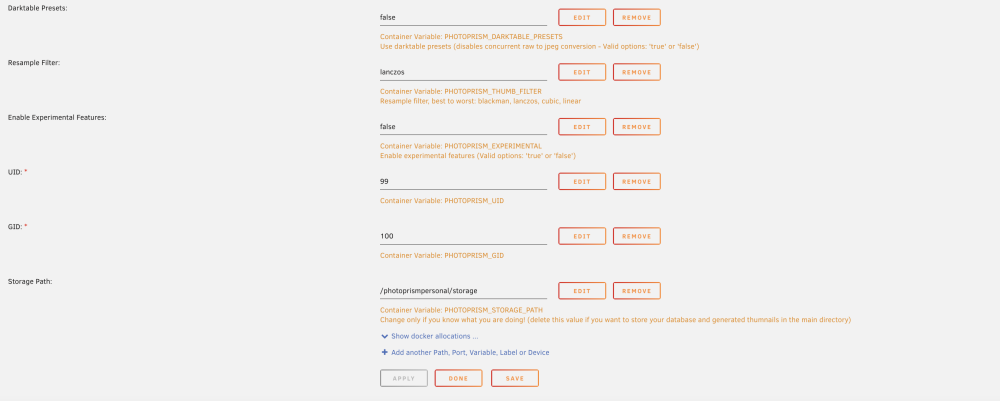
-
Hi Is there a way to run multiple versions of PhotoPrism on UnRaid. I have attempted to manually create a docker, reuse the template and adjust storage paths and ports but on start, the web UI is not accessible and clicking on console or logs brings up a terminal window that closes immediately. Is there some other path / variable that I am missing?



