apandey
Members
-
Joined
-
Last visited
Everything posted by apandey
-
Is the free space TB or TiB? An 18TB drive is only 16.37TiB usable space. Filesystems measure in TiB while drive manufacturers do TB
-
since parity always needs to be up to date, it has to be up-to-date from the start as well. otherwise it cannot be consistently updated. that is your 20 hour tax See this for how parity works, https://wiki.unraid.net/Parity#How_parity_works
-
Those warnings come when qemu doesn't know what cpu you have and it tries to test all cpu features to figure it out. This is usually the case when qemu is presented with a virtual cpu What is the cpu mode in your VM settings? (sorry, on mobile so haven't seen your attachment). Setting mode to host passthrough should help. MacOS would look for specific cpu capabilities If it's intentially virtual cpu, it needs to be a specific one that emulates what macOS is looking for. I'm not sure what it should be in that case
-
I would expect that. Be sure you see same disk layout in UI. Also, don't proceed with starting the array if you see any issues Since you have a spare nvme on new server, I suggest you boot it up once with a new unraid trial usb to check if all your hardware is supported. That way you know upfront of any driver support issues etc. before you start tearing down old server. I had one mobo with an unsupported Ethernet adapter once
-
The most important thing to do is to make sure the same disks (identified by serial numbers) are in the same exact slots as shown in the unraid Ui. Best to take screenshot of Unraid main tab as a reference. If you are reusing your existing usb, you should retain that config It doesn't matter how the drives are physically connected, as long as they are directly presented to unraid os (no using a raid controller or anything that might hide the native drive behind an abstraction). So cables, sata slots etc aren't important to match. If the drives are all visible, and config is retained, unraid will work it out
-
Since the RAM is a potential suspect, have you tried running a long memtest session? You will need the download from memtest86 site if it's ECC RAM
-
@srfnmnkno real experience with reverse breakout cables myself As for hot plug, that is possible with SATA. It needs to be supported by the controller and most modern sata controllers do. But hard to say for your specific case. Best bet is to try, the expense is just a cable here
-
You should post diagnostics as suggested. Just VM log does tell what else was going on in the system. Also, I don't know what is telling you that this is a memory issue. Looks more like the VM isn't starting and that would explain why no memory is claimed or allocated. The effect may not be the cause here EDIT: I also noticed you are not the thread starter. Better to start a new thread in such cases rather than continue on someone else's problem which may not be same issue
-
Thanks. I don't have atop. All of my excess logs are something that I know. They largely fall into cases where I want to defer the solution to later for various reasons. One example is link up/down spam on P2P 10gbe DAC connection which shows up when the other side of link sleeps/wakes. Some are application stuff I want to look at later when I have free time In all cases, it's not runaway logging. Just a bit more that will can be managed with a different sizing Thanks for confirming the remount solution. I'll use that for now
-
It can be, but my concern is not the size of the log right now, but rather if I can tune it to a given size. Are there any concerns if I decide that I want 256MB instead of 128MB? It can be something as simple as wanting to go longer at any given logging rate I understand that 128MB ought to be enough for everyone, but what if it's not?
-
Currently, every 2 weeks or so, I start to get a /var/log getting full warning. At current rate, I would need at least one reboot within a month to clear it This is not a question about what is in the logs. I can always reduce some logs, but that will probably only change how long it takes to fill up. What is recommended sizing methodology to keep going indefinitely without needing a reboot. Let's say I don't need more than 1 month of logs and I can come up with a size (let's assume 300MB) that would fulfill it... * is it possible to change tmpfs size permanently from 128MB to higher. I have RAM to allocate * are there other logrotate of similar mechanisms recommended to setup how much to keep? I can try to do things the usual Linux way and then stuff things into config/go, but I am looking for the unraid way of managing this. Suggestions?
-
Does your motherboard have sata ports? You can also do 2 LSI 8i for 16 drives and put the remaining 4 on motherboard slots. This allows you to not think too much about link bottlenecks I have a 24 drive setup, with 16 connected to LSI-9300-16i and 8 connected to the motherboard. I skipped any expanders for this one. Also a previous thread covering this topic with some numbers:
-
I restarted nginx via ssh and that fixed it. so, at least have proved that only nginx was out of order still wondering what the underlying issue is. it will very likely happen again 😬
-
the php response I posted in first post is a red herring, that seems to be what notices.php does. I did try in an incognito tab as well as on mobile, so the issue is real I managed to get the diagnostics from command line. attached godaam-diagnostics-20230102-1209.zip Edit: seems like nginx is having memory issues, but why would that be? Jan 2 12:09:46 Godaam nginx: 2023/01/02 12:09:46 [error] 20455#20455: nchan: Out of shared memory while allocating channel /diagnostics. Increase nchan_max_reserved_memory. there is no memory pressure at system level
-
here it is ~# df -h / Filesystem Size Used Avail Use% Mounted on rootfs 32G 1.4G 30G 5% / also ~# ls -al /boot/config/plugins/community.applications* -rw------- 1 root root 100057 Dec 30 14:47 /boot/config/plugins/community.applications.plg /boot/config/plugins/community.applications: total 240 drwx------ 2 root root 16384 Dec 30 14:47 ./ drwx------ 30 root root 16384 Jan 1 23:25 ../ -rw------- 1 root root 17 Oct 29 18:46 accepted -rw------- 1 root root 127304 Dec 30 14:47 community.applications-2022.12.29-x86_64-1.txz -rw------- 1 root root 151 Nov 10 23:35 community.applications.cfg -rw------- 1 root root 153 Dec 30 14:47 notification_scan.cron -rw------- 1 root root 686 Dec 30 14:47 pinned_appsV2.json -rw------- 1 root root 13 Oct 29 18:46 plugins_accepted
-
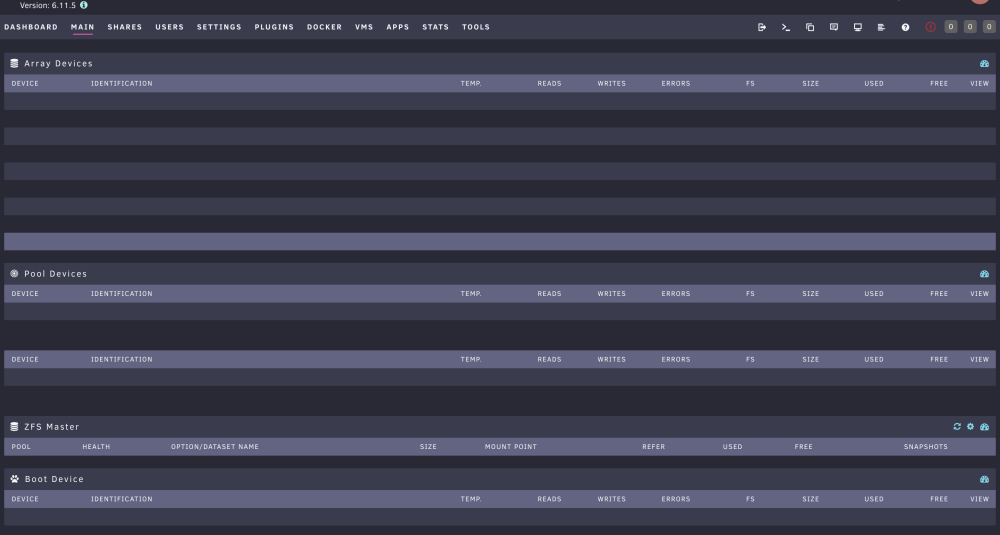
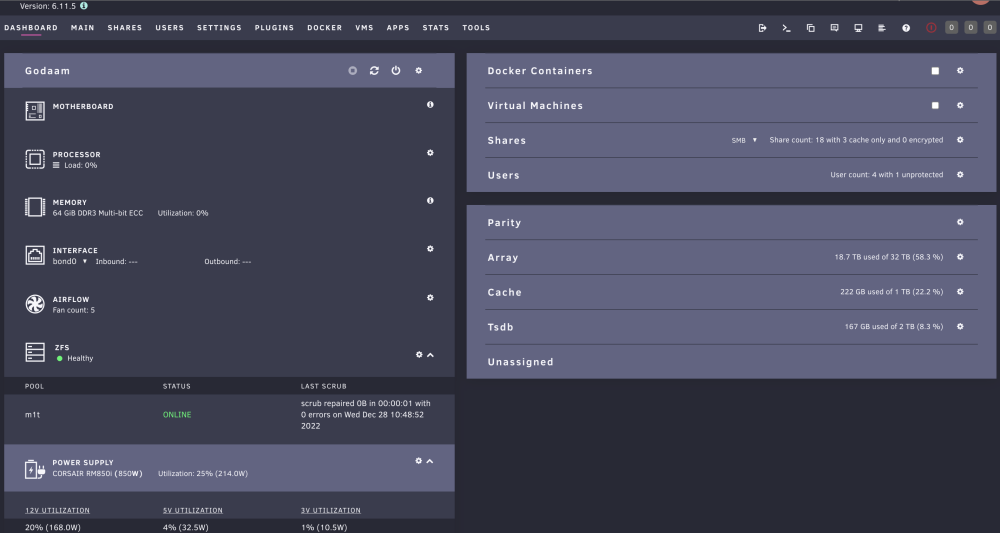
My unraid server web UI is suddenly broken. seems the php resources are failing to load with this error Searching for mccloud/ps3netsrv:* Not FoundSearching for unRAIDServer.plg Found Looking for conditions Testing unraid version 6.11.5 >= 6.6.0 Passed Testing unraid version 6.11.5 <= 6.8.0 Failed Conditions not met. Do nothing! Searching for disklocation-master.plg Found Looking for conditions Testing plugin version 2022.06.18 < 2020.02.23 Failed Conditions not met. Do nothing! Searching for community.applications.plg123 Not Found[] above was from plugins/community.applications/scripts/notices.php Is this a bad update on plugin, or a sign of something worse? I can ssh into the server fine. A monthly parity check is runnning, so I am reluctant to reboot right now if its just a UI issue. how can I confirm the extent of damage? Trying to get diagnostics hangs from UI This is what the UI looks like. What are my options to troubleshoot?
-
I am trying to setup timemachine backups for my macbook and mac desktop I created a timemachine share on unraid, and set things up. The backup starts, then runs for a while, and eventually fails midway with error suggesting that backup disk was disconnected or ejected. I know the connectivity between the 2 systems is working because I also have a file sync going on at same time using chronosync that continues to do its job On the mac end, I see following in timemachine logs around the time of failure: 2022-12-29 19:31:10 Failure to copy '/Volumes/com.apple.TimeMachine.localsnapshots/Backups.backupdb/GigaMacPro/2022-12-29-190646/GigaMacPro - Data/Users/Ashish/VirtualBox VMs/Win10Work/Win10Work.vhd' to '/Volumes/Backups of GigaMacPro/2022-12-29-190651.inprogress/GigaMacPro - Data/Users/Ashish/VirtualBox VMs/Win10Work', error: -36, srcErr: NO 2022-12-29 19:31:11 Cancelling backup because volume '/Volumes/Backups of GigaMacPro' was unmounted. 2022-12-29 19:31:11 Requested backup cancellation or termination 2022-12-29 19:31:11 Found disk10s1 41504653-0000-11AA-AA11-00306543ECAC 2022-12-29 19:31:12 Failed to determine disk image URL for volume '/Volumes/Backups of GigaMacPro', error: 2 No such file or directory 2022-12-29 19:31:12 Failed item stats: l:12.36 GB p:12.36 GB c:1, Target Volume Total: 995937443840, Target Volume Free Space: 0 2022-12-29 19:31:12 Fatal failure to copy '/Volumes/com.apple.TimeMachine.localsnapshots/Backups.backupdb/GigaMacPro/2022-12-29-190646/GigaMacPro - Data/Users/Ashish/VirtualBox VMs/Win10Work/Win10Work.vhd' to '/Volumes/Backups of GigaMacPro/2022-12-29-190651.inprogress/GigaMacPro - Data/Users/Ashish/VirtualBox VMs/Win10Work', error: -8062, srcErr: NO 2022-12-29 19:31:12 Couldn't resolve checkpoint file! 2022-12-29 19:31:12 Failed finding checkpoint marker for directory at /Volumes/Backups of GigaMacPro/2022-12-29-190651.inprogress/GigaMacPro - Data/Users/Ashish/VirtualBox VMs/Win10Work error: Error Domain=NSPOSIXErrorDomain Code=2 "No such file or directory" 2022-12-29 19:31:12 Failed to set string value '2022-12-29-193112,3,540672,540672,2,0,0,0' for extended attribute 'com.apple.timemachine.private.directorycompletiondate' on '/Volumes/Backups of GigaMacPro/2022-12-29-190651.inprogress/GigaMacPro - Data/Users/Ashish/VirtualBox VMs/Win10Work', error: 2 No such file or directory <........ lots of above errors about no such file repeated .........> 2022-12-29 19:31:12 '/Volumes/gigamac' does not support SMB FullFSync 2022-12-29 19:31:12 Failed to create volume info from disk '<TMDisk: 0x7fe60980a000> '/System/Volumes/Data/home'', error: missingURLForRemounting 2022-12-29 19:31:12 Failed copy from volume "GigaMacPro - Data" 2022-12-29 19:31:12 Copy stage failed with error: Error Domain=com.apple.backupd.ErrorDomain Code=11 "(null)" UserInfo={NSUnderlyingError=0x7f93440db180 {Error Domain=NSOSStatusErrorDomain Code=-8062 "(null)"}, MessageParameters=( 2022-12-29 19:31:12 Found disk10s1 41504653-0000-11AA-AA11-00306543ECAC 2022-12-29 19:31:23 Unmounted '/Volumes/com.apple.TimeMachine.localsnapshots/Backups.backupdb/GigaMacPro/2022-12-29-190646/GigaMacPro - Data' 2022-12-29 19:31:23 Unmounted local snapshot: com.apple.TimeMachine.2022-12-29-190646.local at path: /Volumes/com.apple.TimeMachine.localsnapshots/Backups.backupdb/GigaMacPro/2022-12-29-190646/GigaMacPro - Data source: GigaMacPro - Data 2022-12-29 19:31:23 Failed to enumerate instances of structure APFSBackup under path /Volumes/Backups of GigaMacPro 2022-12-29 19:31:23 Failed to enumerate URLs under /Volumes/Backups of GigaMacPro for SnapshotInProgressContainer reuse with error Error Domain=NSCocoaErrorDomain Code=260 "The file “Backups of GigaMacPro” couldn’t be opened because there is no such file." UserInfo={NSURL=file:///Volumes/Backups%20of%20GigaMacPro/, NSFilePath=/Volumes/Backups of GigaMacPro, NSUnderlyingError=0x7f9370369390 {Error Domain=NSPOSIXErrorDomain Code=2 "No such file or directory"}} 2022-12-29 19:31:23 Failed to enumerate instances of structure ReadOnlyBackup under path /Volumes/Backups of GigaMacPro, error: Error Domain=NSCocoaErrorDomain Code=260 "The file “Backups of GigaMacPro” couldn’t be opened because there is no such file." UserInfo={NSURL=file:///Volumes/Backups%20of%20GigaMacPro/, NSFilePath=/Volumes/Backups of GigaMacPro, NSUnderlyingError=0x7f9370394880 {Error Domain=NSPOSIXErrorDomain Code=2 "No such file or directory"}} 2022-12-29 19:31:23 Backup failed because the destination disk was ejected or disconnected unexpectedly! 2022-12-29 19:31:23 Failed to get capacity in use for '/Volumes/Backups of GigaMacPro', error: -69810 2022-12-29 19:31:23 Backup failed (27: BACKUP_FAILED_DISK_INTERRUPTION - The connection to the backup disk was interrupted.) 2022-12-29 19:31:23 Cleared pending cancellation request When a backup is running fine (and progress showing on data transferred), the following errors keep repeating in timemachine logs: 2022-12-29 19:23:08 com.apple.backupd.sandbox.xpc: connection invalid 2022-12-29 19:23:36 '/Volumes/gigamac' does not support SMB FullFSync 2022-12-29 19:23:36 Failed to get name of volume with mountpoint 'file:///Volumes/.timemachine/192.168.10.215/7AD3CBA8-93FA-4630-94EB-FDD6CC84D545/timemachine/', error: Error Domain=NSCocoaErrorDomain Code=257 "The file “timemachine” couldn’t be opened because you don’t have permission to view it." UserInfo={NSURL=file:///Volumes/.timemachine/192.168.10.215/7AD3CBA8-93FA-4630-94EB-FDD6CC84D545/timemachine/, NSFilePath=/Volumes/.timemachine/192.168.10.215/7AD3CBA8-93FA-4630-94EB-FDD6CC84D545/timemachine, NSUnderlyingError=0x6000036a2790 {Error Domain=NSPOSIXErrorDomain Code=13 "Permission denied"}} 2022-12-29 19:23:36 Failed to get name of volume with mountpoint 'file:///Volumes/.timemachine/192.168.10.215/7AD3CBA8-93FA-4630-94EB-FDD6CC84D545/timemachine/', error: Error Domain=NSCocoaErrorDomain Code=257 "The file “timemachine” couldn’t be opened because you don’t have permission to view it." UserInfo={NSURL=file:///Volumes/.timemachine/192.168.10.215/7AD3CBA8-93FA-4630-94EB-FDD6CC84D545/timemachine/, NSFilePath=/Volumes/.timemachine/192.168.10.215/7AD3CBA8-93FA-4630-94EB-FDD6CC84D545/timemachine, NSUnderlyingError=0x6000036a22b0 {Error Domain=NSPOSIXErrorDomain Code=13 "Permission denied"}} 2022-12-29 19:23:36 Failed to create volume info from disk '<TMDisk: 0x7fe60888d200> '/Volumes/.timemachine/192.168.10.215/7AD3CBA8-93FA-4630-94EB-FDD6CC84D545/timemachine'', error: missingName 2022-12-29 19:23:36 Failed to create volume info from disk '<TMDisk: 0x7fe608888c00> '/System/Volumes/Data/home'', error: missingURLForRemounting 2022-12-29 19:23:40 com.apple.backupd.sandbox.xpc: connection invalid on unraid side, I don't see a correlating error message at same time. I only see the following come up occasionally in syslog, but this is not at the time of TM backup failure Dec 29 18:56:18 Godaam smbd[22840]: smb2_validate_sequence_number: smb2_validate_sequence_number: bad message_id 12 (sequence id 12) (granted = 1, low = 0, range = 1) Dec 29 19:09:13 Godaam kernel: traps: lsof[10370] general protection fault ip:14b3ad4b84ee sp:e7436549d3fd73f3 error:0 in libc-2.36.so[14b3ad4a0000+16b000] Dec 29 19:09:13 Godaam kernel: traps: lsof[10374] general protection fault ip:1486070854ee sp:7f557bbe9e87e00a error:0 Dec 29 19:09:13 Godaam kernel: Dec 29 19:09:13 Godaam kernel: in libc-2.36.so[14860706d000+16b000] the transfers are over a point-to-point 10GbE link between the mac and unraid. mellanox CX3 pro card on unraid end, solarflare S6102 on mac end, connected via a FS.com generic SFP+ DAC. I can get stable 9GbE+ throughput via iperf on this link, and since my chronosync backup isn't interrupted, the link doesn't seem like the root cause for now. Still, I am not ruling this out - I just don't know how to properly troubleshoot unraid Diagnostics attached. last failure around 19:23 timestamp godaam-diagnostics-20221229-1938.zip
-
can confirm this works well now after updating UD to latest. My disks are now showing up as zfs and preclear option has disappeared
-
thanks, tried this out and defaulted the name
-
I am just trying out zfs with my unraid server, and it would be nice if I can align myself to what is coming up. Is there a set of steps I can follow to create my pools to be compliant with upcoming UD way? I guess I need a specific partitioning step before zpool create BTW, great to hear all this progress being made in UD for zfs support. I am not sure how far down zfs cache pools are in unraid proper, but UD support will certainly make things easier
-
I have the following plugins: zfs for unraid 6 (2.1.6) zfs companion (2021.08.24) zfs master (2022.12.04.61) I have simply created a zpool mirror with 2 disks, and a dataset under it for now. no zvols for now no VMs involved, no actual passthrough. I marked the disks passthrough just to disable all the UD features (mount / format etc) being offered for those drives
-
fdisk -l gives me something more crystal clear Device Start End Sectors Size Type /dev/sdj1 2048 1953507327 1953505280 931.5G Solaris /usr & Apple ZFS /dev/sdj9 1953507328 1953523711 16384 8M Solaris reserved 1
-
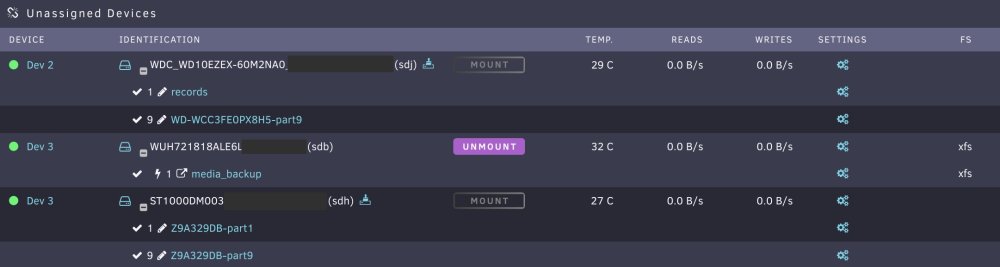
Sorry, I didn't realize that I wasn't seeing partitions because I has passthrough turned on Here is what I see in 6.11.5 Interestingly, unlike SimonF, I don't see a FS type (same with lsblk). Also, I noticed something interesting which may or may not be useful here. The partition name seems irrelevant - records was once a xfs partition I had on the first disk before I created a zpool on it. Seems zpool create retained the name that existed I have a zfs mirror on first and third disk here. The first partition on each is the 1TB data partition used by zfs. the second one (marked part9) is the 8MB partition - I believe this is the solaris reserved partition. In theory, this can be a way to detect zfs presence, but I am not sure how bulletproof this is
-
I understand that, but does not help here. My point is that passthrough might mean the disk is being used in ways that may not be detectable in usual way. There is no traditional filesystem for preclear to detect here, unless its looking for zfs pools and the disks participating. That pre-clear button is just a risk with no current way to disable or opt out of it for disks that are in use Would it be a useful feature for preclear to opt out when it sees passthrough (if it can?). Disks being passed should have no legitimate use case to be precleared, while passed disks are legitimate "unknowns" to be allowed to be precleared by mistake
-
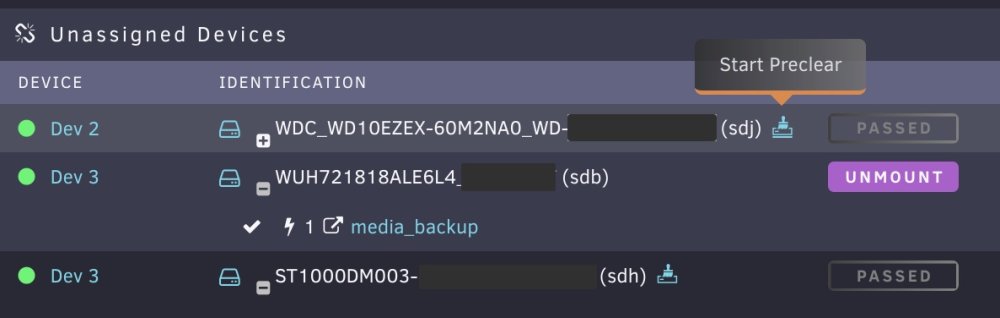
I recently started to create a zfs pool on my unraid server. With that setup, I want the participating drives to not be a target of any destructive operations. I have marked the disks as passthrough in UD, and that pretty much achieves it - no more mount, format etc are offered by UD. However, preclear option is still offered next to the disk ID, which obviously makes me a bit nervous I also tried disabling the destructive mode in UD settings, but seems preclear plugin doesn't respect that Is there any way I can marks certain disks not eligible for preclear option? attached screenshot to show the issue