





apandey
Members
-
Joined
-
Last visited
Everything posted by apandey
-
Huh. What is this based on? Are you saying unraid supported tiered caching before 2020 and now it doesn't? What is the source of chatGPT answer and how is it better than unraid manual in this case?
-
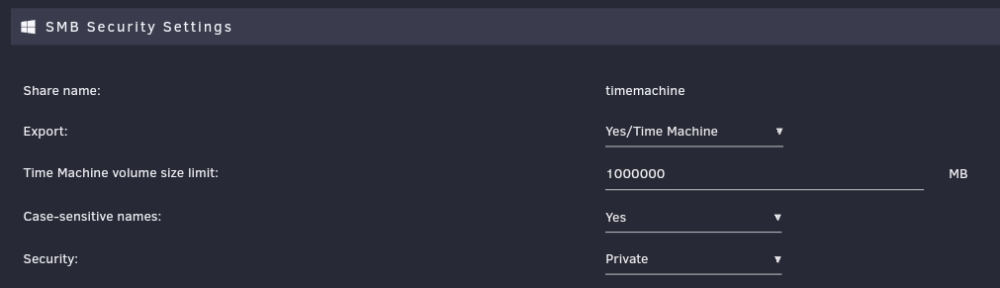
All I have is a cache only share. I simply did the following in smb settings User access is read/write for a single timemachine user. I will perhaps agree. Although I have it set up for at least 10 years, I have never needed to restore anything from it. Whenever I needed to interact with it, it was to deal with fixing it from some outage. I have used synology as a target in the past and it was same. To me it's just a secondary backup, just in case. I mainly depend on my more traditional backups which work across Mac and other systems
-
The linked article has details, but in summary, if you are able to login to unraid terminal, you just need to run "diagnostics" command which is part of unraid. Once it finishes running, you should find the zip file in logs directory on your USB boot drive
-
I use rsync. Its simple, reliable and repeatable (which makes it resilient to any interruptions)
-
All config is stored on usb boot drive If you can open terminal, Post diagnostics so someone can see what is happening
-
I have it working fine on 6.11.5 with simply setting up timemachine options in share settings When I initially set it up, it kept disconnecting on initial backup and for a couple of days, it felt as if the backup will never complete. But then, I gave it time and it did complete eventually in few more days. After initial backup, it has been keeping up fine. So I think it's some issue with backing up large chunks in one go
-
You should look in syslog, the error while mounting should be logged there If not sure, post diagnostics
-
Can you check if the target file or its partial copy already exists in the destination? The (2) is odd, usually those are added on windows if the file already exists
-
Maybe setup remote syslog server to record activity leading to the crash
-
Hard to tell without knowing your setup. Maybe post diagnostics so someone can see When you say inaccessible, is unraid itself inaccessible or a specific app you are trying to use? If I had to purely guess, and if it's latter, see if you have any config or appdata backup tasks, because they might need to stop docker / VM service to work
-
This example is an interesting one, but not necessarily a good use case for what we are discussing. No one makes a 4.02TB drive, so the question here should be how to tackle the discrepancy in disk metadata and what is causing it in first place. Maybe LT just need to handle that The big rule in unraid is to not waste the space like raid systems do and let one use the maximum disk space available when mixing drives. So while unraid can try to do all the things, it's the opposite of unraid's core focus. To add, raid systems anyway waste the time to build in addition to wasting space when you do it Maybe you can save some time for first disk, but then locked out for any further additions unless you keep wasting disk space on every addition from that point on. Given disk additions are rare events, what is the issue with time it takes? It's not like one needs to do array expansions multiple times a week. We do it once, let it finish and have an optimal system. This is no worse than any raid system disk addition with a better outcome on space utilization going forward
-
This is correct. What exactly is the error you get. Where is your mount path and is it writable by nobody:users? If not you need to fix permissions before starting the container.
-
The general rule is to use nobody:users for container, and fix permissions so that actual share has same
-
Have you looked at the mover tuning plugin. I believe it has an age based move criteria
-
IMO, you have to read the book. It took Douglas Adams pages and pages and pages to drill the details firmly into our brains, and I think the screen adaptations just Skim to the conclusion. They are probably OK to make the 42 joke, but any more detail is lost in translation Back to the topic, thanks for the ideas. I am leaning to make my own DIY thing with the PC dust mesh (rolls of material that they put on PC case inlets). That way I don't have to worry out picking the right pitch for the application. I don't need it 100% dust free, just something to slow down the accumulation and easier to clean outer layer until I hit the inevitable maintenance window on the bays My Temps are good now. Can always look at before / after trend on grafana to see if I have overdone it. Also open to put another fan-wall outside behind the mesh if needed The first task is of course finding the right frame material. This might take a while doing at low priority, but if I do manage to do something, I'll post back
-
Since it's clear I am not following you, I will drop off this conversation now I don't think what you are saying will work, but you can surely convince others who can understand it better than me. Good luck
-
There is nothing that can tell us that in how unraid parity works. If it's a hypothetical scenario, sure, but in practice, how will you know this is the case. The only communication breakdown is that we are talking hypothetical vs real When you start proposing things qualified with "high likelihood" or "to an extent", they sound not implementable to me. What you proposed about knowing parity state from filesystem state is not knowable because they don't interact with each other in any way I don't think you can, and you haven't shown you can. zfs provides guarantees and tools based on those guarantees, not just tools which can be used based on guesses about validity of data. Doing anything similar will need a filesystem to be written, which unraid is not We are going round in circles, so unless you have a practical way to implement this scenario, we should stop here
-
I would be careful trying to rebuild in this state. In my case, my data drives were connected to adaptec, but my parity drives were connected to motherboard sata ports. So, I was fairly certain that whatever corruption the adaptec might have done, my parity was fine. If you parity was on adaptec, that may be bad as well More importantly, I don't see how you can rebuild when all drives may be bad. Unless you know the extent of damage, recovering via array rebuild is a long shot I would try to fix the filesystem on the single disk you care about and see if it can be made readable, then move data off it. I myself could not do it in my case
-
Yes, I could not fix it. My later attempts in that thread were mostly to see if I can recover and learn something. I eventually restored from backup
-
I went through something similar, you can read through my thread if it helps In my case, I believe I ran into this because I booted in simple volume mode. It was correctable, but I was worried a switchable mode is a risk if it ever reverts back I know you booted in HBA mode, but it's possible the issue was something else. Sorry to be bearer of bad news. Hope you have backup. I learned never to boot with new hardware without separately testing it first
-
All those tools work at filesystem level. So yes, they can potentially tell you that the filesystem is not in a good state and some file is corrupted. This DOES NOT mean that parity is invalid. It also DOES NOT mean that parity holds anything related to the valid non-corrupted file I had covered this case explicitly. If filesystem tells you that a file is corrupted, and parity is valid, you will only get the same corrupted state of filesystem when you rebuild disk If you grab those files from backup, you don't have to rebuild a disk. Simply restore from backup In what situation would you presume that parity will have valid uncorrupted data but the fs does not? That simply means that parity is not in sync, and in addition that means we have no way of knowing how badly out of sync it is. All bets are off at this point. It is very unlikely that parity is broken at the same time as filesystem being broken, and in addition there is no concept of knowing parity is off by how much Yes, and that is the real communication breakdown. By design, a valid parity should reflect the state of writes on disk, even if those writes lead us to a corrupted file on disk. A known out of sync parity has no way of knowing how much off it is. It is completely independent of any filesystem management Perhaps, you are looking for a system like zfs which tackles redundancy and filesystem concepts in unison rather than try to achieve that with unraid array which works very differently
-
is the DHCP assigned IP in the same subnet as the one you are assigning statically? Is it outside the DHCP range? Are you sure the static IP being assigned is free on the network?
-
not unless you know what needs to be restored and where it sits on the disk - both of these are filesystem concepts. A corrupted filesystem can still have a valid parity, so if you restore from parity, you still end up with corrupted filesystem. If you restore based on filesystem repair tools, it has nothing to do with unraid itself and parity doesn't play a part in that so how do you plan to mix the two concepts?
-
We do know how the data is written, the parity calculation is blind to data and a simple predictable calculation on bits being written. But there is nothing more to it which make it filesystem aware. That knowledge is in fact the basis of my comments so far I understand the thought experiment part, just that I don't think it's viable without fundamentally rewriting what unraid does and going into the territory of trying to code a filesystem in itself. I am not challenging the thought experiment, just that I feel I am at a dead end of going any further with it
-
as I said, what is true in our mind has to be recorded and guaranteed to be true for a system to be able to act on it. "generally true" is a dangerous assumption to base any data mutation decisions on. Whatever credibility a storage system may have can quickly evaporate if it tried to do something which can compromise data integrity. Is there a specific implementation proposal here which can create these guarantees before the selective rebuild can proceed? Even if initiated manually, what data will such action be decided on so that user doesn't end up with data loss surprises? I agree with trurl here, this is a dark rabbit hole, so we can only engage if there is a specific implementation proposal that actually sounds viable. and that too is probably a topic for a different forum - perhaps feature requests

