





apandey
Members
-
Joined
-
Last visited
Everything posted by apandey
-
You have a few choices 1. Copy from synology over network. Simplest, reliable. Speeds won't be bad over 1gbps for a spinner as long as your synology doesn't bottleneck. I've done it this way 2. Break raid to basic in synology, then mount via UD. You need to look for corresponding adadm commands 3. Pass the disk via ata-id to a Linux VM and mount it there using mdadm (unraid cannot do that as it uses its own md stack). Then rsync back to unraid share I would keep it simple and go with 1, all you need is wait until copy finishes
-
It would be fair if it said so. "IMO it would be good to have in unraid, but I don't know if it's there"
-
It is not clear what problem you are facing. What stopped working? What exactly did you change?
-
The simplest would be to 1. Pause any time machine backups 2. Format 6A and ensure the share is available again on array 3. Rsync the data from 6B to array Another approach could be to put back 6A and rebuild parity to match current disk contents, but this risks the whole array during rebuild, so i suggest you don't attempt this
-
if it was me, I would so it in this order: 1. upgrade unraid version - so that all other operations benefit from running on latest software, and you are not left dealing with any older bugs that may be less supported 2. replace parity with 18TB, rebuild. Don't add a 2nd parity if you don't intend to keep 2 parity drives. Just shutdown, take out 14TB parity and replace it with 18TB, assign it to parity slot and start the array to rebuild parity 3. replace one of the 1.5TB data drives with the 14TB. If you want, you can move data off that drive, but its not really needed. Follow https://wiki.unraid.net/Replacing_a_Data_Drive 4. Move data off the remaining 1.5TB drive and then remove it from the array. Follow https://wiki.unraid.net/Shrink_array
-
Please post diagnostics
-
Just checking, you have enabled UEFI mode in BIOS?
-
It is a pre fail attribute, so yes, if it keeps increasing and breaches threshold, the drive should be considered failed. Just like all similar HDD attributes, no one can tell you how slow or quick that progression can be - it's a matter of what caused it in the first place, if there is a constant leak, the drive will fail eventually These drives expect a helium filled internals to operate, with normal air, they will see sub optimal conditions (more friction, vibration etc) I agree with others, RMA it if you can
-
So you are saying she is no better than "I'm feeling lucky" option of a basic search engine? How confident are you that the algorithm you are suggesting is the true one behind her implementation?
-
Indeed. Thank You
-
Since it's a parity drive, you don't need to pre clear or format. It will be completely overwritten as part of parity rebuild
-
That will a very long and boring video. A 12TB spinning drive will usually take 12-24 hours to be completely written if no bottlenecks BTW, I find it better to see read writes in MB/s rather than counts. The blue icon on top right can change what you see. That way, I know parity builds start at fastest speeds supported by my disk (around 250MB/s) and then tapers out (to about 150MB/s) as outer sectors are written. If I see that progression and range, I know things are going as fast as they can irrespective of elapsed time
-
And rebuild parity Assuming no data disk fails while parity is being built, as you would running an unprotected array during that phase
-
There should be no effect from data point of view. Parity needs to be valid at any point on every disk sector. The read write mechanism needs to be consistent and unraid guarantees that. You will be checking the state either before or after your ongoing writes, never an inbetween state. Same with writing corrections You may still want to minimize array access during parity checks, because fast parity checks depend on sequential IO. If the drive heads have to move between parity read and data read often, that leads to very slow random IO. So there is a performance concern
-
Do any of the files for media share still exist on cache? If yes, those files will still be managed on cache. Any new writes will go to array. You can check where files are by clicking compute on shares tab If files are still on cache, set cache to "yes", then run mover and once there is nothing on CA he drive, set cache to "no". Don't forget to disable anything writing to that share during this move. Mover ignores any open files
-
Choose that "enhance your experience with myservers" option, login into MyServers using the unraid / limetech account you created when buying the key. You will see your key download option from myservers If you are using same account to login to forum, you can also see MyServers in forum menu
-
Start here If above doesn't help, try clearing windows' knowledge of that share from before. Run following in an elevated command prompt net use \\server\share /delete
-
See if your asmedia controller matches one described here https://bugzilla.kernel.org/show_bug.cgi?id=196805 pcie_port_pm=off may be a better boot option than pci=noacpi
-
Some asmedia devices don't correctly identify to Linux. Try booting with pci=noacpi flag and see if that helps
-
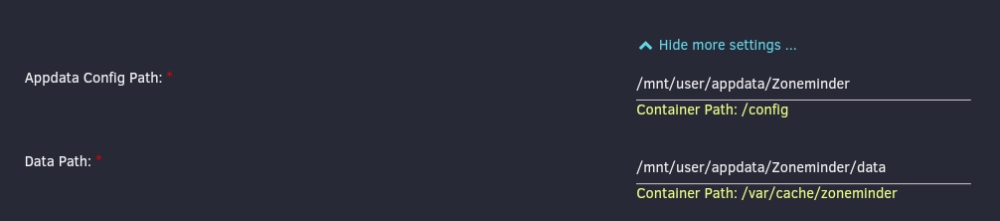
Which exact zoneminder image are you using The one here seems to have mount points for config and data that you should be able to map into your appdata https://github.com/dlandon/zoneminder.machine.learning As per docs, the mysql and events data is also stored here. The unraid version of image has same mounts (but not same documentation) If you are using the unraid template provided by CA, it is already mapping to appdata
-
The main issue to look for is any other IO happening on the array. Any other reads or writes to array will slow down parity rebuild significantly. Is the slow speed sustained or varies over time?
-
Short for motherboard
-
Does enabling mover logs give any more useful details? Mover won't move any open files or firs connected via terminal Set cache to "only", then run mover while docker / VM service is stopped
-
https://github.com/SpaceinvaderOne/Unraid_check_docker_script SpaceinvaderOne also has some YouTube videos going into this topic. Look them up Also, check container size button on docker page. It is helpful, but misses on some cases as mentioned in SIO videos
-
if the disk wasn't disabled, and all you are getting are UDMA CRC errors, you should look at connections first (SATA / Power). Replace cables, check they are properly attached etc. It's more likely a connection issue than disk issue. Since you have reassembled, its more likely too If that doesn't help, run extended SMART test on the disk before you decide to replace it. Replacing disk would make it look like disk issue if all it does is reconnect new disk properly



