





apandey
Members
-
Joined
-
Last visited
Everything posted by apandey
-
I would say "very very soon" Soon is what I reserve for things like zfs support for raidz expansion
-
Not all, one or more. It's down to luck. The issue is same either way
-
-
I would like to understand this a bit more, why does this matter? I always thought the slots are logical in nature, and as mentioned parity 2 cares about them. But what's the relationship with spindown? And why would unassigned disks play into array slots being used?
-
this is a known issue, see this thread for fix that is something else
-
I did not have an opportunity to take the array offline yet, but I issued a global spin down to see what happens. As expected, all disks spun down, so at least spindown works. But slowly, one by one, all of them came back up within a few minutes, including the pre cleared unassigned drive that is completely unused. So seems spindown itself works, but something wakes up all the drives on the HBA
-
I have mine mounted under /zdata, I leave /mnt aside for unraid to manage Unraid will support zfs with version 6.12, so there might be a better recommendation by then
-
It is not clear whether you want access to unraid from outside your network or you want to access the internet from radarr/sonarr etc via a VPN. For remote access, you will either port forward, or use your own point to point VPN running on unraid. see here - https://wiki.unraid.net/My_Servers#Configuring_Remote_Access_.28optional.29 For VPN based access for containers, I think you already managed to do that using your mullvand vpn
-
How is the /mnt/user/zfs created? Lots of errors in syslog related to that. Anything under /mnt/user is a user share, so if you actually mounted a zfs filesystem there, try moving it to a different path
-
Did you accidentally enable disk shares under global share settings? Flip that back to auto and user shares to enabled and that should hopefully fix it
-
Do you have local network sharing enabled in your VPN app? https://mullvad.net/en/help/using-mullvad-vpn-app/#localnetworksharing Without this, every connection will be router to VPN and will exit from VPN IP which obviously has no route back to your local network
-
Thanks, will give this a try next time when I can plan some downtime
-
Looking at this thread, it seems this HBA should support spindown. I believe I am on latest firmware. Attaching diagnostics if someone can spot an issue godaam-diagnostics-20230129-1155.zip
-
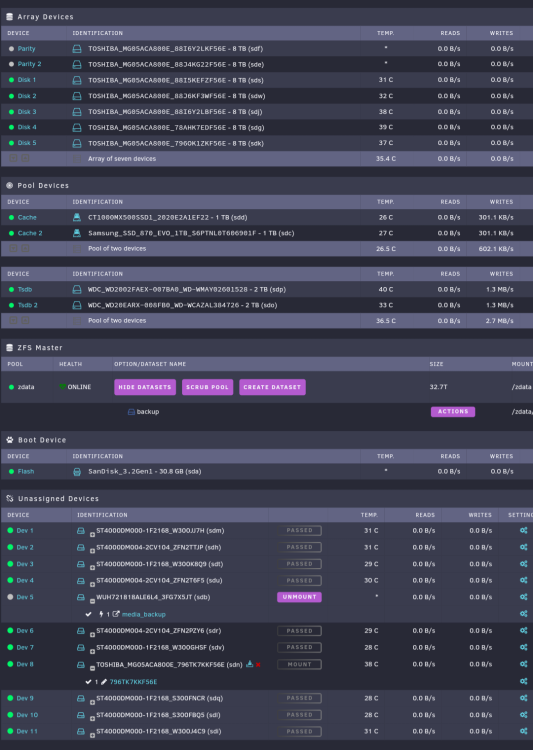
I have been trying to troubleshoot why my array disks won't spindown. Reaching a dead end and would appreciate some tips on how to investigate further Here is my setup My setup is to have minimal array read / writes. Most stuff goes to the 2 pools. Even within array, disk 4 should get occasional writes while others are expected to be idle through the day. Unassigned Dev 5 is a backup drive, used once a night. Dev 8 is a precleared spare not in use. Spindown is set to 1 hour in disk settings. I only see parity and Dev 5 stay in spindown. I expect most array drives to mostly spindown, and I don't see a reason why dev 8 should spin up at all At this point I am suspecting the LSI 9300-16i, since the drives that do spin down are connected directly to the motherboard SATA. But I don't understand why this should be a problem in pure HBA mode I have tried to use file activity plugin on array drives which confirms no array activity for a few hours and drives are still spun up. I am stuck at this point, since it confirms what I expect, but I don't know where to look next. Some ideas will help
-
I mostly go to the manual. See if this helps https://wiki.unraid.net/Manual/Storage_Management#Removing_disks_from_a_multi-device_pool If your disk to remove is a separate pool by itself, simply make sure it's not used by any shares, has no data on it and then you can just delete the pool If you are not sure, post diagnostics or a screenshot of your main page to get further advise
-
Shares have a setting to limit reported size for timemachine. I wonder how that works and if it can be used for smb in general
-
A wireguard VPN tunnel is encrypted. If it was not you would have much bigger problems than "who can see your streams". Problems like who else can reach your unraid server and home network and do whatever they wanted with it Having said this, a VPN tunnel is as secure as how it's keys are managed and software is kept up to date, so if you are exposing unraid from outside your network, you should always be on the lookout for malicious activity
-
first thing to rule out would be a basic hardware error. try running a long memtest session to rule out bad memory if that turns out fine, try sending logs to a remote syslog server or mirror to flash so logs can survive a reboot after crash
-
Unraid doesn't officially support custom drivers. You can probably do something diy, but it's not as simple as installing a driver from a CD Having said that, I225V should be supported out of the box since unraid 6.9.2 or thereabouts. What version are you on and what actual issue are you seeing? Perhaps post diagnostics so someone can see what is going on
-
You should post diagnostics so someone can see what your setup looks like The way you directly worked with disks can be confusing if the disks are part of an array. Your user shares are a combined view across all disks in array, so if the disks are on array, try checking the user share
-
Beware of what you are asking. Unraid is not raid, the array is not one homogenous store but rather just a management layer for JBOD. So, if a disk is full, it's possible for writes to fail if your allocation policy drives writes to that disk, even if other disks have enough free space
-
Yes, known issue. Solution in below linked thread https://forums.unraid.net/topic/134016-fix-to-a-small-issue-with-updating-oci-docker-images/
-
Try a reboot, that will reset syslog, then you are in better position to investigate further
-
If you just want reaffirmation, yes, what was said is true. I say this based on validating each of those statements against the linked documentation. The specific points / caveats being made have been specifically noted down in documentation. some relevant parts As always, best to test and validate when you set things up fresh yes, as long as it is a brand new series that does not yet exist on any array disk already
-
nothing explains it better than the links themselves



