





apandey
Members
-
Joined
-
Last visited
Everything posted by apandey
-
See adding disks to pool https://wiki.unraid.net/Manual/Storage_Management#Adding_disks_to_a_pool
-
If you have managed to repair fs and scrub is no longer giving you errors, no need to do anything. You should probably run one more scrub to be sure Good idea to do a scheduled scrub. I do once a month, separate time from my parity check) Balance, you may not need. Depends on your data write pattern. If your utilization stays good, no need to rewrite everything (which is what balance does)
-
see this thread, you may need to set something in BIOS. Your drives are showing masked in syslog Also, seems your drives attached to server which are visible are in RAID mode, which is not recommended
-
something is clearly wrong. what actually happens? why do you need to create a fresh USB?
-
have you tries setting bus to SATA?
-
Run lsusb or look under tools -> System Devices to validate this assumption first
-
run the following to check your filesystem as a start btrfs device stats /mnt/cache also try running a scrub to see if you have any checksum errors if I had backup, I would re-do the cache than fighting this, unless the value add is purely for learning
-
Normally you don’t have to, btrfs does that automatically. Also, if you are spooked by usage ratio being close to 100%, that is normal. That simply means btrfs is using allocated space efficiently without much wastage. Think of that like fragmentation loss, when that number is much less than 100%, you must run rebalance to rewrite data blocks to improve the situation. That is why it says “No balance required” next to it I think your problem is nothing to do with space, but rather is a case of filesystem corruption when you tried to repair the errors. I don’t think that worked well. Your syslog has “parent transid verify failed” which is a sign of broken filesystem. That is probably what let to it going read only I will leave it to someone more experienced with btrfs to suggest next steps, but I think availability of space is not something you need to worry about
-
The X% threshold can be handled with mover tuning plugin, but I am not sure if file ageing is considered. Maybe you can ask in plugin thread
-
What is the access mode for docker containers set to? Have you tried read-write-slave (or shared if you plan to mount from within container)? The setting is in advanced config for your container
-
Only in physical sense - basically, you have a risk of yanking the cable a bit more. At interface level, esata is same as sata obviously, what makes them similar also puts higher demands on esata connectivity - cables are shielded, connector is a bit more robust, so in the end physical differences may not matter as long as you don’t manage to disconnect or power off drives while in use
-
It should be fine, as long as your hardware works with unraid. You can boot a trial usb on your PC to check out. Unraid runs from memory, so it won't touch your existing drives etc unless you create and start arrays and pools
-
The shares are unprotected because they are using the cache, which is a single drive with no redundancy. Since at any given point in time, some files can be on cache, you can lose them if the cache drive fails You can click compute on shares page to see which drives are used for each share
-
In my case, I got distracted with other stuff and parked this issue for a while. It eventually finished first backup and from there on incremental backups have been smooth. So whatever it was, it seems to only affect initial backup. The network interface itself is stable, I can transfer large amounts of non-timemachine data without any interruptions Anyway, it's mysteriously fixed and is no longer an issue for me, so I'll mark this solved
-
As I see, the plugin does at least 2 things: 1. Install the software in a way that it works with unraid 2. Do it at startup I don't want 2, but would appreciate not having to reinvent 1. If I am overthinking this, maybe there is a one liner package manager command already to install. Would I be using pkgtool to do this?
-
Yes, that would be my backup plan, or migrate my scripts to bash. I was hoping to leverage the install method already in the plugin
-
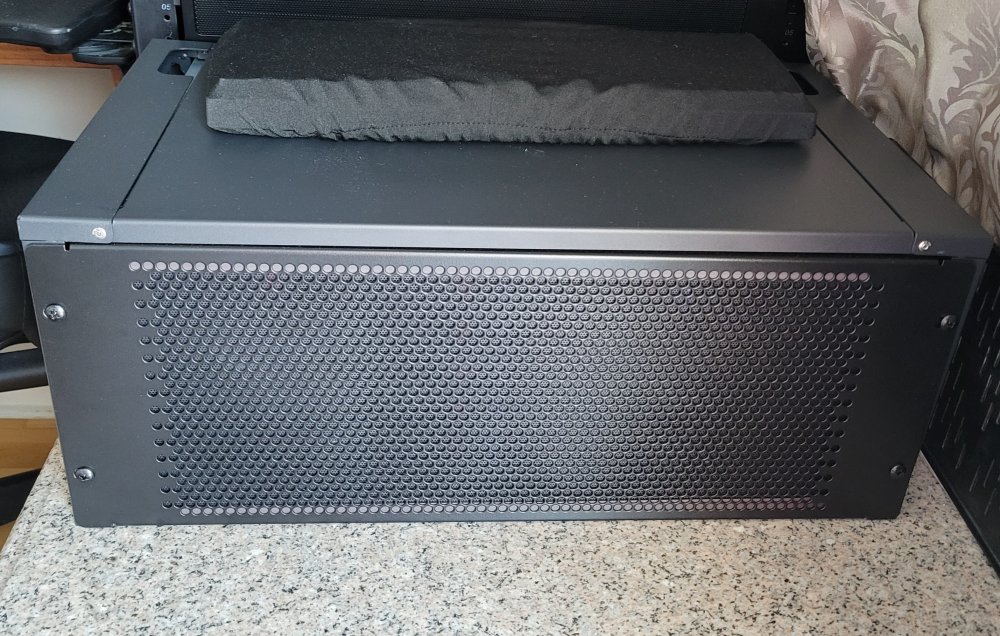
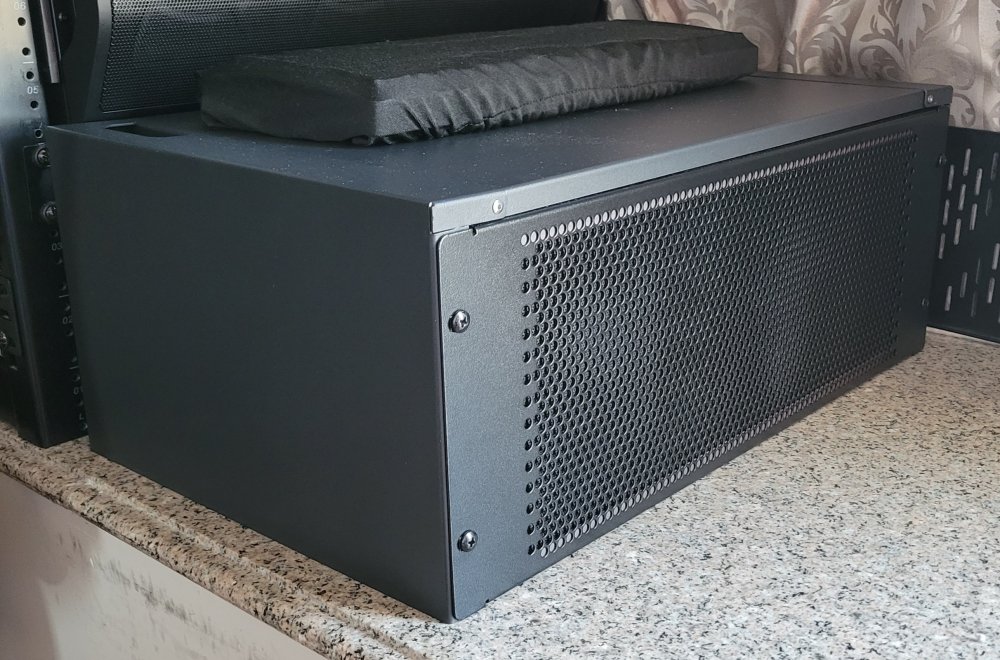
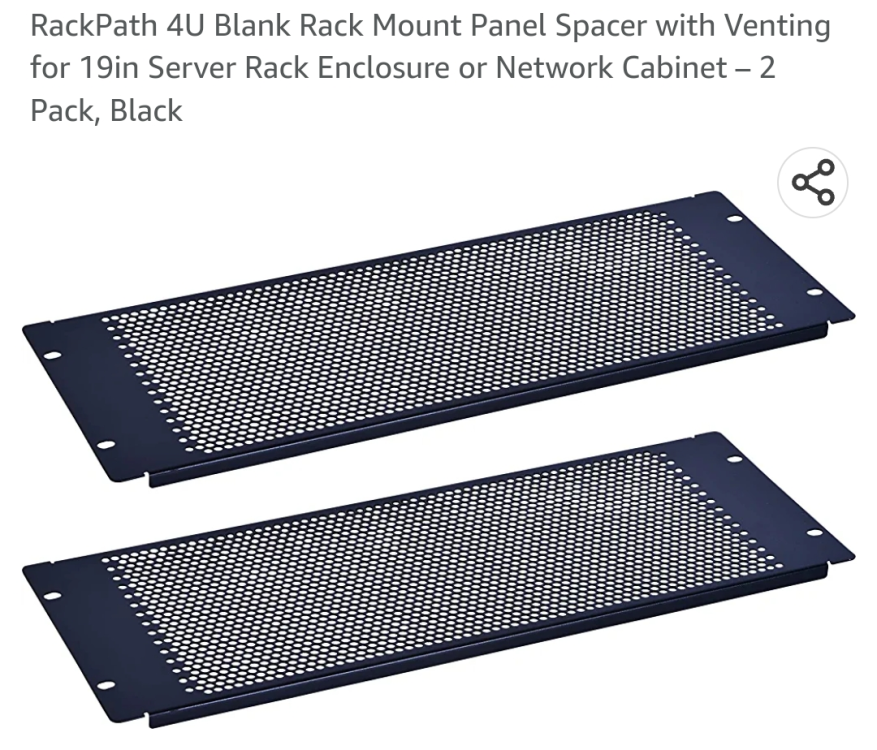
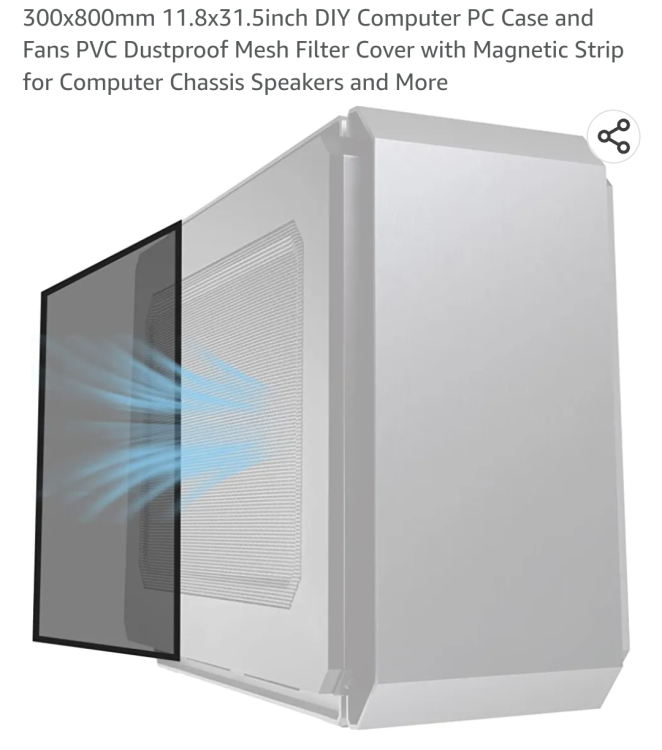
I finally manage to put something together, which looks good and works well. So as promised, sharing back Here is what I ended up with The parts I used are: 1. 4u vented panel with larger holes 2. PC mesh - large roll which I cut to 4u size, and stuck adhesive magnets on the border to stick with panel. It's right behind the panel. I mounted them on a 4u wall mount frame which I just can lower as a cap (it has no bottom or back) I was also planning to add a 140x3 fan wall between the panel and server in front, but my server fan wall behind the drives is doing a good job and Temps aren't affected, so I haven't pursued additional fans Parts used are these. The mesh comes as a roll without the magnetic strip attached. It can be cut to custom size and then magnet can be cut and attached as a tape accordingly
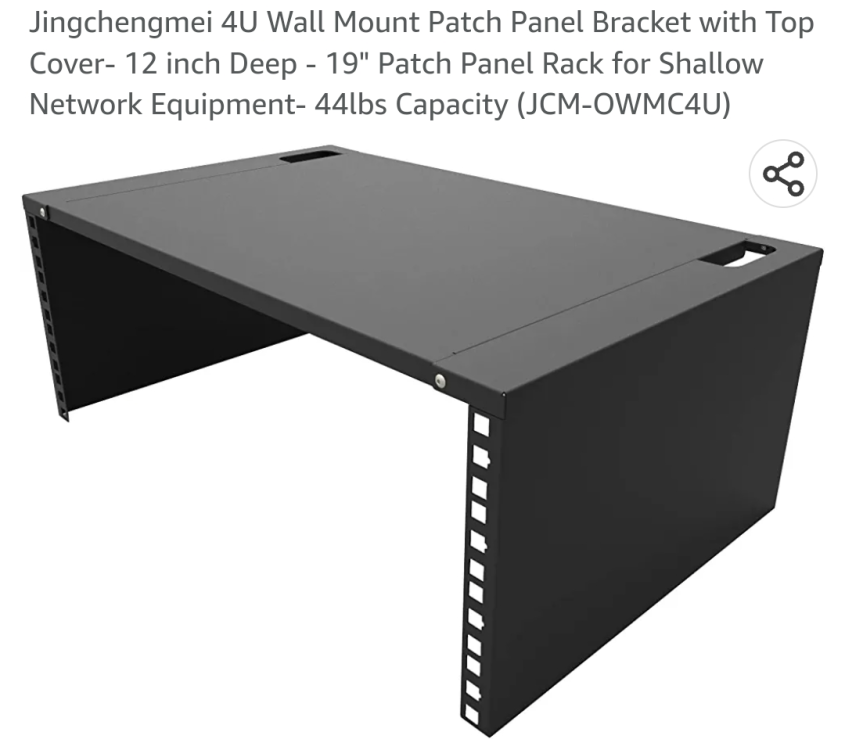
-
I have influxdb + grafana setup to capture metrics from my unraid server (using unraid ultimate dashboards as base). That way I can see trending data on cpu / memory / docker resources. Useful to see what is using resources
-
the main thing I see is constant app crashes due to lack of memory. Are you running some sort of webserver that is exposed to other users? any chance you are getting unexpected high traffic if it happens again, try to look at docker resource utilization. I have a grafana dashboard setp up which helps a lot to look back at any trending data
-
First, I would like to say that of all the plugin threads, this one is the hardest to follow. A bunch of very different plugins are all discussed together and we are close to 150 pages of content. If I want some help of a specific plugin, it is really hard to go through what has been discussed about that so far I need some help understanding the autofan plugin. I am confused as to how to set it up and so far haven't found any documentation that explains Here is my hardware setup (based on playing with pwmconfig): hwmon0 - corsair PSU (I am ignoring this) hwmon1 - coretemp hwmon2 - nct6776 (motherboard - I am focusing on this) hwmon2 presents 3 pwm controllers, but as far as I can tell using pwmconfig, only pwm1 is connected, the others (pwm2, pwm3) show no correlation with any fans I have 5 PWM fan headers on my motherboard, all controlled via hwmon2/pwm1 controller fan1 is mounted to my HBA, I want this to be BIOS controlled fan5 is CPU, I want this to be bios controlled fan2, fan3 and fan4 are my fanwall behind my drives. I want to control these 3 fans via autofan to speed up based on HDD temps I can't seem to figure out how to set this up. It seems for pwm1, I can only save 1 config, which looks something like this: options="-c /sys/devices/platform/nct6775.2608/hwmon/hwmon2/pwm1 -f /sys/devices/platform/nct6775.2608/hwmon/hwmon2/fan3_input -l 30 -t 30 -T 50 -m 5 -e sdf,sdc" service="1" controller="/sys/devices/platform/nct6775.2608/hwmon/hwmon2/pwm1" fan="/sys/devices/platform/nct6775.2608/hwmon/hwmon2/fan3_input" pwm="30" low="30" high="50" interval="5" exclude="sdf,sdc" this only seems to cater to one fan (fan3 above). How do I control multiple fans? Also, the excludes seem to use sdX, but those can change on reboot. Is there a way to define these by ata-id?
-
is there a way to lazy load the packages with nerdtools? I need python for some of my automation scripts, but setting up python during bootup slows down the boot significantly. I would prefer if python setup happened after system bootup, even if it means I may not have a working python for some time after system startup (I can always check for python availability and make my scripts safe) Is there a way to achieve this behaviour?
-
I am on mobile, so haven't checked your diagnostics Can you check docker tab, advanced view to see if a specific container is eating up all the CPU? Or type docker stats in a terminal The memory being full is also not good. The first step is to separate the cause and effect.
-
I just searched on the internet, you can try to find out. It's not an unraid question
-
This isn't exactly an unraid thing. Seems windows colors them based on fixed percentage utilization. It doesn't seem like you can change this in windows, but you can get rid of colors entirely https://superuser.com/questions/113754/how-to-change-the-disk-space-left-warning-in-windows-7
-
If I remember correctly, btrfs raid 5/6 isn't considered stable. At least historically. If you want to go this route, I would suggest you wait for unraid 6.12 which will allow zfs pools


