





archedraft
Community Developer
-
Joined
-
Last visited
Everything posted by archedraft
-
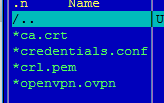
you issue looks to be certificate related, what are the filenames of the crt and pem files in the /config/openvpn/ folder on the host side? From the zip they are: crl.rsa.4096.pem ca.rsa.4096.crt renaming them to crl.pem ca.crt and changing the port to 1198 Everything working. EDIT: I deleted everything apart from credentials.conf from /config/openvpn but I also deleted my deluge docker and repulled it from the hub. @archedraft - It's a PEBKAC error.... Ah, I just figured it was a standard archedraft is special moment...
-
See attached. yeah as i suspected, you need to delete ALL files in /config/openvpn/, then restart the docker, this will update the ovpn file and the certs, your screenshot shows the old cert filenames so i know your not using the new ones. OK so for some reason when I updated the port number on the last step my docker was not pulling the latest version. I had to manually click update docker and install latest version, then delete openvpn files, and then change the port. Now it is working. Thanks for your help!
-
See attached.
-
Doesn't like port 1198 for me. The files are too large to attach so I am sending you a PM with a link.
-
Very nice. You want me to redirect the output of the script to a log file with the option to display it? Lol, squid your so good at this point, you can anticipate user requests before they are even asked.
-
Just double checking--is this still the case? Every time I reboot my Windows VM (e.g., to install windows updates), my USB devices no longer show up and I have to reboot the whole server. Honestly, I'm having a hard time remembering the context of that post. Since then I now PCI-stub my USB controllers on boot so that they show up in unraids 6.2 VM editor. Therefore unRAID isn't even aware they exist. That said I can stop my windows 10 VM and then start my win 7 VM with the same USB controller and t works just fine. I wonder if you did the same if they would work after a VM reboot?
-
How about putting the radio on top of a piece of 3/4" plywood with a Lazy Susan Bearing between the two? I am not sure how heavy the radio is so you would have to get a bearing that would support the weight. Also I would want a locking mechanism to stop it from spinning by its self.
-
Update fixed all the network issues I had to change my plugin location to my cache drive instead of an UD disk for this plugin to start after a boot but that's fine. Thanks!
-
Peter, are you also having the same issue with the plugin starting at boot?
-
Absolutely: # Generated settings: IFNAME[0]="br0" BONDNAME[0]="bond0" BONDING_MIIMON[0]="100" BRNAME[0]="br0" BRSTP[0]="no" BRFD[0]="0" BONDING_MODE[0]="1" BONDNICS[0]="eth0" BRNICS[0]="bond0" DESCRIPTION[0]="br0" USE_DHCP[0]="yes" DHCP_KEEPRESOLV="no" MTU[0]="" SYSNICS="1"
-
Happy to hear it's a common issue and not the normal archedraft is "special" issue.
-
Yes, backup your flash drive and take note of each of the drive assignments. I have never done this so I could be wrong but my guess would be that you are going to have to reassign each drive once you connect them to the new motherboard. If that does happen I would only assign the data drives first without parity and start the array. Then double check to make sure all your data is there and you didn't accidentally assign the parity drive as a data drive. Assuming all looks good then stop the array and assign parity and then do the parity checks. I would set all VM's to not auto-start. Then once you get all the discs a figured out above, I would use the unRAID editor and re-assign the correct cores to each VM. This will make sure you have the correct cores selected. Windows 10 may detect a hardware change and ask you to activate windows again. I know for sure if you use Microsoft Office 2010 it will ask you to reactive office if it detects the CPU has changed.
-
Issue #2: I can start the OpenVPN server manually; however, once I connect my phone to the VPN I can only access my unRAID webGUI. I cannot remote desktop or access my router on that same network. This was working just fine with the same settings on Version 6.1.9 so I wonder if the new ethernet settings on b23 are conflicting with this plugin? EDIT: Just noticed that I can only access the unRAID webGUI. All other traffic including a google search or local network (ie router page) do not load.
-
On unRAID 6.2b23 OpenVPN does not start for me on a reboot. I get this error in syslog. Diagnostics attached. Jun 13 17:18:12 Pithos root: Starting OpenVPN Server Jun 13 17:18:12 Pithos root: Starting Openvpn server..... Jun 13 17:18:13 Pithos sudo: root : TTY=unknown ; PWD=/ ; USER=root ; COMMAND=/usr/sbin/openvpn --writepid /var/run/openvpnserver/openvpnserver.pid --config /mnt/disks/vmdisk/plugins/openvpn/openvpnserver.ovpn --script-security 2 --daemon Jun 13 17:18:13 Pithos avahi-daemon[13881]: Service "Pithos" (/services/ssh.service) successfully established. Jun 13 17:18:13 Pithos avahi-daemon[13881]: Service "Pithos" (/services/smb.service) successfully established. Jun 13 17:18:13 Pithos avahi-daemon[13881]: Service "Pithos" (/services/sftp-ssh.service) successfully established. Jun 13 17:18:14 Pithos root: An error occurred, server not started!. More info in /var/log/openvpnserver.log or /var/local/emhttp/plugins/openvpnserver/openvpnserver.out Jun 13 17:18:14 Pithos emhttp: Any ideas why it isn't starting? EDIT: Output from /var/local/emhttp/plugins/openvpnserver/openvpnserver.out Options error: In [CMD-LINE]:1: Error opening configuration file: /mnt/disks/vmdisk/plugins/openvpn/openvpnserver.ovpn Use --help for more information. I guess my UD mount is not mounting fast enough?
-
I am setting up unRAID from new with default settings. You know a plugin is awesome when it's the first one you install! I really like how easy this makes installing everything again; plugins and dockers. THANK YOU Squid for all the time spent working on this plugin.I've made a feature req to have new perms not mess with appdata, and am considering creating a "docker safe" new perms tool in conjunction with fix common problems (but next on my plate is some changes to CA) Not a bad idea. Pain in the butt to figure out the permissions were messed up. I used to have all my dockers on an "UD" attached drive, I may consider moving my docker files back to it.This morning I ran the new permissions script. Unraid then modified all my permissions including all my docker files. Then I noticed that this OpenVPN docker was no longer starting. I copied my old config folder and ended up recreating this docker with a new config folder. I then chmod --reference=newconfig_file oldconfig_file every folder/file and then copied back the old config file to get it to work. It is working now but I wonder if this docker should check the folder permissions at start and change them back to the correct ones?Yeah, you made that one up in your head. Next rev or two however I was already planning on changing the logging and making it less verbose Lol, well good to know that I make up stuff. I was searching though the posts and was like hmmm where did that go...I thought I read somewhere in here that once you ignore messages there is also a way to create some txt file to stop it from being placed in the syslog as well? or did I make that up in my head? I changed my Plex docker to https so that the webGUI link actually works with my settings and I don't think I want to see the 4 line entry on my syslog every morning about me being a rebel and changing thingsWell I do enjoy being difficult... Thanks for your help!The server that's giving this error, was it previously running 6.2 (at any point)? Can you give me the contents of /boot/config/docker.cfg Yes, I did upgrade to 6.2 but then went back when I ran into some VM issues. /boot/confit/docker.cfg DOCKER_HOME="/mnt/cache/docker" DOCKER_OPTS="--storage-driver=btrfs" DOCKER_CONTAINERS="Couchpotato,RickRage,Transmission,SickRage" DOCKER_ENABLED="yes" DOCKER_IMAGE_SIZE="15" DOCKER_IMAGE_FILE="/mnt/cache/docker/docker.img" DOCKER_APP_CONFIG_PATH="/mnt/user/appdata/" DOCKER_AUTHORING_MODE="no" The docket containers listed above are not installed? Not sure if that's an issue.Huh??? A couple of post ago and it's not fixed? I hope you're feeling well! I decided to watch a movie yesterday. Wedding anniversary tomorrow so I figured I gotta play nice Sent from my LG-D852 using Tapatalk True, smart man.Huh??? A couple of post ago and it's not fixed? I hope you're feeling well!Just gave this plugin a go! Really good idea btw, found one settings that was mistypesd. One thing that it might be mistaken is "docker appdata location is stored within /mnt/user". I have my docker image located "/mnt/cache/docker/docker.img" and the docker folder is set to "cache only". I am still on 6.1.9 if that matters. Am I misinterpreting this error or is it a bug?

