





Emneth Design
Members
-
Joined
-
Last visited
Everything posted by Emneth Design
-
Did you change any other variables other than the default handbrake-for-nvidia (apart from watch and completed folders perhaps). No matter what encode options I select any encodes hammer my cpu rather than my GeForce RTX 3060 :( I have the correct drivers installed and emby transcodes just fine using the gpu but starting to make my little brain hurt with this one lol Any ideas would be very welcome :)
-
Could it possibly be your pc browsers cache? Try another browser just to rule that out (wouldn't be the first time I've seen that on my system).
-
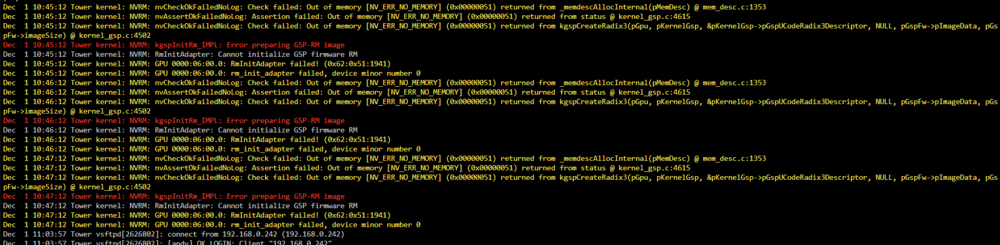
Afternoon folks - I recently updated my server from 7.1.4 to 7.2.2 during which time my Nvidia RTX 3060 driver was also updated. I have both "above 4G decoding and resizable bar" enabled and the bios fully upto date on the motherboard. All recommended bios settings also in place on my Gigabyte B550M DS3H and have run memtest for 8 hours with no errors. Things seemed to be running fine for nearly a day then these errors started to appear. I downgraded from the latest "production branch" nvidia driver back to the earliest Open Source Driver listed but nothing helped and again after a few hours the errors started to show. I only really use the server for media storage (emby and the *arrs collection) and as said worked fine for months with no errors showing at all. I've since moved back down to 7.1.4 but any Nvidia drivers other than v570.181 seems to keep causing these errors (that version of the driver is NOT shown in the driver package in v 7.2.2). Any ideas would be really appreciated - it's doing my head in and would REALLY like to update my system to keep up with the new features. Error states: NVRM: kpspInitRm_IMPL: Error preparing GSP-RM image NVRM: RmInitAdapter: Cannot initialise GSP firmware RM NVMR: GPU 0000:06:00.0: RmInitAdapter failed! (0x62:0x51:1941) NVRM:nvCheckOKFiledNoLog: Check failed: out of memory (nv_err_no_memory) (0x00000051) returned from memdescallocinternal(pmemdec) @mem_desc.c:1353
-
Oh yes def waited - been caught before when the Nvidea driver was still downloading or installing and rebooted too early and learned my lesson (follow the instructions and keep away from the reboot button until told to do so lol). Latest diagnostic file attached and sincere thanks once again for taking the time to look. tower-diagnostics-20250220-0946.zip
-
Sorry I moved back and the issue is still there BUT I did download the diagnostic file before I did for 7.0.0 Hopefully you can see where the issue is. This is a new one for me! tower-diagnostics-20250215-2127.zip
-
Many thanks - I thought I had but doesn't look like it sorry. Appreciate any help or pointers? I've now moved back to 6.12.15 but the issue still shows briefly on the GPU stats dashboard (it only stays there a couple of seconds then goes)?? tower-diagnostics-20250219-0851.zip
-
Hi folks - anyone else come across this issue with their system? I have a Nvidia RTX3060 in my system and using the latest drivers via the Nvidia settings in the unraid user interface. I also use the GPU Statistics app but recently it shows "gpu not available bound to vfio or in use in a vm"? I do NOT have VM turned on and the bios is also disabled for vm (it's a Gigabyte B550M DS3H motherboard). Any ideas? I think the card is still transcoding (emby) but bit of an odd error message considering there is no VM on my rig? I'm using Unraid 7.0.0 and have checked in the tools>system devices and nothing is bound in there that I can see? Thanks in advance.
-
As far as I am aware the developers know about this and have announced that they will release the appropriate docker version shortly
-
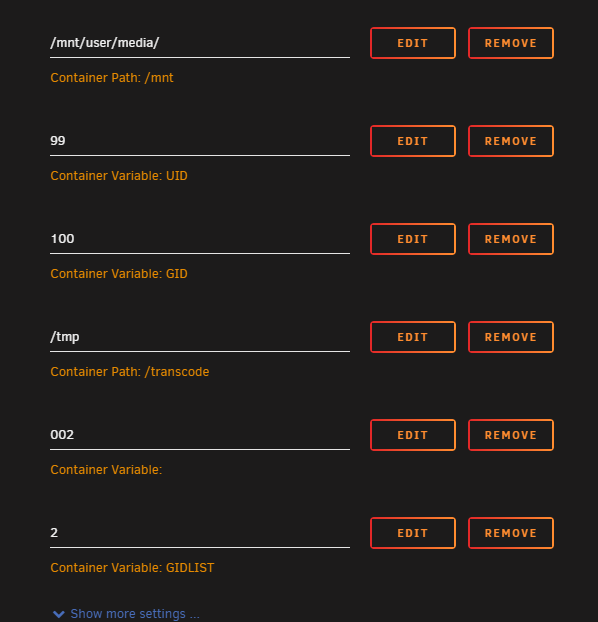
As Rick just said - make sure the GID and UID settings are right for Emby (on unraid Dashboard left click Emby and choose EDIT)
-
Perhaps when you copied the movie to the folder it was set with the wrong permissions? Have you tried going into the TOOLS page on Unraid and then chosen the "docker safe new perms" and run that which I think will change all the permissions so that they are uniform and you should then be able to delete then? Worth a try?
-
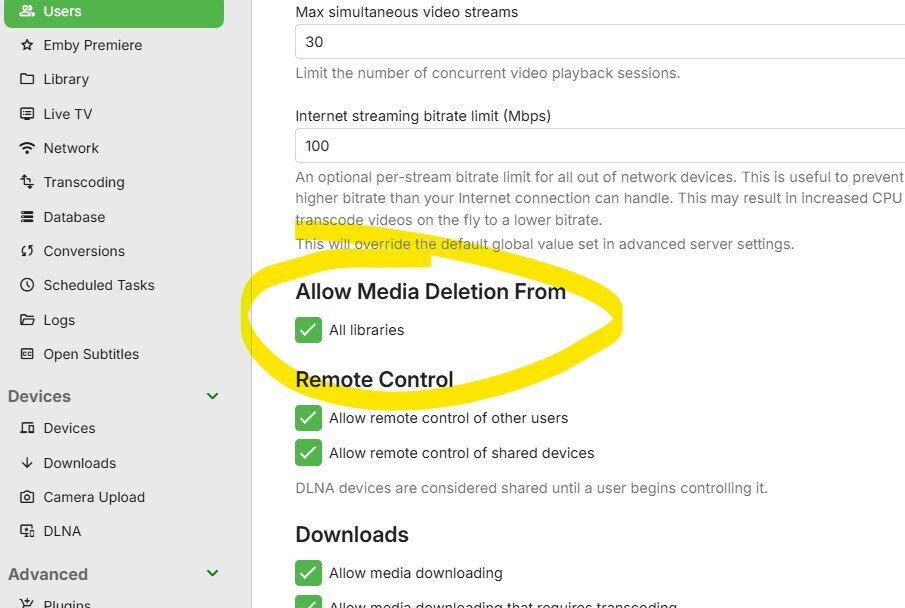
Hi there - in the Emby settings for your main user (or any user which you want to allow to delete files) have you turned that option on? In the web interface click on the cog on the top right of the page then USERS - select the main user then half way down the page is the option to allow media deletion. Hope that helps.
-
You possibly have the network set as a custom proxy which would indeed change the in-home (lan) ip address to something like that? You could change the NETWORK TYPE back to HOST which would change Emby back to the 192.168 range for the time being. Hope that helps. Andy
-
I'm on version 4.8.1.0 and unraid 6.12.6 and since the update getting ffmeg errors when transcoding with my RTX 3060 "Too many packets buffered for output stream 1:1" any ideas? Can the settings be changed does anyone know and if so.. how?
-
Anyone else having issues with the new 4.8.0.80 and latest 4.8.1.0 versions? I use a couple of amazon firesticks and when choosing a "play from here" option half the time the emby app just reloads rather than play whatever it's supposed to. Also in the Tv Shows for example there is an "upcoming" option - again this only works occasionally and the artwork seems to stick going down the list of shows then Emby just restarts again? I'm running Unraid 6.12.6 Any suggestions?
-
Morning folks - this is a new one to me and only since I upgraded to UnRaid 6.12.0 the other day. Any help would be appreciated - I have not change the Ram or the CPU since I installed them at the start of the year. Thanks in advance. tower-diagnostics-20230619-1126.zip
-
Hi Folks - hopefully some clever person can help here. Been using the Unraid (6.11.5) for a while and have Emby running on it (4.7.11.0) just fine BUT the last week things have gone a bit pear shaped? Not installed any new apps or dockers so not sure what's going on. I have set the transcode temp path within Emby to /transcode and then in the Emby docker settings created the container path for /transcode to /tmp. As said all was going fine until recently. Apparently this /tmp path is pointed to ram so should be ok and all the hardware is under 4 months old. so I thought would be upto the task (using an AMD Ryzen 5 5600 6-Core @ 3500 MHz with 16Gb of DDR4 ram so should be ok for emby (the main use of my unraid system). Here goes... If the tv show or movie is played "direct play" the system is flawless but if a friend needs to have his external stream transcoded any the other streams buffer like mad until the transcoding is done and the CPU's all go 100%? Has something changed recently? I've attached the Emby log and ffmpeg log files to see if anyone can either point me to the correct settings or just any advice? Thanks in advance guys. embyserver.txt ffmpeg-transcode-13bb29eb-36c8-4156-ba4c-0f6673688fb8_1.txt
-
Many thanks - if it works that should help quite a few folk.
-
Hi there Trott Any chance you can expand on your steps to help the SMB speed please? Is this done on the windows pc or on Unraid? Thanks in advance :)


