





Sak
Members
-
Joined
Everything posted by Sak
-
I just tried disabling cache on the share again and it does not have exclusive access. I think it's because you use zpool so you have a single unified pool similar to how Synology handles the volumes. I just use the regular xfs as I want to mix and match the disk as well as to spin down the disk when not in use.
-
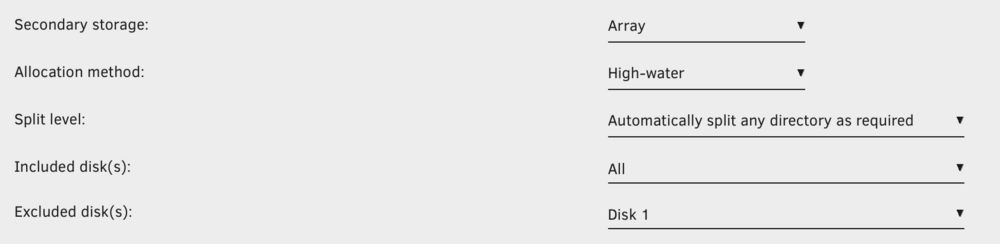
I'm transferring to a "Media" share spread over 4 drives (disk2 to disk5). Since it is spread over 4 drives it does not have exclusive access. The share has cache enabled but I am transferring to /mnt/user0 to bypass cache. However, when I tested copying a file to "appdata" share that is cache-only and have exclusive access, the transfer speed still hovers around 30MB/s which is puzzling to me as it is writing directly to the ssd cache pool. I did not know you could rsync over ssh, thanks for the suggestion, I will have to try that. Since iperf between the Synology and Unraid was full gigabit, I think I will see a speed improvement with rysnc.
-
I use disk 1 for seeding torrents only. It is excluded from the share that I am moving files into. I have also tried removing parity and turbo write as well. Made no difference.
-
I am migrating about 40TB+ from a Synology NAS to Unraid. I have the mounted the Synology on Unraid with unassigned devices. However the transfer speed averages around 30MB/s no matter what I tried. I think it might be a problem with SMB or networking. All devices are connected to a single managed switch. Things that I have tried: 1. I have tried both with cache enabled and cache disabled on the target user share. 2. I have also tried to transfer to a cache-only folder (appdata folder) but speed also remains the same (ave 30MB/s). 3. I ran iperf3 between Unraid, Synology NAS, Router (pfsense), as well as my computer. All tests achieve 950+ MB/s. So it's not a network problem. 4. Tested array with DiskSpeed container. Slowest drive average 138 MB/s and fastest drive average 286 MB/s with a simultaneous max throughput of 1.52 GB/s. Therefore it is not a drive or the controller problem. 5. Tried copying with Krusader, Double Commander, as well as Dynamix File Manager. No difference in speed. 6. In Tips and Tweaks, I have tried (one at a time) disbling NIC Flow Control and NIC Offload. I have also increased Rx and Tx buffer to 1024. Still no changes to transfer speed. 7. Previously I had this Samba extra configuration: #server multi channel support = no server min protocol = SMB3_02 client ipc min protocol = SMB3_11 client NTLMv2 auth = yes restrict anonymous = 2 null passwords = no raw NTLMv2 auth = no #vfs_fruit compatibility for Apple SMB [global] vfs objects = catia fruit streams_xattr fruit:nfs_aces = no fruit:zero_file_id = yes fruit:encoding = native spotlight backend = tracker fruit:metadata = stream fruit:posix_rename = yes readdir_attr:aapl_max_access = no readdir_attr:aapl_finder_info = no readdir_attr:aapl_rsize = no but now I have also removed all of it and Samba extra configuration is empty. 8. I have tried toggling Tunable (enable Direct IO) and reconstruct write. 9. I have also tried removing parity drive and writing directly to the unprotected array. It made no difference to the transfer speed. So I have now rebuilt parity and chose to do the migration with parity protection. 10. I also tried mounting the Unraid share in Synology and doing the transfer on Synology. But the speed was even worse at around 20MB/s. 11. Tried mounting the Synology share using NFS instead of SMB but it made no difference. 12. Doing a transfer speed test from my Mac to Unraid using Blackmagic Disk Speed Test always give random results. Sometimes it achieve full 100MB/s but most other times it is way less around 10-20 MB/s. The same test to Synology share always gets 100MB/s. The only thing I am hesitant to try is modifying docker network setting as it would require changing all of my container network settings to match. Currently I have macvlan + host access to custom network enabled. I am out of ideas of what to do. Please give me some suggestions on what else to try as 40TB+ transfer at 30MB/s would take a couple weeks instead of days. tower-diagnostics-20240906-1019.zip
-
I don't want to fill up the cache as I have other docker containers writing and reading new data on other user share. I think I will use user0 to do the transfer.
-
I need to move around 43TB from Synology NAS to the Unraid array. There is an existing user share with cache enabled. Should I disable cache temporarily to write directly to the disk array or should I write to user0 without changes to the cache settings. Are there any differences between the two options?
-
Thanks! that worked
-
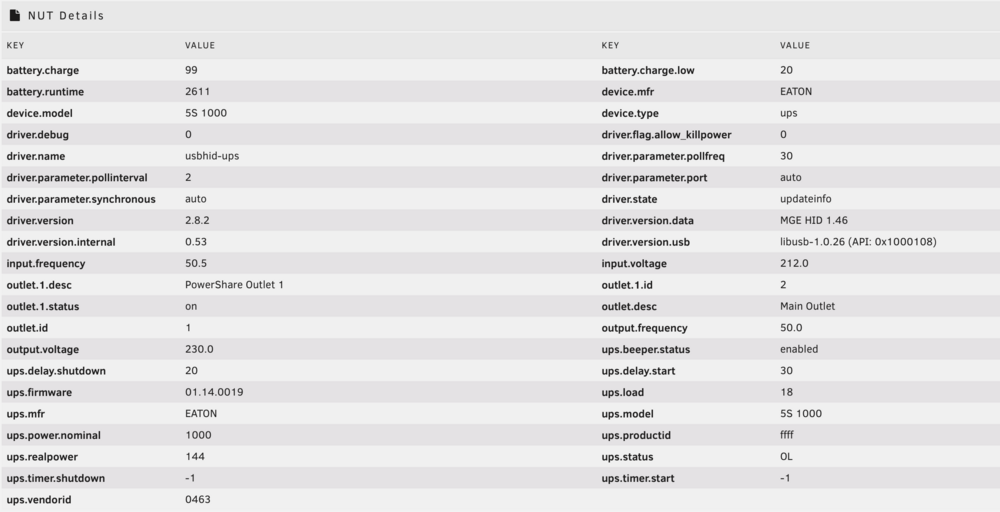
How do I disable the beeper? I am using Eaton 5S1000i
-
thanks! setting pice_aspm=off seemed to have help the PCIe errors.
-
yes both SSD shows up in BIOS and I ran SMART short test both on BIOS and on Unraid and they all passed. After the initial failure yesterday, I restarted Unraid a few times but the SSD still would not show up. I shutdown the machine and left it off for a couple hours. When I start it again, both SSDs were recognized however docker failed to start – I'm guessing due to docker.img failure. This ran for a couple of hours before the machine became unreachable. Today I had a chance to get to the machine and check BIOS settings again. I disabled VMD controller and enabled native ASPM. Also changed from ASUS OC profile to Intel Defaults for CPU Configs. Now Unraid and docker is running fine again with no loss of data. I did not backup the previous BIOS settings before the update so I am not sure if VMD controller was enabled before the update. Hopefully this fixed the issue, I will continue to monitor it. I had read about the intel 14th gen CPU problem and updated the BIOS as it had this in the changelog. My CPU is the i5-14500 1. Updated with microcode 0x125 to ensure eTVB operates within Intel specifications. Currently seeing Aug 2 14:51:21 Tower kernel: python3[26366]: segfault at 7c92 ip 0000153bb66fd556 sp 0000153b745f0c68 error 4 in ld-musl-x86_64.so.1[153bb66b8000+54000] likely on CPU 6 (core 12, socket 0) Aug 2 14:53:31 Tower kernel: python3[7600]: segfault at 7c92 ip 00001476e52ab556 sp 00001476a33d4c68 error 4 in ld-musl-x86_64.so.1[1476e5266000+54000] likely on CPU 6 (core 12, socket 0) Aug 2 15:01:12 Tower kernel: pcieport 0000:00:1a.0: AER: Multiple Corrected error message received from 0000:00:1a.0 Aug 2 15:01:12 Tower kernel: pcieport 0000:00:1a.0: PCIe Bus Error: severity=Corrected, type=Physical Layer, (Receiver ID) Aug 2 15:01:12 Tower kernel: pcieport 0000:00:1a.0: device [8086:7a48] error status/mask=00000001/00002000 tower-diagnostics-20240802-1521.zip
-
I updated my motherboard bios to the latest one from the manufacturer website a couple days ago and everything was working fine. Today both of my SSD in the cache pool crashed and was no longer recognized by Unraid. Any advice? tower-diagnostics-20240801-1850.zip
-
I just recreated the container with a new image still but still facing the same problem. Maybe it's just my setup, I'll do it manually for now, till it works again. thanks anyway
-
thanks for the work, really appreciate it. It was working fine until the recent update. btw I am also getting this warning Warning: `/config/wireguard/wg0.conf' is world accessible did I misconfigure something, or can I ignore this warning?
-
wireguard connecting to ProtonVPN Cambodia
-
I am using ProtonVPN and port forwarding port not automatically assigned after the previous update. It was working previously. current log shows 2024-06-05 00:33:18,014 DEBG 'watchdog-script' stdout output: [info] qBittorrent listening interface IP 0.0.0.0 and VPN provider IP 10.2.0.2 different, marking for reconfigure 2024-06-05 00:33:18,021 DEBG 'watchdog-script' stdout output: [info] qBittorrent not running 2024-06-05 00:33:18,021 DEBG 'watchdog-script' stdout output: [info] qBittorrent incoming port 6881 and VPN incoming port 52584 different, marking for reconfigure 2024-06-05 00:33:18,021 DEBG 'watchdog-script' stdout output: [info] qBittorrent config file already exists, skipping copy [info] Removing session lock file (if it exists)... 2024-06-05 00:33:18,029 DEBG 'watchdog-script' stdout output: [info] Attempting to start qBittorrent... 2024-06-05 00:33:18,031 DEBG 'watchdog-script' stdout output: [info] qBittorrent process started 2024-06-05 00:33:18,031 DEBG 'watchdog-script' stdout output: [info] Waiting for qBittorrent process to start listening on port 8082... 2024-06-05 00:33:18,138 DEBG 'watchdog-script' stdout output: [info] qBittorrent process listening on port 8082 it say marking for reconfigure, but it never does. I have to manually change it in webui previously the "start-script" shows that the automatic port forward works: 2024-06-04 07:37:38,955 DEBG 'start-script' stdout output: [info] Successfully assigned and bound incoming port '58741'
-
Have you found a fix? I am facing the same problem with an attached Synology as well.
-
Hi, I am trying to improve security on my unraid server as I have many exposed containers. One of the way is to user docker socket proxy for any containers that requires access to docker socket. some containers such as dozzle lets me set the socket endpoint through an environment variable. but my sablier container does not have that option. I found an example online where you can use the --host or -H command to set the daemon host. In the compose.yml file you can set it easily through the "command" block command: -H tcp://socket-proxy:2375 How can I do the same with the unraid docker gui? I have tried adding it as an extra parameter but that did not work.
-
It was a firewall issue. I only had a firewall rule to allow traffic from unRAID to the network share but not from unRAID to the router. I was able to mount the network share with the mount button with only this rule but automount requires a pass rule from unRAID to the router as well. It's working now after I added the new rule. Thank you for the plugin and the quick response.
-
Automount network share is not working for me after a reboot. It has been like that for quite some time. The error I see in the log is "unassigned.devices: Cannot 'Auto Mount' Remote Shares. Network not available!" I have tried changing my network from DHCP to Static IP. Any advice? tower-diagnostics-20230528-1759.zip


