Sak
Members
-
Joined
Everything posted by Sak
-
Thanks for this! My server unexpectedly shutoff today without warning and I think it was due to my corsair HX1200i overheating. I have just installed this and set the fan curve - hopefully that'll fix the problem. I previously have "Corsair PSU Statistics" plugin installed to display power usage on the dashboard. Can these two plugin work side by side? or will it interfere with one another?
-
I managed to access from a different VLAN by creating a NAT policy on my pfsense router. I created a virtual ip 10.25.30.250 in the subnet of the server. All traffic from my computer (10.25.0.4) going to my my server IP+port is translated to look like it is coming from 10.25.30.250.

-
I faced the same issue and disabling EPC and low current spin up did not make this timeout go away. I also tried increasing /sys/block/sd*/device/eh_timeout and /sys/block/sd*/device/timeout but that also did not help. I think I finally narrowed down the issue to SCT ERC (Error Recovery Control). View the current value of the drive SCT ERC with smartctl -l scterc /dev/sd* make sure to replace the * with your drive's letter. Mine was all at 7s. This means when the drive is spinning up and can't respond within 7 seconds, it returns an error, which then triggers the SCSI abort. So I setup a user script to increase it for all my drives: ``` # Increase SCT ERC timeout for all drives to handle spin-up for dev in /dev/sd?; do smartctl -l scterc,150,150 "$dev" 2>/dev/null done ``` This increase it to 15 seconds for all my drives and so far I have not seen any new timeout errors in the log. Edit: it has been 15 hours and the error has appeared again in the log. I guess my problem is not from this. No clue what to do now except disabling spin-down entirely and just leave array spinning all the time. If anyone has any clue what to try next, do let me know.
-
My issue was not like yours. I had to reboot to reboot Unraid to reset the iGPU and make it ready for use again by the VM. However, I found this https://github.com/inga-lovinde/RadeonResetBugFix So far it seems to be working. At shutdown, it cleanly disable the iGPU and switch to a Virtual GPU. During startup, it enables the iGPU again. This way the iGPU is always cleanly shutdown which doesn't trigger the AMD reset bug.
-
Thanks I got it to work for my Windows VM on Ryzen 9 9950x as well. However, it only works on the first VM boot. If I restart the VM, the gpu would no longer be working (Code 43). I have to restart Unraid itself again. Any idea how to fix this? I think this is the AMD Reset Bug. AMD Vendor Reset does not work for Ryzen 9 9950x.
-
How do you use the AM Vendor Reset plugin? I am getting the reset bug on my Windows VM on Ryzen 9 9950x. The iGPU would work at first VM boot but subsequent VM boot would have Code 43
-
That did it. Thanks! I added a 5 seconds sleep just to be sure. sudo modprobe drivetemp sleep 5 docker start CoolerControl
-
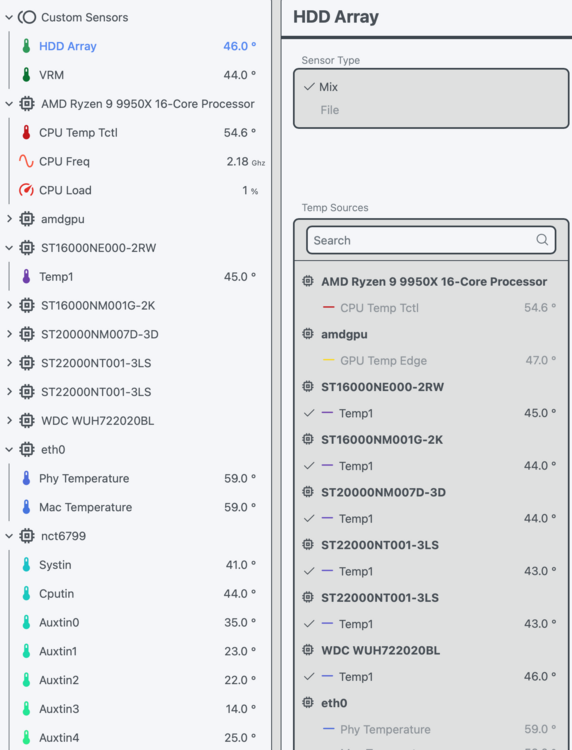
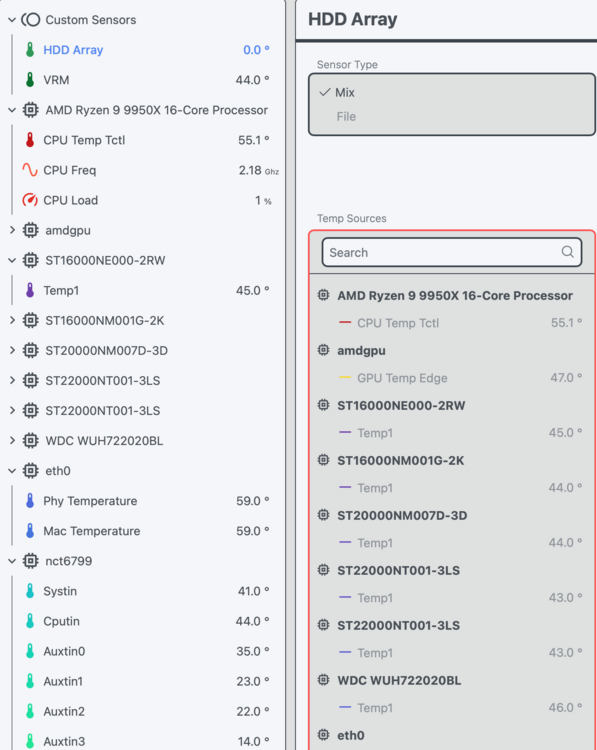
I'm facing an issue where after every Unraid host reboot, the HDD custom sensor resets to being empty. It does not reset if I just restart the container. The VRM custom sensor does not have this problem, only the HDD ones. Something to do with the drivetemp module perhaps? Anyone has any clues? I'm also running in privileged mode because without it, CoolerControl can't change the fan speed, only read it.
-
On the Unraid page about ZFS memory use https://docs.unraid.net/unraid-os/manual/zfs/placeholder/#zfs-pools Perhaps Unraid is doing something with the auto adjusting mechanism? root@Tower:~# cat /proc/spl/kstat/zfs/arcstats | grep c c 4 8045555296 c_min 4 3140741760 c_max 4 24000000000 'c_max' is the max memory zfs can use while 'c' is the current target. not sure what c was before the update, but the current 'c' is only at 8GB, no wonder my actual usage hovers around 7.5GB at the moment. root@Tower:~# arcstat 1 10 time read ddread ddh% dmread dmh% pread ph% size c avail 11:14:20 0 0 0 0 0 0 0 7.0G 7.0G 52.3G 11:14:21 18K 56 100 18.1K 100 16 100 6.9G 6.9G 52.3G 11:14:22 10K 0 0 10.4K 100 0 0 6.9G 6.9G 52.3G 11:14:23 196 0 0 196 100 0 0 6.9G 6.9G 52.3G 11:14:24 1.5K 737 100 775 100 35 0 6.9G 7.0G 52.3G 11:14:25 2.0K 709 100 1.3K 100 16 100 6.9G 7.0G 52.2G 11:14:26 337 59 100 251 100 27 100 6.9G 7.0G 52.3G 11:14:27 262 56 100 206 100 0 0 6.9G 6.9G 52.3G 11:14:28 6.3K 414 100 5.8K 100 0 0 6.9G 7.0G 52.3G 11:14:29 80K 79.5K 100 271 100 34 0 6.9G 6.9G 52.3G summary of the stats from chatgpt: read peaks at 79K, mostly hitting from ARC (ddh% and dmh% consistently at 100%). Very few prefetch reads (pread), and mostly demand reads (dmread), all hitting. This suggests the data you’re accessing is already cached — good ARC hit rate. size (actual ARC usage): 7.9 GB, very stable. c (target size): floats between 7.9–8.0 GB, nowhere near your c_max (24 GB). avail: plenty of free memory available (~52 GB), so ARC could grow if needed. ARC is working well with 100% cache hit rates — it’s serving your reads efficiently. Current workload only needs ~8 GB of ARC, so there’s no reason for it to grow toward the 24 GB limit. No issue exists unless you expected ZFS to cache more or your workload changes to require it. So I guess it is working as intended? Could you run arcstat or cat /proc/spl/kstat/zfs/arcstats | grep c to check what your current target 'c' is?
-
I have not yet disabled direct IO yet with zfs set direct=disabled <pool name>/<dataset>. This is my iostats. Surprisingly, no direct IO everything is already going through arc cache. But ZFS cache is only at 5.4GB on the dashboard. root@Tower:~# cat /proc/spl/kstat/zfs/cache/iostats 79 1 0x01 26 7072 104056354597 33592417132851 name type data trim_extents_written 4 0 trim_bytes_written 4 0 trim_extents_skipped 4 0 trim_bytes_skipped 4 0 trim_extents_failed 4 0 trim_bytes_failed 4 0 autotrim_extents_written 4 6815968 autotrim_bytes_written 4 2272647577600 autotrim_extents_skipped 4 4774296 autotrim_bytes_skipped 4 44617293824 autotrim_extents_failed 4 0 autotrim_bytes_failed 4 0 simple_trim_extents_written 4 0 simple_trim_bytes_written 4 0 simple_trim_extents_skipped 4 0 simple_trim_bytes_skipped 4 0 simple_trim_extents_failed 4 0 simple_trim_bytes_failed 4 0 arc_read_count 4 7803763 arc_read_bytes 4 928879902208 arc_write_count 4 65558151 arc_write_bytes 4 923930223048 direct_read_count 4 0 direct_read_bytes 4 0 direct_write_count 4 0 direct_write_bytes 4 0
-
I am also seeing low arc usage in ram. currently at 5GB even though I set it to 24GB with zfs_arc_max. It is likely caused by this https://openzfs.github.io/openzfs-docs/man/v2.3/7/zfsprops.7.html#direct However the parameter zfs_arc_direct is not found in /sys/module/zfs/parameters/ so I can't test it. zfs_arc_direct was introduced in OpenZFS 2.2 and is not available unless the ZFS kernel module was compiled with it I'm running ZFS 2.3.1 userland, but the kernel module was likely built without full 2.2+ options. Could we get the new parameter in the kernel module to test?
-
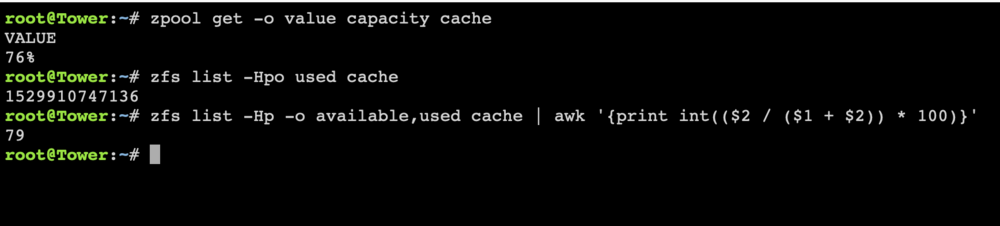
Yes the new formula shows 79% which matched the dashboard. But I don't think this is the cause of my problem.
-
what I meant by that was that the combined usage of all my cache:only shares only total up to about 20% of the cache pool. That is the appdata, vm, system, etc... shares. So the files in those shares did not make it into the filtered file list. It is this part that I am curious about. There are 1376 files being considered for the moved. It should have selected 400 to 500 files at least, yet only 246 files were selected. ************************************************************ ANALYSING MOVING ACTIONS *********************************************************** Mar 13 00:00:02 Tower move: Deciding the action (move/sync/keep) for each file. There are 1376 files, it can take a while... Mar 13 00:00:03 Tower move: A total of 246 files representing 255GiB will be moved/synced: Mar 13 00:00:03 Tower move: - 246 files representing 255GiB will be moved/sync from cache to secondary
-
Mover is not moving to the expected percentage. I set it to move files down to 60%, however after the mover ran, it only went down to 79%. It should have moved at least 500GiB+ but it only moved 255GiB. If I delete the mover tuning plugin and moved all files that are can be moved, my cache pool would go down to around 20%. When I first installed the mover tuning plugin a few versions ago, it was working correctly as I expected. Every move brought the cache pool down to around 60%. After the previous 1 or 2 update, this was no longer the case and it only moved less than the expected file. Not sure if this is revelant but my cache pool is zfs mirrored (I saw the changelog for this latest version regarding zfs percent calculation). But the cache pool was btrfs when I first installed the plugin and it was working correctly. ************************************************* Mover Tuning Plugin version version=2025.03.11 ************************************************ Mar 13 00:00:01 Tower move: Log Level: 1 Mar 13 00:00:01 Tower move: ----------------------------------------------------------------- Global settings --------------------------------------------------------------- Mar 13 00:00:01 Tower move: Using global (cache) moving threshold: 90 % Mar 13 00:00:01 Tower move: Using global (cache) freeing threshold: 60 % Mar 13 00:00:01 Tower move: Age: Automatic (smart caching) Mar 13 00:00:01 Tower move: Clean Folders: yes Mar 13 00:00:01 Tower move: Clean ZFS datasets: yes Mar 13 00:00:01 Tower move: Enable Turbo: yes Mar 13 00:00:01 Tower move: Skip filetypes: part !qB Mar 13 00:00:01 Tower move: Notify: errorsOnly Mar 13 00:00:01 Tower move: Debug Logging: yes Mar 13 00:00:01 Tower move: Validate Filenames: yes Mar 13 00:00:01 Tower move: ***************************************************************** FILTERING FILES *************************************************************** Mar 13 00:00:01 Tower move: ------------------------------------------------------------- Processing [Main] share ----------------------------------------------------------- Mar 13 00:00:01 Tower move: Primary storage: cache - size: 1.8TiB - used: 93 % (1.7TiB) Mar 13 00:00:01 Tower move: Secondary storage: user0 Mar 13 00:00:01 Tower move: Share Information: Name: Main - Path: /mnt/cache/Main Mar 13 00:00:01 Tower move: Moving threshold: 90% (1.6TiB) ; Freeing threshold: 60% (1.1TiB) Mar 13 00:00:01 Tower move: Mover action: cache->user0 (cache:yes). Pool is above moving threshold percentage: 93% >= 90%. Mar 13 00:00:01 Tower move: => Will smart move old files from cache to user0. Nothing will be moved from user0 to cache Mar 13 00:00:01 Tower move: Skipping Filetypes from List. File sizes are taken into account for the calculation of the threshold Mar 13 00:00:01 Tower move: Ignored filetypes are using 124MiB Mar 13 00:00:01 Tower move: ------------------------------------------------------ Debugging [Main] share Find Function ----------------------------------------------------- Mar 13 00:00:01 Tower move: FINDSTR: find "/mnt/cache/Main" -type f -depth -not -name '.placeholder' -not -name '*.part' -not -name '*.!qB' -printf '%T@|%s|%S|%n|%i|%p|\0' | awk -v RS='\0' -v FS='|' -v SPARSENESS='0' -v PRIMARYSTORAGENAME='cache' -v SECONDARYSTORAGENAME='user0' -v SHARENAME='Main' -v SHAREUSECACHE='yes' -v PRIMARYSIZETHRESH='1158674802278' ' { printf "%s|%s|%s|%s|%d|%d|%d|%d|%d|%d|%s\n", PRIMARYSTORAGENAME, SECONDARYSTORAGENAME, SHARENAME, SHAREUSECACHE, $1, PRIMARYSIZETHRESH, $2, $3, $4, $5, $6}' Mar 13 00:00:01 Tower move: Mar 13 00:00:01 Tower move: Updated Filtered filelist: /tmp/ca.mover.tuning/Filtered_files_2025-03-13T000001.list for Main Mar 13 00:00:01 Tower move: ------------------------------------------------------------ Processing [Media] share ----------------------------------------------------------- Mar 13 00:00:01 Tower move: Primary storage: cache - size: 1.8TiB - used: 93 % (1.7TiB) Mar 13 00:00:01 Tower move: Secondary storage: user0 Mar 13 00:00:01 Tower move: Share Information: Name: Media - Path: /mnt/cache/Media Mar 13 00:00:01 Tower move: Moving threshold: 90% (1.6TiB) ; Freeing threshold: 60% (1.1TiB) Mar 13 00:00:01 Tower move: Mover action: cache->user0 (cache:yes). Pool is above moving threshold percentage: 93% >= 90%. Mar 13 00:00:01 Tower move: => Will smart move old files from cache to user0. Nothing will be moved from user0 to cache Mar 13 00:00:01 Tower move: Skipping Filetypes from List. File sizes are taken into account for the calculation of the threshold Mar 13 00:00:02 Tower move: Ignored filetypes are using 124MiB Mar 13 00:00:02 Tower move: ------------------------------------------------------ Debugging [Media] share Find Function ---------------------------------------------------- Mar 13 00:00:02 Tower move: FINDSTR: find "/mnt/cache/Media" -type f -depth -not -name '.placeholder' -not -name '*.part' -not -name '*.!qB' -printf '%T@|%s|%S|%n|%i|%p|\0' | awk -v RS='\0' -v FS='|' -v SPARSENESS='0' -v PRIMARYSTORAGENAME='cache' -v SECONDARYSTORAGENAME='user0' -v SHARENAME='Media' -v SHAREUSECACHE='yes' -v PRIMARYSIZETHRESH='1158674802278' ' { printf "%s|%s|%s|%s|%d|%d|%d|%d|%d|%d|%s\n", PRIMARYSTORAGENAME, SECONDARYSTORAGENAME, SHARENAME, SHAREUSECACHE, $1, PRIMARYSIZETHRESH, $2, $3, $4, $5, $6}' Mar 13 00:00:02 Tower move: Mar 13 00:00:02 Tower move: Updated Filtered filelist: /tmp/ca.mover.tuning/Filtered_files_2025-03-13T000001.list for Media Mar 13 00:00:02 Tower move: ------------------------------------------------------------- Processing [Misc] share ----------------------------------------------------------- Mar 13 00:00:02 Tower move: Primary storage: cache - size: 1.8TiB - used: 93 % (1.7TiB) Mar 13 00:00:02 Tower move: Secondary storage: none Mar 13 00:00:02 Tower move: Share Information: Name: Misc - Path: /mnt/cache/Misc Mar 13 00:00:02 Tower move: Mover action: no action, only cache used (cache:only). Mar 13 00:00:02 Tower move: => Nothing will be moved. Share usage is taken into account in the calculation of the threshold for other shares. Mar 13 00:00:02 Tower move: cannot open 'cache/Misc': dataset does not exist Mar 13 00:00:02 Tower move: cache/Misc used: B Mar 13 00:00:02 Tower move: ---------------------------------------------------------- Processing [Paperless] share --------------------------------------------------------- Mar 13 00:00:02 Tower move: Primary storage: cache - size: 1.8TiB - used: 93 % (1.7TiB) Mar 13 00:00:02 Tower move: Secondary storage: user0 Mar 13 00:00:02 Tower move: Share Information: Name: Paperless - Path: /mnt/cache/Paperless Mar 13 00:00:02 Tower move: Moving threshold: 90% (1.6TiB) ; Freeing threshold: 60% (1.1TiB) Mar 13 00:00:02 Tower move: Mover action: cache->user0 (cache:yes). Pool is above moving threshold percentage: 93% >= 90%. Mar 13 00:00:02 Tower move: => Will smart move old files from cache to user0. Nothing will be moved from user0 to cache Mar 13 00:00:02 Tower move: Skipping Filetypes from List. File sizes are taken into account for the calculation of the threshold Mar 13 00:00:02 Tower move: Ignored filetypes are using 124MiB Mar 13 00:00:02 Tower move: ---------------------------------------------------- Debugging [Paperless] share Find Function -------------------------------------------------- Mar 13 00:00:02 Tower move: FINDSTR: find "/mnt/cache/Paperless" -type f -depth -not -name '.placeholder' -not -name '*.part' -not -name '*.!qB' -printf '%T@|%s|%S|%n|%i|%p|\0' | awk -v RS='\0' -v FS='|' -v SPARSENESS='0' -v PRIMARYSTORAGENAME='cache' -v SECONDARYSTORAGENAME='user0' -v SHARENAME='Paperless' -v SHAREUSECACHE='yes' -v PRIMARYSIZETHRESH='1158674802278' ' { printf "%s|%s|%s|%s|%d|%d|%d|%d|%d|%d|%s\n", PRIMARYSTORAGENAME, SECONDARYSTORAGENAME, SHARENAME, SHAREUSECACHE, $1, PRIMARYSIZETHRESH, $2, $3, $4, $5, $6}' Mar 13 00:00:02 Tower move: Mar 13 00:00:02 Tower move: Updated Filtered filelist: /tmp/ca.mover.tuning/Filtered_files_2025-03-13T000001.list for Paperless Mar 13 00:00:02 Tower move: ------------------------------------------------------------- Processing [Plex] share ----------------------------------------------------------- Mar 13 00:00:02 Tower move: Primary storage: cache - size: 1.8TiB - used: 93 % (1.7TiB) Mar 13 00:00:02 Tower move: Secondary storage: user0 Mar 13 00:00:02 Tower move: Share Information: Name: Plex - Path: /mnt/cache/Plex Mar 13 00:00:02 Tower move: Moving threshold: 90% (1.6TiB) ; Freeing threshold: 60% (1.1TiB) Mar 13 00:00:02 Tower move: Mover action: cache->user0 (cache:yes). Pool is above moving threshold percentage: 93% >= 90%. Mar 13 00:00:02 Tower move: => Will smart move old files from cache to user0. Nothing will be moved from user0 to cache Mar 13 00:00:02 Tower move: Skipping Filetypes from List. File sizes are taken into account for the calculation of the threshold Mar 13 00:00:02 Tower move: Ignored filetypes are using 124MiB Mar 13 00:00:02 Tower move: ------------------------------------------------------ Debugging [Plex] share Find Function ----------------------------------------------------- Mar 13 00:00:02 Tower move: FINDSTR: find "/mnt/cache/Plex" -type f -depth -not -name '.placeholder' -not -name '*.part' -not -name '*.!qB' -printf '%T@|%s|%S|%n|%i|%p|\0' | awk -v RS='\0' -v FS='|' -v SPARSENESS='0' -v PRIMARYSTORAGENAME='cache' -v SECONDARYSTORAGENAME='user0' -v SHARENAME='Plex' -v SHAREUSECACHE='yes' -v PRIMARYSIZETHRESH='1158674802278' ' { printf "%s|%s|%s|%s|%d|%d|%d|%d|%d|%d|%s\n", PRIMARYSTORAGENAME, SECONDARYSTORAGENAME, SHARENAME, SHAREUSECACHE, $1, PRIMARYSIZETHRESH, $2, $3, $4, $5, $6}' Mar 13 00:00:02 Tower move: Mar 13 00:00:02 Tower move: Updated Filtered filelist: /tmp/ca.mover.tuning/Filtered_files_2025-03-13T000001.list for Plex Mar 13 00:00:02 Tower move: ----------------------------------------------------------- Processing [Seeding] share ---------------------------------------------------------- Mar 13 00:00:02 Tower move: Primary storage: user0 - size: 113TiB - used: 57 % (64TiB) Mar 13 00:00:02 Tower move: Secondary storage: none Mar 13 00:00:02 Tower move: Share Information: Name: Seeding - Path: /mnt/user0/Seeding Mar 13 00:00:02 Tower move: Mover action: no action, only user0 used (cache:no). Mar 13 00:00:02 Tower move: => Skipping Mar 13 00:00:02 Tower move: ----------------------------------------------------------- Processing [appdata] share ---------------------------------------------------------- Mar 13 00:00:02 Tower move: Primary storage: cache - size: 1.8TiB - used: 93 % (1.7TiB) Mar 13 00:00:02 Tower move: Secondary storage: none Mar 13 00:00:02 Tower move: Share Information: Name: appdata - Path: /mnt/cache/appdata Mar 13 00:00:02 Tower move: Mover action: no action, only cache used (cache:only). Mar 13 00:00:02 Tower move: => Nothing will be moved. Share usage is taken into account in the calculation of the threshold for other shares. Mar 13 00:00:02 Tower move: cannot open 'cache/appdata': dataset does not exist Mar 13 00:00:02 Tower move: cache/appdata used: B Mar 13 00:00:02 Tower move: ----------------------------------------------------------- Processing [backups] share ---------------------------------------------------------- Mar 13 00:00:02 Tower move: Primary storage: cache - size: 1.8TiB - used: 93 % (1.7TiB) Mar 13 00:00:02 Tower move: Secondary storage: user0 Mar 13 00:00:02 Tower move: Share Information: Name: backups - Path: /mnt/cache/backups Mar 13 00:00:02 Tower move: Moving threshold: 90% (1.6TiB) ; Freeing threshold: 60% (1.1TiB) Mar 13 00:00:02 Tower move: Mover action: cache->user0 (cache:yes). Pool is above moving threshold percentage: 93% >= 90%. Mar 13 00:00:02 Tower move: => Will smart move old files from cache to user0. Nothing will be moved from user0 to cache Mar 13 00:00:02 Tower move: Skipping Filetypes from List. File sizes are taken into account for the calculation of the threshold Mar 13 00:00:02 Tower move: Ignored filetypes are using 124MiB Mar 13 00:00:02 Tower move: ----------------------------------------------------- Debugging [backups] share Find Function --------------------------------------------------- Mar 13 00:00:02 Tower move: FINDSTR: find "/mnt/cache/backups" -type f -depth -not -name '.placeholder' -not -name '*.part' -not -name '*.!qB' -printf '%T@|%s|%S|%n|%i|%p|\0' | awk -v RS='\0' -v FS='|' -v SPARSENESS='0' -v PRIMARYSTORAGENAME='cache' -v SECONDARYSTORAGENAME='user0' -v SHARENAME='backups' -v SHAREUSECACHE='yes' -v PRIMARYSIZETHRESH='1158674802278' ' { printf "%s|%s|%s|%s|%d|%d|%d|%d|%d|%d|%s\n", PRIMARYSTORAGENAME, SECONDARYSTORAGENAME, SHARENAME, SHAREUSECACHE, $1, PRIMARYSIZETHRESH, $2, $3, $4, $5, $6}' Mar 13 00:00:02 Tower move: Mar 13 00:00:02 Tower move: Updated Filtered filelist: /tmp/ca.mover.tuning/Filtered_files_2025-03-13T000001.list for backups Mar 13 00:00:02 Tower move: ---------------------------------------------------------- Processing [ephemeral] share --------------------------------------------------------- Mar 13 00:00:02 Tower move: Primary storage: cache - size: 1.8TiB - used: 93 % (1.7TiB) Mar 13 00:00:02 Tower move: Secondary storage: none Mar 13 00:00:02 Tower move: Share Information: Name: ephemeral - Path: /mnt/cache/ephemeral Mar 13 00:00:02 Tower move: Mover action: no action, only cache used (cache:only). Mar 13 00:00:02 Tower move: => Nothing will be moved. Share usage is taken into account in the calculation of the threshold for other shares. Mar 13 00:00:02 Tower move: cannot open 'cache/ephemeral': dataset does not exist Mar 13 00:00:02 Tower move: cache/ephemeral used: B Mar 13 00:00:02 Tower move: ------------------------------------------------------------ Processing [system] share ---------------------------------------------------------- Mar 13 00:00:02 Tower move: Primary storage: cache - size: 1.8TiB - used: 93 % (1.7TiB) Mar 13 00:00:02 Tower move: Secondary storage: none Mar 13 00:00:02 Tower move: Share Information: Name: system - Path: /mnt/cache/system Mar 13 00:00:02 Tower move: Mover action: no action, only cache used (cache:only). Mar 13 00:00:02 Tower move: => Nothing will be moved. Share usage is taken into account in the calculation of the threshold for other shares. Mar 13 00:00:02 Tower move: cannot open 'cache/system': dataset does not exist Mar 13 00:00:02 Tower move: cache/system used: B Mar 13 00:00:02 Tower move: -------------------------------------------------------------- Processing [vm] share ------------------------------------------------------------ Mar 13 00:00:02 Tower move: Primary storage: cache - size: 1.8TiB - used: 93 % (1.7TiB) Mar 13 00:00:02 Tower move: Secondary storage: none Mar 13 00:00:02 Tower move: Share Information: Name: vm - Path: /mnt/cache/vm Mar 13 00:00:02 Tower move: Mover action: no action, only cache used (cache:only). Mar 13 00:00:02 Tower move: => Nothing will be moved. Share usage is taken into account in the calculation of the threshold for other shares. Mar 13 00:00:02 Tower move: cannot open 'cache/vm': dataset does not exist Mar 13 00:00:02 Tower move: cache/vm used: B Mar 13 00:00:02 Tower move: ************************************************************ ANALYSING MOVING ACTIONS *********************************************************** Mar 13 00:00:02 Tower move: Deciding the action (move/sync/keep) for each file. There are 1376 files, it can take a while... Mar 13 00:00:03 Tower move: A total of 246 files representing 255GiB will be moved/synced: Mar 13 00:00:03 Tower move: - 246 files representing 255GiB will be moved/sync from cache to secondary Mar 13 00:00:03 Tower move: *********************************************************** LET THE MOVING SHOW BEGIN ! *********************************************************
-
yup just tested 5.0 again and that setting was the cause of the problem. Changing it to “delete files permanently”fixed it for me.
-
After the latest update, I am unable to delete files from qbittorrent.

-
I saw a comment on another forum for I226-V stability issues suggesting to turn off all aspm settings in bios. That fixed the issue for me. Transfer speed using the Intel I226V is back to full speed for me now.
-
A quick google search seems to reveal a lot of stability issues with i225 and i226. Hopefully it is fixed soon through the IGC driver updates.
-
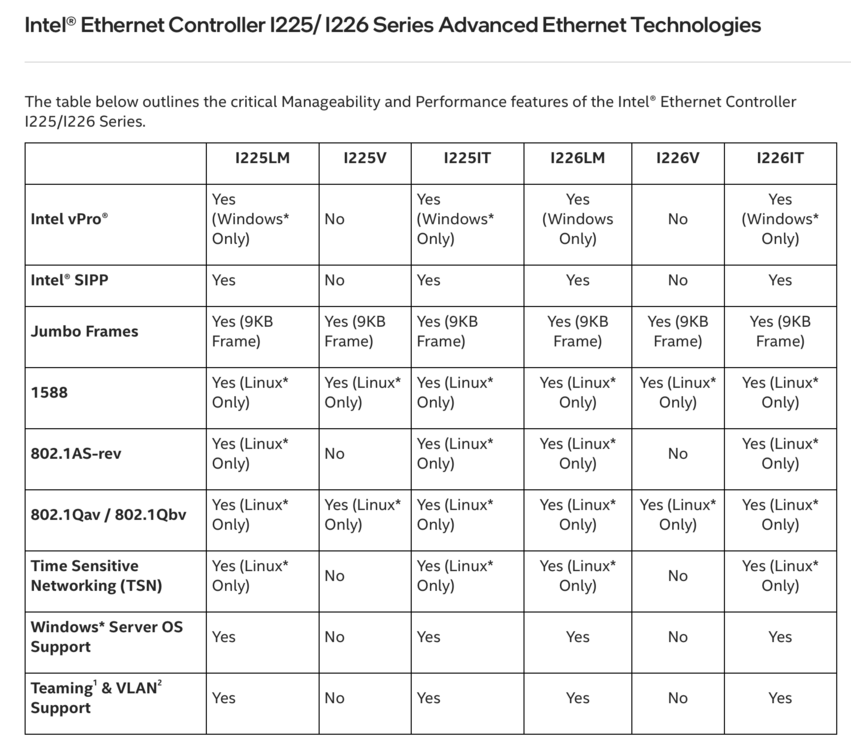
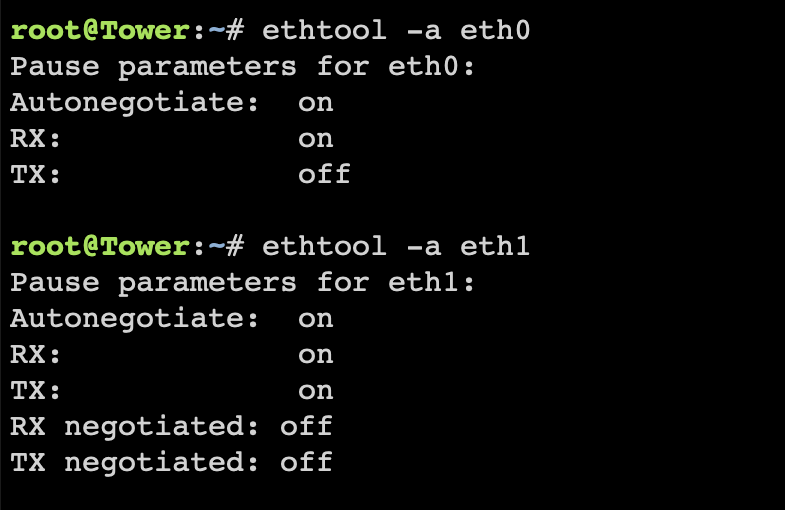
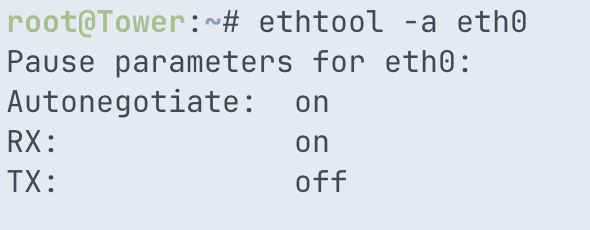
Thanks for the help so far. After switching out cables and testing all network equipments, it is definitely an issue with the Ethernet controller: Intel Corporation Ethernet Controller I226-V (rev 06) on my motherboard. Another user had a problem with this NIC as well. Officially VLANs are not supported on this ethernet controller. However my setup had a vlan enabled in network settings. I thought that might be the cause of the issue but even after I deleted all the VLANs, the issue still persists. Another odd thing I noticed is that flow control for Tx cannot be turned on. I have tried enable/disable through both "Tips and Tweaks" as well as using the ethtool -A commands. Flow control for Autonegotiate and Rx can be turned on and off, however Tx always remains off. In addition, I noticed that when I have turned off flow control for this NIC, sometimes Rx would be on by itself: Autonegotiate: off Rx: on Tx: off I also did a direct connection from my Mac to Unraid and did multiple iperf test. The Unraid to Mac test always get full speed but the Mac to Unraid was not consistent. About half the time it gets full speed, and the rest of the time was unstable with around 300Mbps. For now I am using a USB ethernet adapter plugging directly into the second port of the Synology. I am able to get full transfer speed with this method. is it possible to install our own driver for the I226V? https://www.intel.com/content/www/us/en/download/15084/intel-ethernet-adapter-complete-driver-pack.html The USB Ethernet adapter is not an ideal permanent solution.

-
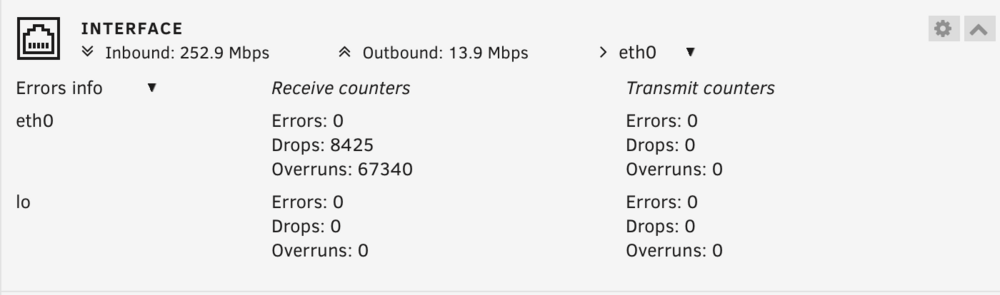
I think you're right that it's a network issue. Looking at the Errors Info, I'm seeing a lot of drops and overruns for receive counters. It seems like flow control was enabled for Rx but not for Tx. In tips and tweaks, Flow Control is enabled by default. Do you recommend to enable or disable flow control for both Rx and Tx?

-
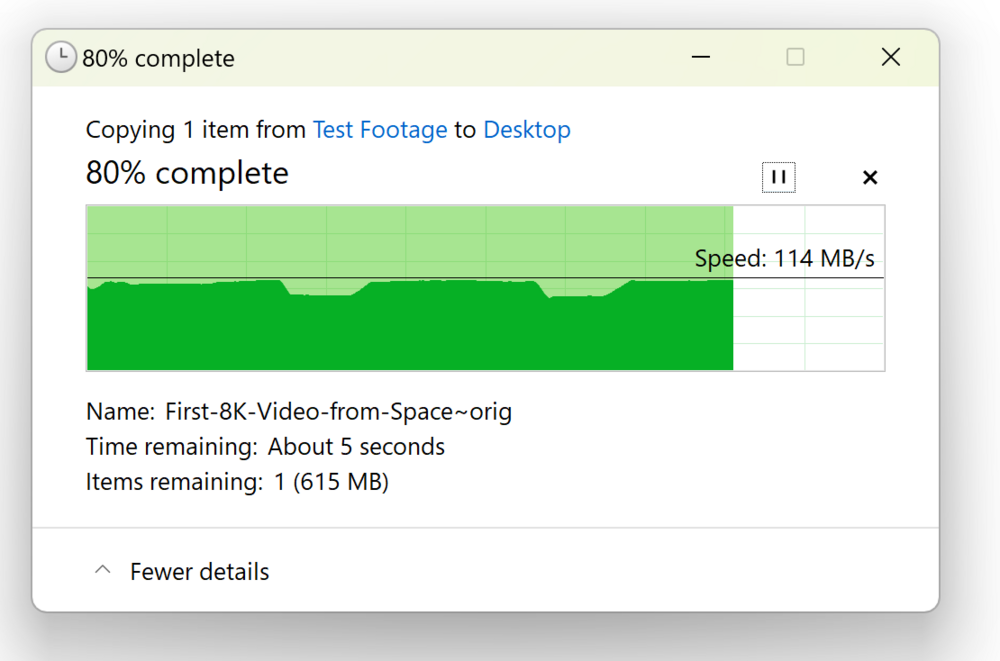
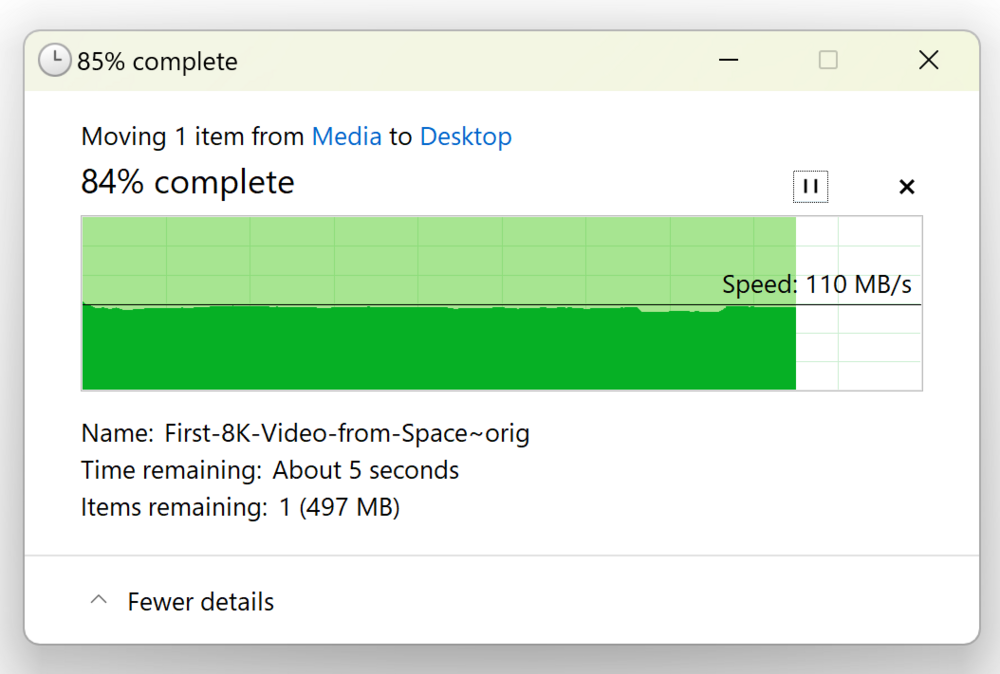
Tested with a spare windows laptop. Seems like the issue is writing into Unraid. No problem with reading or with the Synology NAS. From Unraid to Desktop: From Desktop to Unraid. Copying to "Media" share – a share with Cache as primary and Array as secondary. From Synology to Desktop From Desktop to Synology
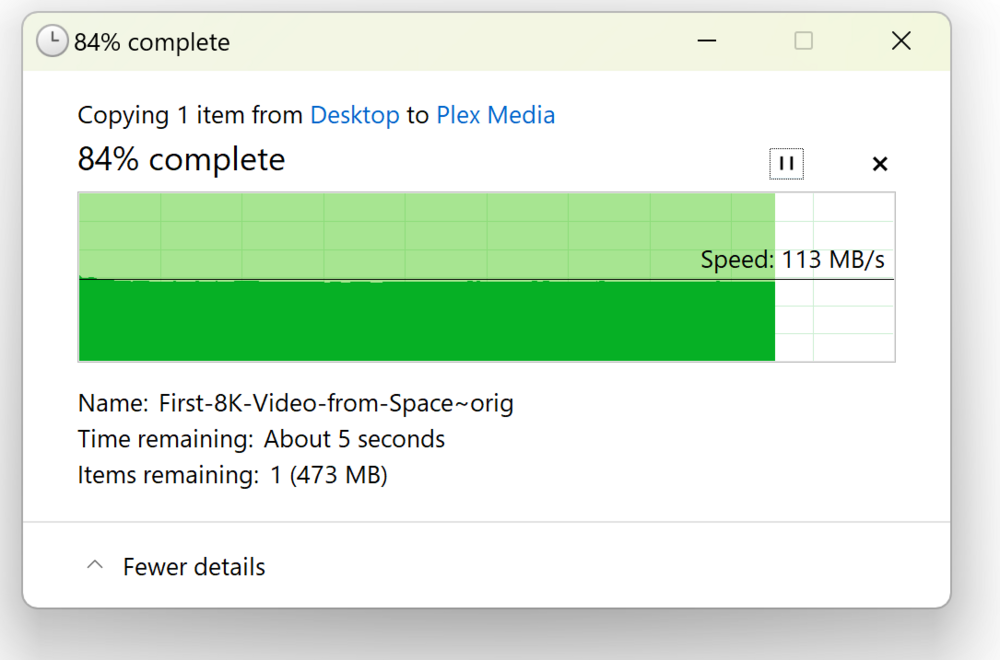
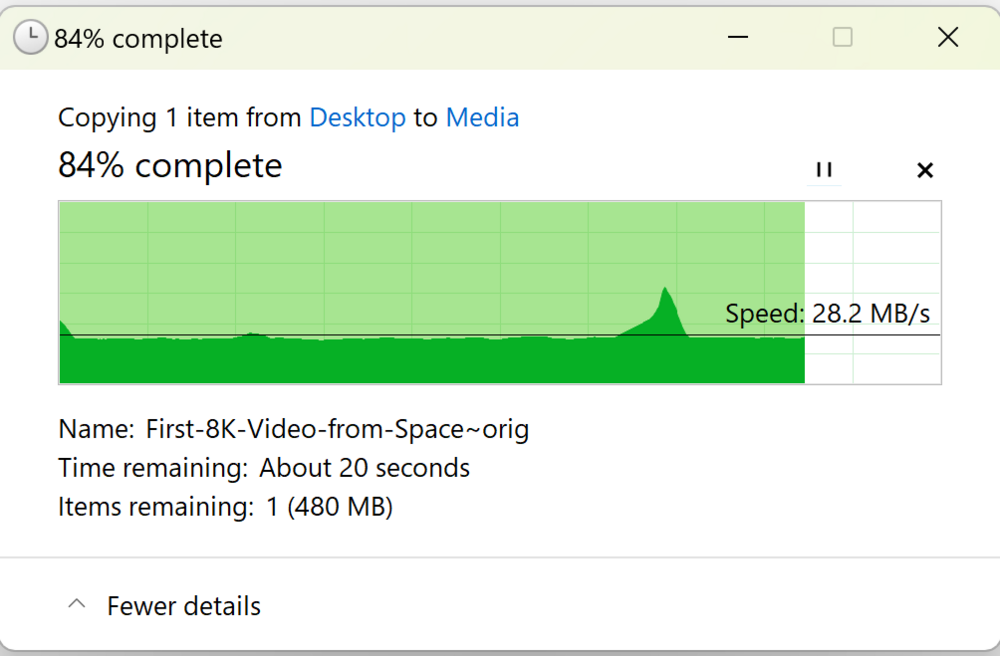
-
I do have DPI on the router, but since all the devices are connected on a single switch, LAN traffic does not pass through the pfsense router. Running a speed test from my Mac to the Synology also shows no problem on the Synology side.
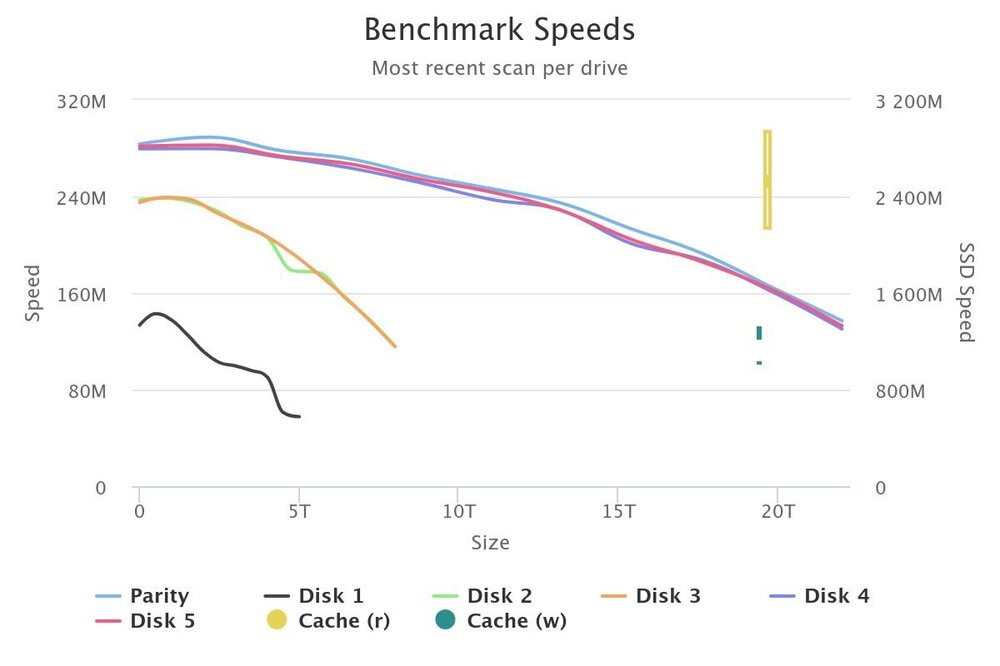
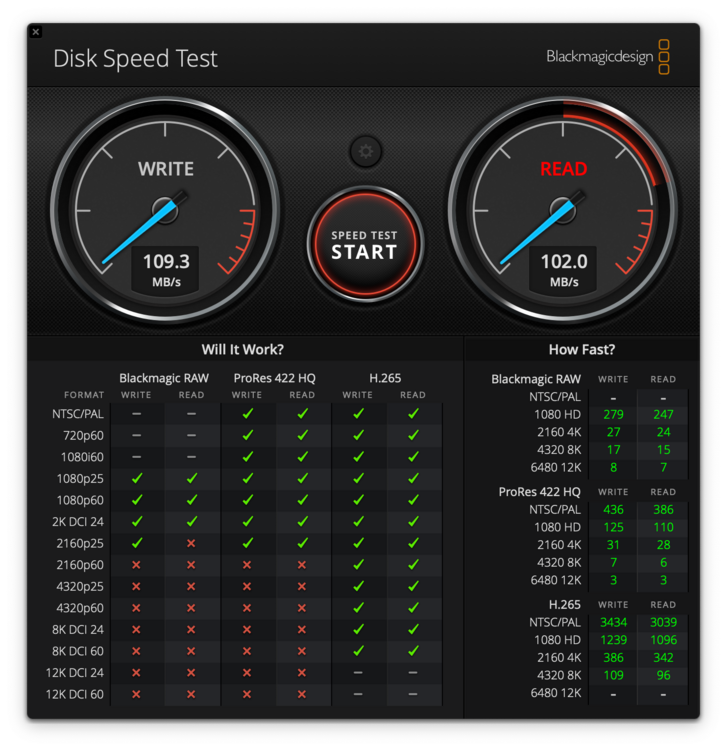 Drives and Controller benchmark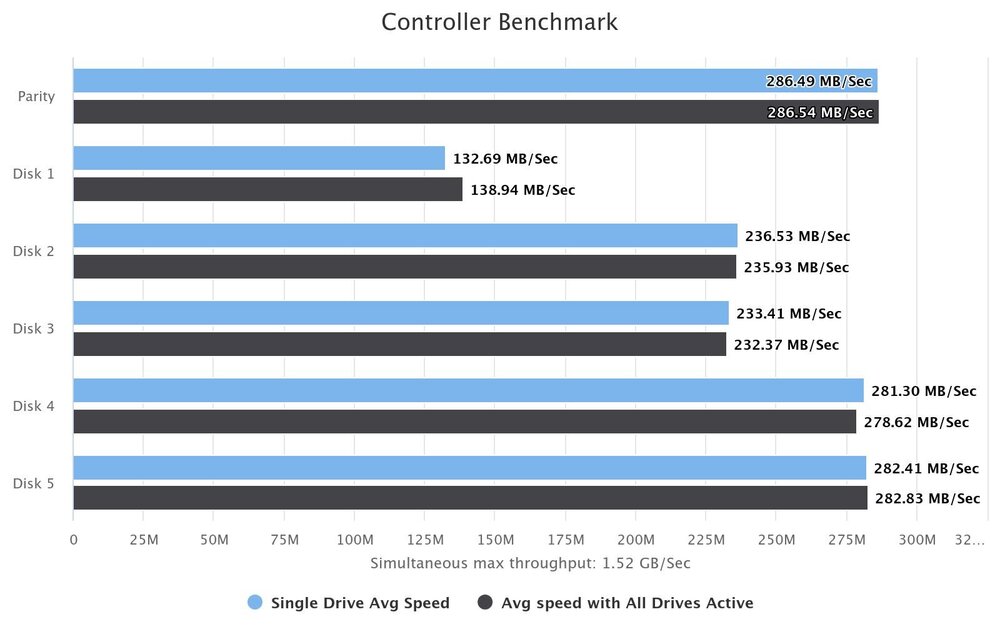
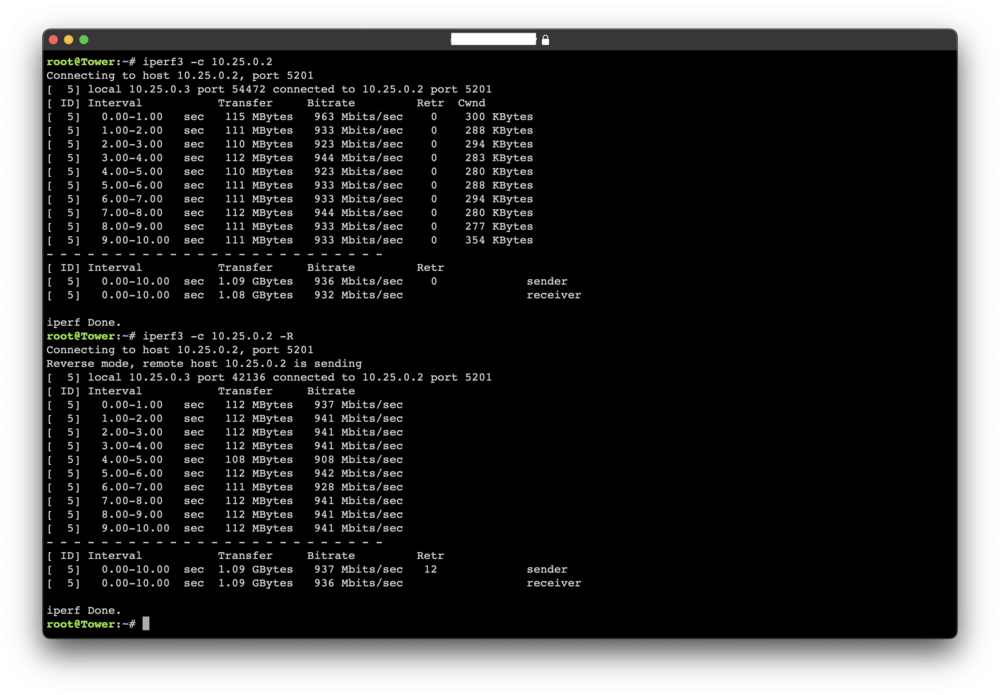
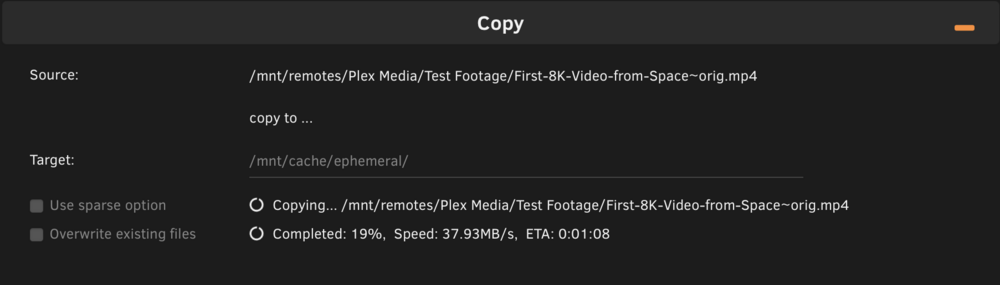
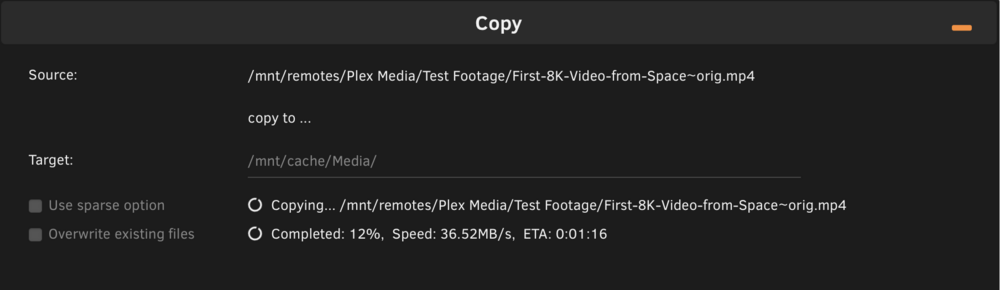
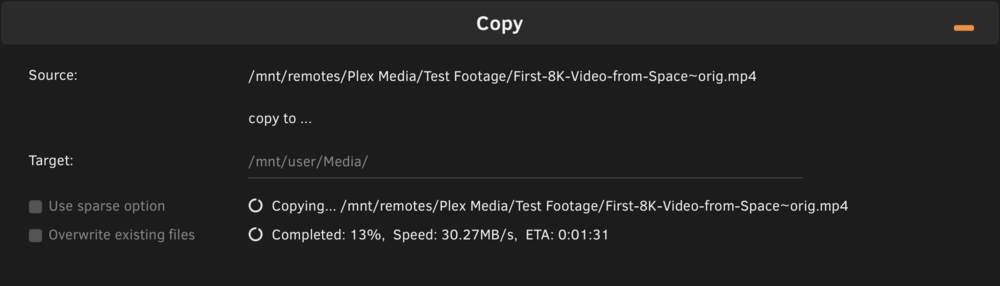
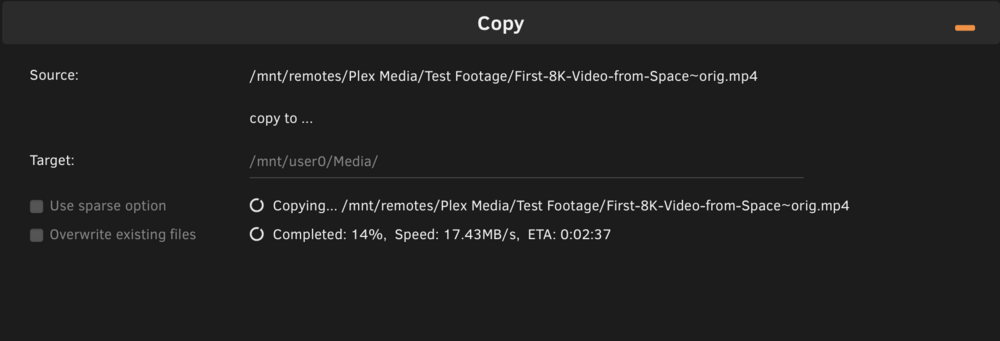
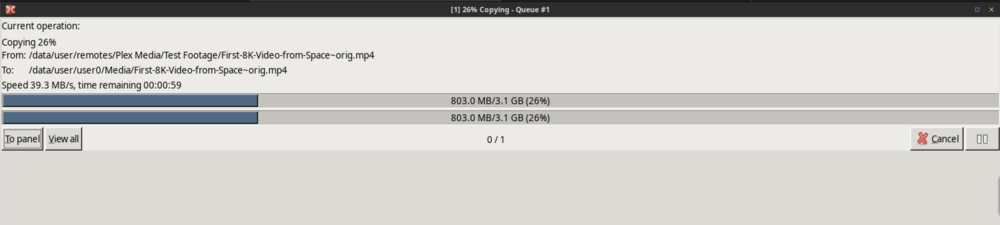
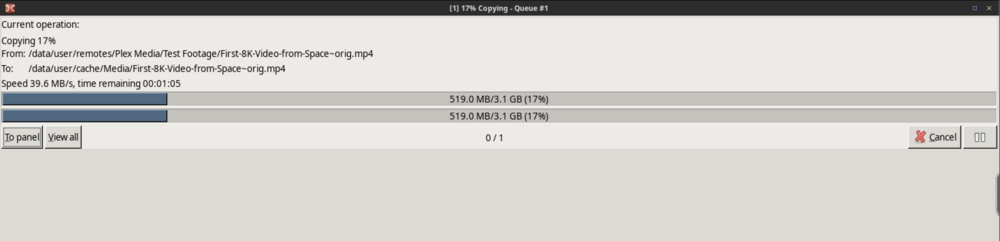
 iperf test to Synology NAS copy direct to /mnt/cache of "ephemeral" – a cache-only share copy direct to /mnt/cache of "Media" – the target folder copy to /mnt/user copy to /mnt/user0 (I think this is FUSE but bypass cache) which is my intended way of copying all the files. Same as above but using double commander. Better speed here. Lastly a copy using double commander directly to /mnt/cache/Media