





spants
Community Developer
-
Joined
-
Last visited
Everything posted by spants
-
interested to see how this goes. I have just virtualised unraid on proxmox to also play with lxc alongside....
-
Yes you could do that. I had to CHMOD my directory as the persistence db wasnt saving. Just rename it after stopping the docker.... and then restart. You may have to set the permissions on the new directory.
-
if you shell on to unraid can you see the directory? can you use the filemanager plugin to see if the files are there? You might have to CHMOD -r 777 (or just RW privs) on the mqtt app directory (beware of the consequences!) as unraid changed the permissions/owners for appdata a while back Let me know how you get on. I use 6.10 with lots of mqtt clients with this. I should really get around to looking at building a more modern mqtt broker and template....
-
Strange! What version of unraid are you using?
-
If you use the "by-id" serial identification this won't happen as it uses the identity of the printer. If you use ttyACM0 or ttyUSB1 methods, these can change
-
I have no idea - it should work! (sorry, I know that isn't a proper answer. I will reinstall my setup and check in a couple of days)
-
You probably could by adding extra keys, but you can also spin up another docker (use one for each printer)-that is what I did!
-
Bridge network gives you that option
-
best to use the /dev/serial/by-id/ method rather than usbtty as the port may change if you plug the printers in differently
-
just create a strong user/password and use port forwarding from your router to the mqtt port?.
-
yes, I see a few people on the internet see the same problem. I wonder if adding --user="nobody:users" to extra parameters would make a difference?. Otherwise you may have to chmod the data directory = https://github.com/node-red/node-red-docker/wiki/Permissions-and-Persistence
-
Its not my docker, but did you fix it? I use the zigbee2mqtt docker as well so I will try and help
-
You can change your own: chgange the repository field to nodered/node-red:2.1.6-16
-
I have been using a similar solution for sometime - based on opnsense firewall and wireguard. Once you understand the basics, it is very easy to setup and use!
-
is this with a new blank appdata/pihole directory? try a different name name to make sure (I had issues with permissions from an old installation). Is 192.168.1.99 already in use elsewhere? ... thats all I can think of at the moment
-
I updated it a few days ago - let me know if it doesnt work for you. I tested it on a new adddata directory to be sure. I have not added "env. variable 'DNSMASQ_USER' with value = 'root'" in a couple of posts up as this is a temporary docker issue.
-
I will add the keys to the pihole template .... btw, the template is not official but it uses the official docker image
-
try setting the permissions of the appdata directory for node red chmod 755 /mnt/appdata/node-red (or whatever you have called it)
-
Edited the pihole template which now uses the new DNS variables. The old variables had been deprecated.
-
The template just uses the official PiHole docker - it seems that there is a discussion here that may help https://github.com/pi-hole/docker-pi-hole/issues/922 . You could also change the docker tag to load a specific version: see here https://hub.docker.com/r/pihole/pihole/tags I do not use PiHole now as I have adguard installed on my firewall so I cannot test.... But just to repeat - this is the offical docker image and not related to the template itself.
-
Does the octoprint backup/restore not work for you?
-
This actually uses the official container - I just updated the template and researched how to get the video drivers working. Glad it is working for you. If you use the CA backup application, make sure that it does not turn off the docker (adv settings) or you will lose a long print!
-
see here:
-
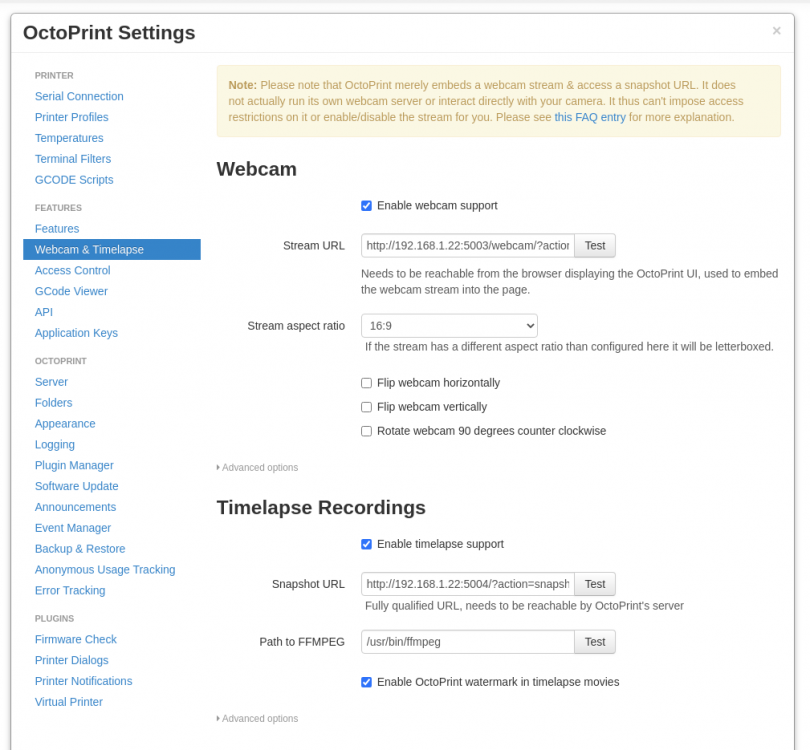
I have created a new docker template for Octoprint using the official docker images and supporting webcam streaming. You need video drivers installed on unRaid for the kernel to see a camera. (on Version: 6.10.0-rc1) - install DVB Drivers in Community Apps and select LibreELEC This will need a reboot after installation plug in your camera, you should see /dev/video0 appear in a terminal session on unRaid Install OctoPrint-Spants add the following: variables: ENABLE_MJPG_STREAMER true CAMERA_DEV /dev/video0 MJPG_STREAMER_INPUT -y -n -r 640x480 (can change to suit) port: webcam container port 80 host port 5003 snapshot container port 8080 host port 5004 In octoprint's webcam settings set the stream url to http://IPADDRESS:5003/webcam/?action=stream and test - it should work set the snapshot url to http://IPADDRESS:5004/?action=snapshot and test IPADDRESS is your unraid server address if you used bridge networking
-
Happy for you to do that.


