SillyKeith
Members
-
Joined
-
Last visited
Everything posted by SillyKeith
-
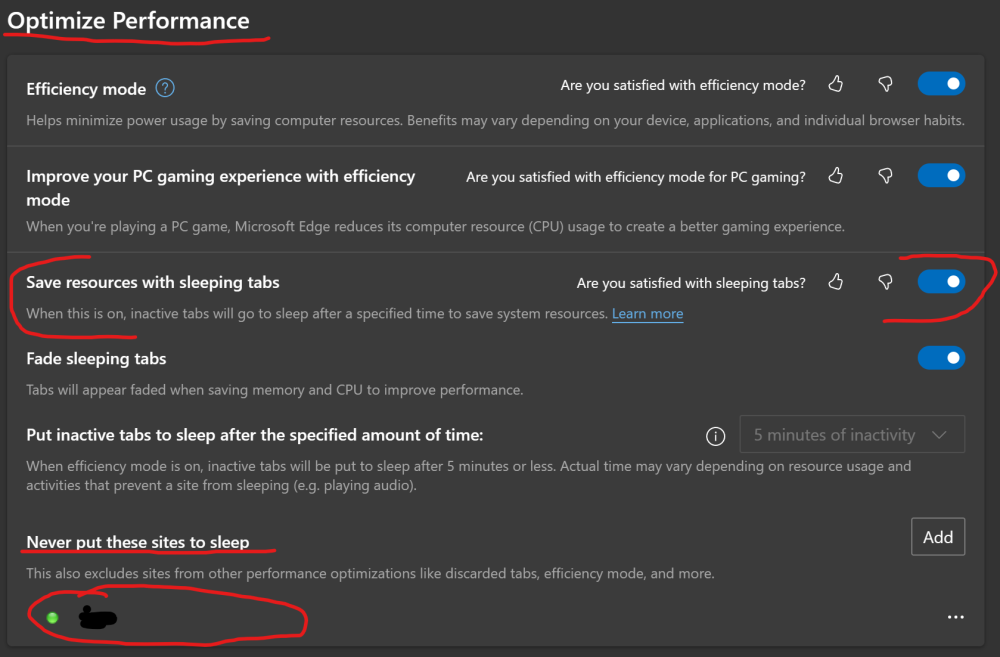
It's called Unloading in Firefox. Unloading Tabs to save memory
-
The above is from Edge but Chrome has a similar option.
-
Postulating here: If this "message" occurs when the Unraid web page senses a "disconnect" event, perhaps it's the browser's "Save resources with sleeping tabs" feature that is causing this? I put my Unraid server name in the "Never put these sites to sleep" and will check back later to see if these messages calm down. I may need to add it's IP address if I don't see these calm down (The web UI for all my *arr apps always uses the IP vs server name). The below is from Edge but Chrome has a similar option.
-
FYI: I hit this same error and it's your VPN's PASSWORD. Your password probably has a quote or double quote in it. When the JSON parser hits this, it stops. Ideally, this would be fixed by GluetunVPN to account for these. But, for now, after I changed my VPN's password and removed any quotes, it works. Give that a try?
-
config.txt # CONFIG_INTEL_PMC_CORE is not set Certain information and OS support regarding the Intel Power Management Controller is inaccessible, as the driver is not packaged by UNRAID. This device is INT33A1 and controls enabling power management to achieve lower power states, even on DESKTOP systems like mine. Intel Power Management This CONFIG is enabled by default on Ubuntu and in a LiveUSB I'm able to achieve all lower C-states, but not on Unraid (even with various kernel flags set). IE: Powertop shows only C1_ACPI, C2_ACPI, C3_ACPI vs C1 through C10 UPS power draw is at best 28watt in Unraid vs 16watts with Ubuntu LiveUSB root@Tiger:~# ls /sys/bus/platform/devices ACPI000C:00@ Fixed\ MDIO\ bus.0@ MSFT0101:00@ PNP0C04:00@ PNP0C0B:01@ PNP0C0B:03@ PNP0C0C:00@ PNP0C14:00@ PNP0C14:02@ PNP0C14:04@ alarmtimer.0.auto@ efivars.0@ microcode@ pcspkr@ rtc_cmos@ ACPI000E:00@ <INT33A1:00@> PNP0103:00@ PNP0C0B:00@ PNP0C0B:02@ PNP0C0B:04@ PNP0C0E:00@ PNP0C14:01@ PNP0C14:03@ PNP0C14:05@ coretemp.0@ iTCO_wdt@ nct6687.2592@ rtc-efi.0@ serial8250@ tiger-diagnostics-20221214-1335.zip
-
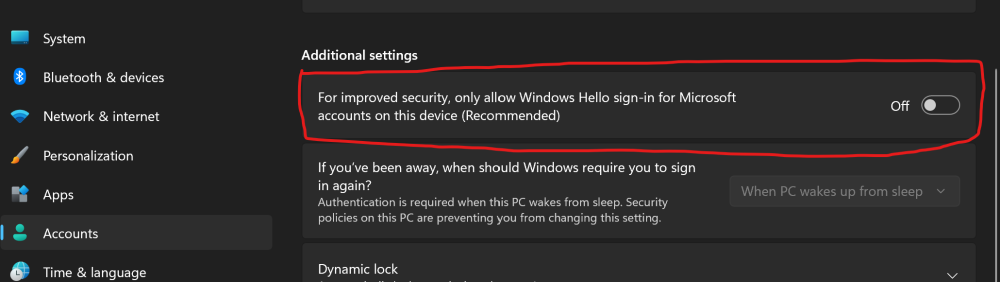
Could you try turning off "Only allow Windows Hello sign-in for Microsoft accounts on this device (Recommended)" and see if that fixes your issue? This setting also blocks Remote Desktop from working and bites me all the time. This should allow your manually created account to sign-in. Go to Settings, Accounts Click Sign-in options Change the slider to OFF for "Only allow Windows Hello sign-in for Microsoft accounts on this device (Recommended)"