faxxe71
Members
-
Joined
-
Last visited
-
Am I understanding this correctly—that no further episodes of a series will be cached in advance? -faxxe
-
That looks fantastic. Like a “new” Unraid. Very clean and well-organized. Kudos for your work! You've already got one fan. -faxxe
-
Pretty nice 🥰 Great work!
-
404 - Page not found -faxxe
-
Clear and functional. I was able to remove my existing duplicates right away. Great job! -faxxe
-
I had a similar issue when 7.3.x came up and i had to add this key to the frigate docker: -faxxe

-
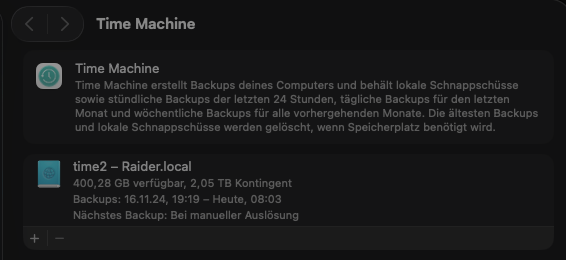
Entschuldige die unklare Beschreibung: Ich hab jedes Update am Server durchgeführt außer 7.3.0. Wo ich beim Erstellen des TM Backups im Nov.2024 war, weiß ich nicht mehr. Aber zu 99.9% auf der zu dieser Zeit aktuellen Version von Unraid. Nach Erscheinen der 7.3.1, habe ich von 7.2.7 auf diese aktuellste Version das Update durchgeführt. Incl nun booten von internen NVME Disks bin ich nuin auf 7.3.1 Möglicherweise ist mein TM Backup aus 11/2024 sogar noch auf einer 6.x.x erstellt worden (chatgpt meint das zu dieser Zeit noch 6. aktuell war). Ich habe gerade ein 10 MB pdf am Desktop von Dez 2024 testweise wieder hergestellt. Also ich denke, das Backup ist fehlerfrei.
-
Es ist schon irgendwie merkwürdig und hilft euch auch wenig aber ich hatte außer 7.3.0 sämtliche Versionen laufen und auf beiden Macs nie Probleme mit den TM Backups. Das TM Backup habe ich Ende 2024 eingerichtet und es ist lesbar. Zwar kommt manchmal im Unraid Log ein Eintrag sinngemäß mit einem Sparse Bundle blabla Error irgendwas aber macOS meint trotzdem, das immer alle Backups erfolgreich waren.
-
That worked for me. Customize it to fit your data I used it in Docker Compose on Unraid, and it worked. It comes from the Synology NAS guide available here: SparkyFitness on Your Synology NAS services: sparkyfitness-db: image: postgres:15-alpine container_name: SparkyFitness-DB hostname: sparkyfitness-db security_opt: - no-new-privileges:true environment: POSTGRES_DB: sparky POSTGRES_USER: sparkyuser POSTGRES_PASSWORD: sparkypass volumes: - /mnt/cache_ssd/dockers/fitness/sparkyfitnessdb:/var/lib/postgresql/data:rw restart: on-failure:5 sparkyfitness-web: image: codewithcj/sparkyfitness:latest container_name: SparkyFitness-WEB ports: - 13003:80 depends_on: - sparkyfitness-server restart: on-failure:5 sparkyfitness-server: image: codewithcj/sparkyfitness_server:latest container_name: SparkyFitness-SERVER environment: SPARKY_FITNESS_LOG_LEVEL: INFO SPARKY_FITNESS_APP_DB_USER: sparkyuser SPARKY_FITNESS_APP_DB_PASSWORD: sparkypass SPARKY_FITNESS_DB_USER: sparkyuser SPARKY_FITNESS_DB_PASSWORD: sparkypass SPARKY_FITNESS_DB_HOST: sparkyfitness-db SPARKY_FITNESS_DB_NAME: sparky SPARKY_FITNESS_DB_PORT: 5432 SPARKY_FITNESS_SERVER_PORT: 3010 SPARKY_FITNESS_EXTRA_TRUSTED_ORIGINS: "*" ALLOW_PRIVATE_NETWORK_CORS: true NODE_ENV: production TZ: Europe/Bucharest SPARKY_FITNESS_API_ENCRYPTION_KEY: 8b21ebe710cd46d4894f463264480f78fbf864b2ff0ee106b8d63ad434476eae JWT_SECRET: mVql49lpEas2imJWcNPKnbfLsWrfoh7rAyCiNRXEz7g= BETTER_AUTH_SECRET: mVql49lpEas2imJWcNPKnbfLsWrfoh7rAyCiNRXEz7g= SPARKY_FITNESS_FRONTEND_URL: https://*****.your.site.com********* SPARKY_FITNESS_DISABLE_SIGNUP: false #or true to Disable Sign Up after first registration. ports: - 4059:3010 depends_on: - sparkyfitness-db restart: on-failure:5
-
if i try to scan my media folder i got this message: 404This page could not be found.
-
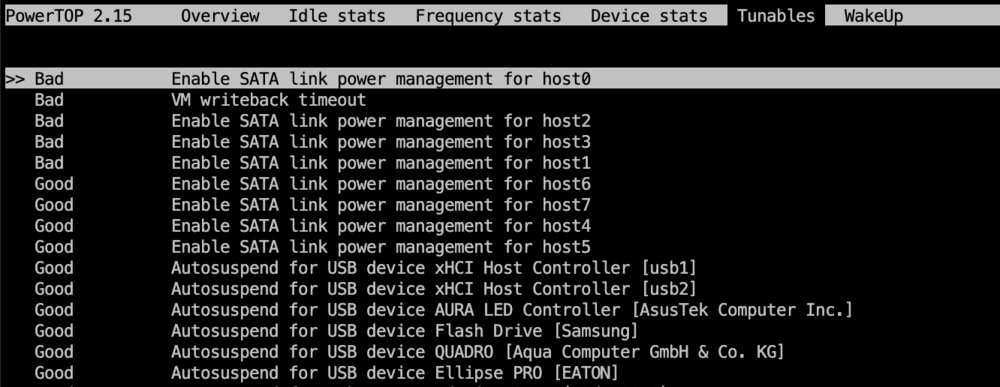
Ich hab in powertop bei den 4 dummy ports "BAD" stehen. Eigentlich nachvollziehbar aber warum gibt es dummy ports?Ich hab nur die 4 ports am Mainboard. Keinen zusätlichen Controller o.ä. -faxxe May 13 05:18:03 Raider kernel: ata1: DUMMY May 13 05:18:03 Raider kernel: ata2: DUMMY May 13 05:18:03 Raider kernel: ata3: DUMMY May 13 05:18:03 Raider kernel: ata4: DUMMY May 13 05:18:03 Raider kernel: ata5: SATA max UDMA/133 abar m2048@0x85702000 port 0x85702300 irq 146 lpm-pol 0 May 13 05:18:03 Raider kernel: ata6: SATA max UDMA/133 abar m2048@0x85702000 port 0x85702380 irq 146 lpm-pol 0 May 13 05:18:03 Raider kernel: ata7: SATA max UDMA/133 abar m2048@0x85702000 port 0x85702400 irq 146 lpm-pol 0 May 13 05:18:03 Raider kernel: ata8: SATA max UDMA/133 abar m2048@0x85702000 port 0x85702480 irq 146 lpm-pol 0
-
Danke, aber ist das die Lösung oder die Ursache? Man müsste den Kernel mit den geänderten Parametern neu kompilieren und dann mit diesen Bootparametern starten? Klingt nicht nach Tätigkeiten für mich gewöhnlichen User 🫣 -faxxe
-
I briefly tried 7.2.5, but I ran into some Docker issues. So I went back to 7.2.4 and am now on 7.3.0. The upgrade went almost flawlessly. Only one Docker instance was thrown off by the time zone setting. Otherwise, it’s been stable for over 24 hours. -faxxe
-
I also had connection issues for a long time, and adding these two additional flags to the Collabora Docker configuration was the solution for me. The first entry is the web address of your personal Nextcloud domain name. Note the syntax with a backslash (\) in between. And the second entry is the domain name of your personal Collabora server address.

-
Auch hier mit 7.2.6 Ich denke, bei mir hängen da die ST16000NM001G-2K 16TB Exos dran Irgendwas is immer ☹️ -faxxe