





PeterB
Community Developer
-
Joined
-
Last visited
Everything posted by PeterB
-
Perhaps this is the hint that it should exist!
-
I have been running Needo's MariaDB docker for some years but, according to Fix Common Problems, its use is deprecated. FCP advises me to use MariaDB from the linuxserver or Binhex repository instead. My problem is that I cannot find binhex-mariadb - does it exist? Having encountered difficulties with a linuxserver offering in the past, I'm a little hesitant to adopt that one. If there's no Binhex build, I'll stick with the Needo version which is not giving me any problems at the moment.
-
Okay. The default location, given when editing the location in the container settings for appdata, is /mnt/docker.... I guess I just assumed that the default was good, and used that mount point in UD.
-
I have a dedicated device for my docker files - docker.img and appdata. This is auto-mounted by the unassigned devices plugin, as /mnt/docker Fix Common Problems always reports "Invalid folder docker contained within /mnt". Is there a more acceptable way to configure this, or should I simply "Ignore Error"?
-
It is best to use Deluge to move your torrents downloads (but I gather that you already moved it outside of Deluge) - Menu over the torrent and 'Move Storage'. With regard to restarting the torrent files you moved (outside of Deluge?), you will need the .torrent file. If that has been removed and Deluge no longer knows about the torrent, you will need to re-add the torrent. When you have done that, and moved the files back into your your Incomplete folder, you will need to 'Force Re-check' on the torrent. Then 'Move Storage' back to your completed folder. Or, to save the extra copy - do the 'Move Storage' before you copy the files back to your completed folder, then 'Force Re-check'.
-
Str Strange! I wonder why I can get 5+MBps up and down, on a 50Mbps connection, without any tinkering? I guess it might be to do with the difference between tcp and udp connections.
-
Have you tried a Speedtest via Privoxy? Perhaps your ISP is messing with VPN connections?
-
What does the deluge settings tell you? Settings -> Network -> Test Active Port?
-
Indeed, not good, then. I see this in your log: 2018-08-16 00:07:57,053 DEBG 'start-script' stdout output: [warn] PIA endpoint '185.230.125.50' doesn't support port forwarding, DL/UL speeds will be slow [info] Please consider switching to an endpoint that does support port forwarding, shown below:- So, for whatever reason, it appears that the Swiss server that you are connected to is not able to initiate port forwarding. Try switching to another end point.
-
Just want to confirm - your line speed is 25MBytes/sec (200Mbits/sec)? I ask because line speeds are usually given in Mbps (Megabits/sec), whereas Deluge reports speed in MBps (MegaBytes/sec). 3MB/s download would be good an a 25Mb/s line.
-
I'm getting 5+MB/sec, up and down, on a 50Mbps connection.
-
I've given up with the two (new) German endpoints - neither seems to port-forward. I've switched to the Czech server and I'm getting full speed transfers now.
-
Okay, I removed and reinstalled the CP docker. I then tried reinstating my config files etc. It seems that the problem is a corrupt CP database, so it seems that I have lost my custom quality profiles, wanted movies and media library. Obviously, I should be able to rebuild the media library. I can, probably, remember my quality profiles. So, the real loss is my long list of wanted movies. I'm looking into a wanted list backup and restore script.
-
!My binhex-couchpotato has, in the last couple of days, been failing. The log file is filling with the error "IOError: Storage doesn't exist!" Logfile attached. The only change I've knowingly made, recently, is the upgrade from 6.5.2 to 6.5.3. I've tried restarting the container, I've done a forced update and I've tried rebooting the system - the error persists. The container appears to go into a fairly tight loop, continually restarting the couchpotato app, and consuming quite a bit of resource. I believe that my Volume mappings are fairly standard: /config -> /mnt/docker/appdata/CouchPotato/config/ /data -> /mnt/docker/appdata/CouchPotato/data/ /media -> /mnt/user/Movies/ sh-4.3# ls /config cache custom_plugins db_backup logs supervisord.log supervisord.log.2 supervisord.log.4 config.ini database _indexes perms.txt supervisord.log.1 supervisord.log.3 supervisord.log.5 sh-4.3# ls /data sh-4.3# Should the /data directory be empty? Does anyone have any idea what may be going on here? CouchLog
-
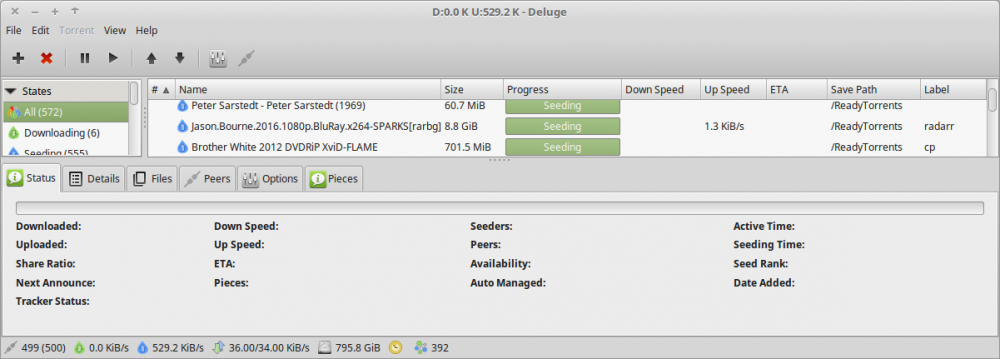
I don't know why you have a problem - I've been using the Label plugin for years, and it works fine.
-
Thank you, sir! That is up and running now.
-
I've reverted to 1.2.1-2-01. Tags are shown on the docker hub tags page!
-
I've just accepted the latest MiniDLNA docker update. Now minidlnad fails to run, producing the following error: /usr/bin/minidlnad: error while loading shared libraries: libavformat.so.58: cannot open shared object file: No such file or directory libavformat 57 is present, but not 58.
-
Revision history suggests that you've attempted to resolve this, but I'm still getting the PHP warnings, even after installing plugin version 2018.04.27 and rebooting.
-
PIA Germany server appears to now be failing to port forward - I have switched to Czech Republic. My single download, which was running at a few kBps is now running at 2.5MBps.
-
I'm seeing 5.2MB down from Germany, all the way to Philippines. Can't complain about that!
-
Okay, I did nothing but renew the contents of the appdata/binhex-delugevpn/openvpn directory, using the Germany endpoint from a new download, and all started working again.
-
I'm having great difficulty with delugevpn, too. Cannot connect with web ui or thin client. The logfile fills up with 2018-04-03 13:31:10,254 DEBG 'start-script' stdout output: [warn] Response code 000 from curl != 2xx [warn] Exit code 7 from curl != 0 [info] 10 retries left Is this a symptom of trying to use the NL server?
-
My DelugeVPN docker seems to have got itself into an odd state. If I attempt to stop or restart from the unRAID web GUI, the green arrow/triangle rotates but nothing happens. The log doesn't update - it still says 'Uptime 2 days' and if I retrieve the log I get about two hours worth of log looking very repetitive: 2018-03-25 21:10:30,415 DEBG 'deluge-script' stdout output: [debug] VPN incoming port is 43796 [debug] VPN IP is 10.17.10.6 [debug] Deluge incoming port is 43796 [debug] Deluge IP is 10.17.10.6 2018-03-25 21:11:00,417 DEBG 'deluge-script' stdout output: [debug] Waiting for valid IP address from tunnel... 2018-03-25 21:11:00,549 DEBG 'deluge-script' stdout output: [debug] Valid IP address from tunnel acquired '10.17.10.6' 2018-03-25 21:11:00,554 DEBG 'deluge-script' stdout output: [debug] Incoming port for tunnel is '43796' 2018-03-25 21:11:00,973 DEBG 'deluge-script' stdout output: [debug] VPN incoming port is 43796 [debug] VPN IP is 10.17.10.6 [debug] Deluge incoming port is 43796 2018-03-25 21:11:00,973 DEBG 'deluge-script' stdout output: [debug] Deluge IP is 10.17.10.6 2018-03-25 21:11:30,975 DEBG 'deluge-script' stdout output: [debug] Waiting for valid IP address from tunnel... 2018-03-25 21:11:31,107 DEBG 'deluge-script' stdout output: [debug] Valid IP address from tunnel acquired '10.17.10.6' 2018-03-25 21:11:31,113 DEBG 'deluge-script' stdout output: [debug] Incoming port for tunnel is '43796' 2018-03-25 21:11:31,515 DEBG 'deluge-script' stdout output: [debug] VPN incoming port is 43796 [debug] VPN IP is 10.17.10.6 [debug] Deluge incoming port is 43796 2018-03-25 21:11:31,516 DEBG 'deluge-script' stdout output: [debug] Deluge IP is 10.17.10.6 2018-03-25 21:12:01,518 DEBG 'deluge-script' stdout output: [debug] Waiting for valid IP address from tunnel... My Internet connection is up and running. Other containers can be stopped and restarted. I'm using PIA netherlands. Other than accepting updates as they are issued, I haven't made any changes to the DelugeVPN setup. I don't know whether it's connected, but if I log in to the unRAID host, I get repeating messages every ten seconds, making it difficult to use the console: Message from syslogd@Tower at Mar 25 23:58:43 ... kernel:unregister_netdevice: waiting for tun0 to become free. Usage count = 1 Any idea what's going on? Do I need to reboot (when the kids have finished watching movies). If I attempt to 'force update' on the DelugeVPN container, I just get a 'Please wait ....' when attempting to stop the container.
-
My problem cannot be due to flooding. I have a 50Mb/50Mb fiber connection. Just now I found that all transfers through the tunnel had stopped - deluge was no longer transferring and no connection via privoxy was working. mtr to a UK address (from Philippines) was showing no packet loss. This is during daytime hours when I have deluge set to 600kB down and 200kB up. Simply restarting the container got everything running again.

