





malaki86
Members
-
Joined
-
Last visited
Everything posted by malaki86
-
I said in the original post that I had ran Diskspeed on v6 months prior to upgrading to v7, then I ran it again a few days ago. The direct drive access looks identical between the two. This is the drive speed from Feb 3rd, under v7
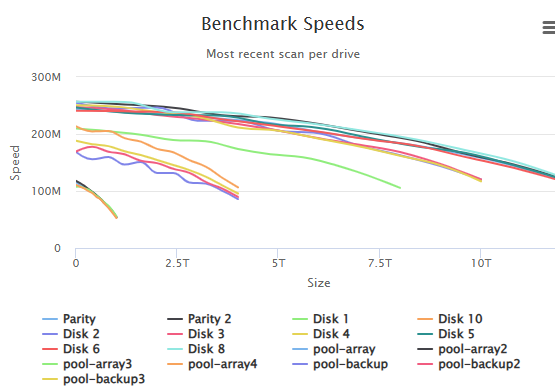 This is after stopping the Docker, VM & NFS systems, with the server doing nothing except for running Mover neo-diagnostics-20250212-0516.zipI'll have to do that tomorrow morning. I'll kill the Docker & VM systems, and disable SMB & NFS.New diagnostics are attached. The only changes I made to the system from these diagnostics compared to the first set are that I have Docker disabled now, and I made the Turbo Write setting you suggested. I did run a DiskSpeed on my array a couple of days ago. The speeds shown in the results from it are basically the same as when I ran it probably 6 months ago. neo-diagnostics-20250211-0514.zipI also noticed that the file size doesn't make any difference in speed. Sub-1mb files transfer at the same speed as 4gb+ files.No change. It's writing to the array at the same speed.Prior to upgrading my fileserver to v7.0.0, my array would constantly have a disk write speed hovering around 120mb/s. After the upgrade, it hovers around 25mb/s. Watching htop run, the only file activity is the Mover itself, except for random short bursts of activity from my Home Assistant VM. If I stop the array, restart the array, then start Mover again, the speeds are back to normal, 120s, for maybe 30 seconds, then drop back to the 20's. Rebooting the server has the same effect as restarting the array. This machine runs a single Home Assistant VM, and the Cloudflare Docker. Nothing else is automatically running other than my backup scripts. When running Mover, the CPU activity stays around 25-50%. As soon as Mover stops, it drops back to 1-2% usage. My array consists of a 15-bay HBA shelf, with 10 SATA drives, 4 to 12Tb, and 2 12Tb parity drives. The shelf is connected to an LSI 9207-8i HBA card in IT-mode. My array cache is a 4x1Tb ZFS Raid-10 spinning drives, connected to the motherboard SATA ports. The system cache is a 2x500Gb m.2 NVME on the motherboard, ZFS mirrored. I do have 2 drives with failing helium levels, 1 parity and 1 array, but these drives have been showing that error for months prior to upgrading to v7, and the transfer speeds were fine under v6.12.14. Diagnostics are attached neo-diagnostics-20250210-0602.zipI have 2 Unraid servers, both running v7.0.0. One is a fileserver (Neo) using both NFS and SMB, the other is an appserver (BusyBee), which uses NFS to mount the shares from Neo. I have been getting the file id changed errors since day one, and have posted on both Facebook and in here, getting no answers. I see no errors in the logs for Neo. The file id changed errors are all from BusyBee. All Docker containers are set to use the Read/Write - Slave options for the remote mounts. I'm attaching diagnostic reports from both servers. This issue has always been a problem for me, with Neo running 6.12 and BusyBee running v7.rc2. neo-diagnostics-20250131-1828.zip busybee-diagnostics-20250131-1820.zipUnraid v7.0.0 - if I open the servers dashboard web page, I'll see the list of notifications pop up. I hit 'Close notifications' (or similarly worded). But, the notification indicator remains lit up. Click that and the same notifications that I just closed are still there. Hit 'Close notifications' again and this time they go away. Small, but annoying, bug.I wanted to post a heads-up about an issue with Jellyseerr v2.1.0 running on Unraid v7: There is a major nodejs problem with Jellyseerr v2.1.0 running on Unraid v7.0.rc.1. It will completely bog itself down with nonstop Fetch errors. The Jellyseerr devs are aware of the problem. It runs perfect on Unraid v6.12.14.But, it didn't exist. When I went in the File Browser, it wasn't there. Nor was it in the /mnt directory from the command line. It wasn't there until I did the reboot.Ok, I don't know WTF is going on with my server. I decided to reboot it 'just to try' and the shares were back, but the 'appdata' was attached to a non-existent location. I had to reconfigure it, but it's back in the proper location now, and appears to be intact. In fact, it seems to be completely fine now. Something went absolutely stupid when I stopped the array and made the changes. Hopefully the diagnostics point to WTH happened.I needed to make a few drive changes to my primary server. I stopped all Dockers, unmounted all NFS connections from other machines, and hit the button to stop the array. It kept throwing an error about not being able to unmount the /mnt/user folder. With the Open Files plugin, I found that there was a process running that was preventing the unmount of the array, SHFS. I dropped to a command line, sent a 'kill -9' command to kill that process, and the array finished shutting down. I then did a new array config, plus added a 3-drive zpool. Clicked the button to start the array and the log was filling with syslog errors. Digging around, I found that all of my shares are missing, as well as the '/mnt/user' folder in the root. neo-diagnostics-20241223-0539.zipgood news - the bad cable was the issue. Everything connected instantly on reboot.I *may* have found the issue. It's possible that the network cable wasn't making a good connection. I started having random internet disconnections on the v7 machine and swapped the cables. Rebooting everything now. Fingers crossed.I forgot to upload the Unassigned Devices diagnostics, so here it is. ud_diagnostics-20241216-062939.zipI added a new server this weekend, running v7.rc.1. When I went to bed last night, it was running everything perfect. When I woke up this morning, it no longer could connect to the NFS shares that I have available on 2 other machines (Unraid v6.12.24 & OpenMediaVault). It finds the servers & their shares, attempts to connect, but fails every time. I can connect to the failed servers NFS share without issue from either of the other 2 servers.I've rebooted multiple times, but the issue remains the same. The only thing that I found was weird was the computer's time. I went into the BIOS at boot and the time was 5hrs ahead. It was showing the time as 10:58 when the local time was 05:58. I've attached the diagnostic files from the failed server. busybee-diagnostics-20241216-0601.zip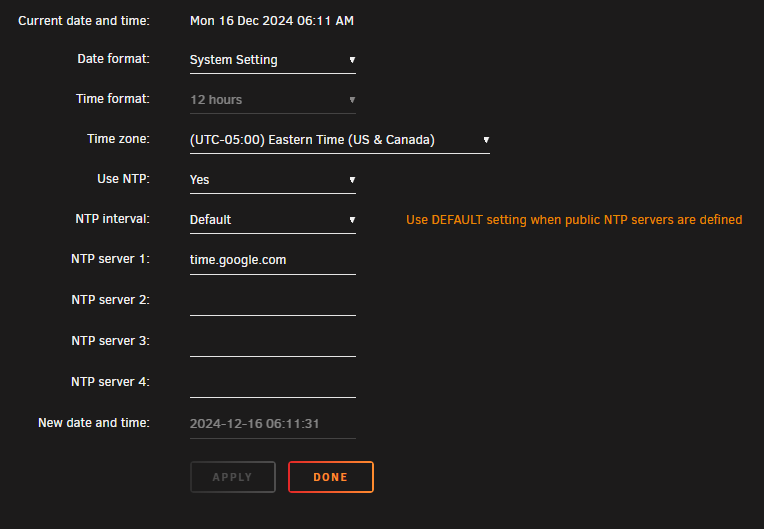
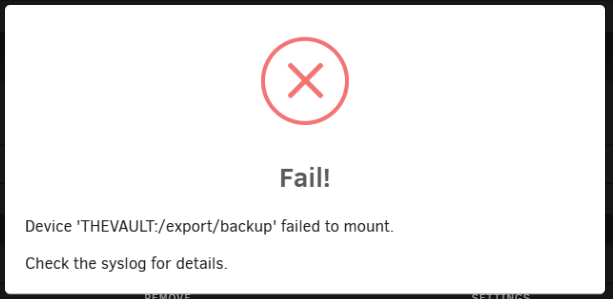
 So far, so good. If it's still running correctly tomorrow morning, I'll mark your fix as the solution. I appreciate the help.Ran 'Fix Common Problems' again and it looks clear now. Fingers crossedNVM - found the settingRead/Write (this one is pretty obvious I guess) RW/Slave RW/Shared RO/Slave RO/Shared I'm assuming that I need to use RW/Slave, but where in the container do I set this?Where do I fix those problems? Docker or UD?Both files are attached ud_diagnostics-20241213-165246.zip busybee-diagnostics-20241213-1651.zipWill do as soon as I get home.

