





lory995
Members
-
Joined
-
Last visited
Everything posted by lory995
-
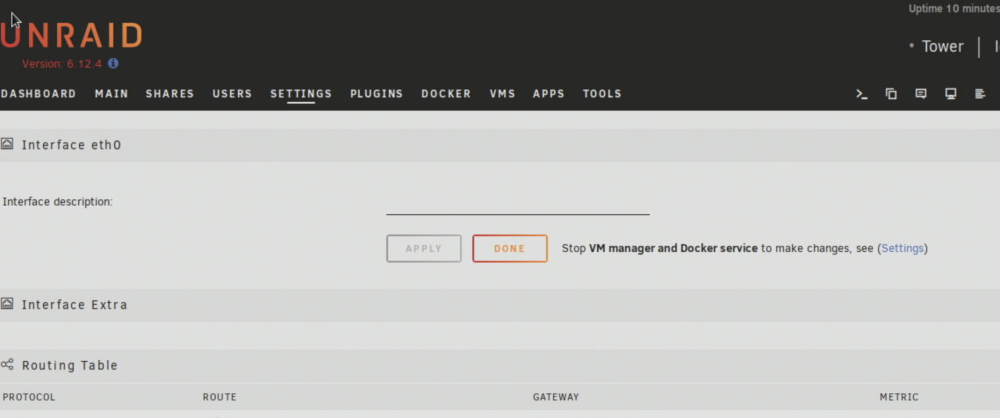
Hi everybody, i'll make it short so i don't waste your time: The most important is Tailscale since it breaks most of my automations: As per object i can't see anything under "Interface Extra" while i try to add the interface there. (screenshot attached) For those of you who have spare time or simple knowledge to spare: - My server still defaults to acpi cpu freq for scaling even if i have an amd cpu and i saw that the amd pscale driver it's been updated in the last linux kernel ( i read in the past that with kernel >6 now it's usable and working so i supposed it would default to it ) - During my update i had problems and had to reinstall from the flash backup on unraid official site. Still when i updated the version was upgraded? This happened both during 6.11.5 and at least from 6.12.3 --> 6.12.4 that i can remember. ( maybe it's connected with the interface extra problem? even if not is there a simple way to call a "reinstall"? and to make a local usb backup? ) Thanks you if you took the time to answer my humble questions, Lory
-
Ahahahah blood problems we all share unfortunately....... Anyway i'm not aware of any last updates, it's been quite some time since i did the last one. At least one i'm aware of: one of the best features of macOS is one of the worst one too for the savvys... it does all automatically in background without you needing to do anythin nor breaking your balls with notifications, but even if 99.5% of the time everything just works when it doesn't you really need to go look behind the curtains via cli without a clear starting point. And as per the previous guy with the same problem, when the solution it's as easy as just a couple click to open brave it's rarely worth the trouble...
-
Actually, i have the same problem... I used it with no problems with safari for 2-3 month already until last week. I don't get why it stopped working, i didn't install any new plugin or anything like that. Maybe when i updated to the last version?
-
The first time i installed unraid and "played" a bit with all the functions in it i remember i isolated some of my cpu cores just to try it and they were fixed on 0% usage until the vms, which i pinned them on, was started. Now i see them being normally used, from 2-3% to even 100% sometimes, like i did nothing at all. Is it working?
-
As per title, my cpu isolation option doesn't work and i don't understand why honestly... I have no clue about what to post or where to look for troubleshooting, i can only say that append isolcpu does show up in the go file as expected. Edit: Now that i think about it maybe it's the amd_pstate module? It's the only thing i can think of that mess up with my cpu...
-
I know in fact i based my steps upon your previous solution, after all you had it working. i just studied a different way to use them Fair enough, different usecases and different necessities
-
Hi, sorry for the late response but i was, and still am, really caught up with work. Anyway i can't launch corefreq-cli it gives me an error atm Daemon connection error code 2 corefreq-ro-shm: 'No such file or directory' @ line 21300 but i didn't configure it nor looking into it so i don't know. I'm gonna look into windows power consumption when i'll have my VM back running again, hopefully soon, but right now in unraid with 4 VMS up and running (2cores x 4 = 8 cores used , avg 30% usage all the time really low demanding tasks) and a total average of 10-15% of all CPU power used i have like 65/70W of real power draw ( at the power outlet ). I got amd_pstate drivers installed. I guess the power draw in windows would be lower thanks to better drivers, after some search it seems that amd is working a lot in reducing their power usage but linux until kernel 6.x it's really behind. Actually i have both of them up and am not noticing hangs nor resets at all ( at least with pstate driver and schedutil governor online for 14 days ). Same for performance. Still, i'd like to ask you why you suggest such a thing. FWIK C-states and CPPC only function it's optimize, that's to say use the least amount of power for the most of performance. Of course if you are gonna disable them you got more performance, but that's not the topic of this thread. Actually it's the opposite. I've written of all the above just to say: are you implying that they don't work adeguately with unraid so we can get more power saving disabling them instead of keeping them enabled? Can you post the source of your information? i'd like to know more about it before going to mess in the bios.
-
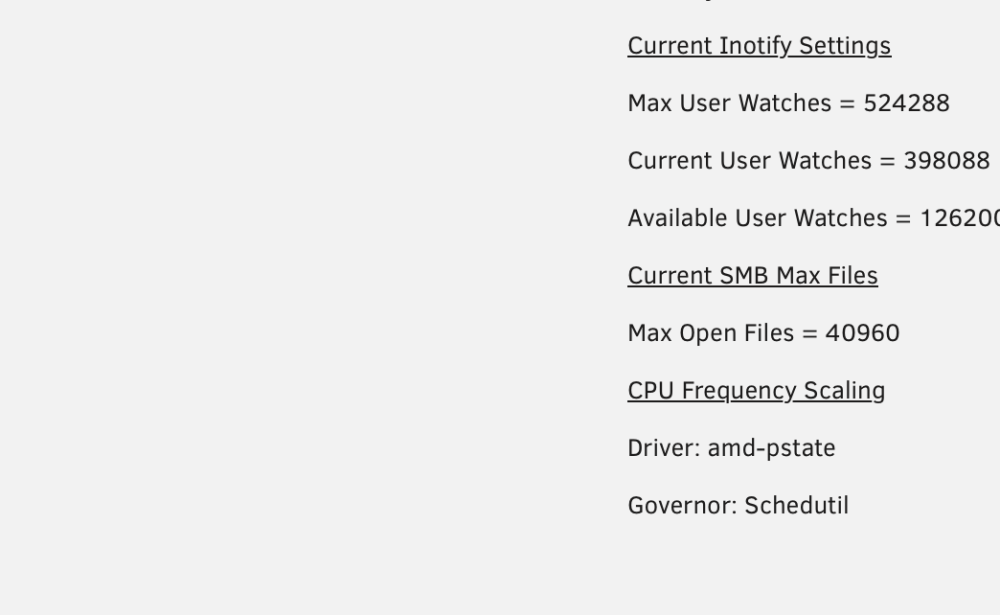
EDIT 15 August 2024: Linux Kernel atm is 6.1.x and since amd-pstate is now builtin all this hassle is not necessary anymore ( and doesn't work ). I'm not sure if you must disable acpi-cpufreq for it to work but i've done it just to be sure ( and didn't want to waste time trying ). To enable pstate: Just go to "MAIN" click on the usb where you boot from and in the "Unraid OS" menu ( or whatever you use ) add "amd_pstate=passive" at the end. Reboot and voilà, jobs done. If you are from the future on Unraid 7 you shouldn't need any of this, just go in your power menu in settings and choose your flavor there. Everything else should be enabled by default. Actually i did already enable all of that at the time you wrote here, but i wanted really go through and try this driver so i stopped and started looking around to try and understand really what i was doing. I read a lot of guides on linux kernel modules and how did they work. And of course, as usually happens when you have some resemblance of understanding of what you are doing, i succeded. What i did instead is injecting them at boot. To do that i modified /boot/config/go adding *before everything* except for #!/bin/bash ( so right under it ) modprobe amd_pstate [....]/emhttp was after the line written above, for example. Then i created 2 .conf files in /etc/modprobe.d one for blacklisting acpi_cpufreq(1) and one for enabling pstate(2): (1) i created it with " nano /etc/modprobe.d/acpifreqdisable.conf " blacklist acpi_cpufreq (2) i created it with "nano /etc/modprobe.d/enableamdpstate.conf" options amd_pstate shared_mem=1 and left /boot/syslinux/syslinux.cfg as link in my first post. Now it works. P.S: @Iker i've got it up an running the 26 or 27th of january and have yet to note any instability whatsoever fortunately. Maybe since you tried them the drivers got updated?
-
i'm using the last one, 6.11.5 with kernel 5.19.17 if i remember correctly. The fact is that i made this server with the intention of futureproofing myself, at the moment i need to run 24/7 only 3 little 2 core vms and a couple dockers ( pihole and tailscale ). Even if the server is idle most of the time it uses like 60~65watt, that without any gpu and with just 2 disks usually spinning that i'm planning to redcue to one once the new ssd comes in. If i connect my gpu ( 3070 ) it goes up to 110~120 watts idle.... I don't know what to do i've tried everything, even disabling half the core, reducing ram clocks to 2133, hard capping it to the minimum Wattage on bios (45W)... Now i at least wanted to activate p-state even for that 15-20% reduction you was talking about in the other post but it seems that it doesn't want to work. Or maybe it's active but i can't see it, i don't know. Is there an appropriate section to discuss power managing problem?
-
Iker it really doesn't work for me I've got a Zen 2 cpu so it should work... If you paste this in your terminal does it state "amd-pstate"? cat /sys/devices/system/cpu/cpu0/cpufreq/scaling_driver
-
Hi everybody, It's one of my first posts around here but i've read lots and lots of problem-solving posts that helped me a lot but i didn't find an answer to this one so here i am. It's a stupid problem, i'm messing up something very easy for sure but bear with me. I've read this comment from @Iker and i've tried to implement it, but after the reboot if i launch cat /sys/devices/system/cpu/cpu0/cpufreq/scaling_driver acpi-cpufreq i obtain acpi-cpufreq so i guess my mod has failed.. As per tagged post i added modprobe.blacklist=acpi_cpufreq amd_pstate.shared_mem=1 in /boot/syslinux/syslinux.cfg ( like this ) and in /boot/config/go ( here ). I didn't know exactly how or under what add them so i guess that it's gonna be an easy solution . Thank you!
-
OT: Interstellar now i know that intel it's better for idle ( i knew it before too, but didn't think it would be so awful with amd ) but anyway now that i have bought an amd ryzen just for this build I, like every other ryzen user, would love to be able to use higher c-state or p-state or whatever. They've been around since 2006-7 with the first core-duos, i find unacceptable that in 2023 i can't go higher than c2 with my almost-brand-new ryzen. It's just wrong.
-
No man, just the cheap ones. Stop buying never-heard-before branded SSD and buy a nice Samsung, or at least a crucial, instead. Yes it's usually more costly but they have better controller, memory chip, last longer, have better warranty etc.. And they don't cheap out on things like Deep sleep. If you have some kind of protection, like the paypal one, i usually buy used. I know that with hard disk you can't never actually say if they tell the truth about the use or not but with s.m.a.r.t. control and paypal customer support you can easily send it back if "it's new" and has 2years of use on his back. To be honest i never tried the above mentioned brand, but looking into them they seems and sound really cheap, with technology and I.T in general the rules of thumbs I follow it's to buy one of the well known brand after a 20 min DYOR with reviews for performance and customer experience. Saving 5-8 bucks doesn't sit well with me at the expense of function and durability. Edit: i see it's a kinda old post, hope you have solved in the meantime


