





serhan
Members
-
Joined
-
Last visited
Everything posted by serhan
-
Thank you JorgeB, it worked. I misunderstood on your first comment and thought the issue was with one of the two pool drives I want. But I see it was one of the ones I removed. I elected to just remove them and I boot fine! Wiping the superblocks via wipefs/btrfs inspect-internal hadn't found anything to clear, but the physical disconnect was apparently what Unraid needed. Many thanks for the diagnosis and patience, you are a godsend.
-
Thanks, I will try and report back.
-
Thanks. The two devices are a mirrored pool. Is this possible to do and still save the data? I’m not physically with the machine but will try this evening to disconnect and test that. I really appreciate your knowledge and help! Thank you. It is reassuring.
-
Thank you for the quick reply. I followed exact instructions, pool unmounted, "Remove Pool" clicked from settings page of cache_ssd, recreated pool with same name "cache_ssd" and 2 slots, assigned both 870 EVOs, filesystem left at "auto", started array. Pool now shows "Unmountable: unsupported or no file system". diskUUID is still empty in cache_ssd.cfg. New diags attached. handaniserver-diagnostics-20260531-1256.zip
-
Hi all, I seem to have worked myself into a "no pool uuid" state on a BTRFS RAID1 cache pool after a multi-step pool reconfiguration. The BTRFS filesystem is provably intact (manual CLI mount succeeds, all data accessible), but Unraid refuses to mount it via the GUI. Looking for the correct procedure to repopulate diskUUID in cache_ssd.cfg and bring the pool back online without data loss. Diagnostics attached. I have used AI to try to help understand the docs and diagnose, and also put together parts of this post (the commands I have already run to diagnose), but I don't trust it and thought I'd come to the experts as I think some serious decision needs to be made. SystemUnraid version: 7.2.2 Array: 6 data disks + 1 parity, XFS, unchanged throughout this Cache pool name: cache_ssd (BTRFS RAID1) Original pool topology4-device BTRFS RAID1 with some very old drives in it. I wanted to remove them as it was a stupid set up, held over from old drives in the machine: Cache_ssd: Samsung 750 EVO 250GB (S33SNWAH490059A) Cache_ssd 2: Samsung 870 EVO 1TB (S75CNL0Y516212P) ← original mirror member, holds full RAID1 copy Cache_ssd 3: Samsung NVMe 128GB (S347NY0HB08290) Cache_ssd 4: Crucial MX500 1TB (CT1000MX500SSD1_1843E1D35674) ← failing, SMART showing 1% endurance remaining SSD4 failing was a good time to address this. Or so I thought... I wanted a 2-device BTRFS RAID1 of two matched 870 EVO 1TBs. What I did (likely where I went wrong)Scrub passed clean, no errors. Removed MX500 via CLI (online, while array running): btrfs device remove /dev/sdj1 /mnt/cache_ssdCompleted cleanly. 4-device → 3-device pool. 3. Removed 128GB NVMe via CLI (online): btrfs device remove /dev/nvme0n1p1 /mnt/cache_ssdCompleted cleanly. 3-device → 2-device pool. 4. Physical swap: stopped array, shut down, physically replaced MX500 with new Samsung 870 EVO 1TB (S8NBNJ0L300085L). Left 750 EVO and NVMe physically in place. 5. Started array, assigned new 870 EVO to Cache_ssd 4 slot in the GUI. Pool came up as 4-device (Unraid still considered all 4 slots active), Unraid auto-triggered a balance. 6. Removed 750 EVO via CLI (online): btrfs device remove /dev/sdc1 /mnt/cache_ssdCompleted cleanly. BTRFS now: 2-device RAID1 of the two 870 EVOs, perfectly balanced (291 GiB allocated on each, identical mirror). At this point: BTRFS layer was 2-device pool, both 870 EVOs, healthy. Unraid GUI = still configured for 4 slots, with 2 marked "Missing" (750 EVO and NVMe) and Cache_ssd 4 marked "Wrong" (new 870 EVO in slot expecting MX500's serial). This was done on Tuesday but I only noticed today, when my Common Problems Plugin fired and told me. Attempt to reconcile Unraid configI followed the docs' "Make Unraid forget the deleted member" CLI procedure: Stopped array, unassigned all 4 pool slots to "no device". Tried to Start array → hit "Wrong Pool State - cache_ssd - too many wrong or missing devices", couldn't proceed. Reassigned the two 870 EVOs to Cache_ssd 2 and Cache_ssd 4 slots, ran Tools → New Config with "Preserve All" current assignments. Backed up super.dat manually before doing this and New Config completed. Array showed "Parity is already valid" option, started array with that ticked (parity check log shows last clean check was May 2, no array drives changed since). Array started successfully, parity not rebuilt. The issue now is that cache pool showed as "Unmountable: wrong or no file system" I stopped the array again and checked and, navigated to Cache_ssd pool settings, changed File system type from "auto" to "btrfs", left Allocation profile as "raid1". Applied. Started array again. Cache pool still shows "Unmountable: wrong or no file system" in the GUI. Current diagnostic statesyslog mount attempt: emhttpd: mounting /mnt/cache_ssd emhttpd: shcmd (3693): mkdir -m 0666 -p /mnt/cache_ssd emhttpd: cache_ssd: no pool uuid emhttpd: shcmd (3694): rmdir /mnt/cache_ssd emhttpd: cache_ssd: mount error: wrong or no file systemBTRFS state (with array stopped or started, doesn't matter): # btrfs filesystem show Label: none uuid: ca0fc1e8-85fc-4f51-ab2b-0f3b7f922590 Total devices 2 FS bytes used 279.18GiB devid 3 size 931.51GiB used 293.03GiB path /dev/sdd1 devid 5 size 931.51GiB used 293.03GiB path /dev/sde1Manual CLI mount works perfectly: # mount -t btrfs /dev/sdd1 /tmp/btrfs-test # ls /tmp/btrfs-test/ Documents/ EBooks/ Media/ duplicacy_cache/ nextcloud_data/ Downloads/ Games/ appdata/ isos/ system/ # df -h /tmp/btrfs-test /dev/sdd1 932G 280G 652G 31% /tmp/btrfs-testAll data is present and accessible. btrfs check --readonly (minor inconsistency, not data corruption): [1/8] checking log skipped (none written) [2/8] checking root items [3/8] checking extents [4/8] checking free space tree We have a space info key for a block group that doesn't exist [5/8] checking fs roots [6/8] checking only csums items (without verifying data) [7/8] checking root refs [8/8] checking quota groups skipped (not enabled on this FS) UUID: ca0fc1e8-85fc-4f51-ab2b-0f3b7f922590 found 299762716672 bytes used, error(s) foundCache pool config (/boot/config/pools/cache_ssd.cfg) — diskUUID is empty: diskFsType="btrfs" diskUUID="" diskFsProfile="raid1" diskId="Samsung_SSD_870_EVO_1TB_S75CNL0Y516212P" diskId.1="Samsung_SSD_870_EVO_1TB_S8NBNJ0L300085L" diskIdSlot="-" diskIdSlot.1="-" diskSize="0" diskSize.1="0"The empty diskUUID="" field appears to be the direct cause of emhttpd: cache_ssd: no pool uuid. What I think needs to happen (or at least what AI thinks!)Unraid needs to be coaxed into populating diskUUID with the actual BTRFS pool UUID (ca0fc1e8-85fc-4f51-ab2b-0f3b7f922590), and ideally also re-record per-device metadata (diskSize is also empty for both members). I've seen forum threads where JorgeB has solved this with the unassign-all-pool-members-then-start-then-reassign cycle, but I haven't tried that procedure yet because: Earlier today, when I tried unassigning all slots, I hit "Wrong Pool State - too many wrong or missing devices" and couldn't Start. State is different now post-New-Config, but I'd rather verify the procedure before attempting it. I want to make sure I don't accidentally trigger a format on the pool members — both drives hold the only copies of the RAID1 mirrored data right now. Next StepsI would be very grateful if the community could help. Is the unassign-all → start → reassign sequence the right procedure for my current state? If so, are there any specific things to look for (or avoid) given my history? Is there a safer alternative? For instance, directly editing /boot/config/pools/cache_ssd.cfg to add the diskUUID? Or some other operation that I'm missing? The minor btrfs check error ("space info key for a block group that doesn't exist") — is that something to address before the reconfiguration, or after, or ignore? I definitely won't: Click "Format" in the GUI (offered next to the Unmountable pool) Click "Erase Pool" or "Remove Pool" in pool settings Run any btrfs check --repair operation Backups etc in placeManual super.dat backup: /boot/config/super.dat.before-new-config-2026-05-31 Automatic super.old from New Config Pre-Cache-pool-rebuild snapshot of pool state: /boot/config/pre-swap-pool-state.txt The 750 EVO and NVMe are still physically present in the system (now Unassigned) — historical state recoverable if needed Thank you to anyone who can help. I have reached the stage where I couldn't work out from the docs and am paranoid. I don't trust the AI's randomly guessing commands approach, although it helped me understand the docs and do some diagnosis! Happy to provide additional diagnostics or run any commands needed. handaniserver-diagnostics-20260531-1047.zip
-
I believe we are all up and running now, looks like smooth sailing. Thanks for the help. This community is always great.
-
Thank you, appreciate it. I will do the fix and see how I go. I thought I had done things in an odd order! Learned for next time though.
-
Hi, I recently swapped a harddrive that died with a new drive. The contents were emulated and a disk rebuild was done. The drive was showing as unmountable and asking for a format. I was advised to not format under any circumstances, and let the rebuild complete. The rebuild is complete but Disk 3 (the new disk) is still unmountable. I did the check file system and got the following: Phase 1 - find and verify superblock... Phase 2 - using internal log - zero log... - scan filesystem freespace and inode maps... - found root inode chunk Phase 3 - for each AG... - scan (but don't clear) agi unlinked lists... - process known inodes and perform inode discovery... - agno = 0 - agno = 1 - agno = 2 - agno = 3 - agno = 4 - agno = 5 - agno = 6 - agno = 7 - process newly discovered inodes... Phase 4 - check for duplicate blocks... - setting up duplicate extent list... - check for inodes claiming duplicate blocks... - agno = 0 - agno = 1 - agno = 4 - agno = 3 - agno = 5 - agno = 6 - agno = 2 - agno = 7 No modify flag set, skipping phase 5 Phase 6 - check inode connectivity... - traversing filesystem ... - traversal finished ... - moving disconnected inodes to lost+found ... Phase 7 - verify link counts... Maximum metadata LSN (1:463638) is ahead of log (1:2). Would format log to cycle 4. No modify flag set, skipping filesystem flush and exiting. The documentation say if I am not sure what this means, I should ask before doing a fix. Am I safe to click Fix? Thank you, and sorry if I am being overly cautious on this!
-
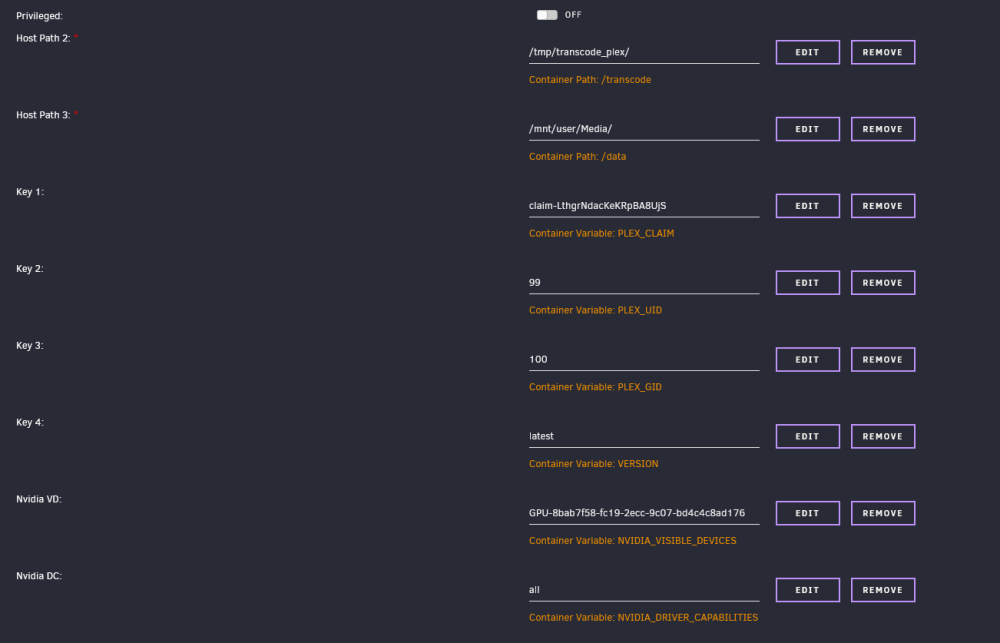
Hi, In the last two weeks, Plex has stopped working for some files. I think its a transcoding issue. I get these errors: [Req#5e2b/Transcode/r7pw9nhy59asswlpgjm37s5q] IsFileWritable: failed to create file '"/transcode/c3a08e2f-6ae3-43cd-ad23-a246f5f31505"' I have attached my settings. I wonder if this is to do with the Host Path 2 I have set up. I thought this was to make it use ram to transcode but perhaps I have done something wrong here. The extra parameters I have are: --runtime=nvidia --no-healthcheck I did get an issue with the nvidia driver when I updated to lasted Unraid OS but this seems to be resolved. Any help would be greatly appreciated!
-
Thank you for continuining to help. I haven't tried a reboot yet, rough migraine yesterday so sorry for my delay. I think my USB has plenty of room. Is showing 62GB free (of 64GB). Here are my diagnostics. server-diagnostics-20230716-1821.zip
-
I dont have any adblocking, full access to internet (I think) and nothing blocking Github (I think). At least I have not set those up. First command returns: 6.1.38 Second returns: nvidia-535.54.03-6.1.38-Unraid-1.txz I appreciate all your help, thank you. I need to step out for a few hours so may be slow to reply with next update.
-
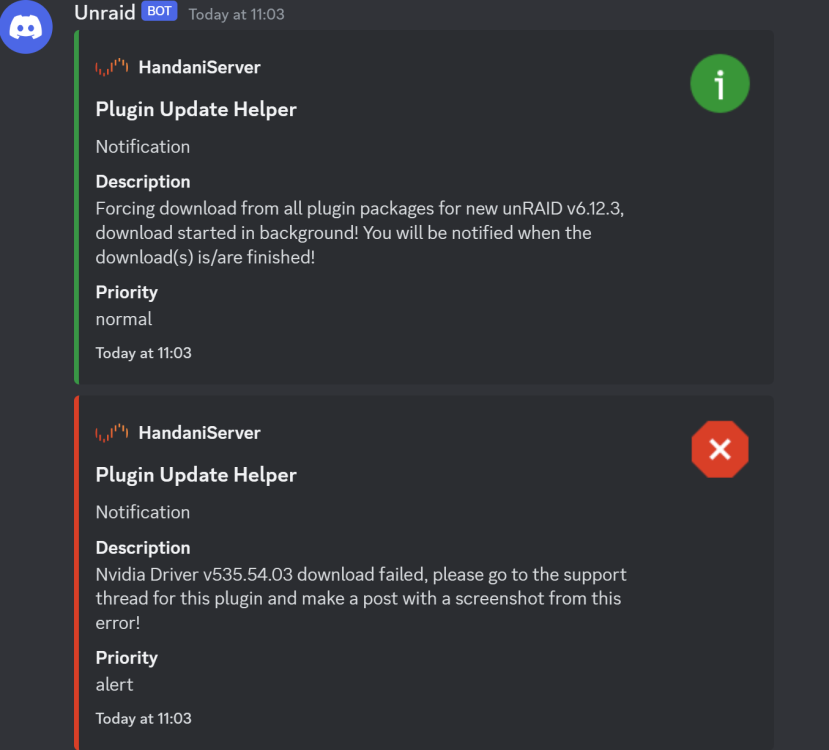
Oh no, I just got notified it failed again.
-
Thank you! It says finished but nothing has popped up in notifications to say the same. Do you think its safe to reboot? Is there a way I can check whether it completed successfully?
-
Sorry, I misunderstood! Unraid is v6.11.5. Unraid is now prompting me to reboot to finish the update but the notifications above are saying don't do it because of plugin download error.
-
Sorry, that would have been helpful, wouldnt it! Current version is 535.54.03. The plugin screen doesn't actually show a newer version. Perhaps I have got confused and there isn't one to upgrade to!
-
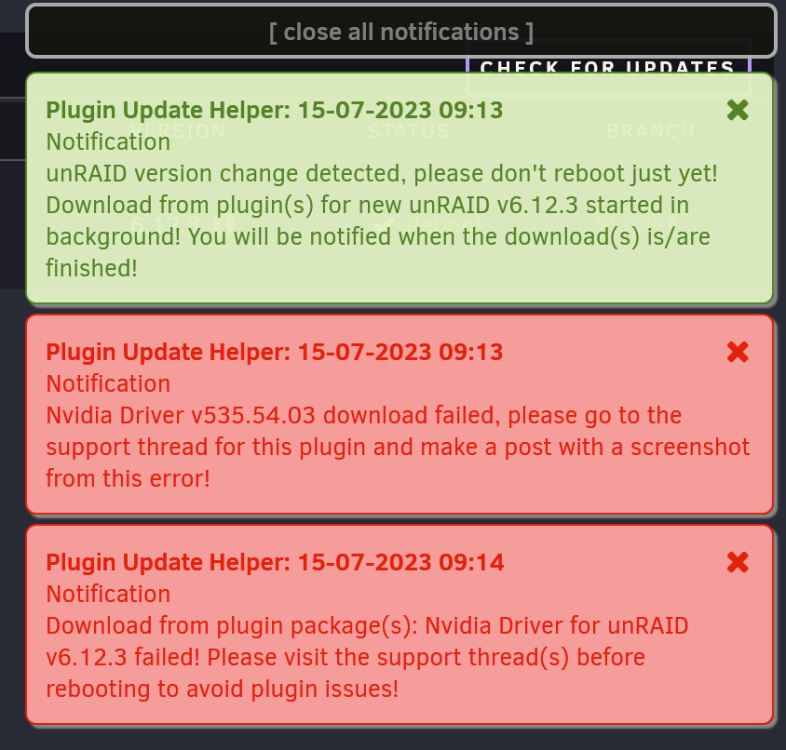
I just updated to 6.12.3 and got an error, attached, that the plugin failed to download. Not sure what to do next but the notifications said to post a screenshot here!
-
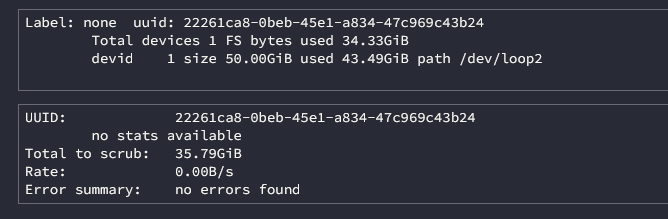
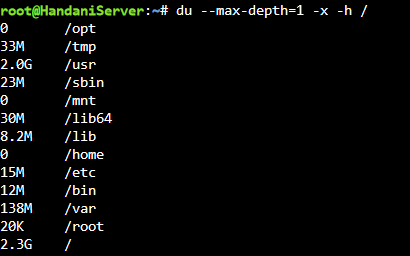
Hi, I am having a rather large error with the system and not sure how to resolve or diagnose. Essentially, containers are not updating or starting. As far as I can tell the docker size is not full. The error is: docker: Error response from daemon: failed to create shim task: OCI runtime create failed: runc create failed: write /var/run/docker/containerd/daemon/io.containerd.runtime.v2.task/moby/6ce813a60cb0812e3e3aa00be23201b3639efb1602feb30f70082e169ea53c06/.init.pid: no space left on device: unknown. And then I get a 'Server Error' when I try to launch any containers. I have attached the docker size information and my du command. I am really quite stumped what is causing this and how to solve it. Other threads say that I may have filled the OS storage in error but I am not sure how to check this. I would be very grateful for a steer!
-
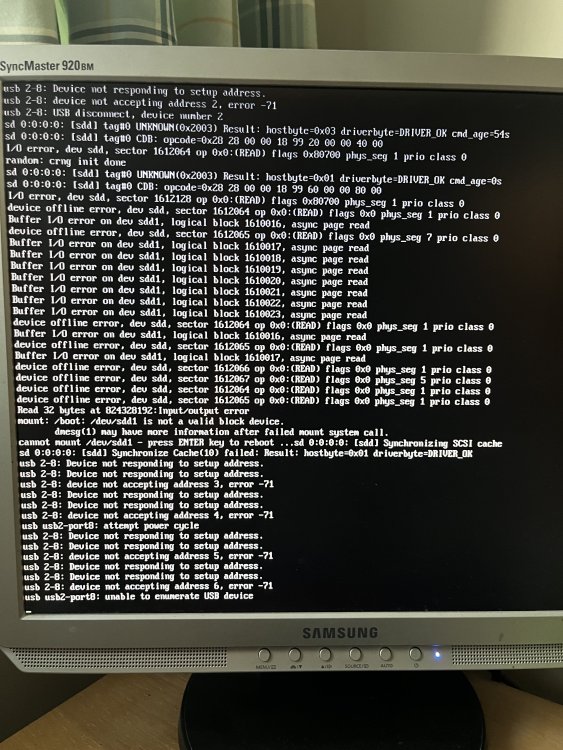
For those that might run across this post in future, I fixed it. I am clueless but decided that usb 2-8: device not responding to setup address meant an issue with my boot drive. I was all ready to restore it from a backup but plugged it into my Windows 11 laptop and did an error checking. As usual Windows gave a vague message of "Errors fixed". When I put it back in, the OS booted no issue! Unsure if I fixed it but at least I am in!
-
Hi, Unraid was running fine this evening but I rebooted to update the nvidia plugin. I now cannot boot and see the following in my boot screen (apologies for my photo!). I am not sure what is going on here. Am I correct in thinking this is an issue with my boot disk? Any help would be fantastic. Thanks,
-
Hi all, This is a very newbie question but I am struggling to access my shares via windows. I think something has gone wrong with my permissions but I am unsure how to troubleshoot. This occurs in several shares but I will use my Documents share as an example. This is set up to export, set to private and my user is given read and write access. If I go to Windows, \\SERVERNAME, I can see all my shares and read everything. When I go to (for example) Documents/consume (for my Paperless location) I cannot add documents to this. Similar occurs in my media shares. What am I doing wrong here? I am sure it is something obvious but I am still learning! Thanks for your help.
-
Hi, I am fairly new to Unraid but trying to get this running. I have once seen the Foundry screen in the webui, I closed the docker thinking I will set things up later. Now I cannot see anything on the webui, just an error. The logs say: * The requested URL returned error: 403 Can anyone offer any guidance on why I can't see seem to access? EDIT: I found at least a problem. My download link had timed out from Foundry. Now I am not getting any errors but still can't see anything on the webui!




