





MTerracciano
Members
-
Joined
-
Last visited
Everything posted by MTerracciano
-
Bumping this, just wondering if anyone else is having this issue as I'm still constantly pegged at >100% all the time.

-
Since an update at the beginning of June plex has consistently been using 100% of the CPU (as shown in Glances), I've gone through and disabled all scheduled tasks besides credit and intro scanning, what is the best way to determine the culprit here? What's the appropriate log to look into? Any help is appreciated!
-
I tried each stick individually, no change. Went and bought a i9-12900k dropped it in and server has been parity checking for a couple of hours now no problem. What are the known issues with the 13900k? Is the CPU cooked or it just has compatibility issues?
-
Updated the Intel ME firmware and made sure my BIOS was the latest as other forum threads suggested as well, the server still hangs up after it gets to about 300GBs in the parity check, no errors found. The server runs perfectly fine otherwise, only during parity check are there issues, this error appears in the log during the check: kernel BUG at drivers/md/unraid.c:1617!
-
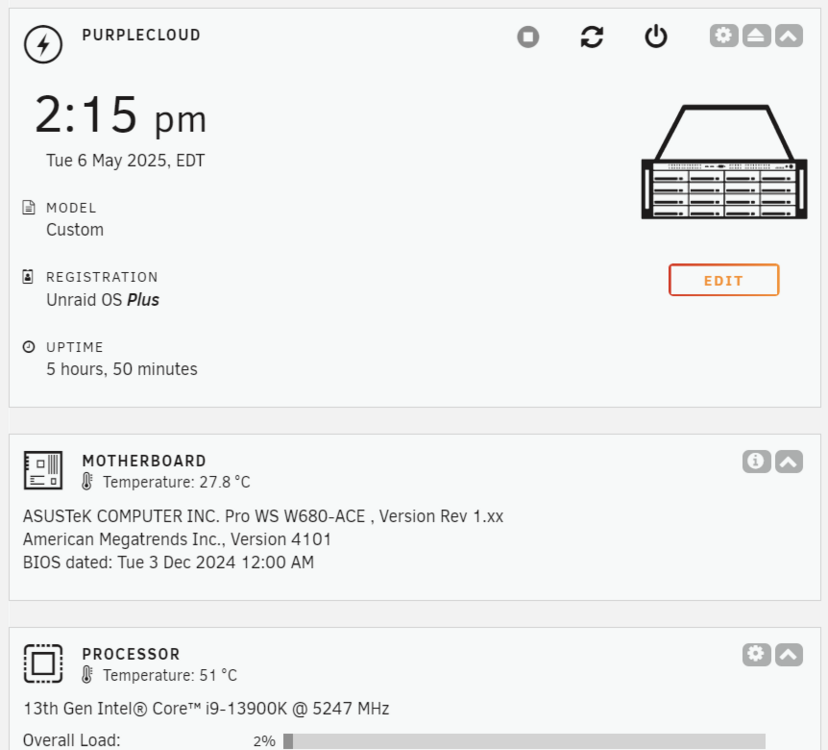
What are the best diagnosis methods to start ruling things out? CPU was moved from my working desktop computer, RAM is brand new and passes all memtests.
-
syslog.txtAnother syslog dump, happened again after I restarted, relevant errors at the very end where parity check slowed to a crawl
-
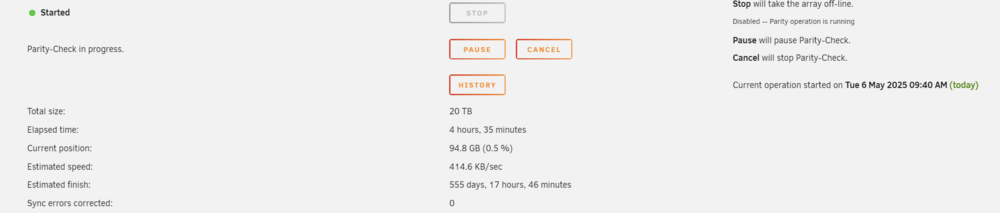
Hello, I was diagnosing some random crashes on my server and narrowed it down to Frigate doing some weird things when a camera went down and taking up on the memory in the system. I since limited all of my dockers memory usage and that appears to have fixed that issue but now when I go to run a parity check it starts out fine but soon slows to a crawl (400kB/s) and even allows the drives to spin down. I don't see any obvious issues in the log (attached) and the server is running fine otherwise. I tried updating to 7.1.0 (was running 7.0.1 before) but the problem persists. Any help is appreciated to figure out what is going on. Worth nothing that I recently had to rebuild the server due to a motherboard/RAM/CPU problem, not exactly sure which it was, but I upgraded everything about a month ago. syslog.txt
-
Is there any way to handle update checks/notifications?
-
Oof modifying that script is unfortunately beyond my abilities, is it safer to run an rsync command script like this: CACHE="/mnt/frigate_cache" ARCHIVE="/mnt/frigate_archive" N=7 #days find "${CACHE}" -type f -atime +${N} -printf '%P\n' | \ rsync --files-from=- -axqHAXWES --preallocate --remove-source-files "${CACHE}/" "${ARCHIVE}/" Again, really appreciate your help!
-
Specifically for reviewing recently recorded events/timeline scrubbing, everything loads much faster when stored on the SSD and I'm far more likely to be reviewing the last few days of recording than I am to go back 30days where I'm fine with it loading a bit slower due to the footage being moved to/living on the hard drive. Ideally I'd schedule the move every day or two to move files older than a week to the hard drive, gives me the best of both worlds, long term storage and fast reviewing of recent events. Thanks again for your help!
-
Worked perfectly! I do realize that balance might not be what I'm looking for exactly, I'm using my merge mount as storage for my Frigate camera recordings, wanted mergerfs.balance to move older recordings from the SSD to the spinning disk within my merge (1TB /mnt/frigate_cache to 6TB /mnt/frigate_archive) hence the 25% balance, but I realize now that balance probably doesn't pay attention to the age of the files. Is there another tool or perhaps a script that you know of that would accomplish what I'm looking for?
-
6.12.13, I installed python 3 through NerdTools plug-in, specifically, python3-3.9.18-x86_64-1_slack15.0.txz, what dependencies are needed/can in install them through a script at startup or what's the best solution? Thank you!
-
When trying to run mergerfs.balance I get the following error, any help is appreciated! root@PurpleCloud:~# mergerfs.balance -p 75 /mnt/addons/Frigate_Recordings Traceback (most recent call last): File "/usr/bin/mergerfs.balance", line 18, in <module> import ctypes File "/usr/lib64/python3.9/ctypes/__init__.py", line 8, in <module> from _ctypes import Union, Structure, Array ImportError: libffi.so.7: cannot open shared object file: No such file or directory
-
I actually abandoned the idea, turns out the M2000 barely uses less power than my GTX1070 when running frigate and compreface, 33W vs. 17W so I can't really justify having a separate GPU, really thought I'd be saving more energy
-
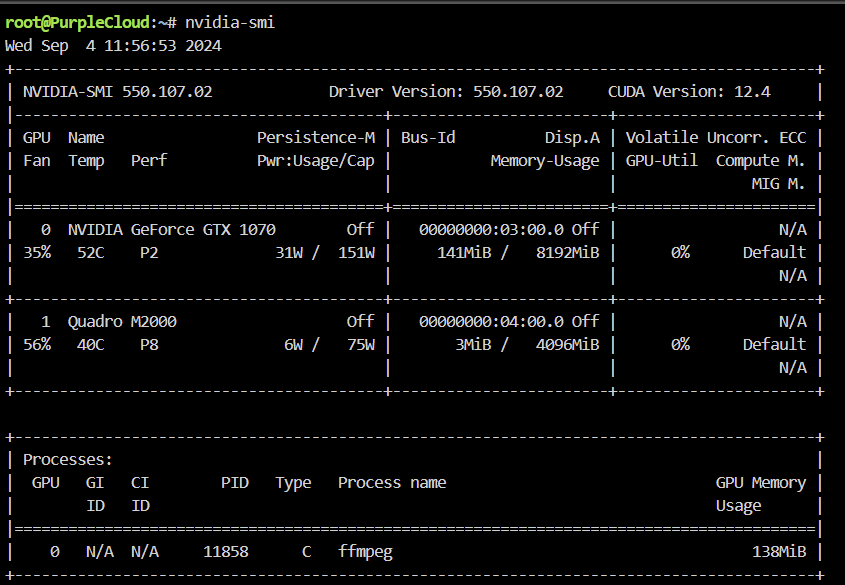
Hi, I installed a 2nd GPU in my machine (nvidia M2000) to take the load off my larger GPU, I updated the GPUID in the frigate container template but it's still using my original GPU, any idea what could be wrong here?
-
Can't thank you enough, that fixed it for me!
-
My syslog is absolutely FULL of nut errors: Jul 14 20:10:06 PurpleCloud usbhid-ups[30087]: nut_libusb_get_report: Input/Output Error Jul 14 20:10:08 PurpleCloud usbhid-ups[30087]: nut_libusb_get_string: Input/Output Error Over and over again, has anyone encountered this/know a fix? Googling hasn't turned up anything conclusive unfortunately, nut is working perfectly fine otherwise just a ton of these errors continuously
-
I have a minimum set but that doesn't solve the underlying issue that the cache drive temperature isn't being monitored by the plugin even though it's listed as a drive that can be "excluded"
-
100% agree, but main point is auto fan speed isn't reading the cache drive temp so everything will continue to heat up inside the case, less than ideal situation
-
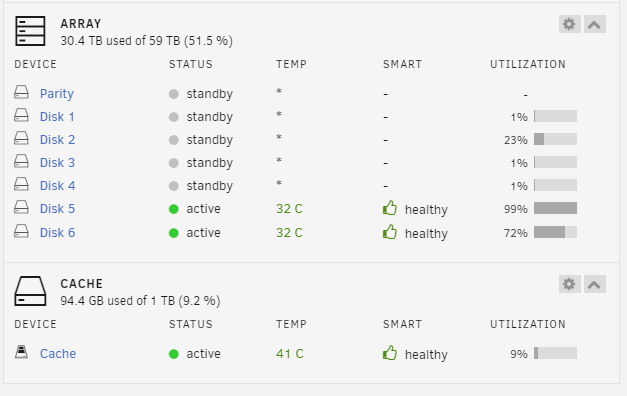
I've been using the auto fan plugin for a while now and just set my drives to spin down, with all the main array drives spun down, except the cache drive, auto fan turns off the fans: "autofan: Highest disk temp is 0C, adjusting fan speed from: FULL (100% @ 1976rpm) to: OFF (0% @ 738rpm)" But the cache drive starts to get really hot, over 40degC, it is included in the auto fan plugin drives list but it seems like the cache temperature is ignored when the main mechanical drives are spun down. Any ideas? Update: With (1) drive spun up auto fan detects it's temperature but still ignores the cache drive: autofan: Highest disk temp is 32C, adjusting fan speed from: FULL (100% @ 1567rpm) to: OFF (0% @ 597rpm)
-
How would I know the network I'd be connecting from if, let's say, I'm just trying to view download progress in the qbittorrent remote app on my phone while on a mobile network?
-
Have never been able to make qbittorrent accessible externally from the web, works locally but not extrenally, all other dockers (Sonarr, Radarr, Tautulli) are all set up similarly and are fully accessible from outside of my network via dyndns and port forwarding at my router, has any else experienced/solved this? Thank you for your help!
-
I'm attempting to use the Tatulli docker notification agent to run a script to pause parity check while someone is streaming. I've setup the notification agent in a similar way to the example in this link: https://github.com/uraid/qbittorrent_throttle And have created a script (ResumeParityCheck.sh below) to call a Parity Tuning Plugin CLI command and placed it in a few different folders but Tatulli throws up a permission error when I try to run the script from within the webGUI: "Tautulli Notifiers :: Failed to run script: [Errno 13] Permission denied: '/scripts/ResumeParityCheck.sh'" ResumeParityCheck.sh #!/bin/bash /usr/local/emhttp/webGui/scripts/parity_control resume Anyone have any idea how to successfully call a script that interacts with the main console from within a docker? Any help is appreciated!




