





Ezekial66
Members
-
Joined
-
Last visited
Everything posted by Ezekial66
-
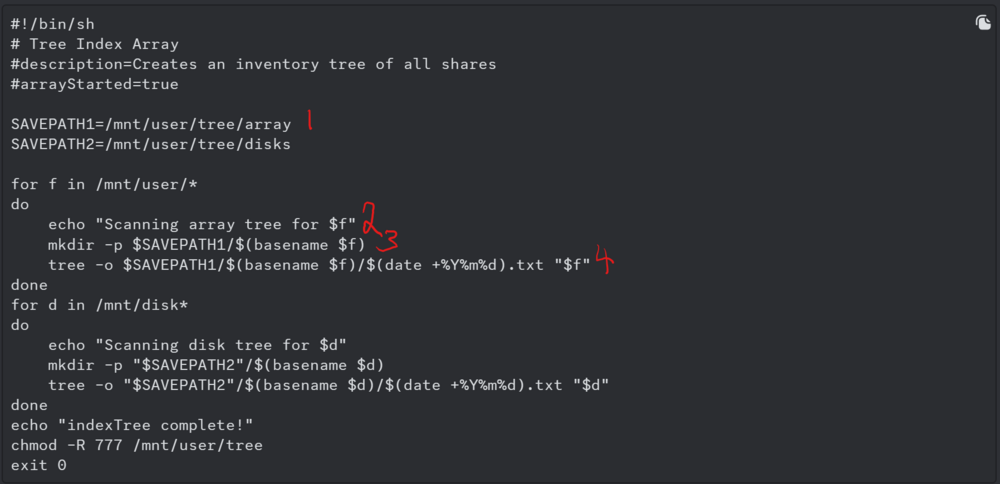
I'm looking to create a txt directory (or csv potentially) of my drives and array now that things are at a fairly stable place and my in and out data movements are relatively idle it seems like a good time to start doing thing to have a backup in case anything is ever lost. I am using Synd's Tree Script included here in order to build it, but I'm not great with command line so hoping someone might have the time to assist me a bit. My understanding is this: -The lines I am copy/pasting into terminal to implement are as numbered in the attached -The portion I should be editing to my personal array is only `basename`? I'm not sure if there is anything else i should be editing in the code prior to running it?
-
Copy that. Will implement and report back.
-
That's my main issue unfortunately. The drives will still spin down periodically, but only for 30-60 seconds at a time. They never stay spun down.
-
It is set at 30
-
Well that does not bode well lol. Is there anyone else here you might recommend may know what is going on?
-
No sir the only dynamix plugins are currently System Temp and File Manager, but both are disabled in Safe Mode where the issue still persisted
-
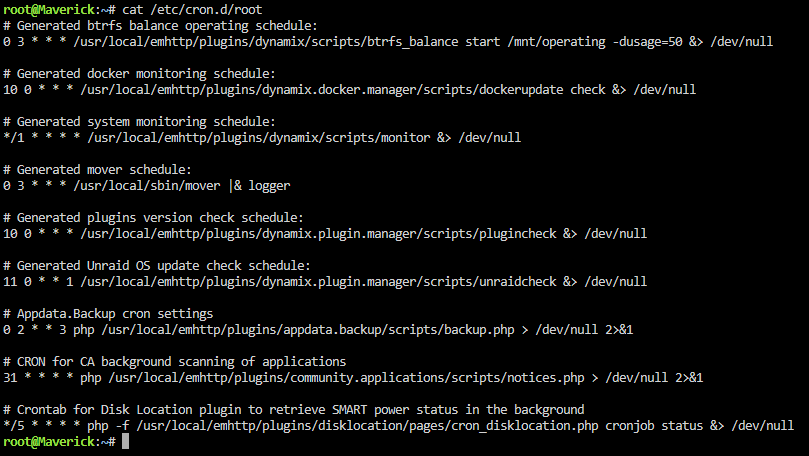
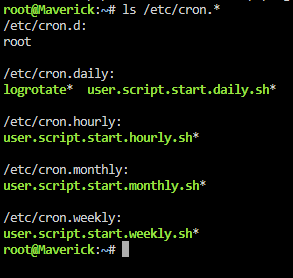
It was the first we went to as it was the only one running every 60 seconds, but all the others that were there seemed normal as well. There were only 6 jobs running in safe mode, 9 total. Which of these do you believe could be the one causing an issue?
-
Further updates, but no solution as we need higher level assistance. We tracked the cron.d that was operating to the dynamix system monitoring that seems to now be embedded in Unraid. There is no way to block the command to test if it is the main issue and as soon as `update_cron` is run then the settings revert. Others dont seem to have the same issue despite this apparently being a new 'setting'. Not sure how to address this bug until we have a response from someone who understands whats happening.
-
@JorgeB UPDATE (Apologies for tagging you, I saw you had read the post already) Going through the terminal processes I was able to confirm the spike is coming from command: usr/sbin/crond The triggering command aligns perfectly with the reads happening on the array We don't really know what is happening there. Are you able to shed any light? Weird Read Spike.mp4
-
Been working on this issue for a while and currently in the thick of it on the Unraid Discord if anyone can lend assistance (we've hit a dead end). All drives are regularly showing a read of approx 540kbps for 1 second, and it is happening every 60 seconds. Current setup is in safe mode, plugins/vms/docks/ disabled, SMB/NFS disabled, yet the issue still persists. Cant seem to find any entries in syslog lending an explanation either. maverick-syslog-20240521-1810.zip
-
Thanks Vr, I did give that a go as well but no luck. It turned out for some reason the solution would up being that adding it to a pool and then formatting both drives together in the pool worked, where as trying to format the drive on its own in UD wouldnt. Interesting circumstance but problem solved non the less.
-
Give me a few minutes I'm just finishing up something and then I can shut it all down again. As I said in the original post, I ran the system in safe mode, with dockers and VM's turned off, and the SAS plugin DELETED. It still was reading. So it has nothing to do with the docker service, but i will turn everyhting off again and send you another diag to show.
-
Sorry, I'm not sure if you're asking a question based on you having a different issue? Or telling me something... My array has always been XFS, it has always started in safe mode without issue. This problem of it constantly reading data from the array does persist in safe mode
-
Of course, Please find attached. maverick-diagnostics-20231005-2340.zip
-
Yes I attempted it both in safe mode (no plugins installed anyway), as well as manually deleting the plugin and going into safe mode. The issue still persists unfortunately.
-
I don't currently have a network capable of VLANs, is there another way to do what you're asking? Is simply disconnecting it and using a local WebGUI interface acceptable?
-
Please find attached a newer (and longer) Sys Log as well as the Diagnostics for review. maverick-syslog-20231006-0234.zip maverick-diagnostics-20231005-2233.zip
-
I'm attempting to format an NVME drive to use in my server. It was a main boot drive on a former PC running Windows, and for some reason it now seems it ooes not want to clear the 'SYSTEM' partition from the drive. When the drive is cleared, it looks fine and gives me the option to format, but no matter what I am formatting to it will all of a sudden show the SYSTEM partition and the 'UDEV' icon (as pictured), I assume saying it failed to format. And my only option then is to clear the drive once again (No option to clear partition) I have attempted using UD Preclear, as well as fdisk in Terminal, all to no avail. Any recommendations?

-
I can post the diagnostics when I have a chance in a few hours, but as I said, this was after a reboot in safe mode, with docker and vm systems off. So no dockers, no VM’s, no plugins. Even then, the issue happens every 60 seconds like clock work. So even on this short log, and in the diagnostics, O can only hope there’s still something showing what’s happening. Because I have no idea.
-
Hey Folks, For some reason, even in safe mode with docker and VM systems shut down, my array is reading every 60 seconds. nothing shows in the logs that i can find, either in the system or the disks. I have no idea what is causing it. It is always around the same size (536-545kbps), and all disks read at the same time. I timed it and it happens exactly every 60 seconds. All disk and smart settings are default except for spin down which is 15 minutes. Any help in trying to address this is much appreciated, its forcing my drives to be active all the time and never spin down. maverick-syslog-20231001-0455.zip
-
Just wanted to follow up on this for anyone who comes across it. In coordinating with AoS, It appears Dell makes some setting adjustments within the HBA to lock it down (typical Dell) that will not be changed if you flash the F/W. I needed to use LSI Utility Tool in order to get in and adjust the settings in order to allow the HBA to see what is plugged into it. AoS has a video specifically on how to do this here:
-
I've been doing some digging, It seems according to broadcom, you cant flash a card from a newer F/W to an older F/W unless it is in DOS. Does Unraid meet that criteria? I don't know how to use Linux let alone DOS...
-
Amazing thank you sir
-
Lol no worries at all. I had to move back to my old hardware for the time being to get my server back up and running, but I will try to sneak in an early morning this week when no one is accessing to shut down and reinstall the new HBA and check the diagnostics. Am I able to sas2flash within Unraid terminal?
-
20.00.11.00 is old? I have not seen many with F/W this new most are 20.00.07.00. What is the newest version I should be updating to? I will make sure to post the diagnostic logs asap. a new update is before it was showing no bios, but now it is showing a bios on boot up for some reason.


