





JLKunka
Members
-
Joined
-
Last visited
-
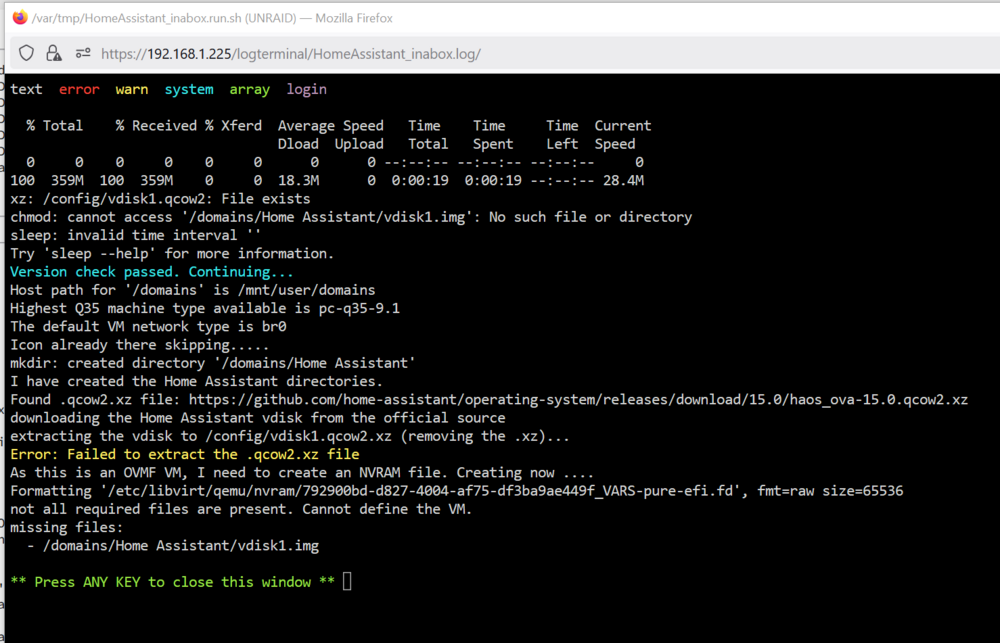
Now running Unraid 7.0.0 and Home Assistant will not install. Getting this on the log: It appears others have experienced this, haven't seen a solution. Any ideas?
-
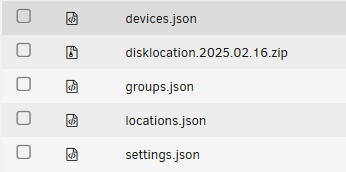
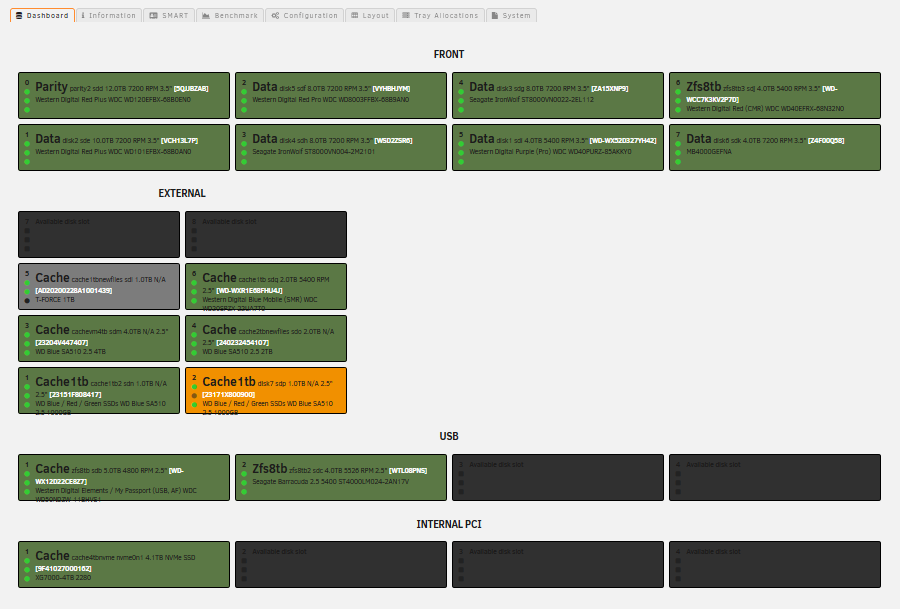
Well I got impatient and did some experimentation that fixed this. First I copied everything under /boot/config/plugins/disklocation as a precaution. I then deleted the plugin and reinstalled. Nothing changed until I manually deleted the files shown here: When I reinstalled the plugin, all the tabs were back. After running "Force Smart + DB", I restored the backup file and my previous configuration was still there.
-
Running latest Hoping maybe there will be another update soon that may resolve this. Willing to roll the dice a bit rather than powering everything down again to pull every drive and write down SSN's to rebuild my database.

-
There is a backup directory i found while browsing for the json file to delete. Is there a short instruction set to restore the plugin from backups, or do you move and overwrite the files in the root plugin directory?
-
Installed disklocation a few days ago, got everything set up with my disk arrangement (four sets: Front Panel, Icydock, USB, and Internal). The Disklocation updates in the last couple days broke it. Running Unraid 7.0.0 on a Dell Poweredge R730, eight 3.5" bays.
-
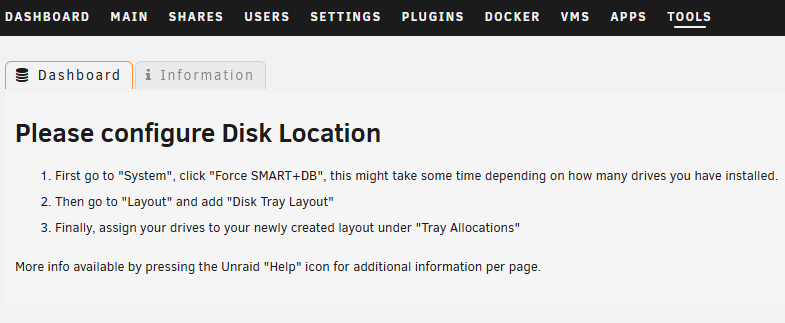
Deleted the file you specify, now the dashboard for the plugin shows this: "Information" tab is blank. Main dashboard works again. Edit: Hoping these changes will not delete the arrangement and tray locations I have set up !!
-
Both, the plugin dashboard and the main dashboard.
-
Blank dashboard after latest update
-
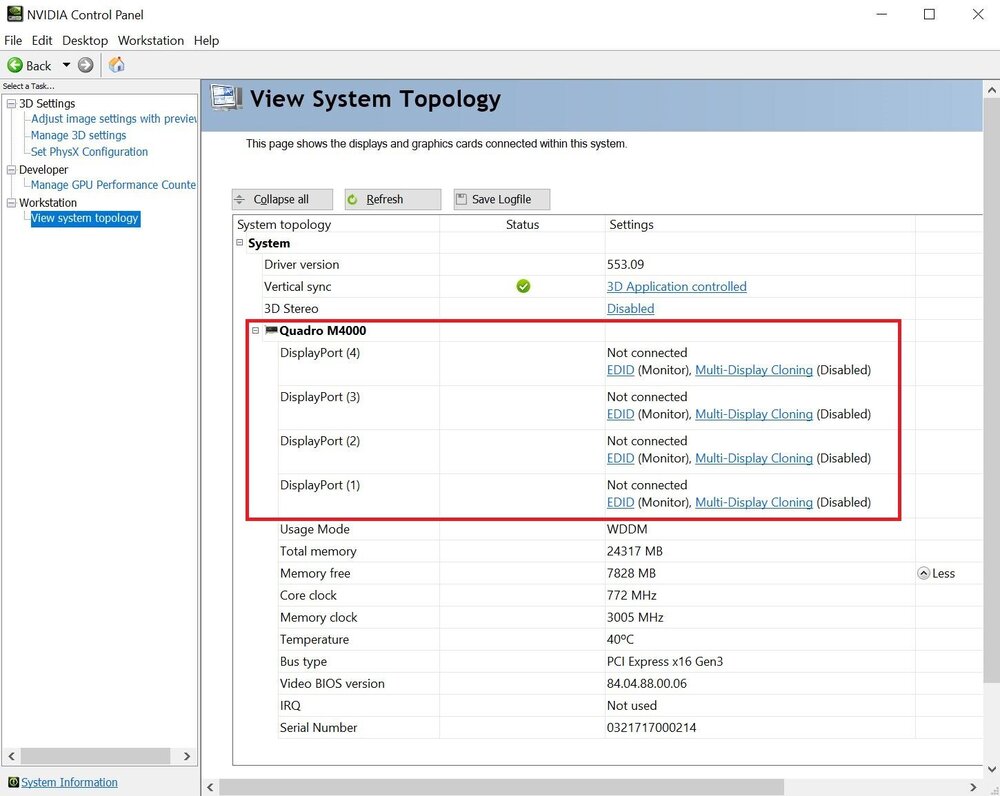
I recently migrated my Unraid server from a Dell i7 Tower to a Dell Poweredge R730 Server running dual CPUs with 12 cores each. The performance boost is substantial. Had issues with the VM but managed to recreate it and point it to my old iso image, so no data loss. The Nvidia Quadro M4000 is found on boot and it is in it's own IOMMU group with the sound card, so it is passed through to the Win 10 VM. When the VM starts I have black screens. Accessing the VM through Windows Remote Desktop, I see the video card is active and functioning properly. Programs that need the GPU like Solidworks and Davinci Resolve (video editor) work while running through Windows Remote Dektop, but the Nvidia Control Panel cannot see any monitors connected in System Topology. This setup is identical to what was running on the i7 tower PC, where the card saw the Dell monitors just fine. Before I start playing with more settings or boot modes, does anyone have any suggestions? Screenshot of Nvidia Control Panel attached for reference..
-
This seems to be a new issue for me, where remote computers once all connected as SMB shares no longer mount. Deleted them, rediscovered them, tried explicit names, then IP addresses with no luck. Shares are successfully found but then do not mount. Unraid Version 6.11.5, all plugins up to date (except Community Applications). Any suggestions appreciated. Log file example: Oct 2 09:16:50 UNRAID unassigned.devices: Mounting Remote Share '//192.168.192.128/C'... Oct 2 09:16:50 UNRAID unassigned.devices: Mount SMB share '//192.168.192.128/C' using SMB default protocol. Oct 2 09:16:50 UNRAID unassigned.devices: Mount SMB command: /sbin/mount -t 'cifs' -o rw,hard,relatime,noserverino,nounix,cache=none,iocharset=utf8,file_mode=0777,dir_mode=0777,uid=99,gid=100,actimeo=10,closetimeo=30,credentials='/tmp/unassigned.devices/credentials_192.168.192.128_C' '//192.168.192.128/C' '/mnt/remotes/192.168.192.128_C' Oct 2 09:16:50 UNRAID kernel: cifs: Unknown parameter 'closetimeo' Oct 2 09:16:50 UNRAID unassigned.devices: Mount SMB share '//192.168.192.128/C' using SMB 3.1.1 protocol. Oct 2 09:16:50 UNRAID unassigned.devices: Mount SMB command: /sbin/mount -t cifs -o rw,hard,relatime,noserverino,nounix,cache=none,iocharset=utf8,file_mode=0777,dir_mode=0777,uid=99,gid=100,actimeo=10,closetimeo=30,vers=3.1.1,credentials='/tmp/unassigned.devices/credentials_192.168.192.128_C' '//192.168.192.128/C' '/mnt/remotes/192.168.192.128_C' Oct 2 09:16:50 UNRAID kernel: cifs: Unknown parameter 'closetimeo' Oct 2 09:16:50 UNRAID unassigned.devices: Mount SMB share '//192.168.192.128/C' using SMB 3.0 protocol. Oct 2 09:16:50 UNRAID unassigned.devices: Mount SMB command: /sbin/mount -t cifs -o rw,hard,relatime,noserverino,nounix,cache=none,iocharset=utf8,file_mode=0777,dir_mode=0777,uid=99,gid=100,actimeo=10,closetimeo=30,vers=3.0,credentials='/tmp/unassigned.devices/credentials_192.168.192.128_C' '//192.168.192.128/C' '/mnt/remotes/192.168.192.128_C' Oct 2 09:16:50 UNRAID kernel: cifs: Unknown parameter 'closetimeo' Oct 2 09:16:50 UNRAID unassigned.devices: Mount SMB share '//192.168.192.128/C' using SMB 2.0 protocol. Oct 2 09:16:50 UNRAID unassigned.devices: Mount SMB command: /sbin/mount -t 'cifs' -o rw,hard,relatime,noserverino,nounix,cache=none,iocharset=utf8,file_mode=0777,dir_mode=0777,uid=99,gid=100,actimeo=10,closetimeo=30,vers=2.0,credentials='/tmp/unassigned.devices/credentials_192.168.192.128_C' '//192.168.192.128/C' '/mnt/remotes/192.168.192.128_C' Oct 2 09:16:50 UNRAID kernel: cifs: Unknown parameter 'closetimeo' Oct 2 09:16:50 UNRAID unassigned.devices: Mount SMB share '//192.168.192.128/C' using SMB 1.0 protocol. Oct 2 09:16:50 UNRAID unassigned.devices: Mount SMB command: /sbin/mount -t 'cifs' -o rw,hard,relatime,noserverino,nounix,cache=none,iocharset=utf8,file_mode=0777,dir_mode=0777,uid=99,gid=100,actimeo=10,closetimeo=30,vers=1.0,credentials='/tmp/unassigned.devices/credentials_192.168.192.128_C' '//192.168.192.128/C' '/mnt/remotes/192.168.192.128_C' Oct 2 09:16:50 UNRAID kernel: cifs: Unknown parameter 'closetimeo' Oct 2 09:16:50 UNRAID unassigned.devices: SMB mount failed: 'mount error(22): Invalid argument Refer to the mount.cifs(8) manual page (e.g. man mount.cifs) and kernel log messages (dmesg)'. Oct 2 09:16:50 UNRAID unassigned.devices: Remote Share '//192.168.192.128/C' failed to mount.
-
Now getting this error myself running 6.11.5 with my Win 10 VM (which was working fine until this error). Frustrated as to what might have changed. Also getting "Out Of Memory errors detected on your server" from Fix Common Problems recently.
-
Here is a link to a discussion thread I started on the Zerotier forum. Are they saying the same thing? Maybe it can help. https://discuss.zerotier.com/t/cant-see-unraid-server-with-windows-machines/14035/6 personally I'm going to wait a bit more before I try 6.12.x again.
-
Downgrading nuked another docker (Syncthing), still checking for other consequences.
-
>>UPDATE<< I downgraded my server to UNRAID 6.11.5 to see if it would fix the issue. It did. I had to remove and reinstall Zerotier, but the server and shares are now visible as they were before. For now I would rather have version 6.11.5 and working shares until a fix or update is available.
-
I installed Zerotier docker with no issues for weeks. UNRAID server and its shares were visible in windows explorer on all PCs. Now the server and its shares cannot be seen or mapped. Zerotier central shows the server is connected and it can be successfully pinged. Log shows this: connect: Host is unreachable connect: Host is unreachable connect: Host is unreachable connect: Host is unreachable 200 join OK connect: Host is unreachable connect: Host is unreachable etc etc All PC versions are 10.5 or 10.6, docker is 10.2 Could this be after upgrading to UNRAID Version: 6.12.0-rc6? I have a Win10 VM running on the server, also running Zerotier, that "machine" is visible and works fine. I need a solution to this, any help is appreciated.


