jrmcmillan
Members
-
Joined
-
Last visited
Everything posted by jrmcmillan
-
All my testing was done using a single 9 gb file, specifically to eliminate file size as a red herring. (BTW, the screenshot I posted was taken while it was transferring a 250 gb Acronis backup file from my main pc to the Unraid server at the time.) Also, I'm not being limited by physical disk speed either. I've tested for that as well. The first post in this thread says it all. Using my 2.5 gb network, under Windows 11 I get ~250 mb/sec transfers; under Unraid, I get ~113 mb/s. It seems pretty clear to me that either: 1) I have an Unraid configuration issue, or 2) Unraid Linux core (or driver) has got some problem. Since I haven't seen much traffic suggesting a lot of other folks are having problems achieving 2.5 gb/s on their 2.5 gb networks, I'm guessing I've got some kind of configuration problem versus an Unraid (or Linux) bug - but I don't know what that might be. That's why I reached out to the forum.
-
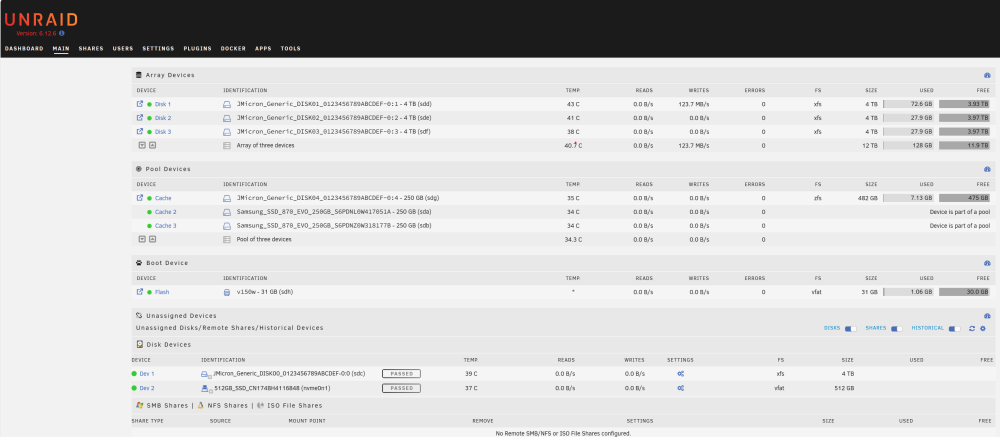
For reasons completely unrelated to the network performance issue, I am totally rebuilding my disks with data (no parity while the data is being transferred). The data is coming from my main Windows 11 PC and being written to the mini pc as an Unraid server. Here's a screenshot. You can see the data transfer rate is 123.7, which bounces around some based on the file size. Clearly this is only transferring at 1.0 gb, not 2.5 gb. I know I'm not getting the transfer rate I should be. Running another test will only confirm the problem. I'm hoping for a solution!
-
No. Both the mini pc (the Unraid server) and my main Windows 11 pc are connected to the network. I'm transferring files to/from the main pc to the mini pc configured as both an Unraid server and as a Windows 11 pc. When it's an Unraid server, it transfers files at ~113 mb/s. When it's a Windows 11 pc, it transfers files at ~250 mb/s. I'm not a Linux guru...I don't know how to run iperf. As I said earlier, it did work correctly for about a month, but something must have changed with respect to the configuration - but I have no idea what that might be.
-
File transfers. ~250 mb under Windows 11; ~113 mb under Unraid.
-
My Unraid server is a mini pc with an XFS array of 4, 4TB disks (including parity) and a 3, 250 GB CCD ZFS cache. This works perfectly, acting as a backup to my main PC system and as a Plex media server. Late in September, I upgraded my network from 1.0 gb to 2.5 gb. The Unraid server worked perfectly for about one month. Early in November, I noticed it stopped running at 2.5 gb and now only runs at 1.0 gb - both uploading and downloading. I don't know when it quit running at 2.5 gb, but I don't think it was the result up upgrading Unraid to the latest version at the time - which I do rather quickly after a new release, but I cannot be 100% sure. I can boot the mini pc with the USB drive to start Unraid or I can boot it up from the internal drive using Windows 11 with the USB drive removed. I have tested the upload and download speeds when booted as a Windows 11 pc and have confirmed the network speed is 2.5 gb. I even have a 2.5 gb USB adapter which tests at 2.5 gb when the mini pc is booted with Windows 11. It also works with Unraid, but only at 1.0 gb. Therefore, I don't think I have a problem with cables or the bridge. My conclusion is there must be some configuration issue with Unraid that I cannot figure out. FYI, the mini PC's NIC is an Intel Ethernet Controller 1225 V, but again, it works fine as a Windows 11 pc. Any help will be appreciated as it is disappointing not being able to take advantage of the 2.5 gb (internal) network with my Unraid server. mini12-diagnostics-20240101-1216.zip
-
The short answer is I'm not 100% sure. I installed tailscale to get remote access to the Unraid dashboard. About a week later, I installed Plex (tailscale already installed and running) and I have remote access to Plex as well. The reason I don't know for sure is because I also have Plex installed on a Windows PC and had remote access to that years before installing tailscale via Plex.tv. I suspect tailscale is not necessary to access Plex remotely via Plex.tv. Tailscale does allow me to access Plex remotely by using the Unraid server's direct address, as in "servername:32400". Doing it this way, Plex thinks I'm on the local network.
-
Switching to the Talescale plug-in versus using the docker will now connect to the webgui. Solved.
-
That did the trick! Thanks so much!
-
I need some help. I'm an Unraid noob trying to get remote access to the webgui for my Unraid server. I've installed Tailscale on the Unraid server, a local PC on the same network, and a laptop which is about 1,000 miles remote. I can ping each machine from each machine successfully. I have installed ProFTPd on the Unraid server and can use Filezilla successfully on the remote laptop to FTP files to/from the Unraid server. But, when I enter the Tailscale-provided IP address (100.126.xxx.xx) in my browser, I get the following message: "100.126.xxx.xx refused to connect." I feel like I'm missing something simple, but I cannot figure it out. Any help would be appreciated.
-
So far, no responses. I'm going to repeat some of the previous post... While the T-Mobile router still isn't ideal, I don't think that's the issue. I've installed Tailscale on the Unraid server, my local computer, and my laptop - which is often remote. I can ping each machine using the Tailscale-provided IP address. I installed ProFTPd on the Unraid server and Filezilla on both my local computer and remote laptop. Using the Tailscale-provided IP address, I can FTP files back and forth between these machines with no issues. However, I cannot connect to the Unraid webgui from the remote laptop using the Tailscale-provided IP address. The error message is "server refused to connect." I assume this means there is some setup parameter that I'm missing, but I have no idea what it might be. Any help would be appreciated.
-
Apparently, not too many people are using T-Mobile routers. I've installed Unraid Connect, ProFTPb, and Tailscale and had some success. Here's the current status: 1) I've connected my Unraid server, my desktop pc, and my laptop to Tailscale's virtual network. 2) I can ping each machine using the Tailscale-provided IP addresses. 3) Using Filezilla, I can FTP files to/from my Unraid server remotely. What I cannot do is run the Unraid gui dashboard remotely. I'm thinking I should be able to use the Tailscale-provided IP address in my remote browser, but I get a message that the Unraid server refuses to connect (versus an error which says it can't find it). I'm guessing I'm missing something, but I don't know what that would be. I can run Unraid Connect, but I cannot access the GUI dashboard using the addresses it provides. I'm not sure what my next step is. Any help would be appreciated.
-
I am a relative noob with Unraid. My objective in creating a network server was two-fold: 1) Create a backup server for my main PC. 2) Learn about network servers in general. I’ve successfully gotten my server up and running, it’s doing nightly backups with no issues, and I think I have a basic understanding of Unraid. I now want to gain access to my server remotely: first with Unraid Connect, then FTP, then perhaps Plex (which is already running on my main PC and accessible remotely). My issue is I’m using a T-Mobile router which cannot act as a bridge, does no port forwarding, and has no way to turn off DNS rebinding protection. The Unraid server itself is connected to an ORBI RBR50, which is connected to the T-Mobile router. It’s a double NAT situation where the T-Mobile router’s DNS assigns the Orbi’s IP address (192.168.12.xxx) and the Orbi assigns the other IP addresses for all the devices in my home (10.0.0.xxx). I use LiteManager for remote access to my PC now (similar to Teamviewer) and it figures out how to connect without me doing anything. The same is true for Plex. It just works. I access my Unraid network via my PC using LiteManager, but I’d like to connect directly versus through my PC. From what I’ve read, I need to use a VPN service (I‘m thinking Tailscale specifically) but I do not know how to do that with my setup. I’m hoping someone has experience with the T-Mobile router’s limitations and can point me in the right direction. Thanks in advance.
-
Appreciate the additional info. Since this server is really just a backup of a backup, I'll try it out and see what happens. Under the circumstances, I think I can live with the risk.
-
I appreciate the info. I'm guessing your thought that the MBD is only presenting one serial number is likely the issue. I've been using USB DAS's on Windows PC's as both my primary and backup drives (both with hardware raid) for years and never had an issue with a disconnect - or anything else for that matter. The idea of using Unraid to create a "real" server is attractive to me as a learning experience while trying to reuse existing hardware. My "server" is actually a mini-PC with essentially no additional storage options other than USB drives. I've had it running for a couple of weeks with these drives as unassigned devices without parity protection - which worked fine - and thought I'd try setting them up as an array with parity. I will have access to a different USB enclosure in a few days. I'll try that to see if I can see all the drives in Unraid. Thanks again.
-
I am a NOOB setting up Unraid as a backup server. I have a couple of WD MyBook Duo's ("MBD"), which are USB DAS enclosures, that I'm trying to use for the array. One MBD has 1 - 4TB drive and the other MBD has 2 - 4TB drives. Both are configured as JBOD. The idea is to use the one MBD with 1 - 4TB drive as the parity drive and the other MBD with 2 - 4 TB drives for data storage. This issue is Unraid only sees one of the drives in the MBD with 2 disks instead of both of them. FYI - Windows 11 sees both drives separately in the MBD with 2 drives - as it should. I've searched other threads but didn't really find any solutions. I know I can use these MBD's as unassigned devices, but that doesn't give me any data protection. My longer-term solution is to use a USB drive enclosure that will house those 3 drives, and perhaps more over time. But, Unraid needs to be able to see each disk individually for this to work. Thanks in advance for any help.
-
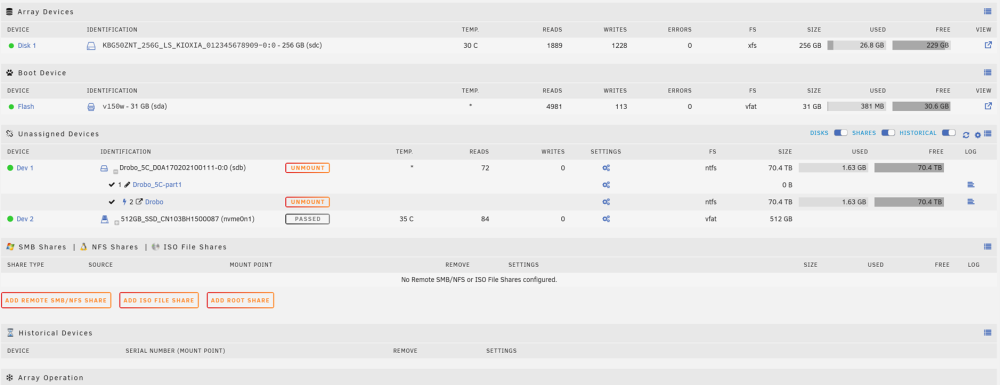
Well, disabling Windows "fast start" solved the "unclean file system" problem. The Drobo 5C mounts r/w and I can make a new directory and start a file copy. However, after about 30 seconds, it slows down, then stops altogether. In the process, it ends up killing the Unraid network completely such that the only way to restart it is to physically power down the server via the on/off switch. Clearly, there is something about the Drobo 5C that Unraid doesn't like. FYI, the Drobo 5C won't eject like a normal USB device (Windows) no matter what I try. However, as a DAS storage device with Windows, it works perfectly, with or without being able to eject it properly - and has for about 4 years. I'm attaching the log, but I can't see anything since it ends up killing Unraid when copying a file. mini12-diagnostics-20230512-1936.zip
-
After doing some more research, I learned a few things: 1) If a Windows PC hibernates, it takes a picture of the state of the PC and saves it to ram. When the PC un-hibernates, it loads the PC's state from ram - hence it starts very quickly. 2) If "fast startup" is enabled (Windows 11 default), even if the PC is shut down and totally depowered, it first saves the PC's state onto the hard disk, then shuts down the PC. Upon restarting the PC, it loads the PC's state from this file rather than directly determining its configuration, hence it accomplishes a "fast startup." Since "fast startup" was enabled on my Windows 11 PC, even though I shut down the computer and depowered it, the saved PC's state still had the Drobo 5C attached. In other words, the usb device (my Drobo 5C) was never ejected properly as a part of the shutdown process and apparently the Drobo 5C knows this. I'm better than 50% sure that's what causes the "unclean file system (0.0)" error on the Drobo 5C which results in it being read-only as an unassigned drive in Unraid. I guess Windows doesn't care about the "unclean file system (0.0)" error and just mounts the drive anyway, while Unraid does care about it, adjusting the read-write status to read-only. I will not be able to test this theory as I am out of town for the rest of the week. But, at least I now have an explanation which seems to make sense.
-
So, I shutdown my server and reconnected the Drobo 5C to my Windows PC. I formatted the 5C, then shutdown the PC, thinking that would reset any "unclean file system" flags. I reconnected the 5C to the server and restarted it. No joy. The 5C still mounts as Read-Only because Unraid is still reading that the "unclean file system" flag is set. Two questions: 1) is there a script that will reset the "unclean file system" flag?, Or, is there a way to get Unraid to ignore that the "unclean file system" flag is set when mounting the disk?
-
A little more from the log: May 8 21:39:55 Mini12 unassigned.devices: Mount cmd: /sbin/mount -t 'ntfs' -o rw,noatime,nodiratime,nodev,nosuid,nls=utf8,umask=000 '/dev/sdb2' '/mnt/disks/Drobo' May 8 21:39:59 Mini12 ntfs-3g[13074]: Version 2022.10.3 integrated FUSE 27 May 8 21:39:59 Mini12 ntfs-3g[13074]: Mounted /dev/sdb2 (Read-Only, label "Drobo", NTFS 3.1) May 8 21:39:59 Mini12 ntfs-3g[13074]: Cmdline options: rw,noatime,nodiratime,nodev,nosuid,nls=utf8,umask=000 May 8 21:39:59 Mini12 ntfs-3g[13074]: Mount options: nodiratime,nodev,nosuid,nls=utf8,allow_other,nonempty,noatime,ro,default_permissions,fsname=/dev/sdb2,blkdev,blksize=4096 May 8 21:39:59 Mini12 ntfs-3g[13074]: Global ownership and permissions enforced, configuration type 1 May 8 21:39:59 Mini12 unassigned.devices: Successfully mounted 'sdb2' on '/mnt/disks/Drobo'. May 8 21:39:59 Mini12 unassigned.devices: Mount warning: The disk contains an unclean file system (0, 0). Metadata kept in Windows cache, refused to mount. Falling back to read-only mount because the NTFS partition is in an unsafe state. Please resume and shutdown Windows fully (no hibernation or fast restarting.) Could not mount read-write, trying read-only . "...disk contains an unclean file system (0,0).,," Apparently, I need to connect the Drobo 5C back to my windows machine and shut them down (both the PC and the Drobo 5C). I assume that will clear the "unclean file system" stuck in the Drobo 5C and allow it to be read-write when reconnected to the server. I will check that out tonight and report back. (Unless someone has a handy script to fix an "unclean file system" problem...)
-
First time running the diagnostics for me. It's fair to say I do not understand most of it's contents... mini12-diagnostics-20230509-1015.zip
-
Apologies if this has been covered before. I'm a complete Unraid noob and don't know Linux at all. I'm not even sure if I'm asking this question in the right place. If not, I'm sorry. I've successfully set up an array (1 disk at this point), created users, and shares. I have a Drobo 5C (DAS) that I've connected to the server as an unassigned disk via USB. I can read files from it, but I cannot write to it. The error message says the disk is write-protected. What do I need to do to make the Drobo 5C read-write on the network? FYI - there is no way to configure the Drobo 5C as JBOD and utilize it as the Unraid array. My thinking is as an unattached device, I will have the benefit of its internal raid protection. Here's a screen shot of my configuration.