





mcraidy
Members
-
Joined
-
Last visited
-
Not sure how relevant this is - or if anyone is interested but..... Rclone Plugin I've been using restic with an rclone backend for a while to backup proxmox LXCs and I tried sharing the credentials around individual containers through a secrets manager but that never worked well as the credentials kept refreshing and it very quickly started causing issues. MS Onedrive family account is just too cheap for 6TB storage - which is why I use rclone - to backup to the cheapest remote I've come across! I landed on installing the rclone plugin on my unraid server, mounting an unraid share for backup data, and then syncing that dir upstream daily. This worked but has always been frustrating to deal with - some of the data was already on unraid, so an LXC copying data from unraid share, to a new unraid share to be backed up daily was counter intuitive (but worked). Rclone Container I've recently found that rclone has a serve method which offers direct compatibility with restic https://rclone.org/commands/rclone_serve_restic/ My container requires rclone config the same way as the plugin does, but I can now configure restic on individual servers to point to the rclone API and sidestep the need to store data on a temporary NFS share. I'm not sure if others are aware of this config, and not sure others will find this useful.... and not sure if unraid is the right place for this config, but it works for me! If there is interest, happy to release the container as a community plugin/ try provide more information if that's useful!
-
This relates to an issue I had - see Unraid provides a gui interface to NFS config - in particular the ability to specify a rule for private access. If there is any problems with the rule then exportfs -r may generate an error and no shares are exported - but NFS services seem to be running. It'd be great that on submission of changes that there is some sort of validation - perhaps outputting the result of exportfs -r in to the web GUI? If the field expects a certain format then even some alt text/ tool tip would be useful. Thanks
-
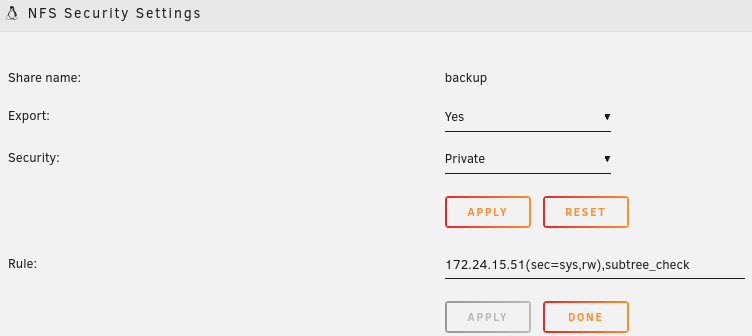
FIXED As seen in the logs: I ran exportfs -r manually and finally saw an error: root@storage:~# /usr/sbin/exportfs -r exportfs: /etc/exports:2: syntax error: bad option list I disabled the 2nd NFS share as seen in `/etc/exports`: # See exports(5) for a description. # This file contains a list of all directories exported to other computers. # It is used by rpc.nfsd and rpc.mountd. "/mnt/user/backup" -fsid=102,async,no_subtree_check 172.24.15.51(sec=sys,rw),subtree_check "/mnt/user/frigate" -fsid=103,async,no_subtree_check *(rw,sec=sys,insecure,anongid=100,anonuid=99,all_squash) "/mnt/user/photos" -fsid=104,async,no_subtree_check *(rw,sec=sys,insecure,anongid=100,anonuid=99,all_squash) And NFS now seems to start (running showmount -e on the server returns the exports). FYI the bad config for the backup share was: I've now fixed and all working. For the devs - it'd be great if there was some sort of validation of the config and/ or some indication that NFS isn't actually running.
-
Looking around at /etc/rc.d/rc.nfs I found some of the stuff in /proc which also seems to indicate that nothing is exported: root@storage:~# cat /proc/fs/nfsd/exports # Version 1.1 # Path Client(Flags) # IPs
-
Have just enabled local syslog as I was sending all remotely. Diagnostics dump attached. After disabling NFS a tail of /var/log/*log when enabling has provided Jan 14 09:46:47 storage root: Starting NFS server daemons: Jan 14 09:46:47 storage root: /usr/sbin/exportfs -r Jan 14 09:46:47 storage root: /usr/sbin/rpc.nfsd -u -s -H 172.24.0.16 -H 127.0.0.1 8 Jan 14 09:46:48 storage kernel: NFSD: Using UMH upcall client tracking operations. Jan 14 09:46:48 storage kernel: NFSD: starting 90-second grace period (net f0000000) Jan 14 09:46:48 storage root: /usr/sbin/rpc.mountd Jan 14 09:46:48 storage rpc.mountd[12052]: Version 2.6.2 starting Jan 14 09:46:48 storage emhttpd: shcmd (83699): /etc/rc.d/rc.avahidaemon restart Jan 14 09:46:48 storage root: Stopping Avahi mDNS/DNS-SD Daemon: stopped Jan 14 09:46:48 storage avahi-daemon[11390]: Got SIGTERM, quitting. Jan 14 09:46:48 storage avahi-dnsconfd[11401]: read(): EOF Jan 14 09:46:48 storage avahi-daemon[11390]: Leaving mDNS multicast group on interface br0.IPv4 with address 172.24.0.16. Jan 14 09:46:48 storage avahi-daemon[11390]: avahi-daemon 0.8 exiting. Jan 14 09:46:48 storage root: Starting Avahi mDNS/DNS-SD Daemon: /usr/sbin/avahi-daemon -D Jan 14 09:46:48 storage avahi-daemon[12088]: Found user 'avahi' (UID 61) and group 'avahi' (GID 214). Jan 14 09:46:48 storage avahi-daemon[12088]: Successfully dropped root privileges. Jan 14 09:46:48 storage avahi-daemon[12088]: avahi-daemon 0.8 starting up. Jan 14 09:46:48 storage avahi-daemon[12088]: Successfully called chroot(). Jan 14 09:46:48 storage avahi-daemon[12088]: Successfully dropped remaining capabilities. Jan 14 09:46:48 storage avahi-daemon[12088]: Loading service file /services/sftp-ssh.service. Jan 14 09:46:48 storage avahi-daemon[12088]: Loading service file /services/smb.service. Jan 14 09:46:48 storage avahi-daemon[12088]: Loading service file /services/ssh.service. Jan 14 09:46:48 storage avahi-daemon[12088]: Joining mDNS multicast group on interface br0.IPv4 with address 172.24.0.16. Jan 14 09:46:48 storage avahi-daemon[12088]: New relevant interface br0.IPv4 for mDNS. Jan 14 09:46:48 storage avahi-daemon[12088]: Network interface enumeration completed. Jan 14 09:46:48 storage avahi-daemon[12088]: Registering new address record for 172.24.0.16 on br0.IPv4. Jan 14 09:46:48 storage emhttpd: shcmd (83700): /etc/rc.d/rc.avahidnsconfd restart Jan 14 09:46:48 storage root: Stopping Avahi mDNS/DNS-SD DNS Server Configuration Daemon: stopped Jan 14 09:46:48 storage root: Starting Avahi mDNS/DNS-SD DNS Server Configuration Daemon: /usr/sbin/avahi-dnsconfd -D Jan 14 09:46:48 storage avahi-dnsconfd[12097]: Successfully connected to Avahi daemon. Jan 14 09:46:49 storage avahi-daemon[12088]: Server startup complete. Host name is storage.local. Local service cookie is 352015384. Jan 14 09:46:50 storage avahi-daemon[12088]: Service "storage" (/services/ssh.service) successfully established. Jan 14 09:46:50 storage avahi-daemon[12088]: Service "storage" (/services/smb.service) successfully established. Jan 14 09:46:50 storage avahi-daemon[12088]: Service "storage" (/services/sftp-ssh.service) successfully established. Although I've tried many times to get NFS going - the latest attempt was with the "photos" share. Any further help would be fantastic
-
Does anyone have any suggestions?! NFS still isn't working - have upgraded now to 6.12.6 hoping it'd work, but still nothing!
-
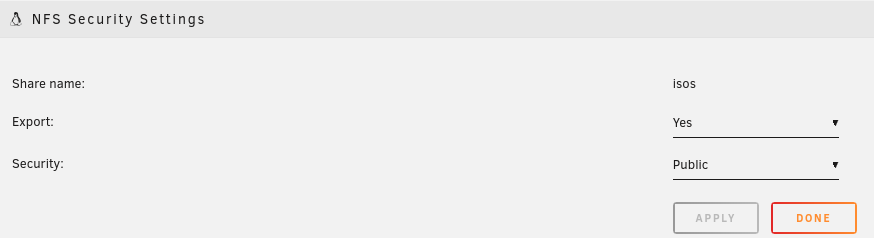
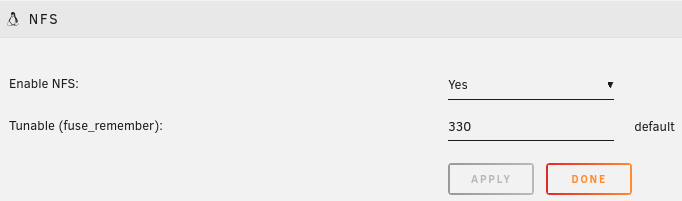
I've been unable to get NFS shares exported on my Unraid set up for some time now and was wondering if anyone has any tips! SMB seems to work fine however when I set up NFS shares I don't seem to see the exports on the Unraid system or remote servers I'm trying to connect to the export. Share shows NFS config and and NFS enabled under settings On the Unraid server /etc/exports is populated # See exports(5) for a description. # This file contains a list of all directories exported to other computers. # It is used by rpc.nfsd and rpc.mountd. "/mnt/user/backup" -fsid=102,async,no_subtree_check 172.24.15.51(sec=sys,rw),subtree_check "/mnt/user/frigate" -fsid=103,async,no_subtree_check *(rw,sec=sys,insecure,anongid=100,anonuid=99,all_squash) "/mnt/user/isos" -fsid=100,async,no_subtree_check *(rw,sec=sys,insecure,anongid=100,anonuid=99,all_squash) "/mnt/user/proxmox-backups" -fsid=101,async,no_subtree_check *(rw,sec=sys,insecure,anongid=100,anonuid=99,all_squash) BUT showmount -e localhost returns nothing root@storage:~# showmount -e localhost Export list for localhost: Anyone have any golden tips? FYI the nfsd module is installed and seen with lsmod too.

-
Yeah, managed to go through and add as community app. Would seem to be a dozen or so using it. I've been sending logs through without issues.... Hopefully working well 😁 Only thing with current configuration is it can't be changed. I've tried to make it as simple as possible to use.
-
I've just created a docker container which places rsyslog in front of promtail. Would be interesting if it would work as this is the type of scenario I was thinking of. Not yet in community apps but thinking about submitting
-
Hi all, I've been looking at messing around with the Grafana free tier for metrics but then came across Loki and Promtail. There is a Promtail container which I believe tries to forward logs from local files within Unraid but in particular I'm looking at remote syslog for devices like my router and Unifi gear..... and also notice that Unraid can log to a remote syslog server. I've got a Docker container all set up I'm testing which has rsyslog in front of promtail (as recommended by Grafana) which will then forward everything back to Loki via a single client URL set as an ENV VAR. My question is - is this useful to others and should I go down the path of trying to get added to the community apps? Is it interesting to anyone?
-
I set up a redirect from / to /zm via Nginx Proxy Manager - added the following to advanced config location = / { return 301 https://cctv.home.local.dom/zm/; }
-
Thanks - interestingly just tried a mysqldump and got mysqldump: Error 2013: Lost connection to MySQL server during query when dumping table `Logs` at row: 130429 There seemed to be something weird in the Logs table so I truncated the table.... service starts again.
-
Just noticed and installed the latest upgrade and now get the same error when trying to manually start zoneminder. root@5f53b929773d:/# service zoneminder start Starting ZoneMinder: 05/08/23 12:05:00.692778 zmpkg[1515].INF [main:318] [Sanity checking States table...] DBD::mysql::st execute failed: Lost connection to MySQL server during query at /usr/share/perl5/ZoneMinder/Logger.pm line 627. 05/08/23 12:05:00.757360 zmpkg[1515].ERR [ZoneMinder::Logger:630] [Can't execute log entry 'INSERT INTO Logs ( TimeKey, Component, ServerId, Pid, Level, Code, Message, File, Line ) VALUES ( ?, ?, ?, ?, ?, ?, ?, ?, NULL )': Lost connection to MySQL server during query] DBD::mysql::st execute failed: Can't connect to local MySQL server through socket '/var/run/mysqld/mysqld.sock' (111) at /usr/bin/zmpkg.pl line 325. 05/08/23 12:05:00.757747 zmpkg[1515].FAT [main:325] [Can't execute: Can't connect to local MySQL server through socket '/var/run/mysqld/mysqld.sock' (111)] ZoneMinder failed to start root@5f53b929773d:/# DB starts fine and I can connect successfully from the CLI using the credentials in /etc/zm/zm.conf I'll try take a better look later this evening, but FYI the latest update seems to do something funky


