





GeeBee
Members
-
Joined
-
Last visited
Everything posted by GeeBee
-
After the recent update to the Beam container, I'm back on this one again. It used to be that accessing the server via the Web UI on port 9045 brought up the command line, which I need to be able to run certain commands against another mod. After the update the BeamMP Server Tools are now showing, with no obvious way to access the command line. Are you able to offer some help please? I'm hoping I'm missing something obvious. Thanks.
-
Perfect, thank you very much for your time. I tried adding a new port, but didn't map 9045 to 8080. Seems to be working as expected now. Cheers
-
When I look at the docker allocations for BeamMP, the only port specified is 30814, the game port. 8080 looks like it's used on another container. 9045 isn't mentioned anywhere. I'm unable to access the WebUI via port 9045.
-
No worries, at all, certainly wasn't a dig, just a part of the story. I thought that was the case, however the BeamMP docker installation does not have a WebUI link, and I don't know what port to use to create one manually.
-
I'm successfully running a BeamMP server and am trying to get BeamJoy working to test it out. It seems that I need to run a command as part of the installation and so far I've been unable to figure out how to do this. I've asked on the mod maintainer's discord, BeamMP discord and Unraid discord, so thought I'd check here next. The instructions at https://www.beamng.com/threads/beamjoy-the-all-in-one-multiplayer-framework-races-hunts-more.106205/ suggest that I need to run bj setgroup <your_playername> owner, however when opening the console from the game's icon in Unraid, I get root level access, without any game context. I hope I'm missing something obvious. Any help greatly appreciated, and a few people waiting to hear back what I find out. Thanks,
-
Also having a go at getting Dawncraft running. It has pulled 2.0.9f as you've mentioned, however I'm unable to even get that version running. Did you manage to get it running? Scrolling up in the logs, the last error reported was Failed to load datapacks, can't proceed with server load. You can either fix your datapacks or reset to vanilla with --safeMode There are loads of errors proceeding this, so I'm wondering if this older version is trying to fetch things that are no longer there. Would appreciate any thoughts on what else I can try seeing as this is a new docker container installed via the Apps directory. Interestingly looking at the image provided on Github it should be pulling latest.
-
Perfect, thank you. Doing this has allowed me to add them back and then remove the one I don't want in there. Do you have a kofi or similar link you can share?
-
Hmm, ok. It seems that seeing as the disk I want to keep is in the 2nd slot, I can't quite do what I need to. When I try and just unassign the disk in slot 1, it says something about incorrect number. If I try and unassign the disk in slot 1 and reassign the disk in slot 2 to slot 1, I get an error about mismatch. Any thoughts?
-
Just to check, this seems to be for replacing a single drive with another, as opposed to removing one. Am I right in thinking it's essentially the same thing? So in essence it's a case of adding the array as secondary storage and running mover to duplicate the files, then stopping the array, unassigning the disk I no longer want and then changing the mover direction back from array to cache before then removing secondary storage again? Seeing as I've now rebalanced to be on Raid1, am I not able to just unassign? I thought Raid1 was mirrored. Thanks again.
-
Thank you very much, really appreciate your help. Do you have a kofi link or similar?
-
Ok, have done, thank you. Diagnostics attached. I guess at this point it's probably worth asking how I might go about removing the smaller of the 2 disks from the cache pool, and whether I need to do something with the balancer. I'm guessing that there is a wiki page for the former. rincewind-diagnostics-20250102-1125.zip
-
If I'm losing data, I may just add the nvme drive back to the cache and not worry about the smaller one, however if I need both to preserve data, if only at least initially, then I'm happy to do that.
-
(array is currently running too)
-
It currently looks like this: Sorry, I'm not 100% sure what to do with regards "unassign any assigned pool devices". If I unassign will it lose all my data on the cache?
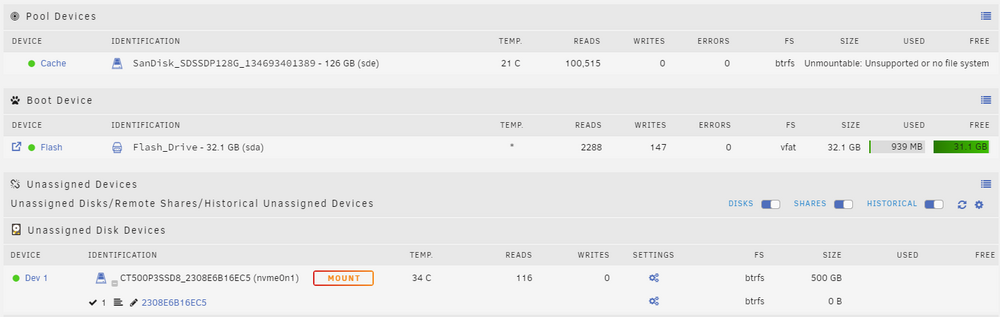
-
# btrfs fi show Label: none uuid: 6576e5a5-69ac-4e75-940e-ac87ffe76bc4 Total devices 1 FS bytes used 360.00KiB devid 1 size 20.00GiB used 536.00MiB path /dev/loop2 Label: none uuid: 91612829-f0d4-4cbc-88d5-4186d01e40a2 Total devices 2 FS bytes used 63.68GiB devid 1 size 117.38GiB used 79.05GiB path /dev/sde1 devid 2 size 465.76GiB used 50.00GiB path /dev/nvme0n1p1
-
# sfdisk /dev/nvme0n1 Welcome to sfdisk (util-linux 2.38.1). Changes will remain in memory only, until you decide to write them. Be careful before using the write command. Checking that no-one is using this disk right now ... OK Disk /dev/nvme0n1: 465.76 GiB, 500107862016 bytes, 976773168 sectors Disk model: CT500P3SSD8 Units: sectors of 1 * 512 = 512 bytes Sector size (logical/physical): 512 bytes / 512 bytes I/O size (minimum/optimal): 512 bytes / 512 bytes sfdisk is going to create a new 'dos' disk label. Use 'label: <name>' before you define a first partition to override the default. Type 'help' to get more information. >>> 2048 Created a new DOS disklabel with disk identifier 0xa2bbd386. Created a new partition 1 of type 'Linux' and of size 465.8 GiB. Partition #1 contains a btrfs signature. Do you want to remove the signature? [Y]es/[N]o:
-
I guess it's worth asking at what point I should consider just restoring a backup too, and whether that might be a good time to move the smaller of the 2 drives we're talking about to unassigned and the larger to the cache. Clearly it would be better if I can resurrect this, but I'm happy to be pragmatic about it.
-
yes
-
fwiw I did try and put the drive in question back, however then they both showed up as Unmountable: Unsupported or no file system
-
# btrfs fi show Label: none uuid: 6576e5a5-69ac-4e75-940e-ac87ffe76bc4 Total devices 1 FS bytes used 360.00KiB devid 1 size 20.00GiB used 536.00MiB path /dev/loop2 Label: none uuid: 91612829-f0d4-4cbc-88d5-4186d01e40a2 Total devices 2 FS bytes used 63.68GiB devid 1 size 117.38GiB used 79.05GiB path /dev/sde1 *** Some devices missing Thank you
-
Hello, Hoping I've not done too much to ruin things here. I had an unassigned drive that I thought I would add to my cache pool, thinking I could keep it and the existing separate. Having stopped the array, added the drive to the cache pool, restarted the array (so far so good), stopped the balancer and run the option to change to single mode, I then decided I didn't want to add this second drive to the cache after all. The balancer had finished its tasks. Still all seemed fine. I then stopped the array again, moved this second drive back to unassigned, went to start the array and the status shown in this issue's title now shows, with nothing in appdata seeing as it lives in my cache. I have attached my diagnostics, and am very much hoping that I've not done something fatal. Thanks in advance. rincewind-diagnostics-20250101-1308.zip
-
Thank you, that seemed to redownload the file. I'm not able to connect to the server yet, however that now feels like a separate issue. Just getting "Connection failed" and this is since the updates were released.
-
I've tried to search this thread to no avail, so apologies if I'm repeating something. If this is a duplicate, can you please link me to the answer? My BeamMP Server is failing with the following in the logs: ---Checking if UID: 99 matches user--- usermod: no changes ---Checking if GID: 100 matches user--- usermod: no changes ---Setting umask to 0000--- ---Checking for optional scripts--- ---No optional script found, continuing--- ---Starting...--- ---Version Check--- ---BeamNG-MP-Server not installed, installing...--- ---Something went wrong, can't download BeamNG-MP-Server v3.1.3, putting container in sleep mode--- I thought that rebooting it would fetch the latest version, however this does not seem to be the case. I've checked that the server is online, and it's just updated the docker container to the latest version. Anything suggestions please?
-
I've read the instructions about fixing a minecraft server to a specific version by downloading the correct jar file and changing the setting on the docker container. If I wanted to fix the version on the server to the existing one, is it simply a case of changing the 'game version' to 'custom' seeing as the current server.jar is the correct version? Also, if I then want to update it in future, would I then either need to amend the game version back to latest or upload a new jar (or either)? Thanks


