





GeeBee
Members
-
Joined
-
Last visited
-
Thanks for following up. It seems that my container is showing as up to date, and I've tried restarting the container too but that hasn't updated anything. Edit: Ok, a Force Update has worked, thanks again for all your hard work.
-
Further to this, I've been in touch with BeamMP support and shared the screenshot. This suggests that it might be to do with the container update, or potentially an Unraid update. In order to use one of the other mods I've got installed (BeamJoy), I need to be able to run commands in the CLI, which is no longer available via this GUI. I'm hoping to be able to test their new beta release soon, however can't do so without command line access (in the game context, not the docker container context). Any help greatly appreciated. Thanks.
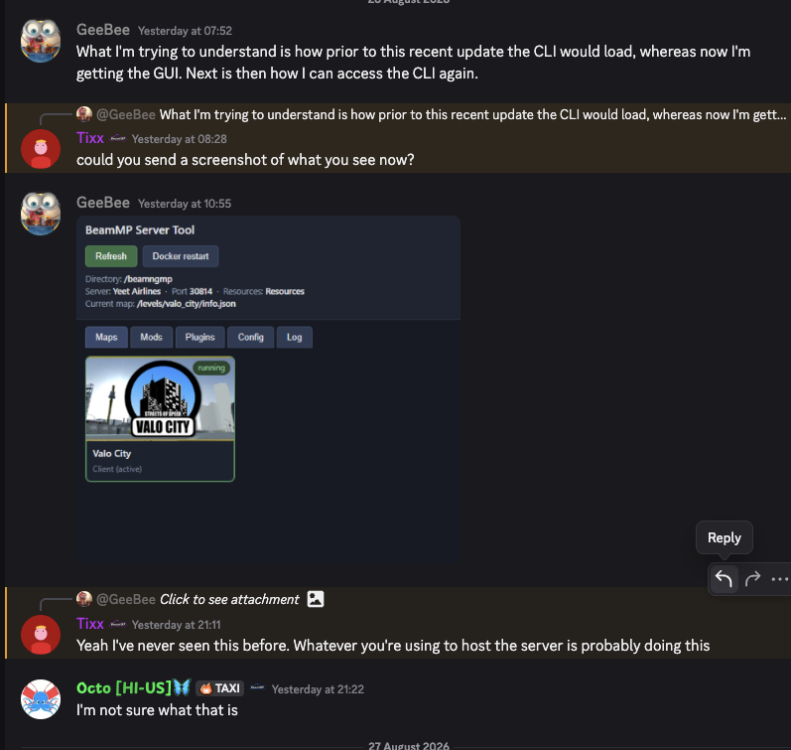
-
After the recent update to the Beam container, I'm back on this one again. It used to be that accessing the server via the Web UI on port 9045 brought up the command line, which I need to be able to run certain commands against another mod. After the update the BeamMP Server Tools are now showing, with no obvious way to access the command line. Are you able to offer some help please? I'm hoping I'm missing something obvious. Thanks.
-
Perfect, thank you very much for your time. I tried adding a new port, but didn't map 9045 to 8080. Seems to be working as expected now. Cheers
-
When I look at the docker allocations for BeamMP, the only port specified is 30814, the game port. 8080 looks like it's used on another container. 9045 isn't mentioned anywhere. I'm unable to access the WebUI via port 9045.
-
No worries, at all, certainly wasn't a dig, just a part of the story. I thought that was the case, however the BeamMP docker installation does not have a WebUI link, and I don't know what port to use to create one manually.
-
I'm successfully running a BeamMP server and am trying to get BeamJoy working to test it out. It seems that I need to run a command as part of the installation and so far I've been unable to figure out how to do this. I've asked on the mod maintainer's discord, BeamMP discord and Unraid discord, so thought I'd check here next. The instructions at https://www.beamng.com/threads/beamjoy-the-all-in-one-multiplayer-framework-races-hunts-more.106205/ suggest that I need to run bj setgroup <your_playername> owner, however when opening the console from the game's icon in Unraid, I get root level access, without any game context. I hope I'm missing something obvious. Any help greatly appreciated, and a few people waiting to hear back what I find out. Thanks,
-
Also having a go at getting Dawncraft running. It has pulled 2.0.9f as you've mentioned, however I'm unable to even get that version running. Did you manage to get it running? Scrolling up in the logs, the last error reported was Failed to load datapacks, can't proceed with server load. You can either fix your datapacks or reset to vanilla with --safeMode There are loads of errors proceeding this, so I'm wondering if this older version is trying to fetch things that are no longer there. Would appreciate any thoughts on what else I can try seeing as this is a new docker container installed via the Apps directory. Interestingly looking at the image provided on Github it should be pulling latest.
-
Perfect, thank you. Doing this has allowed me to add them back and then remove the one I don't want in there. Do you have a kofi or similar link you can share?
-
Hmm, ok. It seems that seeing as the disk I want to keep is in the 2nd slot, I can't quite do what I need to. When I try and just unassign the disk in slot 1, it says something about incorrect number. If I try and unassign the disk in slot 1 and reassign the disk in slot 2 to slot 1, I get an error about mismatch. Any thoughts?
-
Just to check, this seems to be for replacing a single drive with another, as opposed to removing one. Am I right in thinking it's essentially the same thing? So in essence it's a case of adding the array as secondary storage and running mover to duplicate the files, then stopping the array, unassigning the disk I no longer want and then changing the mover direction back from array to cache before then removing secondary storage again? Seeing as I've now rebalanced to be on Raid1, am I not able to just unassign? I thought Raid1 was mirrored. Thanks again.
-
Thank you very much, really appreciate your help. Do you have a kofi link or similar?
-
Ok, have done, thank you. Diagnostics attached. I guess at this point it's probably worth asking how I might go about removing the smaller of the 2 disks from the cache pool, and whether I need to do something with the balancer. I'm guessing that there is a wiki page for the former. rincewind-diagnostics-20250102-1125.zip
-
If I'm losing data, I may just add the nvme drive back to the cache and not worry about the smaller one, however if I need both to preserve data, if only at least initially, then I'm happy to do that.
-
(array is currently running too)


